downgrading to XP

twitchy

New member
Local time
4:05 PM
Messages
5
I have a Gateway DX4300-15e that runs Windows 7 Home 64 bit, I purchased an additional hard drive to install a OEM copy of Windows XP Home 32 bit to set up a dual boot situation so that I can run some of my older softwares and games.
I am having a fit with the system running with XP though, and I can't seem to get Gateway to assist me in finding a list of suitable drivers to get this thing at least quasi-operational with XP.
Any advice would be greatly appreciated, however, please spare the me usual the lecture about older operating systems, I can't afford to run out and buy software upgrades for my higher end software, and I am finding more and more compatibility issues with the 64 bit system.
 

My Computer

Computer Manufacturer/Model Number
Gateway dx4300
OS
Windows 7 home 64
I am afraid you will not find the drivers for XP. The component manufacturers do not bother to develop them (costs a lot of money) because that yields no income for them.

As an alternative I suggest you run the XP in Virtual Box. I run Ubuntu that way and that works quite well. If that does not fit your bill, there are other virtualization programs to choose from.
 

My Computer

Computer Manufacturer/Model Number
HP, Dell, Gateway, Toshiba - 4 laptops and 2 desktops
OS
Vista, Windows7, Mint Mate, Zorin, Windows 8
CPU
from 1.6GHz Duo to i7
Monitor(s) Displays
2x HP w2207
Hard Drives
5x HDD, 7x SSD, 12x Externals
Keyboard
with trackball - no mices
Mouse
Trackball mice
Internet Speed
DSL 6000
Here is one way to do it. I used Method Two. Win7 was installed and I added XP for the same reason as you.

There is also a way to install on a seperate HD. One OS per hard drive. I will see if our resident expert is on line at the moment to assist you with that. Seperate hard drives for the OS's is best in the long run. Mike works so I'll leave it be for now.

I'll see if I can find Gregrocker now.
Mike

http://www.sevenforums.com/tutorials/8057-dual-boot-installation-windows-7-xp.html
 

My Computer

Computer Manufacturer/Model Number
Hopalong/ Godzilla
OS
Windows7 Pro 64bit SP-1; Windows XP Pro 32bit
CPU
Intel Core i7-870 Lynnfield 2.93GHz LGA 1156 95W Quad-Core
Motherboard
ASUS P7P55D-E PRO
Memory
8GB@1400MHz Crucial Ballistix DDR3-1600 4x2GB
Graphics Card(s)
ASUS ENGTX460 DirectCU/2DI/1GD5 1GB 256-bit GDDR5
Sound Card
VIA Onboard
Monitor(s) Displays
Asus VS248H-P 24"; Samsung SyncMaster 941BW 19"ws
Screen Resolution
1920x1080; 1440x900
Hard Drives
Samsung 830 120GB SSD
Intel 320 120GB SSD
Western Digital Caviar Black WD7501AALS 750GB 7200 RPM SATA 3.0Gb/s
Western Digital Caviar Black WD6401AALS 640GB 7200 RPM SATA 3.0Gb/s
PSU
COOLER MASTER Silent Pro RS850-AMBAJ3-US 850W Modular
Case
COOLER MASTER HAF 932 RC-932-KKN5-GP Black
Cooling
Scythe "Mugen-2 Rev.B" (2 ScytheKaze-Jyuni PWM fans)
Keyboard
Logitech K-320
Mouse
Kensington
Antivirus
Avast Inernet Suite
Browser
IE 9 ; Chrome
As Mike suggested, you best install both systems seperately (no dual boot). Disconnect the HDD with Win7 and make a normal install of XP on the other HDD. Then you switch between XP and Win7 (after you rewired the Win7 HDD) by changing the boot sequence in the BIOS. That way you have the least trouble and the two operating systems do not interfere with each other. ---BUT, that will not resolve your driver problem. I don't think you will get XP work in native mode because of the lack of drivers.
 

My Computer

Computer Manufacturer/Model Number
HP, Dell, Gateway, Toshiba - 4 laptops and 2 desktops
OS
Vista, Windows7, Mint Mate, Zorin, Windows 8
CPU
from 1.6GHz Duo to i7
Monitor(s) Displays
2x HP w2207
Hard Drives
5x HDD, 7x SSD, 12x Externals
Keyboard
with trackball - no mices
Mouse
Trackball mice
Internet Speed
DSL 6000
Awesome hopalong! I have been digging into this a little today and from what I gather, I will have to start with installing the SATA drivers for XP with Nlite before I can install XP at all, no problem with that as it seems pretty straight forward, but it's the other system and device drivers like the audio that worries me. If I can pull this off, I would be absolutely thrilled. I just can't deal with 64 bit anymore, it's like having a supercomputer in Borneo right now lol.
 

My Computer

Computer Manufacturer/Model Number
Gateway dx4300
OS
Windows 7 home 64
Gateway Support Drivers & Downloads

Some of the drivers at Gateway are usable. Some are XP and some Vista32 bit and maybes.

Chipset is AMD. Vista32 but AMD may have XP.
LAN is Marvell. Shows Vista32 but Marvell may have an XP.

Audio is Realtek get an XP at Realtek possibly or Windows will supply it thru Windows update.

It is possible.

Windows will automatically get all the drivers it can find once you get on line with XP.
So you would need to find what is left.

Mike
 

My Computer

Computer Manufacturer/Model Number
Hopalong/ Godzilla
OS
Windows7 Pro 64bit SP-1; Windows XP Pro 32bit
CPU
Intel Core i7-870 Lynnfield 2.93GHz LGA 1156 95W Quad-Core
Motherboard
ASUS P7P55D-E PRO
Memory
8GB@1400MHz Crucial Ballistix DDR3-1600 4x2GB
Graphics Card(s)
ASUS ENGTX460 DirectCU/2DI/1GD5 1GB 256-bit GDDR5
Sound Card
VIA Onboard
Monitor(s) Displays
Asus VS248H-P 24"; Samsung SyncMaster 941BW 19"ws
Screen Resolution
1920x1080; 1440x900
Hard Drives
Samsung 830 120GB SSD
Intel 320 120GB SSD
Western Digital Caviar Black WD7501AALS 750GB 7200 RPM SATA 3.0Gb/s
Western Digital Caviar Black WD6401AALS 640GB 7200 RPM SATA 3.0Gb/s
PSU
COOLER MASTER Silent Pro RS850-AMBAJ3-US 850W Modular
Case
COOLER MASTER HAF 932 RC-932-KKN5-GP Black
Cooling
Scythe "Mugen-2 Rev.B" (2 ScytheKaze-Jyuni PWM fans)
Keyboard
Logitech K-320
Mouse
Kensington
Antivirus
Avast Inernet Suite
Browser
IE 9 ; Chrome
I've got to get off of here for a bit but I'll get back here as soon as I can and see what I can come up with, I really appreciate everyone's time!
 

My Computer

Computer Manufacturer/Model Number
Gateway dx4300
OS
Windows 7 home 64
Okay.
 

My Computer

Computer Manufacturer/Model Number
Hopalong/ Godzilla
OS
Windows7 Pro 64bit SP-1; Windows XP Pro 32bit
CPU
Intel Core i7-870 Lynnfield 2.93GHz LGA 1156 95W Quad-Core
Motherboard
ASUS P7P55D-E PRO
Memory
8GB@1400MHz Crucial Ballistix DDR3-1600 4x2GB
Graphics Card(s)
ASUS ENGTX460 DirectCU/2DI/1GD5 1GB 256-bit GDDR5
Sound Card
VIA Onboard
Monitor(s) Displays
Asus VS248H-P 24"; Samsung SyncMaster 941BW 19"ws
Screen Resolution
1920x1080; 1440x900
Hard Drives
Samsung 830 120GB SSD
Intel 320 120GB SSD
Western Digital Caviar Black WD7501AALS 750GB 7200 RPM SATA 3.0Gb/s
Western Digital Caviar Black WD6401AALS 640GB 7200 RPM SATA 3.0Gb/s
PSU
COOLER MASTER Silent Pro RS850-AMBAJ3-US 850W Modular
Case
COOLER MASTER HAF 932 RC-932-KKN5-GP Black
Cooling
Scythe "Mugen-2 Rev.B" (2 ScytheKaze-Jyuni PWM fans)
Keyboard
Logitech K-320
Mouse
Kensington
Antivirus
Avast Inernet Suite
Browser
IE 9 ; Chrome
Keep in mind that you are entitled to either 32- or 64-bit with each license, no matter what Gateway says. I see there are important 32 bit drivers on the Gateway Downloads webpage for your model: Gateway Support Drivers & Downloads

I would be tempted to first test install 32 bit to the other HD to see if Win7 installer - which is nearly driver-complete, with newer arriving quickly via optional Windows Updates - has the important drivers in 32 bit. Import any drivers then missing in Device Manager from page linked above.

Then you could test the software which is giving you fits in 64 bit to see if it works correctly in friendlier 32 bit, and even give your XP software a good shot using http://www.sevenforums.com/tutorials/316-compatibility-mode.html or by installing Virtual Box or Virtual Player which is how many are utilizing XP in Win7 until they get balky programs working in Win7.

You can run this 32 bit test install up to 120 days without activating until you decide which you want to keep: http://www.sevenforums.com/tutorials/875-activation-trial-period-extend-up-120-days.html

If you decide to install XP instead, you'll need to find the SATA controller driver to either insert it at F6 prompt during initial drivers-loading phase if you have a floppy drive, or by slipstreaming it into the XP installer: http://www.sevenforums.com/tutorials/72185-sata-drivers-slipstream-into-windows-xp-cd.html?ltr=S

XP is so old now that it doesn't have most modern SATA controllers in its installer so they have to be provided. Research exactly what SATA controller you have (in Device Manager or using Belarc Advisor) then Google to find if there is an XP driver for it, or try to use a Vista driver.

Excellent advice given about booting via BIOS to keep HD's independent to come and go as you please. On Gateway use the F10 key to boot whichever is not set as first HD to boot in BIOS setup.
 
Last edited:
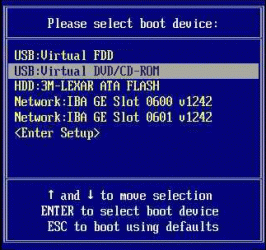
In reference to what Hopalong said about installing XP, if the option is available from the bios (for me it is F8 while on the bios loading screen) to pop up a boot device menu the easiest way to dual boot is to,

1. Disconnect the drive with Windows 7 on it

2. Connect the drive for XP and install

3. Once XP is installed and working then reconnect the Windows 7 drive

4. Check the bios, manual or even possibly it will show up on the Gateway loading screen (what you probably have) and see if it says which key to hit. If it is available after you hit the correct key you will have something that looks like this,

7-2-Boot-Device-Menu.gif

where you just select which hard drive to boot from. Even if that option isn't available it would still be easier to to the above and then enter the bios and change the boot order to the drive/OS you want to load than having the Windows bootloader.

As far as drivers for it goes, assuming the specs for yours is the same as what is here (780G chipset with teh HD 3200 integrated video),

Gateway Official Site: Shop - Desktops - DX4300 15e Desktop Product Details

then XP drivers are not a problem despite what Gateway says, just get them straight from AMD,

ATI Radeon

If you need the AHCI driver to get XP to install (the F6 step at the beginning) grab this,

View attachment XP.zip

That is the XP AHCI/RAID/SATA driver (was easier than posting directions on how to get it).

for the audio you can get that straight from Realtek,

Realtek

Not sure what it has for the onboard NIC (Gateway only shows a Marvell-Yukon driver for all OS'es, and is dated from 2005 ????), just check what it shows in Device Manager in 7 (same can be done with the TV tuner shown in the specs if you plan on using it in XP).
 

My Computer

Computer type
PC/Desktop
Computer Manufacturer/Model Number
Me
OS
Win 7 Ultimate x64
CPU
FX-8350 @ 4.6 GHz so far
Motherboard
Asus M5A97 EVO
Memory
ADATA XPG V1 Series Black 8GB DDR3 1600
Graphics Card(s)
Sapphire R9 270x Dual-X
Sound Card
Xonar DGX w/ Corsair Vengence 1300
Monitor(s) Displays
Acer S232HL Abid
Screen Resolution
1920x1080
Hard Drives
120 GB OCZ Vertex 3
500 GB Seagate 7200.12
PSU
Antec Earthwatts 650W Green
Case
Antec Three Hundred
Cooling
Cooler Master 212 EVO
Keyboard
Logitech G510
Mouse
Logitech G500s
Internet Speed
35000/3000
Bear with me as I am starting with the basics here, but I'm looking for the XP compatible drivers for the SATA drive, it is a wd3200aaks. Do I need to get this from the MOBO manufacturer, Western Digital, or is there a generic driver that will work? I downloaded nlite and it looks fairly simple, I just want to make sure I have the right SATA driver to paste into the ISO folder when I get ready to do this.

Also just for claification, I am installing XP on a completely seperate drive, I looked into the dual boot situation on the same drive and it looks like it takes some tweaking to get XP not to kick windows 7's butt lol, I don't mind using seperate drives at all to avoid the 'tweaking'.
 
Last edited:

My Computer

Computer Manufacturer/Model Number
Gateway dx4300
OS
Windows 7 home 64
You need the SATA driver. If you know the brand of motherboard then the driver may be available from them. Asus, Gigabyte etc.

I'm not sure of your brand. You will need a 32bit version.
My Asus SATA drivers for my moboard will work with 32 or 64bit XP, Vista or Win7. So it didn't make any difference.

It just depends on manufacturer of the motherboard and what brand SATA driver they used on the board.
 

My Computer

Computer Manufacturer/Model Number
Hopalong/ Godzilla
OS
Windows7 Pro 64bit SP-1; Windows XP Pro 32bit
CPU
Intel Core i7-870 Lynnfield 2.93GHz LGA 1156 95W Quad-Core
Motherboard
ASUS P7P55D-E PRO
Memory
8GB@1400MHz Crucial Ballistix DDR3-1600 4x2GB
Graphics Card(s)
ASUS ENGTX460 DirectCU/2DI/1GD5 1GB 256-bit GDDR5
Sound Card
VIA Onboard
Monitor(s) Displays
Asus VS248H-P 24"; Samsung SyncMaster 941BW 19"ws
Screen Resolution
1920x1080; 1440x900
Hard Drives
Samsung 830 120GB SSD
Intel 320 120GB SSD
Western Digital Caviar Black WD7501AALS 750GB 7200 RPM SATA 3.0Gb/s
Western Digital Caviar Black WD6401AALS 640GB 7200 RPM SATA 3.0Gb/s
PSU
COOLER MASTER Silent Pro RS850-AMBAJ3-US 850W Modular
Case
COOLER MASTER HAF 932 RC-932-KKN5-GP Black
Cooling
Scythe "Mugen-2 Rev.B" (2 ScytheKaze-Jyuni PWM fans)
Keyboard
Logitech K-320
Mouse
Kensington
Antivirus
Avast Inernet Suite
Browser
IE 9 ; Chrome
OK Cool,
I know you guys get this all the time, but I really do appreciate all the help. These forums are the unsung heros of the computer age.
 

My Computer

Computer Manufacturer/Model Number
Gateway dx4300
OS
Windows 7 home 64
Aw Shucks!! :o
 

My Computer

Computer Manufacturer/Model Number
Hopalong/ Godzilla
OS
Windows7 Pro 64bit SP-1; Windows XP Pro 32bit
CPU
Intel Core i7-870 Lynnfield 2.93GHz LGA 1156 95W Quad-Core
Motherboard
ASUS P7P55D-E PRO
Memory
8GB@1400MHz Crucial Ballistix DDR3-1600 4x2GB
Graphics Card(s)
ASUS ENGTX460 DirectCU/2DI/1GD5 1GB 256-bit GDDR5
Sound Card
VIA Onboard
Monitor(s) Displays
Asus VS248H-P 24"; Samsung SyncMaster 941BW 19"ws
Screen Resolution
1920x1080; 1440x900
Hard Drives
Samsung 830 120GB SSD
Intel 320 120GB SSD
Western Digital Caviar Black WD7501AALS 750GB 7200 RPM SATA 3.0Gb/s
Western Digital Caviar Black WD6401AALS 640GB 7200 RPM SATA 3.0Gb/s
PSU
COOLER MASTER Silent Pro RS850-AMBAJ3-US 850W Modular
Case
COOLER MASTER HAF 932 RC-932-KKN5-GP Black
Cooling
Scythe "Mugen-2 Rev.B" (2 ScytheKaze-Jyuni PWM fans)
Keyboard
Logitech K-320
Mouse
Kensington
Antivirus
Avast Inernet Suite
Browser
IE 9 ; Chrome
If you run the Belarc Advisor I linked, it will tell you the exact mobo and chipset you have.

Google it, go to maker's website to download drivers (hopefully) for XP. Someone here will help you with each step you need help for.

Unzip the chipset drivers to flash stick or CD, let Nlite clue you to which is the SATA or storage controller, or insert all the chipset drivers.

Sometimes you get lucky, it's a great learning experience, but it is not always successful and can be frustrating for those not fascinated by this stuff. This is why I gave you the other options which may start looking better as you proceed.
 
Unless Gateway had the board modified beyond recognition (like Dell and HP are known to do), with the 780G chipset on it it should have the AMD SATA controller on it. The one I posted should be all you need, just download it, extract it and with it being XP most likely need to put it on a floppy disk.

If you don't have a floppy drive, unless someone else has a better idea you're going to have to use something like this,

nLite - Deployment Tool for the bootable Unattended Windows installation

and slipstream the driver into the XP install disk. The guide here,

nLite - Deployment Tool for the bootable Unattended Windows installation - Guide

if pretty straightforward as to what to do.
 

My Computer

Computer type
PC/Desktop
Computer Manufacturer/Model Number
Me
OS
Win 7 Ultimate x64
CPU
FX-8350 @ 4.6 GHz so far
Motherboard
Asus M5A97 EVO
Memory
ADATA XPG V1 Series Black 8GB DDR3 1600
Graphics Card(s)
Sapphire R9 270x Dual-X
Sound Card
Xonar DGX w/ Corsair Vengence 1300
Monitor(s) Displays
Acer S232HL Abid
Screen Resolution
1920x1080
Hard Drives
120 GB OCZ Vertex 3
500 GB Seagate 7200.12
PSU
Antec Earthwatts 650W Green
Case
Antec Three Hundred
Cooling
Cooler Master 212 EVO
Keyboard
Logitech G510
Mouse
Logitech G500s
Internet Speed
35000/3000
Hi there
Contrary to some of the posts here it IS quite feasable to downgrade most systems to XP if you wish.

You won't be able to use bleeding edge technology but you can certainly install XP on pretty well 99% of even CURRENT hardware.

What you have to do first is SLIPSTREAM SATA drivers into an XP install disc ( at least SP2 but preferably SP3 level) or your XP install system won't find any Disk drives to install on.

Visit the Driverpacks site -- follow the tutorial and you will be fine. All the software is available including XP drivers for almost every system out there.


All DriverPacks | DriverPacks.net

Tutorial Here DriverPacks.net Forum / DriverPacks BASE tutorial (English)


Cheers

jimbo
 

My Computer

Computer type
PC/Desktop
Computer Manufacturer/Model Number
Custom built, several laptops HP/ASUS
OS
Linux CENTOS 7 / various Windows OS'es and servers
CPU
Intel i7 Intel i5
Memory
8GB, 16GB
Graphics Card(s)
On Motherboard
Sound Card
Realtek HD audio
Monitor(s) Displays
Apple Cinema display, Samsung LCD
Screen Resolution
1920 X 1080
Hard Drives
4 X 1TB SATA
Mouse
Toshiba wireless laser
Internet Speed
> 20MB up
Back
Top