
Hello,
I'm not sure if this is the right forum to post under, but I was on Google and noticed others have had the same issue; however no solution was found.
Computer was working fine yesterday, but today I noticed that I can't seem to download any files anymore. I've tried with Chrome, IE, saving/opening the files, restarting my computer, saving to different locations... But I'm not sure what's wrong, and at this point I guess it's too late to download a anti-malware/anti-virus.
When I save to the desktop I watch the file (named "Unconfirmed 112297.crdownload") - and once the download finishes the file completely disappears. Opening via Chrome says that the location can't be found.
This is really interfering with my ability to download lecture notes for class... If anyone has a solution, please post.
Thank you in advanced.
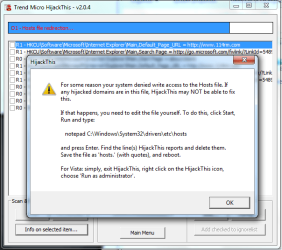
Attached is an error I get when scanning using HijackThis, and its subsequent log.
I'm not sure if this is the right forum to post under, but I was on Google and noticed others have had the same issue; however no solution was found.
Computer was working fine yesterday, but today I noticed that I can't seem to download any files anymore. I've tried with Chrome, IE, saving/opening the files, restarting my computer, saving to different locations... But I'm not sure what's wrong, and at this point I guess it's too late to download a anti-malware/anti-virus.
When I save to the desktop I watch the file (named "Unconfirmed 112297.crdownload") - and once the download finishes the file completely disappears. Opening via Chrome says that the location can't be found.
This is really interfering with my ability to download lecture notes for class... If anyone has a solution, please post.
Thank you in advanced.
Attached is an error I get when scanning using HijackThis, and its subsequent log.
Attachments
Last edited:
My Computer
At a glance
Windows 7 Ultimate
- OS
- Windows 7 Ultimate


