downloads causing heavy PC lag

MrCharles

New member
Local time
9:50 PM
Messages
12
This is the strangest problem I've come across with Windows 7. once I start downloading files, or my browser starts downloading images/streaming videos my entire PC lags until the downloads are complete or have been paused. Then my computer runs fine again.

This never occurred when I first installed Windows 7 it just started happening out of nowhere after 2 months of using the OS. I've tried reinstalling and it fixed everything and ran perfect, and now its back again! And yes it was 100% a clean install.
Along with my entire PC lagging if I have music on it starts playing as if there's no memory, and its unbearable to listen - the song starts playing in slow motion an choppy while my mouse is lagging like crazy also.

The only solution I have found is to reinstall the OS, and I really don't want to keep reinstalling every two months or so I'm going to lose my mind!

-Video drivers / Audio drivers all up to date.
-Only programs running are Firefox/Eset NOD32/Malwarebytes and Winamp
-I have 2 Gigs of DDR2 memory running along with a Pentium 4 processor
 

My Computer

Computer Manufacturer/Model Number
HP A1312n [Not stock specs!]
OS
Windows 7 Ultimate
CPU
Pentium 4 524 HT 3.06 GHz (533 MHz front side bus)
Motherboard
Asterope-GL8E RC410-M
Memory
2GIGS DDR2
Graphics Card(s)
Nvidia Geforce 9500GT
Sound Card
Realtek ALC 883 chipset
Right click on the taskbar and click on Task Manager. In the Task manager window, click on "Processes" tab, that will tell you what processes are hogging your cpu.
Incidentally, do you have Zone Alarm installed? Have seen some such issues with that.
 

My Computer

Computer Manufacturer/Model Number
Too many to describe...
OS
Windows 7 x64 pro/ Windows 7 x86 Pro/ XP SP3 x86
No zone Alarm installed, I'm just using the Windows firewall
 

My Computer

Computer Manufacturer/Model Number
HP A1312n [Not stock specs!]
OS
Windows 7 Ultimate
CPU
Pentium 4 524 HT 3.06 GHz (533 MHz front side bus)
Motherboard
Asterope-GL8E RC410-M
Memory
2GIGS DDR2
Graphics Card(s)
Nvidia Geforce 9500GT
Sound Card
Realtek ALC 883 chipset
Sorry to jump on your thread MrCharles, but I am having the same issue.

I am running 64 bit ultimate, and this is really doing my head in. I have been trying to resolve this for about a week now with no luck :( . I have tried disabling AVG internet security, disabling all non essential devices in the bios, removed the drivers for the on board NIC card and various other things.

Any suggestions would be greatly appreciated.

DeZ
 

My Computer

Computer Manufacturer/Model Number
Own Make
OS
Windows 7 Ultimate 64
CPU
E5200
Motherboard
Asrock N7AD-SLI
Memory
Samsung DDRII 4gig
Graphics Card(s)
Ati Radeon 2400HD
Sound Card
On board
Monitor(s) Displays
Digimate 19"
Wish I had ANY Ideas, I have absolutely no clue.

I've monitored running processes and memory, nothing out of the normal, I've turned off all gadgets, ive run registry cleaners along with defraging, even system restore, nothing seems to be helping.
 

My Computer

Computer Manufacturer/Model Number
HP A1312n [Not stock specs!]
OS
Windows 7 Ultimate
CPU
Pentium 4 524 HT 3.06 GHz (533 MHz front side bus)
Motherboard
Asterope-GL8E RC410-M
Memory
2GIGS DDR2
Graphics Card(s)
Nvidia Geforce 9500GT
Sound Card
Realtek ALC 883 chipset
I have now resolved this issue, for me anyway :D

I have an Asrock N7AD-SLI Motherboard that has a nForce 740i chipset. I used the latest drivers from nvidia.co.uk, the pack installed Ethernet Driver (v73.14+) WHQL that was causing the problem (thank christ for the spare wlan adapter i had lying).

So, uninstalled that driver and installed Ethernet Driver (v73.06) WHQL, now able to download at full speed with no system lag ;)

DeZ
 

My Computer

Computer Manufacturer/Model Number
Own Make
OS
Windows 7 Ultimate 64
CPU
E5200
Motherboard
Asrock N7AD-SLI
Memory
Samsung DDRII 4gig
Graphics Card(s)
Ati Radeon 2400HD
Sound Card
On board
Monitor(s) Displays
Digimate 19"
MrCharles, if the computer is lagging it must be because some app or process is hogging cpu or ram. You need to identify which.
So, one way is to check in your Task manager when you are experiencing the lag.
You can also check your event viewer. Might be useful info there.
 

My Computer

Computer Manufacturer/Model Number
Too many to describe...
OS
Windows 7 x64 pro/ Windows 7 x86 Pro/ XP SP3 x86
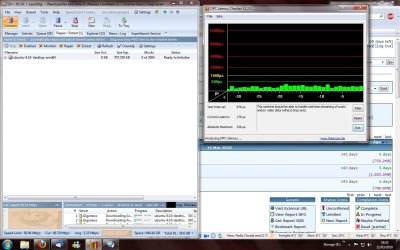
So, thought the problem was resolved but it still remains :( have gone and bought a new Ethernet card as well. I'm thinking you might be right path Bill2, when windows first starts up i can download fine for a few minutes, however the system gets laggy again. I'm beginning to think one of the system services are causing the problem, as i have disabled every device one by one checking dpclatency checker.
 

My Computer

Computer Manufacturer/Model Number
Own Make
OS
Windows 7 Ultimate 64
CPU
E5200
Motherboard
Asrock N7AD-SLI
Memory
Samsung DDRII 4gig
Graphics Card(s)
Ati Radeon 2400HD
Sound Card
On board
Monitor(s) Displays
Digimate 19"
Let us know.
 

My Computer

Computer Manufacturer/Model Number
Too many to describe...
OS
Windows 7 x64 pro/ Windows 7 x86 Pro/ XP SP3 x86
Problem still going on, Whats going on here

mua442.png
 

My Computer

Computer Manufacturer/Model Number
HP A1312n [Not stock specs!]
OS
Windows 7 Ultimate
CPU
Pentium 4 524 HT 3.06 GHz (533 MHz front side bus)
Motherboard
Asterope-GL8E RC410-M
Memory
2GIGS DDR2
Graphics Card(s)
Nvidia Geforce 9500GT
Sound Card
Realtek ALC 883 chipset
You need to sort the ask List by CPU %. Your CPU is peg at 100% and we cannot see which tasks are the culprit.
 

My Computer

Computer Manufacturer/Model Number
Asus P5B
OS
Windows 7 Ultimate
CPU
Intel Q9550
Motherboard
Asus P5B
Memory
4x2GB HyperX
Graphics Card(s)
ATI HD3850 512
Sound Card
Creative X-Fi Platinum
Monitor(s) Displays
Samsung 50 / Samsung 24
Screen Resolution
1920*1080 / 1920*1200
Hard Drives
Multiple RAID volumes
PSU
ThermalTake ToughPower
Case
Armor
Cooling
Liquid
Keyboard
$6 2.4 gHz desktop
Internet Speed
Just this side of fast enough.
Are you running any Anti-Virus software? If so, in some odd cases the real time protection can cause huge CPU usage when downloading something from the Internet as it's checking the file as it's coming. Just something to look for until we get an updated screenshot of the Task Manager.
 

My Computer

Computer type
PC/Desktop
Computer Manufacturer/Model Number
Custom Build
OS
Windows 7
CPU
AMD Phenom II X4 955 Black Edition
Motherboard
MSI 870A-G54
Memory
8GB
Graphics Card(s)
PNY XLR8 GeForce GTX 460 1024MB GDDR5
Monitor(s) Displays
2 x 24"
^^ Yes running ESET Nod32 AntiVirus

34o5uzt.png
 

My Computer

Computer Manufacturer/Model Number
HP A1312n [Not stock specs!]
OS
Windows 7 Ultimate
CPU
Pentium 4 524 HT 3.06 GHz (533 MHz front side bus)
Motherboard
Asterope-GL8E RC410-M
Memory
2GIGS DDR2
Graphics Card(s)
Nvidia Geforce 9500GT
Sound Card
Realtek ALC 883 chipset
Hi guys! This is my first post on this forum and I do it in order to rescue you MrCharles ;)

I had exactly the same problem than you. It happens that sometimes my system runs lower than usualy even if I found a cure.
I have chosen Eset Nod32 and I have 2GB of RAM too so I know how your system is used to run (however I have a c2d but it doesn not care) :D
The problem is that Seven, in all of its versions, seems to have some difficulties managing less than 2GB of RAM. Seven is actually made to run with the very half of all the RAM you have in your PC (if you have 2GB it will need about 1GB to run properly).
Nevertheless Win7 has the capacity to unlock exactly what it needs to run, I mean RAM. So when you dl like I do with Mozilla Firefox or Flashget or I-dont-know-what the more you write on your HDD, the more your dl-manager will need some RAM to run and when there is no available RAM anymore, the soft (firefox) stops everything it was doing and try to find the ressources to continue downloading.
It is kind of irritating when you were about to put an end to a 10GB download that took 5h! Hopefully, as I said, Win7 may close programs or processes in order to decrease the quantity of RAM in use and sometimes it happens that firefox reloads and continues downloading but often it does not. So the cure I found is very simple, you have to use a download manager that may stop downloading while you are rebooting your system and restarts after you made it. Of course there is another solution: get more RAM :p
My system was using about 45% out of 2GB RAM when I started downloading, 2h later it uses more than 95% and my HDD makes some unusual noises making Win7 running very very slowly but now I make breaks every 2h and reboot windows (in the wait of my second pin of 2GB ^^)!

Unfortunately Win7 has been built like that and people like us (with less than 4GB of RAM) pay the price...
 

My Computer

Computer Manufacturer/Model Number
Made by my own hands
OS
Windows 7 Ultimate x64
CPU
Intel c2d E8400 O/C 3.0Ghz @ 3.6Ghz
Motherboard
Asus P5QL Pro 'green'
Memory
2x2Go DDR2-8500 Corsair XMS2-perf 1066 5-6-6-16 2.1v
Graphics Card(s)
Nvidia Geforce 8800GT 512mo
Sound Card
Realtek HD
Monitor(s) Displays
Samsung Wide 19"
Screen Resolution
1440x900
Hard Drives
Samsung 750Go / WD 640Go
PSU
450W
Case
Advance
Cooling
many fans ^^
Internet Speed
10M
Other Info
Asus EeePc 1005HA O/C (WEI: 7.5)
So in conclusion theres no way to fix this :confused:
 

My Computer

Computer Manufacturer/Model Number
HP A1312n [Not stock specs!]
OS
Windows 7 Ultimate
CPU
Pentium 4 524 HT 3.06 GHz (533 MHz front side bus)
Motherboard
Asterope-GL8E RC410-M
Memory
2GIGS DDR2
Graphics Card(s)
Nvidia Geforce 9500GT
Sound Card
Realtek ALC 883 chipset
MrCharles,
the snapshot shows 2 striking things:
1) Firefox is consuming 32 % cpu resources. Thats abnormal to say the least. Would suggest you uninstall and try using a different browser. Or at least uninstall, clean up, then reinstall firefox.
2) The other is the that ntkernel and system cpu usage. Suggest you scan for malware with malwarebytes Antimalware. Also suggest you turn off indexing on all drives.
 

My Computer

Computer Manufacturer/Model Number
Too many to describe...
OS
Windows 7 x64 pro/ Windows 7 x86 Pro/ XP SP3 x86
Switch to Chrome. It has all the extensions and features of Firefox, minus the bloat. Firefox is prone to
memory leaks and using a ton of resources after a short while of browsing. It might not fix your problem entirely, but it's a step forward.
 

My Computer

OS
Windows 7 Enterprise 64-bit
CPU
AMD Phenom II X4 3.0GHz
Motherboard
ASUS M5A97
Memory
8GB G-Skill Ripjaws DDR3 1333
Graphics Card(s)
PNY GeForce 460 GTX 1GB OC - Enthusiast Edition
Sound Card
VIA High Definition Audio
Monitor(s) Displays
Dell 19"
Screen Resolution
1280x1024
Hard Drives
1TB - Primary
160GB - Secondary
250GB - External backup for important files
PSU
OCZ Fata1ty 700W Modular PSU
Case
ASUS
Keyboard
Microsoft Wireless Keyboard 2000
Mouse
Microsoft Wireless Mouse 2000
Internet Speed
3 Mbps/768 kbps
I did not try Chrome, maybe it needs less RAM than Firefox but i am not sure at all. :confused:
I have installed Malwarebytes' and turn the environmental protection on (in order to instantly detect malwares) then my system does not run faster..
I heard there was a way to defrag the RAM, it will be useful, perhaps you should try.:sarc:
 

My Computer

Computer Manufacturer/Model Number
Made by my own hands
OS
Windows 7 Ultimate x64
CPU
Intel c2d E8400 O/C 3.0Ghz @ 3.6Ghz
Motherboard
Asus P5QL Pro 'green'
Memory
2x2Go DDR2-8500 Corsair XMS2-perf 1066 5-6-6-16 2.1v
Graphics Card(s)
Nvidia Geforce 8800GT 512mo
Sound Card
Realtek HD
Monitor(s) Displays
Samsung Wide 19"
Screen Resolution
1440x900
Hard Drives
Samsung 750Go / WD 640Go
PSU
450W
Case
Advance
Cooling
many fans ^^
Internet Speed
10M
Other Info
Asus EeePc 1005HA O/C (WEI: 7.5)
This is the strangest problem I've come across with Windows 7. once I start downloading files, or my browser starts downloading images/streaming videos my entire PC lags until the downloads are complete or have been paused. Then my computer runs fine again.

Are you using a virus scanner that checks downloads?

If it's hogging system resources (and many do) it could be simply that the virus scanner is pounding your CPU trying to make sure your system doesn't get messed up by downloads.... Ummm, wait a second, what's wrong with that picture???
 

My Computer

Computer Manufacturer/Model Number
Homebrew
OS
XP Pro SP3 X86 / Win7 Pro X86
CPU
Amd 64 x2 4200 (2.4ghz)
Motherboard
Asus M2N-MX SE Plus
Memory
Kingston DDR2 800 2gb
Graphics Card(s)
Nvidia GF-8400
Sound Card
Realtek on Motherboard
Monitor(s) Displays
Acer x-193bw
Screen Resolution
1440 x 900
Hard Drives
Western Digital 500g
PSU
350watt In-Win
Case
In-Win
Cooling
Air
Keyboard
yes
Mouse
yes
Internet Speed
5mpbs
Other Info
Also ASRock ION 330 as HTPC (on XP).
Acer Aspire as GP netbook (on XP).
MrCharles, are you running Malwarebytes anti malware, if so disable the system ip protection ;)

My issues are now resolved and i can download at full speed, transfer across the network with absolutely no lag :D
 

Attachments

  • dpc.jpg
    dpc.jpg
    152.1 KB · Views: 79

My Computer

Computer Manufacturer/Model Number
Own Make
OS
Windows 7 Ultimate 64
CPU
E5200
Motherboard
Asrock N7AD-SLI
Memory
Samsung DDRII 4gig
Graphics Card(s)
Ati Radeon 2400HD
Sound Card
On board
Monitor(s) Displays
Digimate 19"
Back
Top