Dreamscene shadow font fix that works?

qwiksilvertrav

New member
Local time
9:46 AM
Messages
7
So just got Windows 7 and got dreamscene on it for animated desktops. Works great but now I'm trying to solve the shadowy fonts of my desktop icons.

I've tried a few methods described online with no luck.
First I tried this and here's the link Fix Icon Text in Windows 7 for Dreamscene patch - WinMatrix

1) right click a video and set to desktop background
2) set folder options to show hidden files
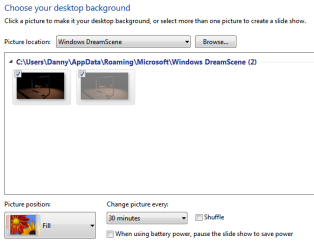
3) go to --> C:\Users\#username#\AppData\Roaming\Microsoft\Windows DreamScene
4) there should be 2 image files of the dreamscene running (1 hidden/greyed)
5) set both files to “read only” & uncheck “hidden”
6) right click desktop > personalise > desktop background
7) under windows dreamscene, you should see both image files
8) make sure both are checked by clicking checkboxes next to them
9) set Picture position: Fill
10)save changes

After all this my font comes back but then the animation stops...making it a still image. :( Maybe I"m missing something in the steps?
I've tried looking into changing the font color for the desktop icons but can't seem to figure that out.

Also I've tried setting my desktop background as a flat black. People have said that having a light background before setting a dreamscene causes the fonts to go black. So I set the background as a flat black and went to run the dreamscene video and it wouldn't activate because Aero was turned off. By selecting a Aero theme (which are all bright!) first I was then able to set a dreamscene file to my desktop but would again get the dark font.

I'm also wanting to avoid downloading the fixes available on the net in fear it might be a virus or something. PLus I'm just not sure how they work. I could look more into it though but would rather just change a settng to fix it.

ANYways I'm rather new to Windows 7 and only on day 2...lol I've tried fixing this and have searched and figured I'd post up to see if anyone can lend a hand.
Thanks
 

My Computer

OS
Windows 7 Home Premium 32bit
CPU
Intel Core 2 Quad
Memory
4 Gig
Graphics Card(s)
Nvidia 9500GT
Sound Card
Xonar DS
Monitor(s) Displays
23' Samsung Syncmaster/46' Samsung LED
Screen Resolution
1920 X 1080
Hard Drives
4 TB total
Internet Speed
25Mbs
After doing the steps, you just have to go back to your video (wherever folder it's in) then, right-click it and set as desktop background again.
 

My Computer

Computer Manufacturer/Model Number
ASUS K42JK
OS
Windows 7 Ultimate x64 (main), Windows 8 Consumer Preview x64
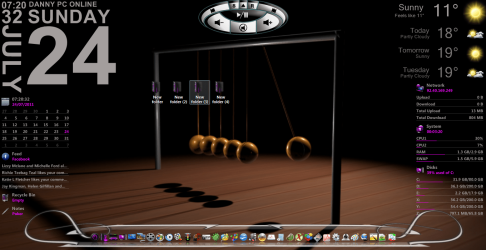
Thats odd your still experiencing this bug as I thought it was fixed a while back as Im not experiencing it since the latest release of dream scene activator. As you can see from my pic my second folder is still hidden and isnt set as read only and although I don't have folders on the desktop my text is fine.I just do the last part of what you suggested.

Capture.PNG

6) right click desktop > personalise > desktop background
7) under windows dreamscene, you should see both image files
8) make sure both are checked by clicking checkboxes next to them
9) set Picture position: Fill
10)save changes

And alls well with the world

Danny
 

My Computer

Computer Manufacturer/Model Number
acer aspire 5935g
OS
Windows 7 Home Premium x64 SP1
CPU
intel(R)core(TM)2 duo CPU T6600 @ 2.20GHz
Motherboard
intel gm45/gm47 revision 07
Memory
3 gb ddr3
Graphics Card(s)
ati radeon hd4570/512mb
Monitor(s) Displays
lop156wh2-tle1 15.3 flat
Screen Resolution
1366x768
Hard Drives
OCZ-Agility3 60gig ssd
320gig external hdd
500gig external hdd
Mouse
Optical
Internet Speed
30Mbps Down/30Mbps Up
Thats odd your still experiencing this bug as I thought it was fixed a while back as Im not experiencing it since the latest release of dream scene activator. As you can see from my pic my second folder is still hidden and isnt set as read only and although I don't have folders on the desktop my text is fine.I just do the last part of what you suggested.

View attachment 166544

6) right click desktop > personalise > desktop background
7) under windows dreamscene, you should see both image files
8) make sure both are checked by clicking checkboxes next to them
9) set Picture position: Fill
10)save changes

And alls well with the world

Danny

Yeah not sure what I'm doing wrong but I follow these steps and once I go to the personlization and part and save the changes after checking both images the desktop just freezes and it becomes a still image. I then reassign it and it animates again with the shaded text....

And what do you mean "As you can see from my pic my second folder is still hidden and isnt set as read only and although I don't have folders on the desktop my text is fine.I just do the last part of what you suggested."? Are you referring to a solid black picture background? How did you get this set up if so.

Anyways still no solution yet.
 

My Computer

OS
Windows 7 Home Premium 32bit
CPU
Intel Core 2 Quad
Memory
4 Gig
Graphics Card(s)
Nvidia 9500GT
Sound Card
Xonar DS
Monitor(s) Displays
23' Samsung Syncmaster/46' Samsung LED
Screen Resolution
1920 X 1080
Hard Drives
4 TB total
Internet Speed
25Mbs
Try it this way, this is how I do it.

1) Apply a new video as desktopbackground
2) Open personalisation/desktop background
3) Tick both boxes, the hidden file and the one you can see like below.Set to Fill.

Capture.PNG

4) Save and exit. Folders should now show the text fine like below.

Capture 2.PNG

Danny

P.s I only meant I don't usually have any folders on my desktop ive put some on just to show the text for you
 

My Computer

Computer Manufacturer/Model Number
acer aspire 5935g
OS
Windows 7 Home Premium x64 SP1
CPU
intel(R)core(TM)2 duo CPU T6600 @ 2.20GHz
Motherboard
intel gm45/gm47 revision 07
Memory
3 gb ddr3
Graphics Card(s)
ati radeon hd4570/512mb
Monitor(s) Displays
lop156wh2-tle1 15.3 flat
Screen Resolution
1366x768
Hard Drives
OCZ-Agility3 60gig ssd
320gig external hdd
500gig external hdd
Mouse
Optical
Internet Speed
30Mbps Down/30Mbps Up
Ok well tried this...and the text shows fine but the animation stops and it just becomes a still image...
 

My Computer

OS
Windows 7 Home Premium 32bit
CPU
Intel Core 2 Quad
Memory
4 Gig
Graphics Card(s)
Nvidia 9500GT
Sound Card
Xonar DS
Monitor(s) Displays
23' Samsung Syncmaster/46' Samsung LED
Screen Resolution
1920 X 1080
Hard Drives
4 TB total
Internet Speed
25Mbs
Still having this problem...gave up on it for months and now I've come back to it. Followed steps 6 - 10 and skipped the making them read only and not hidden stuff. That didn't even give me white text. If I do follow ALL the steps listed above the text turns white but the pic freezes. So I then go back to the original file and right click and click set as desktop and I'm back to square one again. Basically it seems if I can get the text to turn white the animation stops and it becomes a still picture.
Maybe I'm using an out of date dreamscene or something? I'd really like this to work.

Thanks for the help so far though! Keep it coming. :)
 

My Computer

OS
Windows 7 Home Premium 32bit
CPU
Intel Core 2 Quad
Memory
4 Gig
Graphics Card(s)
Nvidia 9500GT
Sound Card
Xonar DS
Monitor(s) Displays
23' Samsung Syncmaster/46' Samsung LED
Screen Resolution
1920 X 1080
Hard Drives
4 TB total
Internet Speed
25Mbs

My Computer

Computer Manufacturer/Model Number
acer aspire 5935g
OS
Windows 7 Home Premium x64 SP1
CPU
intel(R)core(TM)2 duo CPU T6600 @ 2.20GHz
Motherboard
intel gm45/gm47 revision 07
Memory
3 gb ddr3
Graphics Card(s)
ati radeon hd4570/512mb
Monitor(s) Displays
lop156wh2-tle1 15.3 flat
Screen Resolution
1366x768
Hard Drives
OCZ-Agility3 60gig ssd
320gig external hdd
500gig external hdd
Mouse
Optical
Internet Speed
30Mbps Down/30Mbps Up
Thanks, this worked brilliantly.
 

My Computer

Computer Manufacturer/Model Number
Acer T690
OS
windows 7
CPU
2.8
Motherboard
Asus P5G43T-M PRO
Memory
2 gb
Keyboard
microsoft laser
What worked for me

Old thread i know, but i searched lots of forums and couldn't find a reliable fix for this anywhere, so i thought id post what worked for me to get rid of the invisible/blurred text bug. :D

Hope this helps someone.

1: Set one of your videos as a desktop background.
2: In Windows Explorer set all hidden files to viewable.
3: Browse to "C:\Users\UserName\AppData\Roaming\Microsoft\Windows DreamScene"
4: Unhide the file "Img001.jpg"
5: Edit both the files (Paint) "DreamScene.jpg" and "Img001.jpg" and set to a solid black colour but keep dimensions to match your monitors native resolution and save.
6: Set both files and "Read-Only"
7: Right click on Desktop> Personalize> Set Desktop Background> then select BOTH of the files shown, Save and Exit.
8: You should now hopefully have Dreamscenes working with no invisible text bug even when selecting new dreamscenes and between restarts.

capturebrd.jpg


Moon View - video designed by dreamscene.org - YouTube


capturejst.jpg


capturejst.jpg
 
Last edited:

My Computer

OS
Windows 7 Ultimate x64
CPU
E6600
Motherboard
P5B-D
Memory
4GB
Graphics Card(s)
GTX550
Did the DreamScene "new" version/patch work?

I realize it's been over a year since you first described the desktop fonts "issue"
with "DreamScene," but I am having the same/similar troubles and have a quick
question if you don't mind replying...

I installed the whole DreamScene feature probably 9-12 months ago; LOVE it!
I now have in excess of 50 really eye-catching .wmv "scenes" to choose from.
My problem is that, as a rather compulsively organized person:sarc: , I CANNOT
tolerate a desktop cluttered with a billion d*mned shortcuts (nor can I bear
the stupid little arrows MS puts on shortcuts as if you didn't KNOW it was
a .lnk; that gets fixed w/in 5 mins. of installing each new OS!):mad:

Anyway, I have ONLY a straight line of folders at the far left of the screen; you
open UTILS and it has shortcuts to utility apps; open AUDIO and there are your
audio app shortcuts, etc. The remaining 98% of the desktop (I have a 42" HD
widescreen monitor) is blissfully CLEAN. When I just have a nice .jpg image for
the background, the labels for the above-described folders are WHITE with a
shadow...Helen Keller could see/read 'em. Start a DreamScene running as
wallpaper and the freaking folder text labels turn BLACK regardless of the
main background color of the "DS" .wmv. I have tried EVERYTHING which
you described to no avail. I just downloaded the "new version" of the DS
"activator" that fixed the glitch for you...

My question: Since DS is already installed and functioning fine, does
running this NEW activator in ANY way trash, disable, cripple or otherwise
screw up what's currently working fine except that one glitch? I am an
MCSE & CNAA and know from LONG experience that every "fix" from Redmond
manages to BREAK something unexpected. I'll await you reply before being
brave and running this. You are welcome to just e-mail directly at:
[email protected] if you wish...

Thanks in advance for your time and assistance!:)

Kelby Kite
Dallas, TX USA

**** I'm attaching a screen capture image [below] of the very far left
side of my desktop [WITHOUT DS] so that you can see what I mean.
You may have to use something to magnify it in order to see how clearly
the folder names show up w/o DS...

Left Desktop Edge.jpg
 

My Computer

Computer Manufacturer/Model Number
Self-built
OS
Windows 7 Ultimate x64 Sp1
CPU
Intel Core i7-3770, 3.90 GHz
Motherboard
Asus P8277-V (Premium)
Memory
12GB Triple-channel DDR3 @ 2400MHz
Sound Card
Realtek ALC898
Monitor(s) Displays
42" HD Widescreen (TV/monitor combo); 4 HDMI video ports
Hard Drives
4; 2 SATA internal, 1TB each
2 eSATA external, 1TB each
Case
Antec
Keyboard
Logitech wireless kboard/mouse combo
Internet Speed
50Mbps DL; 10Mbps UL
Other Info
Very, very quiet. From OFF to full OS availability is
34 secs. average
My problem was with the font not being visible and here is the fix that worked for me.
Dreamscene font fix

[FONT=&quot]1) right click a video and set to desktop background
2) set folder options to show hidden files
3) go to --> C:\Users\#username#\AppData\Roaming\Microsoft\Windows DreamScene
4) there should be 2 image files of the dreamscene running (1 hidden/greyed)
5) set both files to “read only” & uncheck “hidden”
6) right click desktop > personalise > desktop background
7) under windows dreamscene, you should see both image files
8) make sure both are checked by clicking check boxes next to them
9) set Picture position: Fill
10)save changes

NOTE: You can now set any dreamscene without text bug, however if you dont
do the above procedure everytime you set a different video, you will briefly see the
image of the first video you set at windows startup…therefore just delete both images
that was set to “read only” and start procedure again on new video.[/FONT]
 

My Computer

Computer Manufacturer/Model Number
Acer T690
OS
windows 7
CPU
2.8
Motherboard
Asus P5G43T-M PRO
Memory
2 gb
Keyboard
microsoft laser
dreamscene shadow font

When I follow that path,C:\~ Dreamscene, I see only the image of the scene. I have no "grayed out" file.
 

My Computer

Computer Manufacturer/Model Number
BIOSTAR Group A55MH
OS
Windows 7 Ultimate 64-bit
CPU
2.90 gigahertz AMD A8-3850 APU with Radeon HD Graphics
Motherboard
BIOSTAR Group A55MH Bus Clock: 100 megahertz BIOS: American
Memory
8170 Megabytes Usable Installed Memory
Graphics Card(s)
ATI Radeon HD 5450 [Display adapter]
Sound Card
AMD High Definition Audio Device
Monitor(s) Displays
Samsung SyncMaster [Monitor] (19.1"vis, s/n HA19HVDP427004,
Screen Resolution
1440x900
Hard Drives
1500.20 Gigabytes Usable Hard Drive Capacity
1104.84 Gigabytes Hard Drive Free Space
Case
DELL Dimension 3000
Keyboard
HP KB 0228
Mouse
GH optical-wired
Internet Speed
50+MB
My problem was with the font not being visible and here is the fix that worked for me.
Dreamscene font fix

[FONT=&quot]1) right click a video and set to desktop background
2) set folder options to show hidden files
3) go to --> C:\Users\#username#\AppData\Roaming\Microsoft\Windows DreamScene
4) there should be 2 image files of the dreamscene running (1 hidden/greyed)
5) set both files to “read only” & uncheck “hidden”
6) right click desktop > personalise > desktop background
7) under windows dreamscene, you should see both image files
8) make sure both are checked by clicking check boxes next to them
9) set Picture position: Fill
10)save changes

NOTE: You can now set any dreamscene without text bug, however if you dont
do the above procedure everytime you set a different video, you will briefly see the
image of the first video you set at windows startup…therefore just delete both images
that was set to “read only” and start procedure again on new video.[/FONT]

Worked perfectly !! Thx a lot.
 

My Computer

Computer type
Laptop
Computer Manufacturer/Model Number
ACER
OS
Windows 7 Utilmate x32
CPU
Intel Dualcore T2330
Memory
3Gb
Maeve1941, that worked perfectly! Thanks a bunch!!!
 

My Computer

Computer Manufacturer/Model Number
BIOSTAR Group A55MH
OS
Windows 7 Ultimate 64-bit
CPU
2.90 gigahertz AMD A8-3850 APU with Radeon HD Graphics
Motherboard
BIOSTAR Group A55MH Bus Clock: 100 megahertz BIOS: American
Memory
8170 Megabytes Usable Installed Memory
Graphics Card(s)
ATI Radeon HD 5450 [Display adapter]
Sound Card
AMD High Definition Audio Device
Monitor(s) Displays
Samsung SyncMaster [Monitor] (19.1"vis, s/n HA19HVDP427004,
Screen Resolution
1440x900
Hard Drives
1500.20 Gigabytes Usable Hard Drive Capacity
1104.84 Gigabytes Hard Drive Free Space
Case
DELL Dimension 3000
Keyboard
HP KB 0228
Mouse
GH optical-wired
Internet Speed
50+MB
Back
Top