Solved Drive appears in my computer but doesn't exist

M0bstr

New member
Local time
7:34 PM
Messages
7
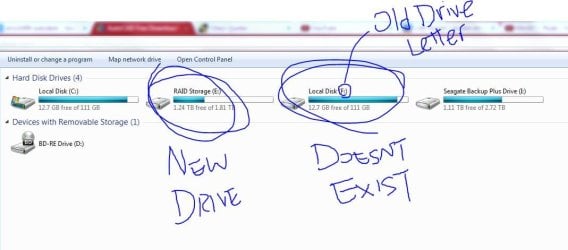
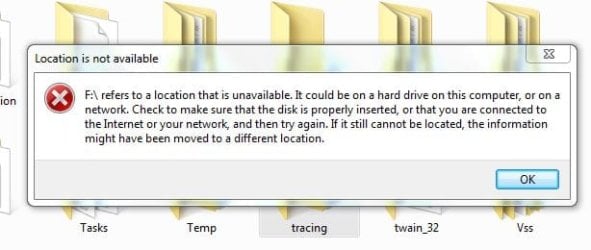
My old drive recently broke down and luckily I was able to recover most of the data. I've since put a new drive in and it has a different drive letter (E:). However, the old drive (F:) still appears in my computer, when I open the drive, there are different files. I have no idea where those files come from but I can't modify it, it shows an error with Location is not available. I want to remove this drive, what do I do?
 

My Computer

Computer type
PC/Desktop
OS
Windows 7 Home Premium 64 bit
Hi there M0bstr!

So you have this E: drive disconnected? And it still appears with its drive letter? Does your new drive work as it should?

This looks like a ghost drive case. Can you post a screen shot of both My Computer and Disk Management where the ghost drive appears?

Does it appear also in Device Manager? If so, I think this would help you:

1. Go to Device Manager
2. Pull down the View menu
3. Select hidden devices, to look everywhere for the ghost drive
4. If you find it, it most probably should look translucent or faded
5. Right click on it and select Uninstall

I hope this helps!

CK_WD

P.S.: Be very careful when uninstalling storage devices like this, make sure it's the right one and that it is really disconnected and what you see is actually a ghost drive!
 

My Computer

Computer type
PC/Desktop
OS
Windows 7 Home Premium x64
Post a screenshot first before you delete anything its possible when changing disks you have revealed a hidden partition or recovery partition that should not have a drive letter assigned and was invisible before but may still belong there
 

My Computer

Computer type
PC/Desktop
Computer Manufacturer/Model Number
Pauly Special
OS
Win7 Ultimate X64
CPU
Intel i5 3570K
Motherboard
Gigabyte Z77X-DS3H
Memory
8GB DDR3 1600
Graphics Card(s)
Onboard
Sound Card
Onboard
Screen Resolution
1280x1024
Hard Drives
Samsung 840 Evo SSD (OS)
1TB Spinner (Data)
PSU
800W Arctic
Case
Cooler Master
Cooling
3x120mm Fans
Keyboard
MS Wireless
Mouse
MS Wireless
Internet Speed
20M
Thanks. But I couldn't find the drive in device manager. The new drive is working, but I am trying to install AutoCAD and when installing, it shows "invalid drive F:", and suddenly, this ghost drive shows up in my computer and I want to remove it.
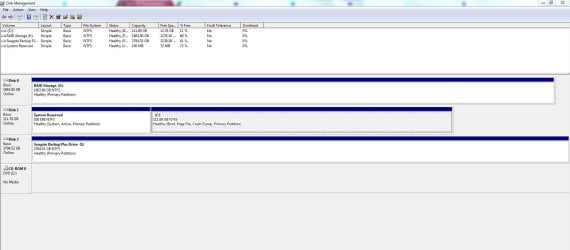
Here are the Screenshots:
 

Attachments

  • Disk Management.JPG
    Disk Management.JPG
    114.5 KB · Views: 11
  • My Comp.JPG
    My Comp.JPG
    56 KB · Views: 7

My Computer

Computer type
PC/Desktop
OS
Windows 7 Home Premium 64 bit
Thank you for the screenshots!

Well, it's clearly shown that your ghost drive appears only in My Computer. It's not in Disk Management, and as you say, it's also not in Device Manager.

Can you try and open it or anything that may be in there to see the errors that appear? Post a screenshot? Does this drive F: give you any options under Properties?

If I understood correctly, you wanted to install AutoCAD on the new E: drive (which already has some information on it) but it gave you an error about F: drive (non-existent)?
 

My Computer

Computer type
PC/Desktop
OS
Windows 7 Home Premium x64
Yes. I want to install AutoCAD in drive E which worked when I installed many other programs and it gives me an error about the drive F, which is non-existent.
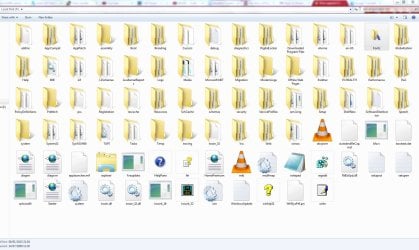
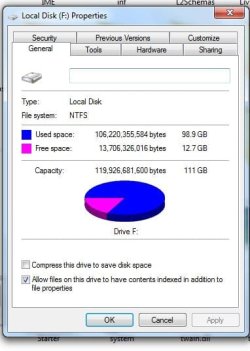
Here are all the files in the drive. Most of it are system configuration files and it seems like its random files from the other drives, I can't open most of the files, except for the fonts in the fonts folder. However, I couldn't delete or modify any files in anyway.
 

Attachments

  • Drive F.JPG
    Drive F.JPG
    174.3 KB · Views: 7
  • Drive F Properties.JPG
    Drive F Properties.JPG
    36.1 KB · Views: 28
  • Error.JPG
    Error.JPG
    31.8 KB · Views: 28

My Computer

Computer type
PC/Desktop
OS
Windows 7 Home Premium 64 bit
It appears to be a duplicate of your C drive - Capacity, Free space :confused:
 

My Computer

OS
Windows 7 Home Premium 32 bit
It appears to be a duplicate of your C drive :confused:

No. All the screenshots are from the F drive, but the files do seem like they come from the C drive.
 

My Computer

Computer type
PC/Desktop
OS
Windows 7 Home Premium 64 bit
I do too think that this is some sort of duplicate to the System Reserved, or C: drive.
Have you tried to clone your F: drive to the E: drive before all this?
I would suggest unplugging from the Internet and then doing a System Restore. See if that helps.

Good luck!

CK_WD
 

My Computer

Computer type
PC/Desktop
OS
Windows 7 Home Premium x64
I know that is your F drive.. But just see the capacity and free space. It reflects your C drive in that - same as your C drive.. That is what I meant. What exactly is happening? - I am just pulling out my hair.:)
 

My Computer

OS
Windows 7 Home Premium 32 bit
I know, this is completely puzzling!
The C drive has some how "cloned" itself and I am not sure if even a System Restore could do anything. Perhaps removing the drive letter F: (deleting it), but we are unaware of the exact circumstanced under which this occurred, so it may not be safe..
 

My Computer

Computer type
PC/Desktop
OS
Windows 7 Home Premium x64
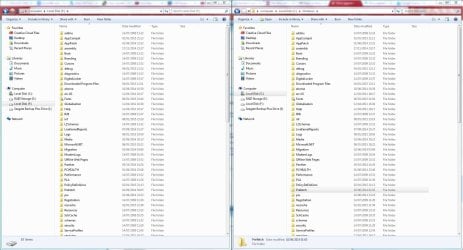
I haven't tried cloning my F drive to the E drive. I looked in the C drive and I think the F drive is a clone of C:\Windows. the new drive is already installed for about a month or two now, I can't do a system restore.
 

Attachments

  • Compare.JPG
    Compare.JPG
    204.1 KB · Views: 4

My Computer

Computer type
PC/Desktop
OS
Windows 7 Home Premium 64 bit
I think I know how the problem with the cloned drive appeared. While trying to solve the installing AutoCAD problem, it recommened me to create a virtual drive by using "subst" command in cmd on the website. That is why the F drive suddenly appeared for no reason. Sorry. But the problem with installing AutoCAD is still there. Do you guys know what is the problem with that?
 

My Computer

Computer type
PC/Desktop
OS
Windows 7 Home Premium 64 bit
I do not know anything about AutoCAD and how to install it - plain speak.:)

But if you want to eliminate the Phantom drive , you may try this:

Download v 0.8.1 of the drivecleanup.zip from Drive Tools for Windows.

Unzip it to a folder, say drivecleanup.

You will have two folders Win32 and x64 each containing DriveCleanup.exe for 32 bit and 64 bit respectively.

Remove all USB storage devices from your system (except your Keyboard and mouse) and reboot.

Right click on the DriveCleanup.exe and run as administrator. (Use the *.exe file appropriate for your bit version of Windows.).

After the clean up act, reboot and check whether your system still shows the Virtual F drive.

As a matter of fact, once you said it is a physically no-existent drive, I wanted to suggest this drive cleanup, but curious to know what has brought about this phantom drive. How can just removing a faulty drive and replacing it with a nes drive bring out a phantom drive? Now that mystery is resolved.

This will be the first time I shall be recommending the drive cleanup under this unusual occurrence and really don't know whether it will actually work in this case. But no harm in trying. It just removes the non-present devices, drive letters and registry entries associated with those non-present devices.

As a matter of abundant caution, create a system restore point before you run the drive cleanup under this circumstance..
 

My Computer

OS
Windows 7 Home Premium 32 bit

Been watching this thread, it is quite unusual

I was wondering about RAID, I see one of the volumes is labelled RAID, is it possible that using hardware (im guessing) RAID could have confused the mobo regards the sata ports ?
 

My Computer

Computer type
PC/Desktop
Computer Manufacturer/Model Number
Pauly Special
OS
Win7 Ultimate X64
CPU
Intel i5 3570K
Motherboard
Gigabyte Z77X-DS3H
Memory
8GB DDR3 1600
Graphics Card(s)
Onboard
Sound Card
Onboard
Screen Resolution
1280x1024
Hard Drives
Samsung 840 Evo SSD (OS)
1TB Spinner (Data)
PSU
800W Arctic
Case
Cooler Master
Cooling
3x120mm Fans
Keyboard
MS Wireless
Mouse
MS Wireless
Internet Speed
20M
Ok so did a bit of digging and it look like the subst has created this virtual drive
Can you remember the exact command that created this

appending /d should delete the volume
I believe the command to delete the virtual drive path will be something like this
subst F: /d

but im really not 100% so I would wait for someone else to confirm
bit of info here Subst and here MS-DOS subst command help
 

My Computer

Computer type
PC/Desktop
Computer Manufacturer/Model Number
Pauly Special
OS
Win7 Ultimate X64
CPU
Intel i5 3570K
Motherboard
Gigabyte Z77X-DS3H
Memory
8GB DDR3 1600
Graphics Card(s)
Onboard
Sound Card
Onboard
Screen Resolution
1280x1024
Hard Drives
Samsung 840 Evo SSD (OS)
1TB Spinner (Data)
PSU
800W Arctic
Case
Cooler Master
Cooling
3x120mm Fans
Keyboard
MS Wireless
Mouse
MS Wireless
Internet Speed
20M
I don't have a answer but I do have a question.

I noticed that the (E) drive is RAID. Could that have something to do with this?

Snap shot i post #4
 

My Computer

Computer type
PC/Desktop
Computer Manufacturer/Model Number
Home made Desktop
OS
Windows 10 Pro. 64/ version 1709 Windows 7 Pro/64
CPU
Intel i7-6800K @ 4.3
Motherboard
ASUS X-99 Deluxe II
Memory
Corsair Platinum 16 gig @2400
Graphics Card(s)
EVGA GTX 1070 OC
Monitor(s) Displays
Asus 27" LED LCD/VE278Q
Screen Resolution
1920-1080 or 1280-720 HDMI
Hard Drives
INTEL SSD 730-240 Gb Sata 3.0/
PSU
EVGA Platium 1200W
Case
Phanteks Luxe Tempered Glass 8 fans/ one radiator
Cooling
XSPC/ Water Cooled CPU
Keyboard
Das 4 Professional
Mouse
Logitech M705/MX Anywhere 2-S
Internet Speed
100 mbits
Antivirus
Microsoft Security Essentials/ Malwarebytes Premium 3.0/ SAS
Browser
I.E. 11 default/Firefox/ ISP Time Warner Cable/Spectrum
Other Info
LG BluRay Burner/
Sound system-KLipsch-THX/
Icy Dock ssd Hot Swap bays.
That was my train of thought in my last post #15 but im thinking it is a virtual drive going by the command used
 

My Computer

Computer type
PC/Desktop
Computer Manufacturer/Model Number
Pauly Special
OS
Win7 Ultimate X64
CPU
Intel i5 3570K
Motherboard
Gigabyte Z77X-DS3H
Memory
8GB DDR3 1600
Graphics Card(s)
Onboard
Sound Card
Onboard
Screen Resolution
1280x1024
Hard Drives
Samsung 840 Evo SSD (OS)
1TB Spinner (Data)
PSU
800W Arctic
Case
Cooler Master
Cooling
3x120mm Fans
Keyboard
MS Wireless
Mouse
MS Wireless
Internet Speed
20M
I had also noticed the RAID drive and was intending to ask details of it. Since the OP came out that he used the subst command during the AutoCAD after which the F drive came into existence, a direct link is established and RAID even remotely connected in anyway was ruled out (by me).

It would appear that a failed AutoCAD install had left the virtual drive. Only someone who had installed AutoCAD and familiar with it could throw more light on this - whether it is a temporary virtual drive created to install it or is part of the installed program..
 

My Computer

OS
Windows 7 Home Premium 32 bit
Thank you folks for answering my question.
 

My Computer

Computer type
PC/Desktop
Computer Manufacturer/Model Number
Home made Desktop
OS
Windows 10 Pro. 64/ version 1709 Windows 7 Pro/64
CPU
Intel i7-6800K @ 4.3
Motherboard
ASUS X-99 Deluxe II
Memory
Corsair Platinum 16 gig @2400
Graphics Card(s)
EVGA GTX 1070 OC
Monitor(s) Displays
Asus 27" LED LCD/VE278Q
Screen Resolution
1920-1080 or 1280-720 HDMI
Hard Drives
INTEL SSD 730-240 Gb Sata 3.0/
PSU
EVGA Platium 1200W
Case
Phanteks Luxe Tempered Glass 8 fans/ one radiator
Cooling
XSPC/ Water Cooled CPU
Keyboard
Das 4 Professional
Mouse
Logitech M705/MX Anywhere 2-S
Internet Speed
100 mbits
Antivirus
Microsoft Security Essentials/ Malwarebytes Premium 3.0/ SAS
Browser
I.E. 11 default/Firefox/ ISP Time Warner Cable/Spectrum
Other Info
LG BluRay Burner/
Sound system-KLipsch-THX/
Icy Dock ssd Hot Swap bays.
Back
Top