- Local time
- 10:06 PM
- Messages
- 408
OP did say that he has only one new drive with the letter E:, which is in this case only named RAID, I assume.
The AutoCAD (Autodesk) installation shouldn't be something more than the usual software installation. It should usually be done through a USB or DVD and the process is described here:
Installing & Configuring Software on a Single Computer with a Stand-Alone License | Installation, Activation & Licensing | Autodesk Knowledge Network
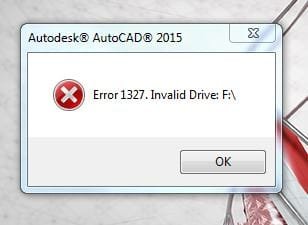
But also, it's great that OP mentioned the subst part, that explains a lot, if not everything. If he had to use a virtual disk for the installation, or the system decided that the CD/USB can be mounted virtually, working with the subst-command is where everything got wrong. At least, this is what I assume.
So following @Pauly's logic, which I think is correct, specifying the path to the virtual "ghost" drive like
subst F: /d
should delete it!
The only thing that's personally bothering me is that the system created a virtual copy of the OS drive. I am not quite aware of how things would proceed, but I think some sort of check up should be made to see if deleting the ghost OS drive won't affect the real C: drive?
Just thinking out loud.
CK_WD
The AutoCAD (Autodesk) installation shouldn't be something more than the usual software installation. It should usually be done through a USB or DVD and the process is described here:
Installing & Configuring Software on a Single Computer with a Stand-Alone License | Installation, Activation & Licensing | Autodesk Knowledge Network
But also, it's great that OP mentioned the subst part, that explains a lot, if not everything. If he had to use a virtual disk for the installation, or the system decided that the CD/USB can be mounted virtually, working with the subst-command is where everything got wrong. At least, this is what I assume.
So following @Pauly's logic, which I think is correct, specifying the path to the virtual "ghost" drive like
subst F: /d
should delete it!
The only thing that's personally bothering me is that the system created a virtual copy of the OS drive. I am not quite aware of how things would proceed, but I think some sort of check up should be made to see if deleting the ghost OS drive won't affect the real C: drive?
Just thinking out loud.
CK_WD
My Computer
- Computer type
- PC/Desktop
- OS
- Windows 7 Home Premium x64