Solved Drive became Unallocated and not having much luck recoverying

It's dead I tell you Dead :cry:

No files sadly ...
 

Attachments

  • pwscan.jpg
    pwscan.jpg
    168.5 KB · Views: 3

My Computer My Computer

At a glance

Windows 7 ultimate 64biti7 92012GBMSI R7
Computer type
PC/Desktop
Computer Manufacturer/Model Number
Home Brew
OS
Windows 7 ultimate 64bit
CPU
i7 920
Motherboard
Asus P6 Deluxe
Memory
12GB
Graphics Card(s)
MSI R7
Hard Drives
Crucial M550 512GB SSD
WD 2TB Black
WD 1TB Black
WD 1TB Blue
Toshiba 2TB
Hitachi 1TB
Case
HAF 960
Cooling
Corsair H80 Water
Browser
Firefox
Can you recover files with "MiniTool Power Data Recovery 7.0"?
 

My Computer My Computer

At a glance

Windows 7 Ultimate x64 SP1AMD Phenom 2 1090T2x8GB Kingston HyperX Fury Black 1600Mhz Unga...MSI GTX 970 Gaming 4G
Computer type
PC/Desktop
Computer Manufacturer/Model Number
Custom Build
OS
Windows 7 Ultimate x64 SP1
CPU
AMD Phenom 2 1090T
Motherboard
Gigabyte GA-890FXA-UD5
Memory
2x8GB Kingston HyperX Fury Black 1600Mhz Unganged
Graphics Card(s)
MSI GTX 970 Gaming 4G
Sound Card
Realtek On-Board HD 7.1 Audio / Logitech G35
Monitor(s) Displays
3xAcer GD245HQ
Screen Resolution
1920x1080
Hard Drives
Samsung 850 Pro 512GB SSD - OS /
WD Caviar Black SATA 3 - 1 TBx2 - Dynamic RAID 0 /
WD Caviar Green SATA 2 - 640GBx2 - Dynamic RAID 0 /
WD Caviar Green SATA 2 - 640GB - Internal Backup /
Seagate Barracude SATA 3 - 3TB - External Backup/ Sync
PSU
HighPower 1000W
Case
Cooler Master HAF 932
Cooling
Noctua NH-D14
Keyboard
Logitech G19
Mouse
Logitech G500
Internet Speed
100/4 Mbit Cable (100GB quota)
Antivirus
ZoneAlarm Extreme Security / MBAM Pro / MBAE Free / SAS Free
Browser
IE 11 - Firefox - Chrome
Other Info
Logitech F710/ G27/ G940/ Z5500 // TrackIR 5 // Nvidia 3D Surround Vision
At the beginning of all this I used photorec which recovered quite a few files but a lot of stuff was missing and anything other than single standalone files is impossible to reconstruct without folder structures.

The other one I tried was Easeus Data recovery but had to abort that some way through. I couldn't really tell if that found more but once I aborted that one it didn't find any mkv files which photorec did.

I'm not sure I can stomach the work needed to figure out which files are which especially if they are incomplete so perhaps if I can't reconstruct the partition it's going to have to be a reformat sadly.
 

My Computer My Computer

At a glance

Windows 7 ultimate 64biti7 92012GBMSI R7
Computer type
PC/Desktop
Computer Manufacturer/Model Number
Home Brew
OS
Windows 7 ultimate 64bit
CPU
i7 920
Motherboard
Asus P6 Deluxe
Memory
12GB
Graphics Card(s)
MSI R7
Hard Drives
Crucial M550 512GB SSD
WD 2TB Black
WD 1TB Black
WD 1TB Blue
Toshiba 2TB
Hitachi 1TB
Case
HAF 960
Cooling
Corsair H80 Water
Browser
Firefox
I understand your anguish. You have indeed done a lot of work (as I did too ) in trying to resurrect the drive or recover the data and it has proved elusive so far. Now we need a booster dose.:)

Do this one last or last but one thing. Download the proven GetdataBack Simple trial version, https://www.runtime.org/data-recovery-software.htm run it and see whether it shows all your folders/files with the original structure. You can open the folders and then the files in it and preview also to confirm that everything is fine. ( To copy thedata however you need to buy it USD69. That is a decision you have to make) Even if you pre-decide not to buy, do this and let us know the results.It will add to our proof list.

Shall continue after a break.
 
Last edited:

My Computer My Computer

At a glance

Windows 7 Home Premium 32 bit
OS
Windows 7 Home Premium 32 bit
Continuing...

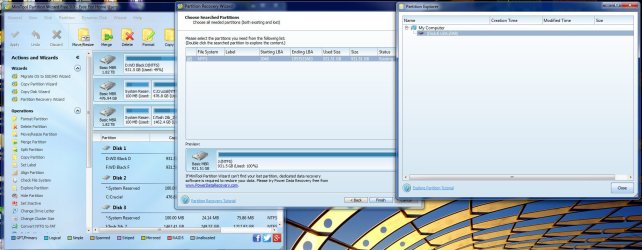
Partition Recovery Wizard found the partition details only from the backup boot sector present somewhere in the last sectors of the drive. That is why it took a long time scanning to the last sectors. (If it were able to find a valid NTFS boot sector at Sector 2048, it would have found it within seconds.)

If you remember, Test Disk also took a longtime before it found the partition details but threw a clear message "NTFS found using backup sector .......... ( The last sentence in the screenshot in your post #5). I do not know why after writing the partition table (which is correct) to sector 0, it started saying that the primary boot sector (at sector 2048) is OK preempting us writing the backup to the primary sector with Backup BS. But it is very clear now it is not and the backup is still valid and OK.

So do this as one last attempt. With bootice save the current sector 2048 ( just in case you want to revert back later). Then select all the 512 fields by running the mouse pointer from start to end, Right click >Fill Selection > 0xFF > OK. Save to disk.

Now run TestDisk. Advanced - File system Utilities Proceed with Boot and see whether it now shows Primary boot sector Bad and Backup boot sector OK. If yes, Backup BS to write the backup to the Primary. If successful, close Test Disk, reboot and check whether lady luck smiles on you.

Good Luck.
 

My Computer My Computer

At a glance

Windows 7 Home Premium 32 bit
OS
Windows 7 Home Premium 32 bit
I understand your anguish. You have indeed done a lot of work (as I did too ) in trying to resurrect the drive or recover the data and it has proved elusive so far. Now we need a booster dose.:)

Do this one last or last but one thing. Download the proven GetdataBack Simple trial version, https://www.runtime.org/data-recovery-software.htm run it

Shall continue after a break.

Booster dose ... I like that.

I am installing the software now.
It doesn't see any files so I am letting it scan which looks like it's going to take a long time.
Did you want the scan or did you just want to see if it can see files when first run?
The scan will take 3 + hours and it's running now till I hear from you.
 
Last edited:

My Computer My Computer

At a glance

Windows 7 ultimate 64biti7 92012GBMSI R7
Computer type
PC/Desktop
Computer Manufacturer/Model Number
Home Brew
OS
Windows 7 ultimate 64bit
CPU
i7 920
Motherboard
Asus P6 Deluxe
Memory
12GB
Graphics Card(s)
MSI R7
Hard Drives
Crucial M550 512GB SSD
WD 2TB Black
WD 1TB Black
WD 1TB Blue
Toshiba 2TB
Hitachi 1TB
Case
HAF 960
Cooling
Corsair H80 Water
Browser
Firefox
Continuing...


If you remember, Test Disk also took a longtime before it found the partition details but threw a clear message "NTFS found using backup sector .......... ( The last sentence in the screenshot in your post #5). I do not know why after writing the partition table (which is correct) to sector 0, it started saying that the primary boot sector (at sector 2048) is OK preempting us writing the backup to the primary sector with Backup BS. But it is very clear now it is not and the backup is still valid and OK.

I'm interested in your conclusion that the backup BS is ok. The way I saw this was that the BackupBS is exactly the same as the current BS and that's why Testdisk doesn't offer to copy the backup.

Does the backup BS not get copied with every write operation?
[/QUOTE]

So do this as one last attempt. With bootice save the current sector 2048 ( just in case you want to revert back later). Then select all the 512 fields by running the mouse pointer from start to end, Right click >Fill Selection > 0xFF > OK. Save to disk.

Now run TestDisk. Advanced - File system Utilities Proceed with Boot and see whether it now shows Primary boot sector Bad and Backup boot sector OK. If yes, Backup BS to write the backup to the Primary. If successful, close Test Disk, reboot and check whether lady luck smiles on you.

Good Luck.
I was tempted to try this now but I'll let the scan complete - seems like 3.5 hours though.

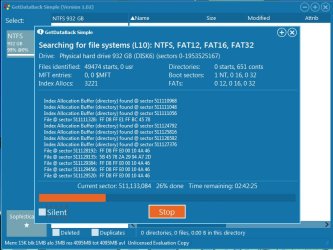
As I am writing this I looked at the scan and it this is what it is finding. I don't think this is much different to photorec finding files but maybe it's different. I saw some folders.
 

Attachments

  • getdata.jpg
    getdata.jpg
    80.3 KB · Views: 0
Last edited:

My Computer My Computer

At a glance

Windows 7 ultimate 64biti7 92012GBMSI R7
Computer type
PC/Desktop
Computer Manufacturer/Model Number
Home Brew
OS
Windows 7 ultimate 64bit
CPU
i7 920
Motherboard
Asus P6 Deluxe
Memory
12GB
Graphics Card(s)
MSI R7
Hard Drives
Crucial M550 512GB SSD
WD 2TB Black
WD 1TB Black
WD 1TB Blue
Toshiba 2TB
Hitachi 1TB
Case
HAF 960
Cooling
Corsair H80 Water
Browser
Firefox
Wait till the end. It may find the correct NTFS boot only at the end and if it does it may rehash everything. I hope so.
 

My Computer My Computer

At a glance

Windows 7 Home Premium 32 bit
OS
Windows 7 Home Premium 32 bit
Wait till the end. It may find the correct NTFS boot only at the end and if it does it may rehash everything. I hope so.

Ok, will do - it's showing 35% and about 2 hours now.
 

My Computer My Computer

At a glance

Windows 7 ultimate 64biti7 92012GBMSI R7
Computer type
PC/Desktop
Computer Manufacturer/Model Number
Home Brew
OS
Windows 7 ultimate 64bit
CPU
i7 920
Motherboard
Asus P6 Deluxe
Memory
12GB
Graphics Card(s)
MSI R7
Hard Drives
Crucial M550 512GB SSD
WD 2TB Black
WD 1TB Black
WD 1TB Blue
Toshiba 2TB
Hitachi 1TB
Case
HAF 960
Cooling
Corsair H80 Water
Browser
Firefox
90% done... 20 mins to go

Hmm, I just noticed when saving sectors for the other drives that one of my 1TB drives had it's NTFS boot sector starting at 63 not 2048.
It's probably the oldest of my drives - but I'm curious why that is. I'm sure the drive we are dealing with is probably 2048 but can we be sure?

Edit: ok I think I understand. It was probably formatted with an older fdisk.
 
Last edited:

My Computer My Computer

At a glance

Windows 7 ultimate 64biti7 92012GBMSI R7
Computer type
PC/Desktop
Computer Manufacturer/Model Number
Home Brew
OS
Windows 7 ultimate 64bit
CPU
i7 920
Motherboard
Asus P6 Deluxe
Memory
12GB
Graphics Card(s)
MSI R7
Hard Drives
Crucial M550 512GB SSD
WD 2TB Black
WD 1TB Black
WD 1TB Blue
Toshiba 2TB
Hitachi 1TB
Case
HAF 960
Cooling
Corsair H80 Water
Browser
Firefox
:what:I don't believe it.
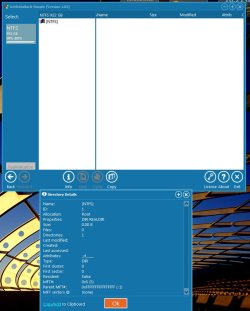
At 100% it showed 65666 files found and Directories : 0 starts, 812 conts.
When it finished I get nothing!!
 

Attachments

  • gb_fail.jpg
    gb_fail.jpg
    74.5 KB · Views: 2

My Computer My Computer

At a glance

Windows 7 ultimate 64biti7 92012GBMSI R7
Computer type
PC/Desktop
Computer Manufacturer/Model Number
Home Brew
OS
Windows 7 ultimate 64bit
CPU
i7 920
Motherboard
Asus P6 Deluxe
Memory
12GB
Graphics Card(s)
MSI R7
Hard Drives
Crucial M550 512GB SSD
WD 2TB Black
WD 1TB Black
WD 1TB Blue
Toshiba 2TB
Hitachi 1TB
Case
HAF 960
Cooling
Corsair H80 Water
Browser
Firefox
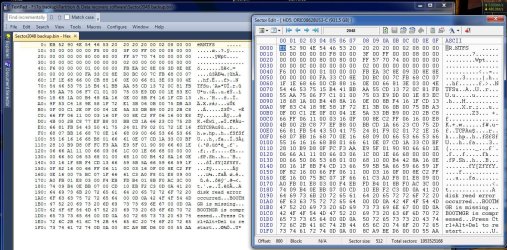
After backing up sector 2048. Testdisk > BackupBS I can see the the table is the same as what I backed up
you can see from the comparison that they were the same but I rebooted all the same - unfortunately Lady Luck is on holiday in the Bahamas drinking pink champagne and laughing.:sarc:

Thanks very much for your tireless efforts. I am going to check out maybe one or two data recovery programs just to see if anything recovers more than photorec. I will then format and put it all down to bad experience.
 

Attachments

  • 2048sector.jpg
    2048sector.jpg
    274.6 KB · Views: 2

My Computer My Computer

At a glance

Windows 7 ultimate 64biti7 92012GBMSI R7
Computer type
PC/Desktop
Computer Manufacturer/Model Number
Home Brew
OS
Windows 7 ultimate 64bit
CPU
i7 920
Motherboard
Asus P6 Deluxe
Memory
12GB
Graphics Card(s)
MSI R7
Hard Drives
Crucial M550 512GB SSD
WD 2TB Black
WD 1TB Black
WD 1TB Blue
Toshiba 2TB
Hitachi 1TB
Case
HAF 960
Cooling
Corsair H80 Water
Browser
Firefox
Very disappointing. The results tally with what PRW listed - nothing, except there is an NTFS bootsector

It is now beyond my comprehension. I am just wondering what could have happened and how it could have happened..

You are now free to try whatever you want.

Regarding sector 63 old versions of partitioning/formatting software placed the the first NTFS boot sector at 63. Windows 7 Disk Management and newer versions of other partitioning software place it at Sector 2048.

At the time I wrote this thread http://www.sevenforums.com/general-discussion/335701-diskpart-clean-zeros-lba-0-lba-2047-a.html even PW started the first partition at 63. Now 2048.

My system which was formatted more than five years ago has the first partition starting at 63.

Oh yes, Bahamas is a nice place to vacation. Join lady luck there and enjoy.

R968_0570.JPG

Is it her in the Bahamas? :)
 

My Computer My Computer

At a glance

Windows 7 Home Premium 32 bit
OS
Windows 7 Home Premium 32 bit
Well what can you do.

I have a couple of theories perhaps on how it happened.

1) I may have turned off the drive when without disconnecting safely however, I discounted this as I don't remember writing to it .. but it's a possibility and I do remember looking at the drive not too long ago.

2) Whilst using photorec on a second run the external drive suddenly disconnected and reconnected. This was on the 19th and is recorded on in the SMART data :

1,Raw Read Error Rate,51,200,200,OK,3,0,Enabled
199,Ultra ATA CRC Error Count,0,200,200,OK (Always passing),1,0,Enabled

I ended up with the above - and HD sentinal shows this happening on the 19th June - so I know it was due to that.

This kind of stoppage is pretty rare but I may suspect a usb 3.0 card Asus U3S6 which I have installed as being the culprit. I've had disconnects before on occasion but very very rare. (My motherboard is old enough not to have USB 3 so this is why that card was added). The SATA part of the card has caused no end of trouble that I had do stop using it.

So it's possible that at some point maybe this might be responsible but again logically I don't see it as I didn't write to the drive. Haven't for some time.

It's concerning though because I've never had this happen ever to me.

When I've reformatted I will test the drive thoroughly with the Western Digital Diagnostic tool to see if it detects anything. I appears healthy according to HD Sentinal

Sector 63 - yes this all makes sense as the WD Drive is a blue version which I installed at least 5 years back and when I had XP

Lady Luck: Oh yes I think that is her although she's feigning sadness for the camera. :D


And again thank you for your efforts and all who have tried to help. I appreciate it so much.

 

My Computer My Computer

At a glance

Windows 7 ultimate 64biti7 92012GBMSI R7
Computer type
PC/Desktop
Computer Manufacturer/Model Number
Home Brew
OS
Windows 7 ultimate 64bit
CPU
i7 920
Motherboard
Asus P6 Deluxe
Memory
12GB
Graphics Card(s)
MSI R7
Hard Drives
Crucial M550 512GB SSD
WD 2TB Black
WD 1TB Black
WD 1TB Blue
Toshiba 2TB
Hitachi 1TB
Case
HAF 960
Cooling
Corsair H80 Water
Browser
Firefox
I think I may be getting to the core of the problem.

I decided to do an extended test with WD Lifeguard diagnostics. Shortly into the test it came up with too many bad sectors and aborted.

I ran it again and it got almost halfway through about 70 mins before it again aborted.

Coupled with the random disconnects I think this is a problem either with the external enclosure or the controller but I don't know which. It appears to be the root cause of the problem though.

I have plugged into USB 2.0 to do the test and I'm betting it will pass although the time is going to be 8 hours instead of 2.

If this is a USB 3 problem I'm damned if I can figure out how to know if it's the controller or the enclosure and yet the Hitachi drive seems to work ok on it.:sick:
 

My Computer My Computer

At a glance

Windows 7 ultimate 64biti7 92012GBMSI R7
Computer type
PC/Desktop
Computer Manufacturer/Model Number
Home Brew
OS
Windows 7 ultimate 64bit
CPU
i7 920
Motherboard
Asus P6 Deluxe
Memory
12GB
Graphics Card(s)
MSI R7
Hard Drives
Crucial M550 512GB SSD
WD 2TB Black
WD 1TB Black
WD 1TB Blue
Toshiba 2TB
Hitachi 1TB
Case
HAF 960
Cooling
Corsair H80 Water
Browser
Firefox
Your drive is a Western Digital Internal drive put inside a third party enclosure I presume..The Hard Disk Sentinel monitor in post #3 was showing 100% health. Reason why I never doubted its integrity ( I use Hard Disk Sentinel too which keeps monitoring the health of my Mini-PC HDD which started off with 90% health).The WD diagnostics report is therefore surprising.

Instead of carrying the tests inside the enclosure with USB 2 or USB 3, you may be better off hooking it up as an internal drive and carry the WD Diagnostics. That way you will be doing away with any intervening interfaces.
 

My Computer My Computer

At a glance

Windows 7 Home Premium 32 bit
OS
Windows 7 Home Premium 32 bit
Your drive is a Western Digital Internal drive put inside a third party enclosure I presume..The Hard Disk Sentinel monitor in post #3 was showing 100% health. Reason why I never doubted its integrity ( I use Hard Disk Sentinel too which keeps monitoring the health of my Mini-PC HDD which started off with 90% health).The WD diagnostics report is therefore surprising.

Instead of carrying the tests inside the enclosure with USB 2 or USB 3, you may be better off hooking it up as an internal drive and carry the WD Diagnostics. That way you will be doing away with any intervening interfaces.

I agree and that would have been next but it has passed the extended test without any problems on the USB 2.

I am tempted to see if the Hitachi will pass on USB 3 since I'm not having the same problems with that. I'm sure I've seen some other forum complaints about WD drives having issues with USB 3.

It's not good if I can't trust this interface. USB 2 is very slow and the box doesn't have a SATA interface and I don't have another USB 3 enclosure to test it against to see if the controller is the problem. It's a bit of a pain. :(
 

My Computer My Computer

At a glance

Windows 7 ultimate 64biti7 92012GBMSI R7
Computer type
PC/Desktop
Computer Manufacturer/Model Number
Home Brew
OS
Windows 7 ultimate 64bit
CPU
i7 920
Motherboard
Asus P6 Deluxe
Memory
12GB
Graphics Card(s)
MSI R7
Hard Drives
Crucial M550 512GB SSD
WD 2TB Black
WD 1TB Black
WD 1TB Blue
Toshiba 2TB
Hitachi 1TB
Case
HAF 960
Cooling
Corsair H80 Water
Browser
Firefox
OK, so in the final analysis using the drive +enclosure on USB 3 seems to be the cause for all your woes. And yes you have to find out whether it is the drive or enclosure that does not like USB 3.

In any case you can hook up the WD drive as an internal drive and check whether all your data is there and can be retrieved..
 

My Computer My Computer

At a glance

Windows 7 Home Premium 32 bit
OS
Windows 7 Home Premium 32 bit
OK, so in the final analysis using the drive +enclosure on USB 3 seems to be the cause for all your woes. And yes you have to find out whether it is the drive or enclosure that does not like USB 3.

In any case you can hook up the WD drive as an internal drive and check whether all your data is there and can be retrieved..

Yes I did that for the 1st photorec session so at least I know that this was not much different where recovery is concerned.

I've just taken the enclosure apart mainly because I had a new fan to put in to replace a noisy one. I made a note of the chipset so I'll do a bit of research. Jmicron as I suspected. I had a sata enclosure with a jmicron chip which had data problems and the rectification was to remove a particular resistor, which I did - it sorted the problem. I wonder if these things are plaqued with similar problems on their USB interface?
 

My Computer My Computer

At a glance

Windows 7 ultimate 64biti7 92012GBMSI R7
Computer type
PC/Desktop
Computer Manufacturer/Model Number
Home Brew
OS
Windows 7 ultimate 64bit
CPU
i7 920
Motherboard
Asus P6 Deluxe
Memory
12GB
Graphics Card(s)
MSI R7
Hard Drives
Crucial M550 512GB SSD
WD 2TB Black
WD 1TB Black
WD 1TB Blue
Toshiba 2TB
Hitachi 1TB
Case
HAF 960
Cooling
Corsair H80 Water
Browser
Firefox
Back
Top