Drive Controller Bad?

riggsb

New member
Local time
11:08 AM
Messages
2
Working on a Toshiba Satellite P775 that got an error on boot causing it to run the system repair which failed. It was left alone for a little while and then booted fine but was extremely slow (20 min to open a window once logged in). Did some troubleshooting and thought it was corrupt file on the hard drive so I replaced the hard drive with a Samsung SSD 840EVO. Installed windows and all was going well. Rebooted after installing a few drivers and I got the system repair again but it booted anyways and all the drivers I had installed were gone. I reinstalled the drivers and rebooted and it went into an infinite system repair loop. I have no idea what else to do to determine what the cause is. I suspect the drive controller is bad but I am not sure how or if there is a way to test it. I am currently reinstalling windows and it seems to be working for now but it is not done installing yet.
 

My Computer

Computer type
PC/Desktop
Computer Manufacturer/Model Number
Toshiba Satellite p775
OS
7 home premium 64 bit
Hello and welcome riggs mate certainly sounds like a controller problem when / if you get to the updates try them in small batches. If all goes well I would install the Samsung Magician and go in and have a look at the drive see if the firmware and suchlike is up to date.
 

My Computer

Computer type
PC/Desktop
Computer Manufacturer/Model Number
Own build (new) Desk1 / Asus ROG Win 7 / Desk2 1st build
OS
Desk1 7 Home Prem / Desk2 10 Pro / Main lap Asus ROG 10 Pro 2 laptop Toshiba 7 Pro Asus P2520 7 & 10
CPU
Desk1 i5 3750K / Laptop i7 GTX 860M / Desk2 i5 2500
Motherboard
Desk1 Asus P877-V / Desk2 Gigabyte H67 UD3H / Laptop ?
Memory
Desk1 8GB (1866) / Desk2 16GB (1333) / Laptop 8Gb DDR3
Graphics Card(s)
Desk 1& 2NVidia GTX 650 & Laptops on board Intel
Sound Card
Desk 1 & 2 -XONAR DG Realtek High Def audio Laptop
Monitor(s) Displays
Desk 1 Benq HD 2450 / Desk2 Philips 24" / Laptop 17.5"
Screen Resolution
1920x1080 D1 & D2 & Laptop 1
Hard Drives
Desk1 Samsung 120GB 830 SSD
Asus ROG 256GB 850 Pro SSD
Desk2 Samsung 840 256 SSD
Toshiba 120GB EVO
PSU
Desk 1 Corsair HX 1050/ Laptop ? / Desk 2 Corsair HX 650
Case
Desk 1 Cooler HAF XM ? Toshiba laptop / Desk2 Coolermaster
Cooling
Fans on all Desk1 -2 Desk2 - all Coolermasters 5 Laptop ?
Keyboard
Desk 1 MS Sidewinder X6 Desk 2 MS Sidewinder X 4
Mouse
Desk 1&2 - Gigabyte MS 900 gamer - laptop - Logitec wireless
Internet Speed
ADSL2+
Other Info
One other Desktop (tester) and spare Toshba laptop both with SSD's
Running Kaspersky 2016 ISS on all machines config'd identically
Logitec audio stereo systems on each machine (x3)
Canon MG5250MFC
Router/modem TP-Link running WPA2SK
Hello riggsb, and welcome to Seven Forums. I really only have one question. The reason you installed the SSD was because you were having trouble with the Original hard drive as I understand it. Now the SSD is having issues too. Would that not suggest your problems are not with the hard drive/SSD but lie somewhere else?
 

My Computers

System One System Two

  • Computer type
    PC/Desktop
    Computer Manufacturer/Model Number
    ALWAYS UNDER CONSTRUCTION
    OS
    Windows 11 Pro
    CPU
    Ryzen 9 5900X
    Motherboard
    Asus X570 Crosshair Viii Hero
    Memory
    32GB G Skill DDR4-3600
    Graphics Card(s)
    EVGA RTX 3080 FTW 3 Ultra
    Sound Card
    On Board/Sennheiser PC37X Headset
    Monitor(s) Displays
    3 X Asus 27"
    Screen Resolution
    2560x1440
    Hard Drives
    2 X 1 TB NVME drives
    PSU
    EVGA 850
    Case
    Phanteks Eclipse P400A
    Cooling
    EVGA 280 AIO
    Keyboard
    Logitech G510s/ Logitech G13
    Mouse
    Logitech G502
    Internet Speed
    24/1
    Antivirus
    ESET/MBAM Pro/SAS Pro
    Browser
    Chrome/ Firefox/ Edge
  • Computer type
    Laptop
    System Manufacturer/Model Number
    Dell 16 Plus
    OS
    Windows 11 Pro
    CPU
    Intel Ultra 9 288V
    Memory
    32 GB LPDDR5X 8533
    Monitor(s) Displays
    16" Mini-LED HDR600 Touch 90 Hz
    Screen Resolution
    2560X1600
    Hard Drives
    1 TB NVME
Yes it would suggest that it is not the hard drive which is why I am asking if it could be the drive controller or if there is something else someone would suspect. I ended up doing another clean install and found that the problem this time appears to be the Toshiba System Driver I was attempting to install. I installed only it after several successful reboots on a clean instal and it caused the system repair to happen which was successful in rolling back the update I tried. So I installed other drivers one by one rebooting each time I had no issues (did not try system driver again). I also got all windows updates installed and it appears to be running fine for now. I am hoping I just had two separate problems that caused the same reaction. The previous hard drive had a bad block (256 mb per block in HD tune). It was also running extremely slow which the new ssd is not doing. Hoping the problem is gone for good and not just waiting to occur again!
 

My Computer

Computer type
PC/Desktop
Computer Manufacturer/Model Number
Toshiba Satellite p775
OS
7 home premium 64 bit
One other thought would be a bad SATA data cable, or poor cable connection on either end. Check the connections and/or try another cable.
 

My Computer

Computer type
PC/Desktop
Computer Manufacturer/Model Number
Home Built - Jan 2013
OS
Windows 7 64 Bit Home Premium SP1
CPU
i7-3820
Motherboard
Asus P9X79-PRO - Bios 4608
Memory
GSkill F3-14900CL9Q - 16GB
Graphics Card(s)
EVGA GeForce GTX660 - Driver 352.86
Sound Card
On board Realtek ALC898
Monitor(s) Displays
Acer S271HL
Screen Resolution
1920 x 1080
Hard Drives
#1- Samsung 840 Pro Series
#2- Western Digital WD1002FAEX Sata3 Black
#3- Western Digital WD1002FAEX Sata3 Black
PSU
Corsair CMPSU-850TX-V2 - 850 watt (by Seasonic)
Case
Corsair Obsidian 550D
Cooling
Standard 3 120mm case fans, Cooler Master Hyper 212 EVO
Keyboard
MS KC-0405
Mouse
Intellimouse 5-button
Internet Speed
56 Mbits/Sec (on a good day)
Antivirus
Avast & Malwarebytes
Browser
Firefox
Other Info
Asus DVD - DRW-24B1ST 24X
Sorry late reply now the SSD I thought was the problem - my error andswapping the HDD in is a straight forward process as seen here http://www.irisvista.com/tech/laptops/Toshiba-Satellite-P755-P755D-P750-P750D/disassemble-P755-1.htmand to my knowledge having done a few Toshiba's doing that has never been aproblem.

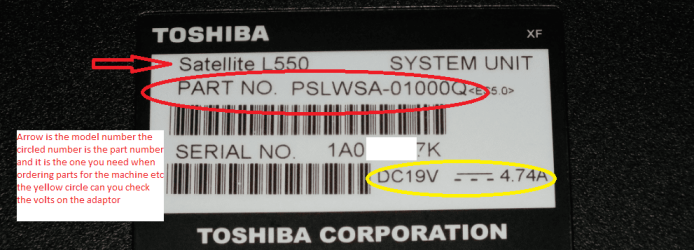
What I might suggest is to reinstall the drivers from the Toshiba site tomake sure you have the right machine you must know the PART NO see pic becauseit denotes for what region the machine was made for and is intended being usedin. Now if that does not work then you might have to use the http://www.sevenforums.com/tutorials/219487-clean-reinstall-factory-oem-windows-7-a.htmland activate with the machines code on the sticker after you have any data onit to external.
Drivers & Software Support | Toshiba
 

Attachments

  • PART NO.PNG
    PART NO.PNG
    112.5 KB · Views: 1

My Computer

Computer type
PC/Desktop
Computer Manufacturer/Model Number
Own build (new) Desk1 / Asus ROG Win 7 / Desk2 1st build
OS
Desk1 7 Home Prem / Desk2 10 Pro / Main lap Asus ROG 10 Pro 2 laptop Toshiba 7 Pro Asus P2520 7 & 10
CPU
Desk1 i5 3750K / Laptop i7 GTX 860M / Desk2 i5 2500
Motherboard
Desk1 Asus P877-V / Desk2 Gigabyte H67 UD3H / Laptop ?
Memory
Desk1 8GB (1866) / Desk2 16GB (1333) / Laptop 8Gb DDR3
Graphics Card(s)
Desk 1& 2NVidia GTX 650 & Laptops on board Intel
Sound Card
Desk 1 & 2 -XONAR DG Realtek High Def audio Laptop
Monitor(s) Displays
Desk 1 Benq HD 2450 / Desk2 Philips 24" / Laptop 17.5"
Screen Resolution
1920x1080 D1 & D2 & Laptop 1
Hard Drives
Desk1 Samsung 120GB 830 SSD
Asus ROG 256GB 850 Pro SSD
Desk2 Samsung 840 256 SSD
Toshiba 120GB EVO
PSU
Desk 1 Corsair HX 1050/ Laptop ? / Desk 2 Corsair HX 650
Case
Desk 1 Cooler HAF XM ? Toshiba laptop / Desk2 Coolermaster
Cooling
Fans on all Desk1 -2 Desk2 - all Coolermasters 5 Laptop ?
Keyboard
Desk 1 MS Sidewinder X6 Desk 2 MS Sidewinder X 4
Mouse
Desk 1&2 - Gigabyte MS 900 gamer - laptop - Logitec wireless
Internet Speed
ADSL2+
Other Info
One other Desktop (tester) and spare Toshba laptop both with SSD's
Running Kaspersky 2016 ISS on all machines config'd identically
Logitec audio stereo systems on each machine (x3)
Canon MG5250MFC
Router/modem TP-Link running WPA2SK
Back
Top