Solved Drive Icons not showing up in "my computer"

Trainman7

New member
Local time
12:19 AM
Messages
1
When I go to "computer" the only drive icon I see is my main hard drive c:. The DVD and the SD drive
are gone. How can I restore them?
 

My Computer My Computer

At a glance

win 7 home premium 64 bitIntel P6200 2.13ghz4.00gb dual channel ddr3 @532 mhzAcer LED 1366x768@60hz
Computer type
Laptop
Computer Manufacturer/Model Number
Acer aspire 5733z-4851
OS
win 7 home premium 64 bit
CPU
Intel P6200 2.13ghz
Motherboard
Acer aspire 5733z
Memory
4.00gb dual channel ddr3 @532 mhz
Graphics Card(s)
Acer LED 1366x768@60hz
Hard Drives
500 gb west digital wdc 5000bpvt-22hxzt3 (sata)
7gb sdhc card
Optical HL-dt-st dvd ram gt32n
Antivirus
avg 2014
Browser
IE,Firefox,Opera,Diglo
Hello Trainman and welcome to Seven Forums.

   Warning
Suggest you create new Restore Point at a minimum.

http://www.sevenforums.com/tutorials/697-system-restore-point-create.html

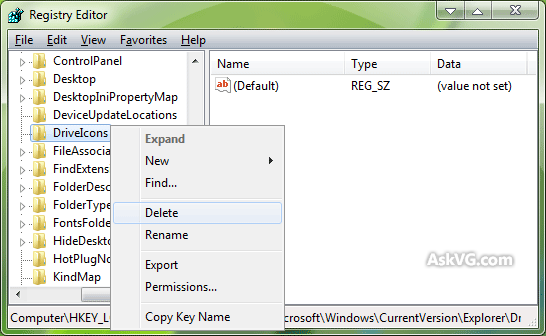
1. Open regedit. Go to:

HKEY_LOCAL_MACHINE\SOFTWARE\Microsoft\Windows\CurrentVersion\explorer

2. Under this key, you should see "DriveIcons". Delete it and restart your computer.

DriveIcons_Registry_Key.png


3. I found this will usually solve the problem and you'll get back your default drive icons. If by some chance it doesn't work you could use the restore point you created earlier.

If you're not comfortable editing the registry you could try try to rebuild the icon cache.

http://www.sevenforums.com/tutorials/49819-icon-cache-rebuild.html
 

My Computer My Computer

At a glance

Win 7 Pro 64-bitIntel i5 2.4 Ghz8GB DDR3Intel HD 3000
Computer type
Laptop
Computer Manufacturer/Model Number
Sony Vaio VPCEB47GM Laptop
OS
Win 7 Pro 64-bit
CPU
Intel i5 2.4 Ghz
Memory
8GB DDR3
Graphics Card(s)
Intel HD 3000
Sound Card
IDT High Definition
Monitor(s) Displays
15.6 WGXA Anti-Glare LED
Screen Resolution
1280x800
Hard Drives
640Gb 7200rpm
Antivirus
MSE
Browser
Opera (primary) with IE9 backup
Back
Top