
Solved Drive Letter Problem

SirDarknight

New member
Member
Local time
10:19 AM
Messages
68
Location
In the world
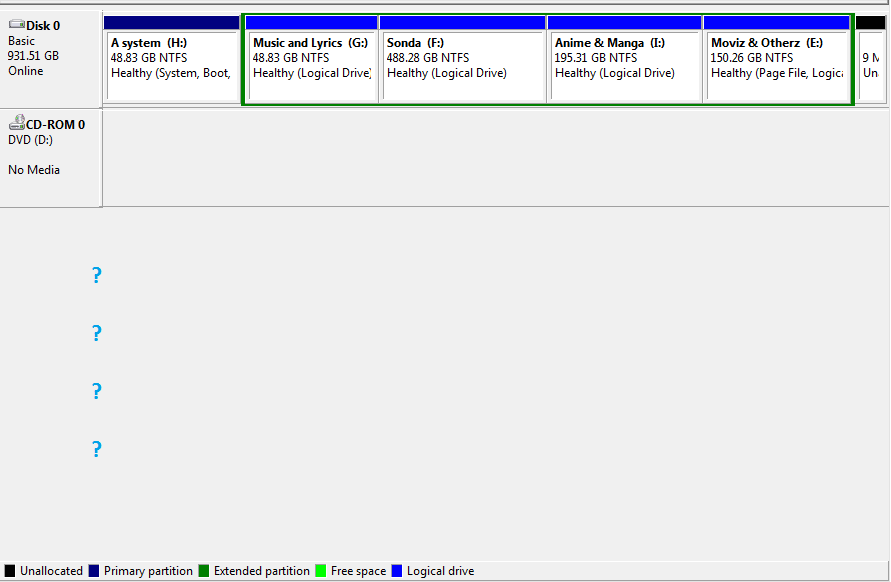
My system drive's(where the OS is installed) letter is "H".I want to change it to "C". So I opened the "Disk Management" and tried to change it to "C". But in the list, there wasn't "C". So I opened "My Computer" and found the "CD Drive's" letter is "C". I opened Disk Management again and wanted to change CD Drive's letter to anything. But there was "DVD Drive" instead of "CD Drive".

Can you give me any solution?

--------------------------------------------------------------------------------------------------
--------------------------------------------------------------------------------------------------

a7820.png
GarV6.png
 

My Computer

Computer Manufacturer/Model Number
DG41WV
OS
Windows 7 Ultimate 64 Bit
CPU
3.00 GHz
Motherboard
Don't know!
Memory
4096 mb
Graphics Card(s)
Very low :P
Sound Card
Not sure yet
Monitor(s) Displays
Dell E170S
Screen Resolution
1280 x 1024
Hard Drives
1 TB
850 GB
Keyboard
Bijoy Keyboard
Mouse
Wireless Optical Mouse
Internet Speed
256 KB/ps
You can't change the drive letter of the drive/partition that Windows is installed too. Windows won't let you do it. That drive letter is referenced by a lot of programs when they are installed and changing it would cause a lot of programs to not function correctly.
 

My Computer

Computer type
PC/Desktop
Computer Manufacturer/Model Number
Home Built
OS
Windows 10 Education 64 bit
CPU
AMD Phenom II X4 980 Black Edition Deneb 3.7GHz
Motherboard
Asus M4N68T-M V2 µATX Motherboard
Memory
8GB 4GBx2 Kingston PC10600 DDR3 1333 Memory
Graphics Card(s)
Zotac NVIDIA Geforce GT640 2 Gig DDR3 PCIe
Sound Card
VIA VT1708s High Definition Audio 8-channel Onboard
Monitor(s) Displays
22" LG E2242 1080p and 2 19" I-INC AG191D
Screen Resolution
1280x1024 - 1920x1080 - 1280x1024
Hard Drives
Crucial M100 256 GB SSD and 500 GB WD Blue SATA
PSU
Thermaltake TR 620
Case
Power Up Black ATX Mid-Tower Case
Cooling
Stock heatsink and fan
Keyboard
Logitech Wireless K350 Wave
Mouse
Logitech Wireless M570 Trackman Wheel
Internet Speed
80 Mbps Down 30 Mbps Up
Antivirus
Windows Defender
Browser
Internet Explorer 11
Other Info
HP DVD1040e Lightscribe - External USB2
I'm intrigued as to how your optical drive was allocated drive letter C and the Windows drive was allocated drive letter H in the first place as Windows would look for and install to your C drive.

Did you, or do you still have a multi-boot setup?
 

My Computer

Computer Manufacturer/Model Number
HP Pavilion Elite 495UK
OS
Windows 7 Ultimate SP1 64-Bit
CPU
Intel Core i7 870 @ 2.93GHz
Motherboard
MSI 2A9C (CPU1)
Memory
8Gb Dual-Channel DDR3 @ 664MHz
Graphics Card(s)
nVidia GeForce GTX 460 1024MB dedicated RAM
Sound Card
Realtek HD Audio
Monitor(s) Displays
HP2310i
Screen Resolution
1920 x 1080
Hard Drives
1x1954GB Hitachi HDS22020ALA 330 (RAID), 1x1954GB Hitachi External for backup and storage
PSU
460W
Case
HP Elite
Cooling
Air cooled
Keyboard
Logitech K750 solar-powered keyboard
Mouse
Logitech Wireless M180 mouse
Internet Speed
2Mb
Other Info
Pure Avanti Flow Internet Radio with iPod Dock, 64Gb iPod, HP USB Speakers, Sony MDR-V500 Headphones, Sony Vaio F-Series Laptop
5-6 months ago, my OS crashed. Without letting me know the OS changed the System drive to "H". During the re-installation I found the System drive to "H".
 

My Computer

Computer Manufacturer/Model Number
DG41WV
OS
Windows 7 Ultimate 64 Bit
CPU
3.00 GHz
Motherboard
Don't know!
Memory
4096 mb
Graphics Card(s)
Very low :P
Sound Card
Not sure yet
Monitor(s) Displays
Dell E170S
Screen Resolution
1280 x 1024
Hard Drives
1 TB
850 GB
Keyboard
Bijoy Keyboard
Mouse
Wireless Optical Mouse
Internet Speed
256 KB/ps
I think you can change the drive letter of your System Volume (H) Drive to C Drive by doing it with a third party boot dick like Acronis Disk Director or Partition Wizard.

All that you need to do is to release C by first changing the CD Drive letter from C to say E. After that you can change the drive letter of H to C. But you must make sure that it continues to remain active and boot drive as it is now.

Hope that this would help.
 

My Computer

Computer Manufacturer/Model Number
Custom Built
OS
Windows 7 Pro with SP1 32bit
Motherboard
Intel D845GVS1 X86-based PC
Memory
2 gigs of RAM
Graphics Card(s)
Intel(R) 82845G/GL/GE/PE/GV Graphics Controller
Sound Card
Realtek AC'97 Audio
Monitor(s) Displays
Samsung SyncMaster 931BF Black 19" LCD Monitor
Screen Resolution
1280X960
Hard Drives
1. SAMSUNG SP0822N ATA Device ~ 80 GigaBytes

2. Seagate FreeAgent Go USB Device ~ 500 GigaBytes
Keyboard
COMPAQ Standard PS/2 Keyboard
Mouse
iBall Laser Precise Speedster
Internet Speed
4 mb/sec
I wouldn't bother messing with it until your next clean install. The system will run just fine as is, but changing it, even with 3rd party apps, can open the door to a world of trouble.
 

My Computer

OS
Windows 7 Ultimate x64 SP1
CPU
Intel Core i7-2600
Motherboard
Gigabyte GA-P67A-UD3P-B3
Memory
12 GB Patriot Extreme DDR3-1333
Graphics Card(s)
Nvidia GTX 470
Monitor(s) Displays
Dell UltraSharp 2209WA
Hard Drives
OCZ Agility3 240 GB, WD5001AALS, WD7501AALS
PSU
OCZ ModStream 700W
Case
CoolerMaster HAF 912 Advanced
Cooling
CoolerMaster Hyper 212 Plus
I'm with Deacon on his one. Changing the drive letter will probably cause A LOT of issues. Your shortcuts definately won't work, assuming your programs work at all. I wouldn't be surprised if Windows refused to boot up, to be honest.
 

My Computer

Computer type
Laptop
Computer Manufacturer/Model Number
Toshiba P775-S7100
OS
Windows 7 Professional SP1 64-bit
CPU
Intel Core i5-2450M @2.5 GHz
Memory
6 GB DDR3 1333MHz
Graphics Card(s)
Intel HD 3000
Monitor(s) Displays
Built-in 17.3" LED; 22" Insignia NS-L22Q-10A
Screen Resolution
1600x900; 1360x768
Hard Drives
750 GB Hitachi
1TB Seagate FreeAgent External
Internet Speed
Verizon DSL Speed(Down/Up): 3360 Kbps / 800 Kbps
Antivirus
MSE and MBAM Pro
Browser
IE10
Thank you, thanks for wasting your valuable time for a silly man like me :P
 

My Computer

Computer Manufacturer/Model Number
DG41WV
OS
Windows 7 Ultimate 64 Bit
CPU
3.00 GHz
Motherboard
Don't know!
Memory
4096 mb
Graphics Card(s)
Very low :P
Sound Card
Not sure yet
Monitor(s) Displays
Dell E170S
Screen Resolution
1280 x 1024
Hard Drives
1 TB
850 GB
Keyboard
Bijoy Keyboard
Mouse
Wireless Optical Mouse
Internet Speed
256 KB/ps
Drive letter problem

Hi,
I believe I have a related problem with my Windows 7. It started suddenly in the past week as I have been unable to load any new programs. I continually get a message that the Windows Installer service could not be accessed...something like that. Nothing worked in terms of fixing this.

I have two drives on the computer. Drive C is the system drive, and E is the backup. Just now I noticed that in "My Computer" Drive E is all of a sudden listed as the system drive and C just hangs around (I suppose) waiting to be 'cloned to' (which is the purpose of E in the first place).

Is there any way that I can change this back to the original arrangement. It's probably a fairly simple process, but I'm at a loss. And, I am thinking that the Installer problem is probably related to this sudden switch. I have no clue what I must have done to facilitate the change, but I'm not having any success finding a similar problem in the messages I'm reading.

Any help out there?
Gudea
 

My Computer

Computer Manufacturer/Model Number
Home built
OS
Windows 7 Home Premium 64
CPU
Intel(R) Core(TM) i3 CPU [email protected] 3.06GHz
Motherboard
Intel Desktop Board DH55HC
Memory
8 Gb
Graphics Card(s)
NVIDIA GeForce GTS 250
Sound Card
Realtek HD Audio
Monitor(s) Displays
Viewsonic Energy Star
Screen Resolution
1680x1050
Hard Drives
2 - 500Gb WDC WD5000AAVS-00N7B0 ATA Device
both internal, C is primary, E is secondary...at least, up until the other day
PSU
650W
Case
Soprano RS
Cooling
Air/fans cooled
Keyboard
Logitech Access Keyboard
Mouse
Microsoft USB Wireless IntelliMouse Explorer
Internet Speed
12Mb/sec download...1Mb upload
It's not good practice to hijack another thread, even more so one that's been resolved, as you're unlikely to get much of a response.

Please start a new thread and include your full system specs along with a screenshot of your fully-expanded disk management layout so that we can give you the best help.
 

My Computer

Computer Manufacturer/Model Number
HP Pavilion Elite 495UK
OS
Windows 7 Ultimate SP1 64-Bit
CPU
Intel Core i7 870 @ 2.93GHz
Motherboard
MSI 2A9C (CPU1)
Memory
8Gb Dual-Channel DDR3 @ 664MHz
Graphics Card(s)
nVidia GeForce GTX 460 1024MB dedicated RAM
Sound Card
Realtek HD Audio
Monitor(s) Displays
HP2310i
Screen Resolution
1920 x 1080
Hard Drives
1x1954GB Hitachi HDS22020ALA 330 (RAID), 1x1954GB Hitachi External for backup and storage
PSU
460W
Case
HP Elite
Cooling
Air cooled
Keyboard
Logitech K750 solar-powered keyboard
Mouse
Logitech Wireless M180 mouse
Internet Speed
2Mb
Other Info
Pure Avanti Flow Internet Radio with iPod Dock, 64Gb iPod, HP USB Speakers, Sony MDR-V500 Headphones, Sony Vaio F-Series Laptop
sorry

Oops...will try again. 'Hijack' makes me feel like I've committed some cardinal sin. Thanks for the reply...I will open a new topic and make another attempt.
 

My Computer

Computer Manufacturer/Model Number
Home built
OS
Windows 7 Home Premium 64
CPU
Intel(R) Core(TM) i3 CPU [email protected] 3.06GHz
Motherboard
Intel Desktop Board DH55HC
Memory
8 Gb
Graphics Card(s)
NVIDIA GeForce GTS 250
Sound Card
Realtek HD Audio
Monitor(s) Displays
Viewsonic Energy Star
Screen Resolution
1680x1050
Hard Drives
2 - 500Gb WDC WD5000AAVS-00N7B0 ATA Device
both internal, C is primary, E is secondary...at least, up until the other day
PSU
650W
Case
Soprano RS
Cooling
Air/fans cooled
Keyboard
Logitech Access Keyboard
Mouse
Microsoft USB Wireless IntelliMouse Explorer
Internet Speed
12Mb/sec download...1Mb upload
OK, we'll do our best to help.

Sorry about the terminology, but it just happens to be the word that best describes what's going on. It's more forum etiquette rather than a cardinal sin. :)
 

My Computer

Computer Manufacturer/Model Number
HP Pavilion Elite 495UK
OS
Windows 7 Ultimate SP1 64-Bit
CPU
Intel Core i7 870 @ 2.93GHz
Motherboard
MSI 2A9C (CPU1)
Memory
8Gb Dual-Channel DDR3 @ 664MHz
Graphics Card(s)
nVidia GeForce GTX 460 1024MB dedicated RAM
Sound Card
Realtek HD Audio
Monitor(s) Displays
HP2310i
Screen Resolution
1920 x 1080
Hard Drives
1x1954GB Hitachi HDS22020ALA 330 (RAID), 1x1954GB Hitachi External for backup and storage
PSU
460W
Case
HP Elite
Cooling
Air cooled
Keyboard
Logitech K750 solar-powered keyboard
Mouse
Logitech Wireless M180 mouse
Internet Speed
2Mb
Other Info
Pure Avanti Flow Internet Radio with iPod Dock, 64Gb iPod, HP USB Speakers, Sony MDR-V500 Headphones, Sony Vaio F-Series Laptop
Back
Top