Driver causing computer to freeze...which driver? Windows 7

vitaminn

New member
Local time
5:05 PM
Messages
46
Hello,

I have a Sony Vaio that just recently started freezing at some random point for no apparent reason; no cursor movement, not keyboard input ... nothing.

I initially thought the freeze maybe caused by a failing HDD so I purchased and installed a SSD (the computer needed updating anyway.)

Along with the SSD, I put a fresh install of Windows 7 on the machine. The computer still froze randomly.

Next, I switched out one stick of ram at a time to see if either (the computer has two sticks) maybe causing the fault/freeze. Nothing...same random freezing.

Then, I noticed that if I move the computer, that's when everything freezes. I thought, "loose connection somewhere."

Lastly, I noticed that when I start in safe mode w/networking, the computer DOESN'T freeze!

This has led me to believe the freeze is being caused by a driver???... but, how do i determine WHICH driver is causing this? (i also have set the bios back to default..no fix)

Can anyone point me in the right direction?

Thanks...
 
Last edited:

My Computer

Computer type
PC/Desktop
Computer Manufacturer/Model Number
Lenovo H405 10059
OS
64 bit Windows 7
CPU
AMD Athlon II X2 255
Motherboard
LENOVO Tilapia CRB
Memory
4.00GB Dual-Channel DDR3 @ 533MHz (8-8-8-20)
Graphics Card(s)
Radeon 3000 Graphics
Monitor(s) Displays
AOC F22 (1440x900@75Hz)
Hard Drives
465GB Seagate ST3500418AS ATA Device (SATA)
Antivirus
Microsoft Security Essentials
Browser
Chrome, Firefox, IE, Safari
Other Info
PLDS DVD-RW DH16ABSH ATA Device
Enable Driver Verifier to monitor the drivers.
Driver Verifier - Enable and Disable
Run Driver Verifier for 24 hours or the occurrence of the next crash, whichever is earlier.

   Information
Why Driver Verifier:
It puts a stress on the drivers, ans so it makes the unstable drivers crash. Hopefully the driver that crashes is recorded in the memory dump.

How Can we know that DV is enabled:
It will make the system bit of slow, laggy.

   Warning
Before enabling DV, make it sure that you have earlier System restore points made in your computer. You can check it easily by using CCleaner looking at Tools > System Restore.

If there is no points, make a System Restore Point manually before enabling DV.

   Tip


Let us know the results, with the subsequent crash dumps, if any. Post it following the Blue Screen of Death (BSOD) Posting Instructions.
 

My Computer

Computer type
PC/Desktop
Computer Manufacturer/Model Number
Self Assembled
OS
Microsoft Windows 10 Pro Insider Preview 64-bit
CPU
Intel(R) Core(TM) i3-4130 CPU @ 3.40GHz
Motherboard
Gigabyte Technology Co., Ltd. B85M-D3H
Memory
Corsair Vengence 4GB x2 (8.00GB Dual-Channel DDR3 @ 798MHz)
Graphics Card(s)
2047MB GeForce GTS 450 (ZOTAC International)
Sound Card
Onboard (Realtek High Definition Audio)
Monitor(s) Displays
LG Flatron E2040T
Screen Resolution
1600x900
Hard Drives
Western Digital 1 TB
Seagate 500 GB
PSU
Corsair VS550
Case
Cooler Master K380
Cooling
Cooler Master Seidon 120V Plus
Keyboard
Logitech MK260r
Mouse
Logitech MK260r
Internet Speed
PMPL Broadband
Antivirus
Windows Defender + MBAM
Browser
Firefox
Other Info
Dell Studio 15" Laptop
Thanks for the ideas Arc.

Before jumping into the troubleshooting methods you suggested above, I looked at the device manager in and out of safe mode, they all appear to be functioning. (see image below)

It only freezes when not in save mode and computer is moved.

Do you still think a driver could be causing the freeze? Or, would it be a startup program?

6rl2cI
 
Last edited:

My Computer

Computer type
PC/Desktop
Computer Manufacturer/Model Number
Lenovo H405 10059
OS
64 bit Windows 7
CPU
AMD Athlon II X2 255
Motherboard
LENOVO Tilapia CRB
Memory
4.00GB Dual-Channel DDR3 @ 533MHz (8-8-8-20)
Graphics Card(s)
Radeon 3000 Graphics
Monitor(s) Displays
AOC F22 (1440x900@75Hz)
Hard Drives
465GB Seagate ST3500418AS ATA Device (SATA)
Antivirus
Microsoft Security Essentials
Browser
Chrome, Firefox, IE, Safari
Other Info
PLDS DVD-RW DH16ABSH ATA Device
Driver Verifier will be a good starting point, for sure.
 

My Computer

Computer type
PC/Desktop
Computer Manufacturer/Model Number
Self Assembled
OS
Microsoft Windows 10 Pro Insider Preview 64-bit
CPU
Intel(R) Core(TM) i3-4130 CPU @ 3.40GHz
Motherboard
Gigabyte Technology Co., Ltd. B85M-D3H
Memory
Corsair Vengence 4GB x2 (8.00GB Dual-Channel DDR3 @ 798MHz)
Graphics Card(s)
2047MB GeForce GTS 450 (ZOTAC International)
Sound Card
Onboard (Realtek High Definition Audio)
Monitor(s) Displays
LG Flatron E2040T
Screen Resolution
1600x900
Hard Drives
Western Digital 1 TB
Seagate 500 GB
PSU
Corsair VS550
Case
Cooler Master K380
Cooling
Cooler Master Seidon 120V Plus
Keyboard
Logitech MK260r
Mouse
Logitech MK260r
Internet Speed
PMPL Broadband
Antivirus
Windows Defender + MBAM
Browser
Firefox
Other Info
Dell Studio 15" Laptop
update: still working on this. I can't get the machine to startup enough in normal mode to even run Driver Verifier....it simply freezes too quickly...now, without even moving it.
 

My Computer

Computer type
PC/Desktop
Computer Manufacturer/Model Number
Lenovo H405 10059
OS
64 bit Windows 7
CPU
AMD Athlon II X2 255
Motherboard
LENOVO Tilapia CRB
Memory
4.00GB Dual-Channel DDR3 @ 533MHz (8-8-8-20)
Graphics Card(s)
Radeon 3000 Graphics
Monitor(s) Displays
AOC F22 (1440x900@75Hz)
Hard Drives
465GB Seagate ST3500418AS ATA Device (SATA)
Antivirus
Microsoft Security Essentials
Browser
Chrome, Firefox, IE, Safari
Other Info
PLDS DVD-RW DH16ABSH ATA Device
No joy. I can't even get this thing to boot normally without freezing...sometimes occurring the boot up or sometimes within 60 seconds after Windows desktop shows up.

Any suggestions or further troubleshooting I can accomplish from Safe Mode (it runs smoothing in Safe Mode w/ networking)?

Thanks.
 

My Computer

Computer type
PC/Desktop
Computer Manufacturer/Model Number
Lenovo H405 10059
OS
64 bit Windows 7
CPU
AMD Athlon II X2 255
Motherboard
LENOVO Tilapia CRB
Memory
4.00GB Dual-Channel DDR3 @ 533MHz (8-8-8-20)
Graphics Card(s)
Radeon 3000 Graphics
Monitor(s) Displays
AOC F22 (1440x900@75Hz)
Hard Drives
465GB Seagate ST3500418AS ATA Device (SATA)
Antivirus
Microsoft Security Essentials
Browser
Chrome, Firefox, IE, Safari
Other Info
PLDS DVD-RW DH16ABSH ATA Device
If it works good in safe mode and not in normal mode, it is most possibly a driver.

Boot into safemode. Press Win+R simultaneously ... the Run dialog will appear. type
msconfig
And hit enter.

It will open the system configuration window, with the "general" tab selected.

  • Click the "startup" tab. Click "Disable all" > Apply > OK.
  • Click on "services" tab. Check the "Hide all Microsoft Services"; Click "Disable all" > Apply > OK
Then try to boot again normally. Is it failing still?

If so, use the onboard graphics and see how it works.
 

My Computer

Computer type
PC/Desktop
Computer Manufacturer/Model Number
Self Assembled
OS
Microsoft Windows 10 Pro Insider Preview 64-bit
CPU
Intel(R) Core(TM) i3-4130 CPU @ 3.40GHz
Motherboard
Gigabyte Technology Co., Ltd. B85M-D3H
Memory
Corsair Vengence 4GB x2 (8.00GB Dual-Channel DDR3 @ 798MHz)
Graphics Card(s)
2047MB GeForce GTS 450 (ZOTAC International)
Sound Card
Onboard (Realtek High Definition Audio)
Monitor(s) Displays
LG Flatron E2040T
Screen Resolution
1600x900
Hard Drives
Western Digital 1 TB
Seagate 500 GB
PSU
Corsair VS550
Case
Cooler Master K380
Cooling
Cooler Master Seidon 120V Plus
Keyboard
Logitech MK260r
Mouse
Logitech MK260r
Internet Speed
PMPL Broadband
Antivirus
Windows Defender + MBAM
Browser
Firefox
Other Info
Dell Studio 15" Laptop
If it works good in safe mode and not in normal mode, it is most possibly a driver.

Boot into safemode. Press Win+R simultaneously ... the Run dialog will appear. type
msconfig
And hit enter.

It will open the system configuration window, with the "general" tab selected.

  • Click the "startup" tab. Click "Disable all" > Apply > OK.
  • Click on "services" tab. Check the "Hide all Microsoft Services"; Click "Disable all" > Apply > OK
Then try to boot again normally. Is it failing still?

If so, use the onboard graphics and see how it works.

I sure do appreciate the follow through Arc...thank you.

I followed your instructions and disabled all "startup" and "services" that weren't microsoft (there were only 3 because this is a fresh install of windows.)

It still freezes when not in safe mode.

I'm not sure what you mean by saying "use the onboard graphics", can you please expound?
 

My Computer

Computer type
PC/Desktop
Computer Manufacturer/Model Number
Lenovo H405 10059
OS
64 bit Windows 7
CPU
AMD Athlon II X2 255
Motherboard
LENOVO Tilapia CRB
Memory
4.00GB Dual-Channel DDR3 @ 533MHz (8-8-8-20)
Graphics Card(s)
Radeon 3000 Graphics
Monitor(s) Displays
AOC F22 (1440x900@75Hz)
Hard Drives
465GB Seagate ST3500418AS ATA Device (SATA)
Antivirus
Microsoft Security Essentials
Browser
Chrome, Firefox, IE, Safari
Other Info
PLDS DVD-RW DH16ABSH ATA Device
When the computer works good in safe mode but crashes in normal mode, it is driver issue, as usually guessed.

But there are some device drivers like display driver. It does not work in safe mode. So if the issue is with the GPU, it will not be detected in this way.

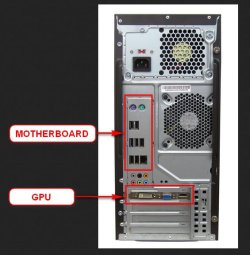
Using onboard graphics is not any difficult. Unplug the display out (VGA/DVI ....) from the GPU's end and put it to the motherbosrd's slot.

2013-11-04_200647.jpg
 

My Computer

Computer type
PC/Desktop
Computer Manufacturer/Model Number
Self Assembled
OS
Microsoft Windows 10 Pro Insider Preview 64-bit
CPU
Intel(R) Core(TM) i3-4130 CPU @ 3.40GHz
Motherboard
Gigabyte Technology Co., Ltd. B85M-D3H
Memory
Corsair Vengence 4GB x2 (8.00GB Dual-Channel DDR3 @ 798MHz)
Graphics Card(s)
2047MB GeForce GTS 450 (ZOTAC International)
Sound Card
Onboard (Realtek High Definition Audio)
Monitor(s) Displays
LG Flatron E2040T
Screen Resolution
1600x900
Hard Drives
Western Digital 1 TB
Seagate 500 GB
PSU
Corsair VS550
Case
Cooler Master K380
Cooling
Cooler Master Seidon 120V Plus
Keyboard
Logitech MK260r
Mouse
Logitech MK260r
Internet Speed
PMPL Broadband
Antivirus
Windows Defender + MBAM
Browser
Firefox
Other Info
Dell Studio 15" Laptop
Using onboard graphics is not any difficult. Unplug the display out (VGA/DVI ....) from the GPU's end and put it to the motherbosrd's slot.

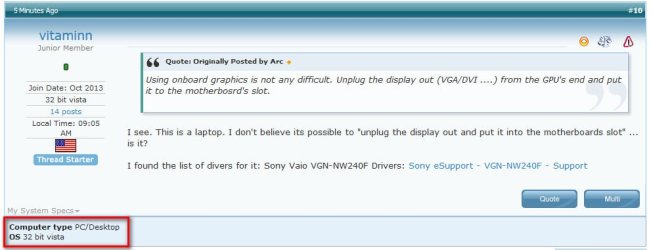
I see. This is a laptop. I don't believe its possible to "unplug the display out and put it into the motherboards slot" ... is it?

I found the list of divers for it: Sony Vaio VGN-NW240F Drivers: Sony eSupport - VGN-NW240F - Support
 

My Computer

Computer type
PC/Desktop
Computer Manufacturer/Model Number
Lenovo H405 10059
OS
64 bit Windows 7
CPU
AMD Athlon II X2 255
Motherboard
LENOVO Tilapia CRB
Memory
4.00GB Dual-Channel DDR3 @ 533MHz (8-8-8-20)
Graphics Card(s)
Radeon 3000 Graphics
Monitor(s) Displays
AOC F22 (1440x900@75Hz)
Hard Drives
465GB Seagate ST3500418AS ATA Device (SATA)
Antivirus
Microsoft Security Essentials
Browser
Chrome, Firefox, IE, Safari
Other Info
PLDS DVD-RW DH16ABSH ATA Device
Using onboard graphics is not any difficult. Unplug the display out (VGA/DVI ....) from the GPU's end and put it to the motherbosrd's slot.

I see. This is a laptop. I don't believe its possible to "unplug the display out and put it into the motherboards slot" ... is it?

I found the list of divers for it: Sony Vaio VGN-NW240F Drivers: Sony eSupport - VGN-NW240F - Support
As we havent got the dump data, we depended on th system specs, and it says it is a desktop PC :sarc:

2013-11-04_203625.jpg
 

My Computer

Computer type
PC/Desktop
Computer Manufacturer/Model Number
Self Assembled
OS
Microsoft Windows 10 Pro Insider Preview 64-bit
CPU
Intel(R) Core(TM) i3-4130 CPU @ 3.40GHz
Motherboard
Gigabyte Technology Co., Ltd. B85M-D3H
Memory
Corsair Vengence 4GB x2 (8.00GB Dual-Channel DDR3 @ 798MHz)
Graphics Card(s)
2047MB GeForce GTS 450 (ZOTAC International)
Sound Card
Onboard (Realtek High Definition Audio)
Monitor(s) Displays
LG Flatron E2040T
Screen Resolution
1600x900
Hard Drives
Western Digital 1 TB
Seagate 500 GB
PSU
Corsair VS550
Case
Cooler Master K380
Cooling
Cooler Master Seidon 120V Plus
Keyboard
Logitech MK260r
Mouse
Logitech MK260r
Internet Speed
PMPL Broadband
Antivirus
Windows Defender + MBAM
Browser
Firefox
Other Info
Dell Studio 15" Laptop
I see the confusion. I have TWO computers. One is this VAIO in which I am having the freezing issue and the other is the 32bit Vista.

Changed the profile to reflect the machine at issue here.

Can a GPU just go bad?
 

My Computer

Computer type
PC/Desktop
Computer Manufacturer/Model Number
Lenovo H405 10059
OS
64 bit Windows 7
CPU
AMD Athlon II X2 255
Motherboard
LENOVO Tilapia CRB
Memory
4.00GB Dual-Channel DDR3 @ 533MHz (8-8-8-20)
Graphics Card(s)
Radeon 3000 Graphics
Monitor(s) Displays
AOC F22 (1440x900@75Hz)
Hard Drives
465GB Seagate ST3500418AS ATA Device (SATA)
Antivirus
Microsoft Security Essentials
Browser
Chrome, Firefox, IE, Safari
Other Info
PLDS DVD-RW DH16ABSH ATA Device
update for anyone following this.

The computer would freeze almost immediately during or soon after booting...unless in Safe Mode; Starting in Safe Mode, the computer operates great.

Because of the freezing during boot, it got stuck in a loop of not even allowing me to startup in Safe Mode...I thought it was over.

In one last effort, I pulled the physical computer apart and tightened any screw I saw, pushed and prodded components, reset the ram, reset the CPU (processor) and applied new heat sync where appropriate. I put it back together with hope.

It started without being in Safe Mode! I ran Driver Verifier...it came back clean. I RE-installed some of the drivers...so far so good. But, and its a BIG BUT,

I moved the computer and it froze again! I noticed that if I jostle the computer, while not in of Safe Mode, it still freezes completely.

At present, I think its a loose connection or something physical simply because movement is causing the freeze. If I don't move the computer, it hums along fine...both Normal Boot and Safe Mode.

I think its time for the garbage. Anyone want a new SSD? :(

Thanks again ARC for your efforts.
 
Last edited:

My Computer

Computer type
PC/Desktop
Computer Manufacturer/Model Number
Lenovo H405 10059
OS
64 bit Windows 7
CPU
AMD Athlon II X2 255
Motherboard
LENOVO Tilapia CRB
Memory
4.00GB Dual-Channel DDR3 @ 533MHz (8-8-8-20)
Graphics Card(s)
Radeon 3000 Graphics
Monitor(s) Displays
AOC F22 (1440x900@75Hz)
Hard Drives
465GB Seagate ST3500418AS ATA Device (SATA)
Antivirus
Microsoft Security Essentials
Browser
Chrome, Firefox, IE, Safari
Other Info
PLDS DVD-RW DH16ABSH ATA Device
Back
Top