Driver failure on boot causing black screen

Dig03

New member
Local time
7:15 AM
Messages
9
Hello,

Sorry if I've posted this in the wrong place, but it appears to be a driver problem (Most likely the GPU).

The computer reaches the "Starting windows" animation, but after that boots to a black screen with a cursor, then the hard drive activity light slowly flickers off, I'm not sure if this is of significance, but moving the cursor results in the screen instantly going to the lowest brightness setting.

I've tried to fix this myself and managed to fix it for a short amount of time, but now the problem is occurring again, I'll update my system specs in a second but this is an Acer Aspire 5532 notebook.

All help is appreciated, Thanks for reading.

I'm posting this from safe mode, and here's the ntbtlog.txt.

Please tell me if I've done anything wrong or you need any information, I will gladly do so.
 

Attachments

Last edited:

My Computer

Computer type
Laptop
Computer Manufacturer/Model Number
Acer
OS
Microsoft Windows 7 Home Premium 64-bit 7601 Multiprocessor Free Service Pack 1
CPU
AMD Athlon(tm) X2 Dual Core Processor L310
Motherboard
Acer Aspire 5532 default motherboard
Memory
4GB
Graphics Card(s)
ATI Radeon HD 3200 Graphics
Sound Card
Realtek High Definition Audio
Hard Drives
Hitachi HTS545050B9A300 ATA Device
Hello and welcome Dig03 yep some system specs would be handy http://www.sevenforums.com/tutorials/180324-system-info-see-your-system-specs.html

Run these in safe mode

http://www.sevenforums.com/tutorials/1538-sfc-scannow-command-system-file-checker.html

http://www.sevenforums.com/tutorials/433-disk-check.html


Could you also run Speccy and let us know what the temps are too? Speccy - Download < download from piriform.

Try reseating the RAM sticks is another easy thing you can do as is reseating the hard drive - plus it may even be the hard drive failing and the only way to test it is run some tests on another machine if you can access one. There are two I use regularly - SeaTools for Windows | Seagate

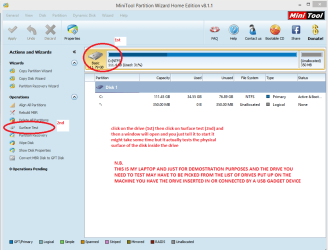
and another that will test the actual physical surface of the spinner - Best Free Partition Manager Freeware and free partition magic for Windows 7, Windows 8, Windows Vista and Windows XP 32 bit & 64 bit. MiniTool Free Partition Manager Software Home Edition. - see my pic.
 

Attachments

  • MINI TOOL SURFACE.PNG
    MINI TOOL SURFACE.PNG
    35.1 KB · Views: 0

My Computer

Computer type
PC/Desktop
Computer Manufacturer/Model Number
Own build (new) Desk1 / Asus ROG Win 7 / Desk2 1st build
OS
Desk1 7 Home Prem / Desk2 10 Pro / Main lap Asus ROG 10 Pro 2 laptop Toshiba 7 Pro Asus P2520 7 & 10
CPU
Desk1 i5 3750K / Laptop i7 GTX 860M / Desk2 i5 2500
Motherboard
Desk1 Asus P877-V / Desk2 Gigabyte H67 UD3H / Laptop ?
Memory
Desk1 8GB (1866) / Desk2 16GB (1333) / Laptop 8Gb DDR3
Graphics Card(s)
Desk 1& 2NVidia GTX 650 & Laptops on board Intel
Sound Card
Desk 1 & 2 -XONAR DG Realtek High Def audio Laptop
Monitor(s) Displays
Desk 1 Benq HD 2450 / Desk2 Philips 24" / Laptop 17.5"
Screen Resolution
1920x1080 D1 & D2 & Laptop 1
Hard Drives
Desk1 Samsung 120GB 830 SSD
Asus ROG 256GB 850 Pro SSD
Desk2 Samsung 840 256 SSD
Toshiba 120GB EVO
PSU
Desk 1 Corsair HX 1050/ Laptop ? / Desk 2 Corsair HX 650
Case
Desk 1 Cooler HAF XM ? Toshiba laptop / Desk2 Coolermaster
Cooling
Fans on all Desk1 -2 Desk2 - all Coolermasters 5 Laptop ?
Keyboard
Desk 1 MS Sidewinder X6 Desk 2 MS Sidewinder X 4
Mouse
Desk 1&2 - Gigabyte MS 900 gamer - laptop - Logitec wireless
Internet Speed
ADSL2+
Other Info
One other Desktop (tester) and spare Toshba laptop both with SSD's
Running Kaspersky 2016 ISS on all machines config'd identically
Logitec audio stereo systems on each machine (x3)
Canon MG5250MFC
Router/modem TP-Link running WPA2SK
I've managed to get the netbook to actually boot so I'll try those programs and shortly try those in safe mode,

Thanks for the reply.
 

My Computer

Computer type
Laptop
Computer Manufacturer/Model Number
Acer
OS
Microsoft Windows 7 Home Premium 64-bit 7601 Multiprocessor Free Service Pack 1
CPU
AMD Athlon(tm) X2 Dual Core Processor L310
Motherboard
Acer Aspire 5532 default motherboard
Memory
4GB
Graphics Card(s)
ATI Radeon HD 3200 Graphics
Sound Card
Realtek High Definition Audio
Hard Drives
Hitachi HTS545050B9A300 ATA Device
Sfc /scannow, returned that all system files are verified and working.

CHKDSK reported no errors.

The Surface Checker elapsed 3 hours 30 minutes to tell me every block is OK.

Speccy reports my temperatures are:

Processor: 50C
Motherboard: 54C
HDD: 44C

(I think thats what you meant by temps, but they're staying around those)

What I'm worried about is the stuff after line 184 in the ntbtlog, where it has a load of driver loading failures,

This problem seems to be intermittent and it can break and decide to work at any time :/

What I'm really worried about is if this problem is going to cause worse damage in the long run.
 

My Computer

Computer type
Laptop
Computer Manufacturer/Model Number
Acer
OS
Microsoft Windows 7 Home Premium 64-bit 7601 Multiprocessor Free Service Pack 1
CPU
AMD Athlon(tm) X2 Dual Core Processor L310
Motherboard
Acer Aspire 5532 default motherboard
Memory
4GB
Graphics Card(s)
ATI Radeon HD 3200 Graphics
Sound Card
Realtek High Definition Audio
Hard Drives
Hitachi HTS545050B9A300 ATA Device
Ok Dig sorry for late reply mate the temps are a little more than I wouldlike but not ridiculous.

Now all that remains is to track down this problem

The driver for the GPU is this Legacy

The driver for the VGA is here and the driver list does not include anything hat I can ID as for the chipset so just try this one
Acer | Driver Download

We may even have to go to testing the RAM too see this

MEMTEST

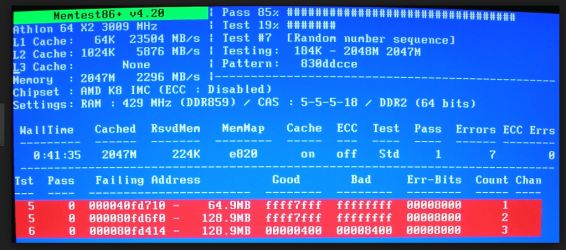
http://www.sevenforums.com/tutorials/105647-ram-test-memtest86.htmlthis one you will need to make a bootable disk set theBIOS to optical (or USB if preferred) boot the machine and let it run for at LEAST 8passes unless the errors come up straight away. Takes fair timeto complete and some leave it running overnight.

Ifthe errors come up quickly then you can stop it and you will have to test eachstick and maybe in each slot to sort the bad one out.


This last suggestion does take a long time to run and you must let it run for at least 8 passes some folks ignore this and miss on errors so be patient but as I stated if the errors come up straight away you can stop because the stick/s will be bad. (see pic it shows errors after 1 pass but it may extend to 5 or 7 or whatever but usually if by 8 passes it is usually safe to find the RAM ok)
 

Attachments

  • MEMTESTERROR.PNG
    MEMTESTERROR.PNG
    235 KB · Views: 0

My Computer

Computer type
PC/Desktop
Computer Manufacturer/Model Number
Own build (new) Desk1 / Asus ROG Win 7 / Desk2 1st build
OS
Desk1 7 Home Prem / Desk2 10 Pro / Main lap Asus ROG 10 Pro 2 laptop Toshiba 7 Pro Asus P2520 7 & 10
CPU
Desk1 i5 3750K / Laptop i7 GTX 860M / Desk2 i5 2500
Motherboard
Desk1 Asus P877-V / Desk2 Gigabyte H67 UD3H / Laptop ?
Memory
Desk1 8GB (1866) / Desk2 16GB (1333) / Laptop 8Gb DDR3
Graphics Card(s)
Desk 1& 2NVidia GTX 650 & Laptops on board Intel
Sound Card
Desk 1 & 2 -XONAR DG Realtek High Def audio Laptop
Monitor(s) Displays
Desk 1 Benq HD 2450 / Desk2 Philips 24" / Laptop 17.5"
Screen Resolution
1920x1080 D1 & D2 & Laptop 1
Hard Drives
Desk1 Samsung 120GB 830 SSD
Asus ROG 256GB 850 Pro SSD
Desk2 Samsung 840 256 SSD
Toshiba 120GB EVO
PSU
Desk 1 Corsair HX 1050/ Laptop ? / Desk 2 Corsair HX 650
Case
Desk 1 Cooler HAF XM ? Toshiba laptop / Desk2 Coolermaster
Cooling
Fans on all Desk1 -2 Desk2 - all Coolermasters 5 Laptop ?
Keyboard
Desk 1 MS Sidewinder X6 Desk 2 MS Sidewinder X 4
Mouse
Desk 1&2 - Gigabyte MS 900 gamer - laptop - Logitec wireless
Internet Speed
ADSL2+
Other Info
One other Desktop (tester) and spare Toshba laptop both with SSD's
Running Kaspersky 2016 ISS on all machines config'd identically
Logitec audio stereo systems on each machine (x3)
Canon MG5250MFC
Router/modem TP-Link running WPA2SK
I installed the VGA driver, (the Legacy was already installed), and I'll try MemTest later, Thanks for the reply, I'll go on using the computer for a couple days and see if the problem resurfaces, if it doesn't I'll mark the thread as solved.

Thanks again.
 

My Computer

Computer type
Laptop
Computer Manufacturer/Model Number
Acer
OS
Microsoft Windows 7 Home Premium 64-bit 7601 Multiprocessor Free Service Pack 1
CPU
AMD Athlon(tm) X2 Dual Core Processor L310
Motherboard
Acer Aspire 5532 default motherboard
Memory
4GB
Graphics Card(s)
ATI Radeon HD 3200 Graphics
Sound Card
Realtek High Definition Audio
Hard Drives
Hitachi HTS545050B9A300 ATA Device
It was working fine until today when I had to restart twenty-odd times before it decided to work :/

And MemTest checked out fine, no problems were found.

I have no idea why the problem has resurfaced, maybe its something more underlying than a driver problem.
 

My Computer

Computer type
Laptop
Computer Manufacturer/Model Number
Acer
OS
Microsoft Windows 7 Home Premium 64-bit 7601 Multiprocessor Free Service Pack 1
CPU
AMD Athlon(tm) X2 Dual Core Processor L310
Motherboard
Acer Aspire 5532 default motherboard
Memory
4GB
Graphics Card(s)
ATI Radeon HD 3200 Graphics
Sound Card
Realtek High Definition Audio
Hard Drives
Hitachi HTS545050B9A300 ATA Device
Dig03,

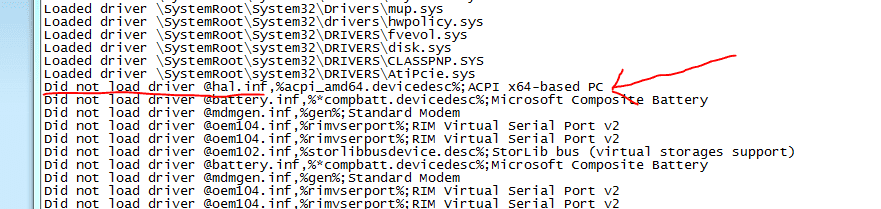
Your problem in the ntblog starts with the computer failing on this line:
Capture38.PNG

That's got to do with the Hardware Abstraction Layer, and it's probably why the rest of the drivers are failing to load. Either the Hal.inf file or the Hal.dll file aren't loading properly, and from reading this thread, it looks like it's an intermittent thing.

That could point to a faulty hard disk, but that's just speculation on my part. Did Seatools give you any error messages?
 

My Computer

Computer type
PC/Desktop
Computer Manufacturer/Model Number
Mellon Labs (custom build)
OS
Win 7 Pro x64/Win 10 Pro x64 dual boot
CPU
AMD FX 8350 Vishera @ 4200
Motherboard
ASUS M5A97 R2.0
Memory
16 GB Mushkin Blackline DDR3-2400 @ 1866 (9-10-10-10-31)
Graphics Card(s)
XFX Radeon R9 280 Double D Black Edition
Sound Card
Realtek HD Audio on MB. Sounds great.
Monitor(s) Displays
Acer 24", Acer 22"
Screen Resolution
3840 x 1080
Hard Drives
1 x Mushkin Chronos 120 GB SSD (Win 10)
1 x Samsung 850 EVO 250 GB SSD (Win 7)
1 x WD 1TB SATA Blue
1 x WD 1TB SATA Green
PSU
Corsair TX-750
Case
CoolerMaster HAF 912+
Cooling
Coolermaster Seidon 240M Liquid AIO. 6 case fans
Keyboard
Logitech G710+
Mouse
Logitech G500s
Internet Speed
Much better since I got fiber, but still way overpriced.
Antivirus
MSE, Malware Bytes for scanning
Browser
Firefox
Other Info
Corsair VOID USB headphones.

A Mellon Labs X-1 - LCD Smartie driven system status display.

Brought to you by the letter E
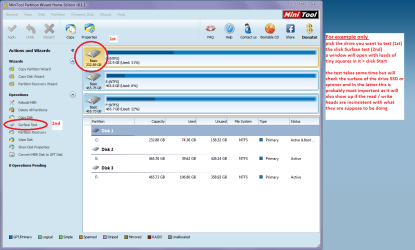
Dig in addition to the Seatools Mellon Head has asked for did you try that physical surface test on the drive with Partition Wizard? It could be something purely mechanical.
 

My Computer

Computer type
PC/Desktop
Computer Manufacturer/Model Number
Own build (new) Desk1 / Asus ROG Win 7 / Desk2 1st build
OS
Desk1 7 Home Prem / Desk2 10 Pro / Main lap Asus ROG 10 Pro 2 laptop Toshiba 7 Pro Asus P2520 7 & 10
CPU
Desk1 i5 3750K / Laptop i7 GTX 860M / Desk2 i5 2500
Motherboard
Desk1 Asus P877-V / Desk2 Gigabyte H67 UD3H / Laptop ?
Memory
Desk1 8GB (1866) / Desk2 16GB (1333) / Laptop 8Gb DDR3
Graphics Card(s)
Desk 1& 2NVidia GTX 650 & Laptops on board Intel
Sound Card
Desk 1 & 2 -XONAR DG Realtek High Def audio Laptop
Monitor(s) Displays
Desk 1 Benq HD 2450 / Desk2 Philips 24" / Laptop 17.5"
Screen Resolution
1920x1080 D1 & D2 & Laptop 1
Hard Drives
Desk1 Samsung 120GB 830 SSD
Asus ROG 256GB 850 Pro SSD
Desk2 Samsung 840 256 SSD
Toshiba 120GB EVO
PSU
Desk 1 Corsair HX 1050/ Laptop ? / Desk 2 Corsair HX 650
Case
Desk 1 Cooler HAF XM ? Toshiba laptop / Desk2 Coolermaster
Cooling
Fans on all Desk1 -2 Desk2 - all Coolermasters 5 Laptop ?
Keyboard
Desk 1 MS Sidewinder X6 Desk 2 MS Sidewinder X 4
Mouse
Desk 1&2 - Gigabyte MS 900 gamer - laptop - Logitec wireless
Internet Speed
ADSL2+
Other Info
One other Desktop (tester) and spare Toshba laptop both with SSD's
Running Kaspersky 2016 ISS on all machines config'd identically
Logitec audio stereo systems on each machine (x3)
Canon MG5250MFC
Router/modem TP-Link running WPA2SK
I've done this so far:

Installed an ATI VGA driver
Ran CHKDSK - No Errors
Ran sfc /scannow - No Errors
Ran surface test - No Errors
MemTest for 8 passes - No Errors

From what I know of, there's no reason for this to happen that is apparent, so the Hard Drive might just be failing or breaking slowly or something, I really don't know.
 

My Computer

Computer type
Laptop
Computer Manufacturer/Model Number
Acer
OS
Microsoft Windows 7 Home Premium 64-bit 7601 Multiprocessor Free Service Pack 1
CPU
AMD Athlon(tm) X2 Dual Core Processor L310
Motherboard
Acer Aspire 5532 default motherboard
Memory
4GB
Graphics Card(s)
ATI Radeon HD 3200 Graphics
Sound Card
Realtek High Definition Audio
Hard Drives
Hitachi HTS545050B9A300 ATA Device

Attachments

  • MINI TOOL SURFACE.PNG
    MINI TOOL SURFACE.PNG
    51 KB · Views: 0

My Computer

Computer type
PC/Desktop
Computer Manufacturer/Model Number
Own build (new) Desk1 / Asus ROG Win 7 / Desk2 1st build
OS
Desk1 7 Home Prem / Desk2 10 Pro / Main lap Asus ROG 10 Pro 2 laptop Toshiba 7 Pro Asus P2520 7 & 10
CPU
Desk1 i5 3750K / Laptop i7 GTX 860M / Desk2 i5 2500
Motherboard
Desk1 Asus P877-V / Desk2 Gigabyte H67 UD3H / Laptop ?
Memory
Desk1 8GB (1866) / Desk2 16GB (1333) / Laptop 8Gb DDR3
Graphics Card(s)
Desk 1& 2NVidia GTX 650 & Laptops on board Intel
Sound Card
Desk 1 & 2 -XONAR DG Realtek High Def audio Laptop
Monitor(s) Displays
Desk 1 Benq HD 2450 / Desk2 Philips 24" / Laptop 17.5"
Screen Resolution
1920x1080 D1 & D2 & Laptop 1
Hard Drives
Desk1 Samsung 120GB 830 SSD
Asus ROG 256GB 850 Pro SSD
Desk2 Samsung 840 256 SSD
Toshiba 120GB EVO
PSU
Desk 1 Corsair HX 1050/ Laptop ? / Desk 2 Corsair HX 650
Case
Desk 1 Cooler HAF XM ? Toshiba laptop / Desk2 Coolermaster
Cooling
Fans on all Desk1 -2 Desk2 - all Coolermasters 5 Laptop ?
Keyboard
Desk 1 MS Sidewinder X6 Desk 2 MS Sidewinder X 4
Mouse
Desk 1&2 - Gigabyte MS 900 gamer - laptop - Logitec wireless
Internet Speed
ADSL2+
Other Info
One other Desktop (tester) and spare Toshba laptop both with SSD's
Running Kaspersky 2016 ISS on all machines config'd identically
Logitec audio stereo systems on each machine (x3)
Canon MG5250MFC
Router/modem TP-Link running WPA2SK
Seatools gave me the all clear, on all tests, so I don't know what exactly could cause it, maybe the hardware is just worn out as it is an old notebook?
 

My Computer

Computer type
Laptop
Computer Manufacturer/Model Number
Acer
OS
Microsoft Windows 7 Home Premium 64-bit 7601 Multiprocessor Free Service Pack 1
CPU
AMD Athlon(tm) X2 Dual Core Processor L310
Motherboard
Acer Aspire 5532 default motherboard
Memory
4GB
Graphics Card(s)
ATI Radeon HD 3200 Graphics
Sound Card
Realtek High Definition Audio
Hard Drives
Hitachi HTS545050B9A300 ATA Device
Dig did you run that surface scan mate as if you are suspecting age to be the problem it should come up as bad or having a lot of errors on it's physical surface.
 

My Computer

Computer type
PC/Desktop
Computer Manufacturer/Model Number
Own build (new) Desk1 / Asus ROG Win 7 / Desk2 1st build
OS
Desk1 7 Home Prem / Desk2 10 Pro / Main lap Asus ROG 10 Pro 2 laptop Toshiba 7 Pro Asus P2520 7 & 10
CPU
Desk1 i5 3750K / Laptop i7 GTX 860M / Desk2 i5 2500
Motherboard
Desk1 Asus P877-V / Desk2 Gigabyte H67 UD3H / Laptop ?
Memory
Desk1 8GB (1866) / Desk2 16GB (1333) / Laptop 8Gb DDR3
Graphics Card(s)
Desk 1& 2NVidia GTX 650 & Laptops on board Intel
Sound Card
Desk 1 & 2 -XONAR DG Realtek High Def audio Laptop
Monitor(s) Displays
Desk 1 Benq HD 2450 / Desk2 Philips 24" / Laptop 17.5"
Screen Resolution
1920x1080 D1 & D2 & Laptop 1
Hard Drives
Desk1 Samsung 120GB 830 SSD
Asus ROG 256GB 850 Pro SSD
Desk2 Samsung 840 256 SSD
Toshiba 120GB EVO
PSU
Desk 1 Corsair HX 1050/ Laptop ? / Desk 2 Corsair HX 650
Case
Desk 1 Cooler HAF XM ? Toshiba laptop / Desk2 Coolermaster
Cooling
Fans on all Desk1 -2 Desk2 - all Coolermasters 5 Laptop ?
Keyboard
Desk 1 MS Sidewinder X6 Desk 2 MS Sidewinder X 4
Mouse
Desk 1&2 - Gigabyte MS 900 gamer - laptop - Logitec wireless
Internet Speed
ADSL2+
Other Info
One other Desktop (tester) and spare Toshba laptop both with SSD's
Running Kaspersky 2016 ISS on all machines config'd identically
Logitec audio stereo systems on each machine (x3)
Canon MG5250MFC
Router/modem TP-Link running WPA2SK
Hi...i'm having similar problem and i suspect it is a regristry problem....try tapping F8....until repair computer...find option in the advance restore and click command prompt...type regedit.....click local machine...software.....microsoft.....windows nt.....current version....find the sheel file double click it and see if it says explorer.exe...and the value has to be 0..if it doesnt say explorer.exe that may be your problem...good luck and deep breath
 

My Computer

Computer type
Laptop
Computer Manufacturer/Model Number
hp pavillion entertainment pc.dv5..serial #cnf8510lb6
OS
windows 7 ultimate 64 bit
Memory
3072 mb
Antivirus
avast
Browser
google chrome
sorry it should of said shell file not sheel
 

My Computer

Computer type
Laptop
Computer Manufacturer/Model Number
hp pavillion entertainment pc.dv5..serial #cnf8510lb6
OS
windows 7 ultimate 64 bit
Memory
3072 mb
Antivirus
avast
Browser
google chrome
Hi..I think I've found our answer because it just finished working for me...please turn on power tap F8..until repair computer..enter when the repair-restore window appears click command prompt....type regedit then type chkdsk...if the result says f parameter not specified...type chkdsk/r and watch it go like crazy through 1000s of files for quite a while..if you dont get proper result tye chkdsk/f and one of these im pretty sure will take care of it..good luck
 

My Computer

Computer type
Laptop
Computer Manufacturer/Model Number
hp pavillion entertainment pc.dv5..serial #cnf8510lb6
OS
windows 7 ultimate 64 bit
Memory
3072 mb
Antivirus
avast
Browser
google chrome
sorry i forgot to include chkdsk /f c:
 

My Computer

Computer type
Laptop
Computer Manufacturer/Model Number
hp pavillion entertainment pc.dv5..serial #cnf8510lb6
OS
windows 7 ultimate 64 bit
Memory
3072 mb
Antivirus
avast
Browser
google chrome
ICit2lol: surface test gave it the all clear, twice
ROBBYPB1: I'll try another CHKDSK, thanks.
 

My Computer

Computer type
Laptop
Computer Manufacturer/Model Number
Acer
OS
Microsoft Windows 7 Home Premium 64-bit 7601 Multiprocessor Free Service Pack 1
CPU
AMD Athlon(tm) X2 Dual Core Processor L310
Motherboard
Acer Aspire 5532 default motherboard
Memory
4GB
Graphics Card(s)
ATI Radeon HD 3200 Graphics
Sound Card
Realtek High Definition Audio
Hard Drives
Hitachi HTS545050B9A300 ATA Device
also try...google lexington computer repair blog...sovlved sfc ...there is a repair pending....if you get this message. if not you also can try http://www.howtogeek.com/forum/topic/system-recovery-options-help...if you get a error 1639 message and this will fix it.....i'll keep looking for answers for us as im still not totaly in the clear...if you have time maybe you can tell me how you're doing and maybe we will cross the finishing line together
 

My Computer

Computer type
Laptop
Computer Manufacturer/Model Number
hp pavillion entertainment pc.dv5..serial #cnf8510lb6
OS
windows 7 ultimate 64 bit
Memory
3072 mb
Antivirus
avast
Browser
google chrome
Hi..I think I've found our answer because it just finished working for me...please turn on power tap F8..until repair computer..enter when the repair-restore window appears click command prompt....type regedit then type chkdsk...if the result says f parameter not specified...type chkdsk/r and watch it go like crazy through 1000s of files for quite a while..if you dont get proper result tye chkdsk/f and one of these im pretty sure will take care of it..good luck
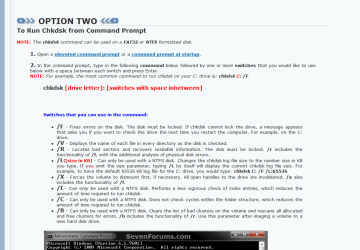
Yes well if you look that is what I did ask Dig to do that in post#2 but I suppose I should have been a little more explicit and include that in that tutorial Option 2 there are the /f and /r options which have worked on a number of occasions for fixes I have done as well as on my own machines.

It is as well to have another look too in that tutorial to see how to type that in the command line as the drive letter comes before the /f and /r and you can type both in and not have to run /f then /r separately. http://www.sevenforums.com/tutorials/433-disk-check.html
 

Attachments

  • CHKDSK OPTIONS.PNG
    CHKDSK OPTIONS.PNG
    37.2 KB · Views: 0

My Computer

Computer type
PC/Desktop
Computer Manufacturer/Model Number
Own build (new) Desk1 / Asus ROG Win 7 / Desk2 1st build
OS
Desk1 7 Home Prem / Desk2 10 Pro / Main lap Asus ROG 10 Pro 2 laptop Toshiba 7 Pro Asus P2520 7 & 10
CPU
Desk1 i5 3750K / Laptop i7 GTX 860M / Desk2 i5 2500
Motherboard
Desk1 Asus P877-V / Desk2 Gigabyte H67 UD3H / Laptop ?
Memory
Desk1 8GB (1866) / Desk2 16GB (1333) / Laptop 8Gb DDR3
Graphics Card(s)
Desk 1& 2NVidia GTX 650 & Laptops on board Intel
Sound Card
Desk 1 & 2 -XONAR DG Realtek High Def audio Laptop
Monitor(s) Displays
Desk 1 Benq HD 2450 / Desk2 Philips 24" / Laptop 17.5"
Screen Resolution
1920x1080 D1 & D2 & Laptop 1
Hard Drives
Desk1 Samsung 120GB 830 SSD
Asus ROG 256GB 850 Pro SSD
Desk2 Samsung 840 256 SSD
Toshiba 120GB EVO
PSU
Desk 1 Corsair HX 1050/ Laptop ? / Desk 2 Corsair HX 650
Case
Desk 1 Cooler HAF XM ? Toshiba laptop / Desk2 Coolermaster
Cooling
Fans on all Desk1 -2 Desk2 - all Coolermasters 5 Laptop ?
Keyboard
Desk 1 MS Sidewinder X6 Desk 2 MS Sidewinder X 4
Mouse
Desk 1&2 - Gigabyte MS 900 gamer - laptop - Logitec wireless
Internet Speed
ADSL2+
Other Info
One other Desktop (tester) and spare Toshba laptop both with SSD's
Running Kaspersky 2016 ISS on all machines config'd identically
Logitec audio stereo systems on each machine (x3)
Canon MG5250MFC
Router/modem TP-Link running WPA2SK
Back
Top