Driver on my WinPE missing

whs

New member
Guru
Gold Member
VIP
Local time
5:35 PM
Messages
26,200
Location
Florida in winter, Black Forest/Germany
I have a WinPE stick for Macrium 32bit that I use on my Asus Transformer Windows 8.1. It works perfectly for all devices EXCEPT for the micro SDXC card. With the installed Macrium I created an image on the micro SDXC card and I was also able to recover from it with the installed Macrium. But the Macrium on the WinPE does not see the micro SD card.

My plan was to keep a couple of images on the SD card so that I am protected when on the road. But if I cannot initiate the restore, then that is not a good plan.

Does anybody know how to get that missing SDXC card driver (I suspect that is the problem) on the WinPE.
 
Last edited:

My Computer

Computer Manufacturer/Model Number
HP, Dell, Gateway, Toshiba - 4 laptops and 2 desktops
OS
Vista, Windows7, Mint Mate, Zorin, Windows 8
CPU
from 1.6GHz Duo to i7
Monitor(s) Displays
2x HP w2207
Hard Drives
5x HDD, 7x SSD, 12x Externals
Keyboard
with trackball - no mices
Mouse
Trackball mice
Internet Speed
DSL 6000
Since 115 people who looked at this thread apparently had no clue either, I made some more research. I think I found part of the answer here (Solution 2):

Driver load issues in WinPE

Now I have to find the SDXC driver.
 

My Computer

Computer Manufacturer/Model Number
HP, Dell, Gateway, Toshiba - 4 laptops and 2 desktops
OS
Vista, Windows7, Mint Mate, Zorin, Windows 8
CPU
from 1.6GHz Duo to i7
Monitor(s) Displays
2x HP w2207
Hard Drives
5x HDD, 7x SSD, 12x Externals
Keyboard
with trackball - no mices
Mouse
Trackball mice
Internet Speed
DSL 6000
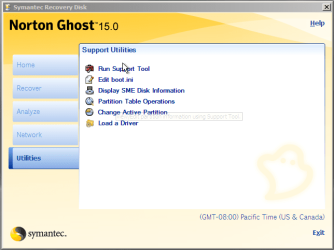
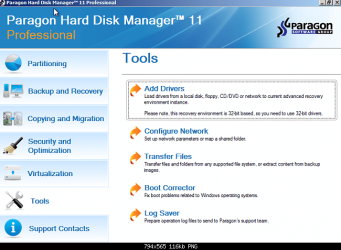
In Norton & Paragon, you have a option Add Drive.

Capture001.PNG

Capture002.PNG
 

My Computer

OS
ME/XP/Vista/Win7
Thanks Theog. Yeah I know. Macrium has that option too but apparently not with the free product - at least I don't see it in my 8.1 x86 system. But I found the link above on how to do it 'manually'. I am now trying to get the driver from PNY (the micro SDXC card manufacturer).

I am not even sure whether the WinPE OS that they use is Win7 or Win8.1. I produced the WinPE on the 32bit 8.1 system because the one from Windows 7 x64 would not load. But that was probably a UEFI or secure boot problem.
 

My Computer

Computer Manufacturer/Model Number
HP, Dell, Gateway, Toshiba - 4 laptops and 2 desktops
OS
Vista, Windows7, Mint Mate, Zorin, Windows 8
CPU
from 1.6GHz Duo to i7
Monitor(s) Displays
2x HP w2207
Hard Drives
5x HDD, 7x SSD, 12x Externals
Keyboard
with trackball - no mices
Mouse
Trackball mice
Internet Speed
DSL 6000
Thanks Theog. Yeah I know. Macrium has that option too but apparently not with the free product

That is nice of them.:( (NOT)
 

My Computer

OS
ME/XP/Vista/Win7
Back
Top