Driver selection for your Hardware devices.

   Note

What's this tutorial about ...
This is an intermediate-high level troubleshooting and selection of drivers for your hardware devices. If you are not sure of the correct drivers to installed for your devices or one that have been installed but does not seem to work too well, then read the following.


Identifying your hardware devices in Device Manager

1) Start > (right click) on Computer > Manage > Device Manager.

  • Here you will find a category listing of your machine's devices. Each category will list particular hardware names pertaining to you machine's devices.
  • Should you have a device which does not have a driver installed (or one which has but is not correct) you may be presented with a yellow exclamation mark. NOTE: the yellow exclamation mark may also be due to a device been disabled.
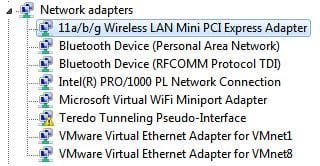
Here i am using the wireless network adapter.

2) Select the 11/a/b/g Wireless LAN Mini PCI Express Adapter, right-click, Properties
43589d1261743736-driver-selection-noname.jpg

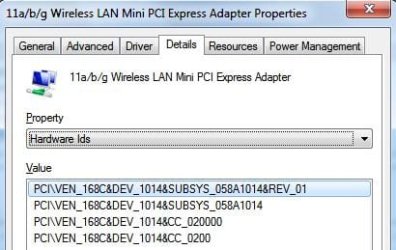
3) In the Properties box, go to Details tab, and under the property drop down menu, select Hardware Ids.
43590d1261743595-driver-selection-noname1.jpg

4) Note down the PCI ID as shown in the Value box. In this example it's PCI\VEN_168C&DEV_1014. This is the info that you will need to located in the driver file, which is for most people in the .inf file to accurately determine if you have the correct driver or not.

  • At this stage you are only concerned with finding the driver which includes this PCI ID.
  • You may also need to make sure that the driver is what matches your system interms of architecture eg. x86 or x64. (refer to further down on how to know this).
The .inf file

5) From your downloaded driver, if it comes in an .exe or .msi you will need to extract this file so you can locate the .inf file for the driver. A popular program to do this is 7-zip (free last time i downloaded it). Go through the extracted folders and search for the .inf file.

  • You may have more than one .inf sitting together in one folder. The best way to pick out the correct .inf file (and hence make sure the driver is correct for your device) is the do a search of the PCI ID string, in the example PCI\VEN_168C&DEV_1014.
6) Once your search returns the .inf file. Open it by right click and Edit or Open.

7) In the opened .inf file, do a search on the PCI ID string of interest.

  • If the search return is position this means the driver you've downloaded is a matching driver for your device, however you will also need to make sure which architecture this driver is compatible with.
  • The way to tell is to search in the opened file for
    [Manufacturer]
    %Intel% = Intel, NTx86.6.0, NTx86.6.0.1
    In this example, it's x86 which is a 32Bit, the 6.6 or 6.0.1 refer to Vista OS
    (you can find indepth details on what these means from Microsoft website INF Manufacturer Section)
8) When your search for the PCI ID string in the .inf file returns positive, and you find that it matches your OS specifics, you can be assured that you have the correct driver. Note: installing the driver can either be from the original .exe or .msi file or a setup.exe file found after extracting.

   Note
This is a simple tutorial for troubleshooting a device driver from an .inf file perspective. There are other ways but at this level i feel it's sufficient to get you over the line.


Hope this tutorial is easy to follow. ;)


Attachments

  • Noname.jpg
    Noname.jpg
    16.5 KB · Views: 18,788
  • Noname1.jpg
    Noname1.jpg
    22.5 KB · Views: 41,308
Last edited by a moderator:
Nice work ;)
I'll be sure to redirect a few others here in future!
 

My Computer

OS
XP Pro/Vista Ultimate (64)/Windows 7 Ultimate Signature Edition(64)
CPU
Core 2 Duo E8500 @ stock
Motherboard
Gigabyte EP45-UD3R
Memory
8Gb (4 X 2Gb) Corsair Dominator 1066Mhz DDR2
Graphics Card(s)
XFX ATI Radeon 4870 1Gb
Sound Card
Onboard 7.1
Monitor(s) Displays
BenQ E2200Hd, Asus VW161D, HP L1506
Screen Resolution
1920 X 1080
Hard Drives
Seagate 7200.12 500Gb
2 X Hitachi 1Tb
PSU
CoolerMaster 650 EPD
Case
Thermaltake
Cooling
2 X Noctua 120mm's, Stock Intel
Keyboard
Logitech
Mouse
Logitech
thank you
 

My Computer

Computer Manufacturer/Model Number
intel
OS
win 7 x86
CPU
3.GHz
Motherboard
Gigabyte
Memory
4 gb ddr 2
Graphics Card(s)
nvidia 8600 gt
Sound Card
realtek
Monitor(s) Displays
1280 x 1024
Hard Drives
seagate x 2 x 1600 gb
1 x 1.5 tb
PSU
simple
Case
simple
Cooling
simple
thank you

no problems at all, there are more that i can add to this tut, but i feel it might be best through answering people's questions, cos not all situations are the same.
 

My Computer

Computer Manufacturer/Model Number
Lenovo ThinkPad T60
OS
Windows 7 Ultimate 64Bit
CPU
GenuineIntel Intel(R) Core(TM) DuoCore T2400 @ 1.83GHz
Motherboard
Intel(R) 82801G (ICH7 Family)
Memory
2.00 GB
Graphics Card(s)
Mobile Intel(R) 945 Express Chipset
Sound Card
SoundMAX Integrated Digital HD Audio
Monitor(s) Displays
ThinkPad Display
Screen Resolution
1400x1050
Hard Drives
100Gb SATA
Keyboard
Standard Keyboard
Mouse
HID-compliant Mouse
Internet Speed
Cable Broadband - 54Mbps
Other Info
Intel(R) PRO/1000 PL Network Connection
11a/b/g Wireless LAN Mini PCI Express Adapter
aem,


2 things:

1: I found this method myself thru a need to find out what devices were not installing properly, nice to see a write up on the process.

I'm trying to work up a guide on upgrading 32 bit systems to x64, I'd like your permission to include your write-up, and link to this thread. Is that ok with you? Would save me some time, and help allot of people.

2: You mentioned other (advanced) ways to obtain info... If you could expand on that I'm sure it would prove helpful, Please do if you find the time.

.
 

My Computer

OS
XP Pro 32, Win7 Pro 64, Windows 7 Ultimate 32/64
Hi WeAreNotAlone,

By all means, reference this tut in your guide if you like.
The other way i was thinking of is what my company use, a script is run to gather all your hardware IDs (there are many scripts out there that does this too) into a file. Depending on which script, it can even tell you who made your device (ie manufacturer). Knowing these infos, it elimates some of the guess works.
 

My Computer

Computer Manufacturer/Model Number
Lenovo ThinkPad T60
OS
Windows 7 Ultimate 64Bit
CPU
GenuineIntel Intel(R) Core(TM) DuoCore T2400 @ 1.83GHz
Motherboard
Intel(R) 82801G (ICH7 Family)
Memory
2.00 GB
Graphics Card(s)
Mobile Intel(R) 945 Express Chipset
Sound Card
SoundMAX Integrated Digital HD Audio
Monitor(s) Displays
ThinkPad Display
Screen Resolution
1400x1050
Hard Drives
100Gb SATA
Keyboard
Standard Keyboard
Mouse
HID-compliant Mouse
Internet Speed
Cable Broadband - 54Mbps
Other Info
Intel(R) PRO/1000 PL Network Connection
11a/b/g Wireless LAN Mini PCI Express Adapter
Hi WeAreNotAlone,

By all means, reference this tut in your guide if you like.
The other way i was thinking of is what my company use, a script is run to gather all your hardware IDs (there are many scripts out there that does this too) into a file. Depending on which script, it can even tell you who made your device (ie manufacturer). Knowing these infos, it eliminates some of the guess works.

Thanks!

Q: It seems to me there should be a listing somewhere on the net that lists manufacturers by device ID..

For example 046 is Logitech, USB=USB, Vid=Video "0840" is the device id...
USB\VID_046D&PID_0840

(Seems to me this would have to be listed somewhere, maybe the FCC?)

Run across any sites that have such a list?

.
 

My Computer

OS
XP Pro 32, Win7 Pro 64, Windows 7 Ultimate 32/64

My Computer

Computer Manufacturer/Model Number
Lenovo ThinkPad T60
OS
Windows 7 Ultimate 64Bit
CPU
GenuineIntel Intel(R) Core(TM) DuoCore T2400 @ 1.83GHz
Motherboard
Intel(R) 82801G (ICH7 Family)
Memory
2.00 GB
Graphics Card(s)
Mobile Intel(R) 945 Express Chipset
Sound Card
SoundMAX Integrated Digital HD Audio
Monitor(s) Displays
ThinkPad Display
Screen Resolution
1400x1050
Hard Drives
100Gb SATA
Keyboard
Standard Keyboard
Mouse
HID-compliant Mouse
Internet Speed
Cable Broadband - 54Mbps
Other Info
Intel(R) PRO/1000 PL Network Connection
11a/b/g Wireless LAN Mini PCI Express Adapter
Back
Top