Solved Drivers laptop Killer Wireless-AC 1550 & USB 3 - Windows 7 64Bit Helps

Cris,
Thanks for all the information & stuff.
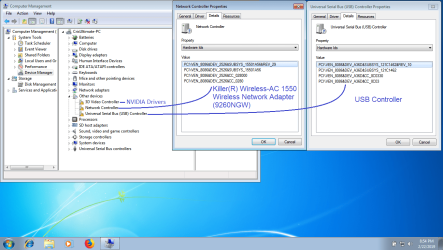
1) DevManView is only good to access a lot of information in few clicks. Its not a real alternative to the traditional Device Manger. Look into the Device Manager for any abnormalities & report.
2) I would mention a little later : how to look into Offline OS Devices/Drivers from within Host/Online OS.
3) I am not telling to make any install from Snappy. But Snappy tells us where to concentrate : The Entries : Driver not installed yet , Not Signed, Device requires driver but not found in DriverPacks & Updated driver available which is also more optimal
4) Install the NET 4.7.2 Frame Work downloaded with Windows Updates Downloader.

Let me know.

Thanks & Regards. ...

EDIT : To avoid any confusion : The DevManView report is very helpful. I always wanted/needed that information. I am going through it & it may take time to suggest further. Till then verify abnormalities in DevManView with the traditional Device Manager. That is all.
 
Last edited:

My Computer My Computer

At a glance

Windows 7 Ultimate x32 With Sp1 + Vista Ultim...Intel Mobile Core 2 Duo T5750 @ 2.00GHz Merom...2.00GB Dual-Channel DDR2 @ 332MHz (5-5-5-15)Mobile Intel(R) 965 Express Chipset Family
Computer type
Laptop
Computer Manufacturer/Model Number
hp compaq presario c795VU notebook pc
OS
Windows 7 Ultimate x32 With Sp1 + Vista Ultimate x32 with Sp1 & Sp2 !!
CPU
Intel Mobile Core 2 Duo T5750 @ 2.00GHz Merom 65nm Technolog
Motherboard
Hewlett-Packard 30D9 (CPU)
Memory
2.00GB Dual-Channel DDR2 @ 332MHz (5-5-5-15)
Graphics Card(s)
Mobile Intel(R) 965 Express Chipset Family
Sound Card
High Definition Audio Device
Monitor(s) Displays
LP154WX4-TLCB on Mobile Intel 965 Express Chipset Family
Screen Resolution
1280x800 @ 60Hz
Hard Drives
149GB Western Digital WDC WD1600BEVS-60VAT0 ATA Device (SATA)
Keyboard
Standard 101/102-Key or Microsoft Natural PS/2 Key + HP QLB
Mouse
ALPS pointing device
Antivirus
Kaspersky AV 2017(Win 7) & AVG AntiVirus Free 2016 (VISTA)
Browser
google chrome
Hi Vineet Garg,


I installed NET 4.7.2 Frame Work and restarted the system. After, I went to Device Manger from Windows 7 and I take for you the screenshot. Here after, you will find attached the picture report.

Thank you soooo much for your help.


Cris
 

Attachments

  • Device Manager.png
    Device Manager.png
    120.9 KB · Views: 3

My Computer My Computer

At a glance

Windows 7 - Windows 10 Pro - Windows 11 Pro -...
Computer type
PC/Desktop
Computer Manufacturer/Model Number
MSI
OS
Windows 7 - Windows 10 Pro - Windows 11 Pro - Windows XP - Deepen OS - Zorin OS - Ubuntu OS
Good Morning Vineet Garg,


I was thinking if for the Killer Wireless-AC 1550 Wireless Network Adapter (9260NGW) drivers , could we try the own Intel 9260NGW drivers (as it's also "coded" by DevManView software which lists the hardware ID in brackets)? Since, the Rivet Networks company that produces Killer Lan / Wireless has been acquired by intel long time ago, and Intel continues to keep this company in order not to lose the gamers clients and cover the Intel hardware under another name like Killer Wireless/ Lan, but in fact, the Killer (R) Wireless-AC 1550 hardware card is an Intel 9260NGW.


Example Rivet Networks and Intel, are like Dell and Alienware or Acer and Predator

Just a rebranding!!!


What do you think about?

I have this doubt, because when I extractd the wireless drivers from the original Killer Wireless packaging file exe, there are the drivers for Windows 7 but not in all the subfolders, I don't remember which one exactly but I remember for sure that in two of these subfolders the Windows 7 drivers was missing, and inside was only for windows 10 (so, I didn't find in these two subfolders the drivers for both OS Windows 7 and 10 as it was for the rest of the Subfolders; but in these two subfolders I have found only for windows 10).


I attached here the PDF hardware specs of the Intel 9260NGW (Killer Wireless-AC 1550).


Cris
 

Attachments

My Computer My Computer

At a glance

Windows 7 - Windows 10 Pro - Windows 11 Pro -...
Computer type
PC/Desktop
Computer Manufacturer/Model Number
MSI
OS
Windows 7 - Windows 10 Pro - Windows 11 Pro - Windows XP - Deepen OS - Zorin OS - Ubuntu OS
Hi Cris,
Greets,
Great! I am getting jealous of you :D
Honestly, I did not think in that direction & I was thinking about how to mod the wireless driver. I am surprised why others did not think in that direction but i know one can make all the difference!
Today, I had very little time & would go thoroughly tomorrow but it sounds interesting!
If you want to use any driver, please share with me & i would be able to tell you whether it supports your Device & OS.

Thanks & Regards. ...

((( Just to mention :
a) You shared two USB drivers with me & the Win-RAID driver supports your device which we added to the ISO.
b) All the three NVMe disks use exactly same driver so only one driver would support all the three.
c) If an ISO is more than 4gb of size, Rufus still support UEFI+GPT for it. It uses NTFS to write that ISO on the pen drive. Don't confuse NTFS because it is only for the pen drive & not the installation. I mean to say there will be no problems at all.
d) I think you missed the tip to go into the Device Manager & From the Menu bar, click VIEW & choose Devices by connection. You would find your SATA Harddisk on SATA AHCI Controller. You would also be able to make general difference between SATA & NVMe.
e) If you are interested, I can help you know reading driver files to know about the supported Devices & OS. I see a lot of possibilities in you. )))
 

My Computer My Computer

At a glance

Windows 7 Ultimate x32 With Sp1 + Vista Ultim...Intel Mobile Core 2 Duo T5750 @ 2.00GHz Merom...2.00GB Dual-Channel DDR2 @ 332MHz (5-5-5-15)Mobile Intel(R) 965 Express Chipset Family
Computer type
Laptop
Computer Manufacturer/Model Number
hp compaq presario c795VU notebook pc
OS
Windows 7 Ultimate x32 With Sp1 + Vista Ultimate x32 with Sp1 & Sp2 !!
CPU
Intel Mobile Core 2 Duo T5750 @ 2.00GHz Merom 65nm Technolog
Motherboard
Hewlett-Packard 30D9 (CPU)
Memory
2.00GB Dual-Channel DDR2 @ 332MHz (5-5-5-15)
Graphics Card(s)
Mobile Intel(R) 965 Express Chipset Family
Sound Card
High Definition Audio Device
Monitor(s) Displays
LP154WX4-TLCB on Mobile Intel 965 Express Chipset Family
Screen Resolution
1280x800 @ 60Hz
Hard Drives
149GB Western Digital WDC WD1600BEVS-60VAT0 ATA Device (SATA)
Keyboard
Standard 101/102-Key or Microsoft Natural PS/2 Key + HP QLB
Mouse
ALPS pointing device
Antivirus
Kaspersky AV 2017(Win 7) & AVG AntiVirus Free 2016 (VISTA)
Browser
google chrome
Hi Vineet Garg,

:D:D:D:D are you kidding, if you become too jealous of me it means that you are taking me too seriously :geek:.
I like always to learn; therefore, I play a lot with computers, hardwares and softwares because I like it, but I have never deepened the drivers world for the hardwares.

I just try to give you a hand for what I can do.


a) You shared two USB drivers with me & the Win-RAID driver supports your device which we added to the ISO.

CRIS: Yes, I understood what you told me; we are in the same page.


b) All the three NVMe disks use exactly same driver so only one driver would support all the three.

CRIS: If you mean about the story of the NVMe driver that gives me the problems during the Windows 7 installation (in copy section and stuck on 0%), honestly, I do not know which driver solve me this problem, I understand that we have installed the NVMe drivers of Windows 7 but do not work with the internal NVMe MSI from Samsung. I have tried many drivers in the past and one by one (so many installation test windows 7), even those MOD from WIN-RAID and the latest Samsung original exactly for the model SAMSUNG MZVLB256, no one worked to delete that installation problem by pop-up error. From what I understand, I think it's some combination of some drivers not to give me that problem of copyng files 0% inside the NVMe, because if you remember that problem disappears only if I inject all the drivers that I have downloaded in the past. So, it's not enough the exactly driver for the NVMe model, but it should be some other driver combination for some controller chipset that together with the original Samsung driver makes the installation work without problems.


c) If an ISO is more than 4gb of size, Rufus still support UEFI+GPT for it. It uses NTFS to write that ISO on the pen drive. Don't confuse NTFS because it is only for the pen drive & not the installation. I mean to say there will be no problems at all.

CRIS: Yes, I know, but the problem is that if the USB Pen drive it is prepared in NTFS it is not possible to start the installation of Windows 7 from the USB Pen under UEFI boot, because the USB Pen drive must to be prepared only in FAT32 to run the boot/installation. But as you know, the FAT32 has the 4GB limit for an entire file (but no worries about, because anyway we don't overpass 4GB).


d) I think you missed the tip to go into the Device Manager & From the Menu bar, click VIEW & choose Devices by connection. You would find your SATA Harddisk on SATA AHCI Controller. You would also be able to make general difference between SATA & NVMe.

CRIS: Yes, I know the differences between SATA and NVMe in details, thanks anyway. Or are you asking me to get you a screenshot?


e) If you are interested, I can help you know reading driver files to know about the supported Devices & OS. I see a lot of possibilities in you. )))

CRIS: I could try, it is something that always was interesting to me to learn. Thank you very much.


* In a Russian forum, I found some people trying to unlock the famous A36D hardware for the USB 3.1, and one user replied to another one that in the latest Intel drivers he need just add the lines inside the “.inf” file (I think). Is it really that simple? Because, to me sounds very strange. I post you the translated link:
Google Translate


Thank you,
Cris
 

My Computer My Computer

At a glance

Windows 7 - Windows 10 Pro - Windows 11 Pro -...
Computer type
PC/Desktop
Computer Manufacturer/Model Number
MSI
OS
Windows 7 - Windows 10 Pro - Windows 11 Pro - Windows XP - Deepen OS - Zorin OS - Ubuntu OS
Hi Cris,
Greets,
Please continue same patience. I got some time today so i tried to mod/make a wireless driver:

1.The modded & unsigned driver for Killer Wireless AC 1550 for win7 SP1 x64.
Hardware ID. PCI\VEN_8086&DEV_2526&SUBSYS_15501A56
( Added Support to 'Win7 Image Updater'/ Intel Wireless Driver/Netwsw04.INF )
Killer Wireless AC 1550 Driver for Win7.zip - Google Drive

(1) Make a System Restore Point.
(2) First try with : 'DPInst64.exe' & observe for some time.
(3) If failed : make System Restore, try with : 'iprodifx.exe' & observe for some time.

2. Very less hopes about 'Intel USB 3.1 extensible Host Controller'
( PCI\VEN_8086&DEV_A36D&SUBSYS_121C1462&REV_10 )

I searched all the internet but no use!

Admin Sir from Win-RAID forum has tried to mod but failed. He says the modification of .inf file is not enough & a real driver for win7 is required from Intel. Though he has some drivers to offer for testing!

In some cases, the modded driver got installed but did not work at all.

I would try myself to make it sure. I would like to try USB 3.1 controller downgraded as USB 3.0 controller.

3. Probably, your hard ware would not be working at its best. What are the short comings ? We should try those drivers one by one. I would read the drivers & tell you the things one by one.

4. The driver listed on the site has full support for your Samsung Nvme Controllers :
PCI\VEN_144D&DEV_A808&SUBSYS_A801144D&REV_00

Now we don't need to use MS Updates for NVMe (2). The Installation problem should end with these drivers. If it doesn't end here, we will add Chipset driver to the ISO.

Site : Forum - Recommended AHCI/RAID and NVMe Drivers

To avoid any confusion direct download link : http://www.smartredirect.de/redir/c...5-Recommended-AHCI-RAID-and-NVMe-Drivers.html

5. You did not tell about Bluetooth ?

Thanks & Regards. ...

6. Can you provide me .inf driver file for A36D from within Win 10 installation ? Launch DevManView from win10, select the A36D device, explore .inf file from the right click menu. You can use 'Save the file as'. I would compare the file with Win-RAID modded drivers.

((( Just to mention :

(a) In a Russian forum, I found some people trying to unlock the famous A36D hardware for the USB 3.1, and one user replied to another one that in the latest Intel drivers he need just add the lines inside the “.inf” file (I think). Is it really that simple? Because, to me sounds very strange. I post you the translated link: Google Translate
Actually, Driver modding moves around adding support in .inf files as said in the forum but as said earlier : Its not working. A Win 7 supported .sys file is also needed but tries are open!

(b) 'Reading Driver' starts with double clicking the .inf files. It will open them in a text file like look.

Don't try to install the .inf files, you have to just read them.
By default, double clicking .inf files doesn't install them & just open them in a text file look.

Avoid changing the files unknowingly in the reading process!

There we have to look for Hardware IDs to check the support for a particular device.

The second thing to look for is the supported OS :
NTamd64.6.0 refers to win7 64 without SP1. NTamd64.6.1 to Win7 SP1 64,
NTamd64.6.2 to win 8 64, NTamd64.6.3 to win 8.1 64
NTamd64.6.10 & ahead to win 10.

Sometimes only NTamd64 is listed there. It is actually supporting all of them.
)))
 
Last edited:

My Computer My Computer

At a glance

Windows 7 Ultimate x32 With Sp1 + Vista Ultim...Intel Mobile Core 2 Duo T5750 @ 2.00GHz Merom...2.00GB Dual-Channel DDR2 @ 332MHz (5-5-5-15)Mobile Intel(R) 965 Express Chipset Family
Computer type
Laptop
Computer Manufacturer/Model Number
hp compaq presario c795VU notebook pc
OS
Windows 7 Ultimate x32 With Sp1 + Vista Ultimate x32 with Sp1 & Sp2 !!
CPU
Intel Mobile Core 2 Duo T5750 @ 2.00GHz Merom 65nm Technolog
Motherboard
Hewlett-Packard 30D9 (CPU)
Memory
2.00GB Dual-Channel DDR2 @ 332MHz (5-5-5-15)
Graphics Card(s)
Mobile Intel(R) 965 Express Chipset Family
Sound Card
High Definition Audio Device
Monitor(s) Displays
LP154WX4-TLCB on Mobile Intel 965 Express Chipset Family
Screen Resolution
1280x800 @ 60Hz
Hard Drives
149GB Western Digital WDC WD1600BEVS-60VAT0 ATA Device (SATA)
Keyboard
Standard 101/102-Key or Microsoft Natural PS/2 Key + HP QLB
Mouse
ALPS pointing device
Antivirus
Kaspersky AV 2017(Win 7) & AVG AntiVirus Free 2016 (VISTA)
Browser
google chrome
Hi,
I read all the drivers & just short listed what is exactly required now :

(a) Chipset driver from product support page is good enough. It is good to first install it with -overall command line switch after OS install.

(b) The dedicated official driver for IMEI ( Intel Management Engine Interface ) does not support your device for win7 but no worries : the Chipset driver (above) gives a driver for that also!

(c) These drivers from official product support page has full support for win7 64 ;
Realtek PCIe Card reader, SteelSeries Keyboard, Synaptics Touchpad
For Optimum use, these drivers should be installed.

(d) Samsung NVMe & USB Thunderbolt drivers : already taken from Win-RAID Forum.
It seems Thunderbolt functionality drivers are available online.
The Win 7 inbox driver seems to work well for the normal HDD.

(e) Realtek HD Audio driver in 'Win7 Image Updater' supports your device & OS. If it does not work so well, we can easily find other good driver online.
It depends upon usage. If you feel something is missing in audio functionality, we would try other drivers.

(f) Good graphic driver is available from NVIDIA itself.

(g) The really missing/challenging drivers are three now: Killer Wireless AC 1550, Killer 1550 Bluetooth driver & intel USB 3.1 xhci controller driver ( A36D )

Let me know.

Thanks & Regards. ...

Before trying any modded driver, make a system restore point at least. In case of failure, uselessness and/or problem(s), immediately restore it to nullify any bad effect(s) on the installed OS. You have got to keep on experimenting so, make sure a good OS is always there!
 
Last edited:

My Computer My Computer

At a glance

Windows 7 Ultimate x32 With Sp1 + Vista Ultim...Intel Mobile Core 2 Duo T5750 @ 2.00GHz Merom...2.00GB Dual-Channel DDR2 @ 332MHz (5-5-5-15)Mobile Intel(R) 965 Express Chipset Family
Computer type
Laptop
Computer Manufacturer/Model Number
hp compaq presario c795VU notebook pc
OS
Windows 7 Ultimate x32 With Sp1 + Vista Ultimate x32 with Sp1 & Sp2 !!
CPU
Intel Mobile Core 2 Duo T5750 @ 2.00GHz Merom 65nm Technolog
Motherboard
Hewlett-Packard 30D9 (CPU)
Memory
2.00GB Dual-Channel DDR2 @ 332MHz (5-5-5-15)
Graphics Card(s)
Mobile Intel(R) 965 Express Chipset Family
Sound Card
High Definition Audio Device
Monitor(s) Displays
LP154WX4-TLCB on Mobile Intel 965 Express Chipset Family
Screen Resolution
1280x800 @ 60Hz
Hard Drives
149GB Western Digital WDC WD1600BEVS-60VAT0 ATA Device (SATA)
Keyboard
Standard 101/102-Key or Microsoft Natural PS/2 Key + HP QLB
Mouse
ALPS pointing device
Antivirus
Kaspersky AV 2017(Win 7) & AVG AntiVirus Free 2016 (VISTA)
Browser
google chrome
Hi Vineet Garg,


I'm back....


In meantime that i try the killer lan drivers, I followed your procedure to read the USB .inf file, and no were there is these words that you listed out:


NTamd64.6.0 refers to win7 64 without SP1. NTamd64.6.1 to Win7 SP1 64,
NTamd64.6.2 to win 8 64, NTamd64.6.3 to win 8.1 64
NTamd64.6.10 & ahead to win 10.


Maybe could be this the problem why cannot be installed the drivers?!


I save it as "Save the file as", you can find attacched the ZIP file below because the Forum does't allow me to attach the file in .inf extension...


Cris
 

Attachments

My Computer My Computer

At a glance

Windows 7 - Windows 10 Pro - Windows 11 Pro -...
Computer type
PC/Desktop
Computer Manufacturer/Model Number
MSI
OS
Windows 7 - Windows 10 Pro - Windows 11 Pro - Windows XP - Deepen OS - Zorin OS - Ubuntu OS
Hi,
Nice to see you back!

Please don't get confused, Its just to mention & churn,I don't expect anything from you out of it!

a) Till i engaged with your issue, I thought .inf is all for drivers but that's not the truth. The other files .sys, .cat , .inf, etc. are also quite important. If one double click & read an .inf file, he would be able to know all the other important driver files.

NTLite works with DISM in the background but is easier to use. As soon as it picks a .inf file, it tells what that driver file is for! All the other needed files are internally pulled from the extracted driver folder but not told!

b) To avoid any problems, I decided to go with minimum drivers & installing the rest drivers only after a successful install.

c) When we talk about the driver mod, it mostly suggests .inf modification.
Seniors said that mod is not working with A36D, 8086. They said that win 7 needs a supported .sys file for the device but why ? I am not satisfied so, i am still hopeful!

d) When I asked Win-RAID Admin Sir to extract & share the driver from Win 10, he shared :

View attachment win10 inbox.rar

e) NTamd64 is there in the USB .inf file!
( Its just the beginning my friend!
While trying to find/replace/change/edit something in a large .inf file, the Notepad's Edit tab from the top menu comes handy.
DevManView also mentions the .inf section of the .inf file. It hints what is the section which is being used from the large .inf file for the particular device under that OS.)

What about the modded Killer LAN driver ?

Let me know.

Thanks & Regards. ...
 
Last edited:

My Computer My Computer

At a glance

Windows 7 Ultimate x32 With Sp1 + Vista Ultim...Intel Mobile Core 2 Duo T5750 @ 2.00GHz Merom...2.00GB Dual-Channel DDR2 @ 332MHz (5-5-5-15)Mobile Intel(R) 965 Express Chipset Family
Computer type
Laptop
Computer Manufacturer/Model Number
hp compaq presario c795VU notebook pc
OS
Windows 7 Ultimate x32 With Sp1 + Vista Ultimate x32 with Sp1 & Sp2 !!
CPU
Intel Mobile Core 2 Duo T5750 @ 2.00GHz Merom 65nm Technolog
Motherboard
Hewlett-Packard 30D9 (CPU)
Memory
2.00GB Dual-Channel DDR2 @ 332MHz (5-5-5-15)
Graphics Card(s)
Mobile Intel(R) 965 Express Chipset Family
Sound Card
High Definition Audio Device
Monitor(s) Displays
LP154WX4-TLCB on Mobile Intel 965 Express Chipset Family
Screen Resolution
1280x800 @ 60Hz
Hard Drives
149GB Western Digital WDC WD1600BEVS-60VAT0 ATA Device (SATA)
Keyboard
Standard 101/102-Key or Microsoft Natural PS/2 Key + HP QLB
Mouse
ALPS pointing device
Antivirus
Kaspersky AV 2017(Win 7) & AVG AntiVirus Free 2016 (VISTA)
Browser
google chrome
Hi Vineet Garg,


I'm back, and I got the tests resoults on your drivers for Killer Wireless AC 1550.


Before I replay to all your posts, I would like to tell you the [FONT=&quot]results [/FONT] first, so, the drivers was installed successfully and before reboot the system I went inside "Control Panel---Network and Internet---Network Connections", and the Killer Wireless Lan 1550 appeared!!!

But, unfortunately, the system go in crash after few seconds.... I tried to reboot the system, and doesn't boot anymore and it stuck/loop on the Windows 7 logo without to enter in the next step to the Desktop environment.

Then, I restored the system, and tried again, but at this time I reboot immediately the system and I got the same symptoms stuck/loop on the Windows 7 logo without to enter in the next step to the Desktop.
So, I tried the 3th way, I reinstalled the OS with the minimum drivers required as last time we did (USB, Windows updates + NVME Samsung) I injected the Killer Wireless AC 1550 Drivers and the Laptop show me the same situation of stuck/loop on the Windows 7 logo without to enter in the next step to the Desktop environment.
Now, I restored everything again and I'm ready for other tests. So, I confirm that , with the Killer Wireless AC 1550 Drivers Modded in this way, we have some problems.


Now, I go through to all your 3 posts:


Post #86


Vineet Garg:

2. I would try myself to make it sure. I would like to try USB 3.1 controller downgraded as USB 3.0 controller.
Cris:
No worries about,because It's ok even the Downgrade for me, I hope really you can my friend...


Vineet Garg:
4. Now we don't need to use MS Updates for NVMe (2). The Installation problem should end with these drivers. If itdoesn't end here, we will add Chipset driver to the ISO.
Cris:
In meantime, I tested also this situation, and it doesn't end this problem even to add the NVMe drivers from Samsung. As I said, I believe it's some combination drivers (maybe, Chipset as well) to take out this problem in the beginning of the OS installation.


Vineet Garg:
5. You did not tell about Bluetooth ?
Cris:
Sorry if I always I forget about, but yes doesn't work the Bluetooth as well. Because, for me the Bluetooth is combine with the problem of the Killer Wireless AC 1550, and always I forget to mentioned to you.

All the rest of the points in Post #86, are well noted.


Post #87


Vineet Garg:
(g) The really missing/challenging drivers are three now: Killer Wireless AC 1550, Killer 1550 Bluetooth driver &intel USB 3.1 xhci controller driver ( A36D ).
Cris:
Yes, right, the missing/challenging drivers are these three.


All the rest of the points in Post #87, are well noted.


Post #89

Congratulation, you have been very analytical to read this situation Vineet Garg, really proud to follow you in this fullish experiments, anyway I'm here. Your thoughts in logic way make me sense to read this entire story about my case, thank you so much to teach me something else. Please, keep going on that because I'm here; we will success together on it.


Thank you so much.


Cris


My Computer My Computer

At a glance

Windows 7 - Windows 10 Pro - Windows 11 Pro -...
Computer type
PC/Desktop
Computer Manufacturer/Model Number
MSI
OS
Windows 7 - Windows 10 Pro - Windows 11 Pro - Windows XP - Deepen OS - Zorin OS - Ubuntu OS
Hi Cris,
Greets,
Thanks for the feed back & kind words.

I am trying to make a good driver for Killer Wireless this time & it may take one or two days.

In the meantime, I need some information from your side.
(a) The .inf files for the other USB controller & hub from win10 ( using DevManView )
(b) Full DevManView information for the two USB 3.1 controllers & USB hub. ( If you find some privacy violating information, you may skip/remove it )

Thanks & Regards. ...
 

My Computer My Computer

At a glance

Windows 7 Ultimate x32 With Sp1 + Vista Ultim...Intel Mobile Core 2 Duo T5750 @ 2.00GHz Merom...2.00GB Dual-Channel DDR2 @ 332MHz (5-5-5-15)Mobile Intel(R) 965 Express Chipset Family
Computer type
Laptop
Computer Manufacturer/Model Number
hp compaq presario c795VU notebook pc
OS
Windows 7 Ultimate x32 With Sp1 + Vista Ultimate x32 with Sp1 & Sp2 !!
CPU
Intel Mobile Core 2 Duo T5750 @ 2.00GHz Merom 65nm Technolog
Motherboard
Hewlett-Packard 30D9 (CPU)
Memory
2.00GB Dual-Channel DDR2 @ 332MHz (5-5-5-15)
Graphics Card(s)
Mobile Intel(R) 965 Express Chipset Family
Sound Card
High Definition Audio Device
Monitor(s) Displays
LP154WX4-TLCB on Mobile Intel 965 Express Chipset Family
Screen Resolution
1280x800 @ 60Hz
Hard Drives
149GB Western Digital WDC WD1600BEVS-60VAT0 ATA Device (SATA)
Keyboard
Standard 101/102-Key or Microsoft Natural PS/2 Key + HP QLB
Mouse
ALPS pointing device
Antivirus
Kaspersky AV 2017(Win 7) & AVG AntiVirus Free 2016 (VISTA)
Browser
google chrome

My Computer My Computer

At a glance

Windows 7 Ultimate x32 With Sp1 + Vista Ultim...Intel Mobile Core 2 Duo T5750 @ 2.00GHz Merom...2.00GB Dual-Channel DDR2 @ 332MHz (5-5-5-15)Mobile Intel(R) 965 Express Chipset Family
Computer type
Laptop
Computer Manufacturer/Model Number
hp compaq presario c795VU notebook pc
OS
Windows 7 Ultimate x32 With Sp1 + Vista Ultimate x32 with Sp1 & Sp2 !!
CPU
Intel Mobile Core 2 Duo T5750 @ 2.00GHz Merom 65nm Technolog
Motherboard
Hewlett-Packard 30D9 (CPU)
Memory
2.00GB Dual-Channel DDR2 @ 332MHz (5-5-5-15)
Graphics Card(s)
Mobile Intel(R) 965 Express Chipset Family
Sound Card
High Definition Audio Device
Monitor(s) Displays
LP154WX4-TLCB on Mobile Intel 965 Express Chipset Family
Screen Resolution
1280x800 @ 60Hz
Hard Drives
149GB Western Digital WDC WD1600BEVS-60VAT0 ATA Device (SATA)
Keyboard
Standard 101/102-Key or Microsoft Natural PS/2 Key + HP QLB
Mouse
ALPS pointing device
Antivirus
Kaspersky AV 2017(Win 7) & AVG AntiVirus Free 2016 (VISTA)
Browser
google chrome
Hi Vineet Garg,


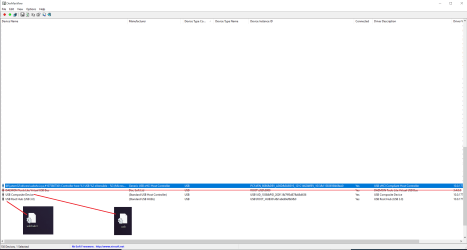
once I disconned all the USB plugged around of the Laptop, the DevManView keep these two USB drivers. Which means are from hte system, so, should be what you asked me for.


***Daemon Tools, as you know, please don't pay attention because it is created by the Daemon Tools Softwear and it's just a Virtual Port USB.


I attached the Picture to recognize which ".inf" file it is related for...


On you last post, please watch my reply below:


1. You made a fresh installation, Did you make SetupChipset.exe -overall ?
CRIS: Yes, I did.


2. Make a system restore point & try this Bluetooth Driver : http://support.killernetworking.com/...1a0f1552234528
( Simply extract the zip & execute Intel Bluetooth. msi )

CRIS: Ok, I'm going to try and i will let you know.


Cris
 

Attachments

My Computer My Computer

At a glance

Windows 7 - Windows 10 Pro - Windows 11 Pro -...
Computer type
PC/Desktop
Computer Manufacturer/Model Number
MSI
OS
Windows 7 - Windows 10 Pro - Windows 11 Pro - Windows XP - Deepen OS - Zorin OS - Ubuntu OS
Hi Vineet Garg,


the Bluetooth driver are installed without problems, and created an Intel folder (with all the Sub folders) inside the Program Files (x86). But, for testing I tried to add a Bluetooth device from the "Control Panel" and doesn't find any devices that I turned on the Bluetooth, maybe could miss the software that managment it.


Cris
 

My Computer My Computer

At a glance

Windows 7 - Windows 10 Pro - Windows 11 Pro -...
Computer type
PC/Desktop
Computer Manufacturer/Model Number
MSI
OS
Windows 7 - Windows 10 Pro - Windows 11 Pro - Windows XP - Deepen OS - Zorin OS - Ubuntu OS
Hi Cris,
Sorry for the confusion,

1. I need .inf file from win10 installation for :
(a) PCI\VEN_8086&DEV_15DB&SUBSYS_121C1462&REV_02

2. Full Hardware IDs & Compatible IDs from Win10 installation from traditional Device Manager for the above device.

3. I need full information from DevManView ( each & every column ) from win10 installation for the two USB 3.1 host controllers :
(a) PCI\VEN_8086&DEV_15DB&SUBSYS_121C1462&REV_02
(b) PCI\VEN_8086&DEV_A36D&SUBSYS_121C1462&REV_10

4. In every fresh Install, first make SetupChipset.exe -overall & 4.7.2 Net framework
( Some driver components @ your pc may need 4.7.2 Net Frmaework )

5. Bluetooth :
The driver is good enough. May be a manager is needed!
(i) Did it installed anything in the Control Panel ? Did it install anything in Installed programs? Uninstall its components from Installed Programs.
(ii) Go with the same bluetooth driver & this time install it with Setup.exe. Does it make any changes ? Bluetooth devices are detected ?

Let me know.

Thanks & Regards. ...
 

My Computer My Computer

At a glance

Windows 7 Ultimate x32 With Sp1 + Vista Ultim...Intel Mobile Core 2 Duo T5750 @ 2.00GHz Merom...2.00GB Dual-Channel DDR2 @ 332MHz (5-5-5-15)Mobile Intel(R) 965 Express Chipset Family
Computer type
Laptop
Computer Manufacturer/Model Number
hp compaq presario c795VU notebook pc
OS
Windows 7 Ultimate x32 With Sp1 + Vista Ultimate x32 with Sp1 & Sp2 !!
CPU
Intel Mobile Core 2 Duo T5750 @ 2.00GHz Merom 65nm Technolog
Motherboard
Hewlett-Packard 30D9 (CPU)
Memory
2.00GB Dual-Channel DDR2 @ 332MHz (5-5-5-15)
Graphics Card(s)
Mobile Intel(R) 965 Express Chipset Family
Sound Card
High Definition Audio Device
Monitor(s) Displays
LP154WX4-TLCB on Mobile Intel 965 Express Chipset Family
Screen Resolution
1280x800 @ 60Hz
Hard Drives
149GB Western Digital WDC WD1600BEVS-60VAT0 ATA Device (SATA)
Keyboard
Standard 101/102-Key or Microsoft Natural PS/2 Key + HP QLB
Mouse
ALPS pointing device
Antivirus
Kaspersky AV 2017(Win 7) & AVG AntiVirus Free 2016 (VISTA)
Browser
google chrome
Hi Vineet Garg,


in meantime I continue to test the Bluetooth, I pass you the file/info that you required to me.


For these two USB Drivers (A36D-15DB) I turn on all the collums infos; I hope it is usefull.


Below, you will find the zip file with the ".inf" file from the USB 15DB and the DevManView info for the USB A36D and 15DB.
 

Attachments

My Computer My Computer

At a glance

Windows 7 - Windows 10 Pro - Windows 11 Pro -...
Computer type
PC/Desktop
Computer Manufacturer/Model Number
MSI
OS
Windows 7 - Windows 10 Pro - Windows 11 Pro - Windows XP - Deepen OS - Zorin OS - Ubuntu OS
Hi Vineet Garg,


after some testings with the Bluetooth case and follow all your advices as well, the conclusion it seems that the Drivers/ Setup of the bluetooth are everything installed except some managment Bluetooth software.


Which means that, inside the Control Panel it's installed the Bluetooth, inside the Installed Programs it's installed the Bluetooth Folder & Subfolders, there is even the Bluetooth ico (just as ".ico" not the .exe) but it seems that the software for managment the Bluetooth hardware it still missing.


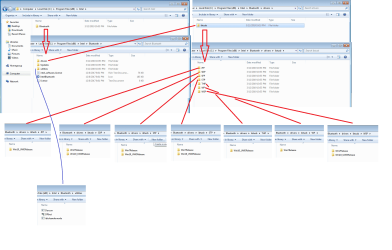
I found a strange thing insiede the Bluetooth installation folder, it seems that not to all subfolders there are the Windows 7 support, am I right? Could be this the problem?

Please, below watch the Picture that I prepared for you....


Cris
 

Attachments

  • Bluetooth drivers.png
    Bluetooth drivers.png
    62 KB · Views: 2

My Computer My Computer

At a glance

Windows 7 - Windows 10 Pro - Windows 11 Pro -...
Computer type
PC/Desktop
Computer Manufacturer/Model Number
MSI
OS
Windows 7 - Windows 10 Pro - Windows 11 Pro - Windows XP - Deepen OS - Zorin OS - Ubuntu OS
Hi Cris,

Greets!

1. Go to the Control Panel in Win7 & check if there is something like 'Bluetooth' or 'Killer'

2. Go to the 'Install or Uninstall a program' section & check the same things as above.

3. I found a strange thing insiede the Bluetooth installation folder, it seems that not to all subfolders there are the Windows 7 support, am I right? Could be this the problem?

I appreciate your efforts. I have already read that. Your driver is in THP folder. It does not have/say win7 drivers. But the listed win10 driver is not locked for win7. Its an old driver from Killer itself & they forgot to take care!!
All new drivers also are like that. They also have only win10 driver in THP but they are locked for win7.

There are no management related utilities in the Bluetooth driver. It looks like just a driver & nothing else. Give a look to extracted Killer 1550 AC wireless driver, you will find there a lot of material Killer Networking, Control Center, etc.
Your hardware card is common for Bluetooth & Wireless but it installs different drivers. It seems Control Centre etc. will come with wireless driver.

If you answer the above two questions, it will be more confirmed.

4. This driver & others, need advance Net Framework so better get installed 4.7.2.

I am analyzing other information & will tell rest tomorrow.

Thanks & Regards. ...
 

My Computer My Computer

At a glance

Windows 7 Ultimate x32 With Sp1 + Vista Ultim...Intel Mobile Core 2 Duo T5750 @ 2.00GHz Merom...2.00GB Dual-Channel DDR2 @ 332MHz (5-5-5-15)Mobile Intel(R) 965 Express Chipset Family
Computer type
Laptop
Computer Manufacturer/Model Number
hp compaq presario c795VU notebook pc
OS
Windows 7 Ultimate x32 With Sp1 + Vista Ultimate x32 with Sp1 & Sp2 !!
CPU
Intel Mobile Core 2 Duo T5750 @ 2.00GHz Merom 65nm Technolog
Motherboard
Hewlett-Packard 30D9 (CPU)
Memory
2.00GB Dual-Channel DDR2 @ 332MHz (5-5-5-15)
Graphics Card(s)
Mobile Intel(R) 965 Express Chipset Family
Sound Card
High Definition Audio Device
Monitor(s) Displays
LP154WX4-TLCB on Mobile Intel 965 Express Chipset Family
Screen Resolution
1280x800 @ 60Hz
Hard Drives
149GB Western Digital WDC WD1600BEVS-60VAT0 ATA Device (SATA)
Keyboard
Standard 101/102-Key or Microsoft Natural PS/2 Key + HP QLB
Mouse
ALPS pointing device
Antivirus
Kaspersky AV 2017(Win 7) & AVG AntiVirus Free 2016 (VISTA)
Browser
google chrome
Cris,
1. One information is missing!
Go to the Device Manager in win 7 & get ALL Hardware IDs & ALLCompatible IDs for 15DB : USB 3.1 Host controller.
2. Also answer the questions 1 & 2 from previous post #98
3. In the meantime i will be finding a bluetooth driver with control centre, etc. if it is there.

Thanks & Regards. ...

EDIT :

4. Next time when you make a reinstall : insert the USB (15DB), Samsung NVMe & All extracted Chipset .inf files in the boot.wim & install.wim
& Windows Updates in the install.wim only.
 

My Computer My Computer

At a glance

Windows 7 Ultimate x32 With Sp1 + Vista Ultim...Intel Mobile Core 2 Duo T5750 @ 2.00GHz Merom...2.00GB Dual-Channel DDR2 @ 332MHz (5-5-5-15)Mobile Intel(R) 965 Express Chipset Family
Computer type
Laptop
Computer Manufacturer/Model Number
hp compaq presario c795VU notebook pc
OS
Windows 7 Ultimate x32 With Sp1 + Vista Ultimate x32 with Sp1 & Sp2 !!
CPU
Intel Mobile Core 2 Duo T5750 @ 2.00GHz Merom 65nm Technolog
Motherboard
Hewlett-Packard 30D9 (CPU)
Memory
2.00GB Dual-Channel DDR2 @ 332MHz (5-5-5-15)
Graphics Card(s)
Mobile Intel(R) 965 Express Chipset Family
Sound Card
High Definition Audio Device
Monitor(s) Displays
LP154WX4-TLCB on Mobile Intel 965 Express Chipset Family
Screen Resolution
1280x800 @ 60Hz
Hard Drives
149GB Western Digital WDC WD1600BEVS-60VAT0 ATA Device (SATA)
Keyboard
Standard 101/102-Key or Microsoft Natural PS/2 Key + HP QLB
Mouse
ALPS pointing device
Antivirus
Kaspersky AV 2017(Win 7) & AVG AntiVirus Free 2016 (VISTA)
Browser
google chrome
Hi Vineet Garg,


I try to replay you point by point, and I will attach to you all the resaults from the new tests that I did:


#98


Hi Cris,

Greets!

1. Go to the Control Panel in Win7 & check if there is something like 'Bluetooth' or 'Killer'
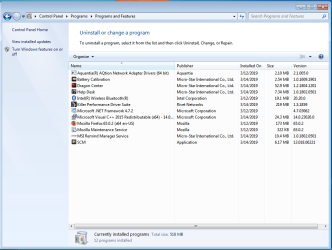
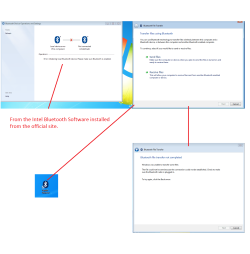
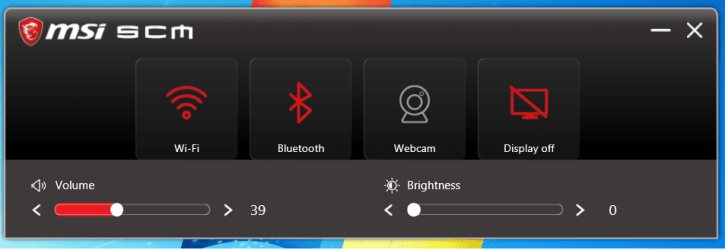
CRIS: [FONT=&quot]I already tried, and for strange are not any words/ icon related to the Bluetoothhardware (after all checked section, one by one, I tried even to check by the "Search bar" as well but nothing comes out). Suspected of that,I went inside the “Device Manager” and in fact there is not any Bluetooth Ico as installed hardware. And then, I tried to install the "SCM" from MSI (as Picture attached) that management the Bluetooth, WIFI and so on... after restart the System , I opened the SCM to turn on the Bluetooth, after I went to "System32" folder looking for "fsquirt" (fsquirt, it's the Bluetooth manager build-in in Windows 7 (because doesn’t appear in Control Panel this Bluetooth ico) and try to connect some devices by Bluetooth with my laptop; but the PC, insist to say that is not installed any Bluetooth Hardware . I got you all the pictures report about and are attached below.[/FONT] [FONT=&quot]So, not happy, I went to Intel site, and looking for the Bluetooth software that management the Bluetooth , after found-downloaded and installed , I found the software successfully installed in the same folder as the drivers installed C:/Program File (86)/ Intel......but once I tried to open it, the software said that no Bluetooth hardware are installed and cannot turn on the communication.[/FONT]


2. Go to the 'Install or Uninstall a program' section & check the same things as above.
CRIS: Inside the Install or Uninstall a program, as I said thereis succesfully installed the Bluetooth (I attached the picture).


3. I found a strange thing insiede the Bluetooth installation folder, it seems that not to all subfolders there are the Windows 7 support, am I right? Could be this the problem?

I appreciate your efforts. I have already read that. Your driver is in THP folder. It does not have/say win7 drivers. But the listed win10 driver is not locked for win7. Its an old driver from Killer itself & they forgot to take care!!
All new drivers also are like that. They also have only win10 driver in THP but they are locked for win7.
CRIS: Thank you so much to teach me this Vineet Garg, I appreciate so much your patience with me :-)


There are no management related utilities in the Bluetooth driver. It looks like just a driver & nothing else. Give a look to extracted Killer 1550 AC wireless driver, you will find there a lot of material Killer Networking, Control Center, etc.
Your hardware card is common for Bluetooth & Wireless but it installs different drivers. It seems Control Centre etc. will come with wireless driver.
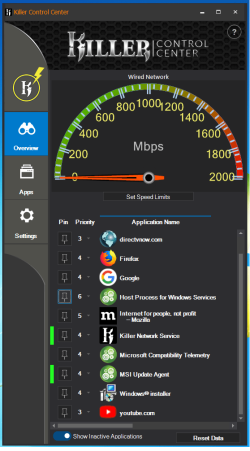
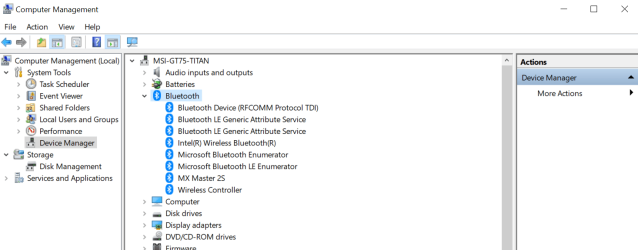
CRIS: Killer Control Center, it's just a really poor software that prioritize the Connections by Wireless internet connection and nothing related to the Bluetooth section. Windows 10 as the build-in Bluetooth control center, and the laptop use this. For curiosity, in Windows 10, I went to the [FONT=&quot]C:/Program File (86)/ Intel and in fact there is not any bluetooth control managment installed from intel; inside the folder there are exactly the same files as we got in windows 7 installation. But in Windows 10 Device Manager there are many voices related to the bluetooth hardware instead of Windows 7 that doesn't get even no one. I posted the picture of Windows 10 Device Manager under Bluetooth Voice to show you (Windows 7 I don't post because there is not).
[/FONT]


If you answer the above two questions, it will be more confirmed.

4. This driver & others, need advance Net Framework so better get installed 4.7.2.
CRIS: Yes I got you, and I already did it no worries.

I am analyzing other information & will tell rest tomorrow.
CRIS: Ok take your time.


Tomorrow, I will replay you and attach your request to your last post....


Cris
 

Attachments

  • Control Panel.png
    Control Panel.png
    43.2 KB · Views: 0
  • windows 7 bluetooth.png
    windows 7 bluetooth.png
    66.6 KB · Views: 0
  • CSM.png
    CSM.png
    20.5 KB · Views: 0
  • Killer Control.png
    Killer Control.png
    46.9 KB · Views: 0
  • Untitled.png
    Untitled.png
    55.3 KB · Views: 0
Last edited:

My Computer My Computer

At a glance

Windows 7 - Windows 10 Pro - Windows 11 Pro -...
Computer type
PC/Desktop
Computer Manufacturer/Model Number
MSI
OS
Windows 7 - Windows 10 Pro - Windows 11 Pro - Windows XP - Deepen OS - Zorin OS - Ubuntu OS
Back
Top