
Drives - Hide or Show Empty Drives in Computer Folder

How to Hide or Show Empty Drives in Windows 7 and Windows 8


   Information
This tutorial will show you how to have empty removable drives to show or hide in the Computer or This PC folder in Windows 7 and Windows 8.

   Tip
If you want an empty CD/DVD drive to show in the navigation pane, you'll need to set show empty drives below, and set to show all folders in the navigation pane.


OPTION ONE

To Hide or Show Empty Drives using Folder Options


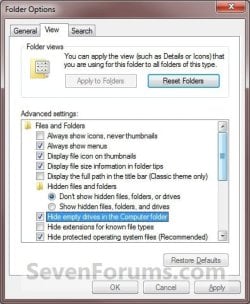
1. Open Folder Options in Windows 7 or Windows 8, and click/tap on the View tab. (See screenshot below)
Folder_Options.jpg
2. To Show Empty Removable Drives
A) Uncheck the Hide empty drives in the Computer folder box, and click/tap on OK. (See screenshot above)
3. To Hide Empty Removable Drives
NOTE: This is the default setting.
A) Select (dot) Don't Show hidden files, folders, and drives.

B) Check the Hide empty drives in the Computer folder box, and click/tap on OK. (See screenshot above)


OPTION TWO

To Hide or Show Empty Drives using a REG File Download


1. To Show Empty Removable Drives
A) Click/tap on the Download button below to download the file below.
Show_empty_drives_in_the_Computer_folder.reg


Download


B) Go to step 3.
2. To Hide Empty Removable Drives
NOTE: This also sets to Don't Show hidden files, folders, and drives.
A) Click/tap on the Download button below to download the file below.
Hide_empty_drives_in_the_Computer_folder.reg

Download


3. Save the .reg file to your desktop.

4. Double click/tap on the downloaded .reg file to merge it.

5. Click on Run, Yes (UAC), Yes, and OK when prompted.

6. Log off and log on, or restart the computer to apply.

7. When done, you can delete the downloaded .reg file on the desktop if you like.


OPTION THREE

To Hide or Show Empty Drives Manually in Registry Editor


1. Open the Start Menu, then type regedit in the search line and press enter.

2. If prompted by UAC, then click/tap on Yes.

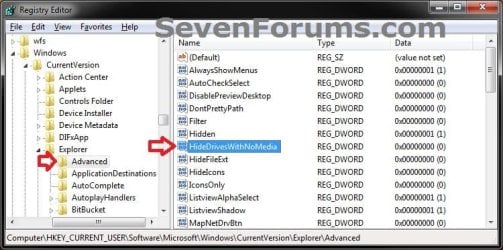
3. In regedit, navigate to the location below. (see screenshot below)

Code:
HKEY_CURRENT_USER\Software\Microsoft\Windows\CurrentVersion\Explorer\Advanced
Reg1.jpg
4. To Show Empty Removable Drives
A) In the right pane of Advanced, double click/tap on HideDrivesWithNoMedia to modify it. (see screenshot above)

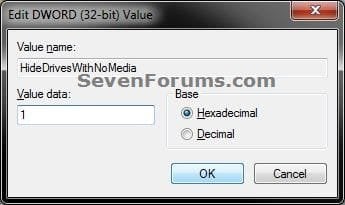
B) Type 0 and click/tap on OK. (see screenshot below step 5B)

C) Go to step 6.
5. To Hide Empty Removable Drives
NOTE: This also sets to Don't Show hidden files, folders, and drives.
A) In the right pane of Advanced, double click/tap on HideDrivesWithNoMedia to modify it. (see screenshot below step 3)

B) Type 1 and click on OK. (see screenshot below)
Modify.jpg
C) Go to step 6.


6. Close regedit.

7. Log off and log on, or restart the computer to apply.
That's it,
Shawn


Attachments

Last edited:
Steps 4 and 5 are mislabeled as of this post--s/b to show empty drives, set HideDrivesWithNoMedia to 0, and to hide them set it to 1. [This has now been corrected--see next post.]

Also, to get the settings to take effect, you can just re-start explorer (run task manager, kill the "explorer.exe" process, and then select File -> Run, and type "explorer" to re-start it).
 
Last edited:

My Computer

Computer type
PC/Desktop
Computer Manufacturer/Model Number
white box
OS
Windows 7 Ultimate x64
CPU
core i5-670
Motherboard
ASUS
Memory
16 GB
Graphics Card(s)
none
Antivirus
Symantec Internet Security
Browser
Firefox
Ooops. Thank you Willus. It has been corrected now. :)
 

My Computer

Computer type
PC/Desktop
Computer Manufacturer/Model Number
Self built custom
OS
64-bit Windows 11 Pro for Workstations
CPU
Intel i7-8700K OC'd to 5 GHz
Motherboard
ASUS ROG Maximus XI Formula Z390
Memory
64 GB (4x16GB) G.SKILL TridentZ RGB DDR4 3600 MHz
Graphics Card(s)
ASUS ROG-STRIX-GTX1080TI-O11G-GAMING
Sound Card
Integrated
Monitor(s) Displays
2 x Samsung Odyssey G7 27"
Screen Resolution
2560x1440
Hard Drives
1TB Samsung 990 PRO M.2,
4TB Samsung 990 PRO PRO M.2,
TerraMaster F8 SSD Plus NAS
PSU
Seasonic Prime Titanium 850W
Case
Thermaltake Core P3
Cooling
Corsair Hydro H115i
Keyboard
Logitech wireless K800
Mouse
Logitech MX Master 4
Internet Speed
2 Gb/s Download and 100 Mb/s Upload
Antivirus
Malwarebyte Anti-Malware Premium
Browser
Google Chrome
Other Info
Logitech Z625 speaker system,
Logitech BRIO 4K Pro webcam,
HP Color LaserJet Pro MFP M477fdn,
APC SMART-UPS RT 1000 XL - SURT1000XLI,
Galaxy S23 Plus phone
What about hiding empty partitions of non-removable drives?
 

My Computer

Computer Manufacturer/Model Number
Gateway M6827
OS
Win 7 Professional 32-bit
CPU
Intel Core 2 Duo CPU T5750 @ 2.00 GHz
Memory
3GB
Monitor(s) Displays
ViewSonic Vx900
Screen Resolution
1280x1024
Hard Drives
150GB Hard Drive
Hello Nabilalk,

If you like, you can hide them by removing their drive letter, but you will not be able to access them until you add a drive letter back to them.
Drive Letter - Add, Change, or Remove
Here's another option to hide drives, but still have access to them.
Drive - Hide or Unhide
Hope this helps. :)
 

My Computer

Computer type
PC/Desktop
Computer Manufacturer/Model Number
Self built custom
OS
64-bit Windows 11 Pro for Workstations
CPU
Intel i7-8700K OC'd to 5 GHz
Motherboard
ASUS ROG Maximus XI Formula Z390
Memory
64 GB (4x16GB) G.SKILL TridentZ RGB DDR4 3600 MHz
Graphics Card(s)
ASUS ROG-STRIX-GTX1080TI-O11G-GAMING
Sound Card
Integrated
Monitor(s) Displays
2 x Samsung Odyssey G7 27"
Screen Resolution
2560x1440
Hard Drives
1TB Samsung 990 PRO M.2,
4TB Samsung 990 PRO PRO M.2,
TerraMaster F8 SSD Plus NAS
PSU
Seasonic Prime Titanium 850W
Case
Thermaltake Core P3
Cooling
Corsair Hydro H115i
Keyboard
Logitech wireless K800
Mouse
Logitech MX Master 4
Internet Speed
2 Gb/s Download and 100 Mb/s Upload
Antivirus
Malwarebyte Anti-Malware Premium
Browser
Google Chrome
Other Info
Logitech Z625 speaker system,
Logitech BRIO 4K Pro webcam,
HP Color LaserJet Pro MFP M477fdn,
APC SMART-UPS RT 1000 XL - SURT1000XLI,
Galaxy S23 Plus phone

My Computer

Computer Manufacturer/Model Number
Gateway M6827
OS
Win 7 Professional 32-bit
CPU
Intel Core 2 Duo CPU T5750 @ 2.00 GHz
Memory
3GB
Monitor(s) Displays
ViewSonic Vx900
Screen Resolution
1280x1024
Hard Drives
150GB Hard Drive
You're most welcome. :)
 

My Computer

Computer type
PC/Desktop
Computer Manufacturer/Model Number
Self built custom
OS
64-bit Windows 11 Pro for Workstations
CPU
Intel i7-8700K OC'd to 5 GHz
Motherboard
ASUS ROG Maximus XI Formula Z390
Memory
64 GB (4x16GB) G.SKILL TridentZ RGB DDR4 3600 MHz
Graphics Card(s)
ASUS ROG-STRIX-GTX1080TI-O11G-GAMING
Sound Card
Integrated
Monitor(s) Displays
2 x Samsung Odyssey G7 27"
Screen Resolution
2560x1440
Hard Drives
1TB Samsung 990 PRO M.2,
4TB Samsung 990 PRO PRO M.2,
TerraMaster F8 SSD Plus NAS
PSU
Seasonic Prime Titanium 850W
Case
Thermaltake Core P3
Cooling
Corsair Hydro H115i
Keyboard
Logitech wireless K800
Mouse
Logitech MX Master 4
Internet Speed
2 Gb/s Download and 100 Mb/s Upload
Antivirus
Malwarebyte Anti-Malware Premium
Browser
Google Chrome
Other Info
Logitech Z625 speaker system,
Logitech BRIO 4K Pro webcam,
HP Color LaserJet Pro MFP M477fdn,
APC SMART-UPS RT 1000 XL - SURT1000XLI,
Galaxy S23 Plus phone
Hi,

For me on windows 8 x64, check the option "Hide empty drives in the Computer folder" doesn't work. (The disk is just grey)
I have to uncheck Folder Option --> General --> Display all folders

So it works :) :D
 

My Computer

Computer type
PC/Desktop
OS
Win 8 64

My Computer

Computer type
PC/Desktop
Computer Manufacturer/Model Number
Self built custom
OS
64-bit Windows 11 Pro for Workstations
CPU
Intel i7-8700K OC'd to 5 GHz
Motherboard
ASUS ROG Maximus XI Formula Z390
Memory
64 GB (4x16GB) G.SKILL TridentZ RGB DDR4 3600 MHz
Graphics Card(s)
ASUS ROG-STRIX-GTX1080TI-O11G-GAMING
Sound Card
Integrated
Monitor(s) Displays
2 x Samsung Odyssey G7 27"
Screen Resolution
2560x1440
Hard Drives
1TB Samsung 990 PRO M.2,
4TB Samsung 990 PRO PRO M.2,
TerraMaster F8 SSD Plus NAS
PSU
Seasonic Prime Titanium 850W
Case
Thermaltake Core P3
Cooling
Corsair Hydro H115i
Keyboard
Logitech wireless K800
Mouse
Logitech MX Master 4
Internet Speed
2 Gb/s Download and 100 Mb/s Upload
Antivirus
Malwarebyte Anti-Malware Premium
Browser
Google Chrome
Other Info
Logitech Z625 speaker system,
Logitech BRIO 4K Pro webcam,
HP Color LaserJet Pro MFP M477fdn,
APC SMART-UPS RT 1000 XL - SURT1000XLI,
Galaxy S23 Plus phone
You're most welcome Chili. :)
 

My Computer

Computer type
PC/Desktop
Computer Manufacturer/Model Number
Self built custom
OS
64-bit Windows 11 Pro for Workstations
CPU
Intel i7-8700K OC'd to 5 GHz
Motherboard
ASUS ROG Maximus XI Formula Z390
Memory
64 GB (4x16GB) G.SKILL TridentZ RGB DDR4 3600 MHz
Graphics Card(s)
ASUS ROG-STRIX-GTX1080TI-O11G-GAMING
Sound Card
Integrated
Monitor(s) Displays
2 x Samsung Odyssey G7 27"
Screen Resolution
2560x1440
Hard Drives
1TB Samsung 990 PRO M.2,
4TB Samsung 990 PRO PRO M.2,
TerraMaster F8 SSD Plus NAS
PSU
Seasonic Prime Titanium 850W
Case
Thermaltake Core P3
Cooling
Corsair Hydro H115i
Keyboard
Logitech wireless K800
Mouse
Logitech MX Master 4
Internet Speed
2 Gb/s Download and 100 Mb/s Upload
Antivirus
Malwarebyte Anti-Malware Premium
Browser
Google Chrome
Other Info
Logitech Z625 speaker system,
Logitech BRIO 4K Pro webcam,
HP Color LaserJet Pro MFP M477fdn,
APC SMART-UPS RT 1000 XL - SURT1000XLI,
Galaxy S23 Plus phone
Thanks very much for addressing this issue. It's been driving me nuts but I should have know. Pepper
 

My Computer

Computer type
PC/Desktop
Computer Manufacturer/Model Number
Dell
OS
Windows 7 x64
I'm glad it could Eugne, and welcome to Seven Forums. :)
 

My Computer

Computer type
PC/Desktop
Computer Manufacturer/Model Number
Self built custom
OS
64-bit Windows 11 Pro for Workstations
CPU
Intel i7-8700K OC'd to 5 GHz
Motherboard
ASUS ROG Maximus XI Formula Z390
Memory
64 GB (4x16GB) G.SKILL TridentZ RGB DDR4 3600 MHz
Graphics Card(s)
ASUS ROG-STRIX-GTX1080TI-O11G-GAMING
Sound Card
Integrated
Monitor(s) Displays
2 x Samsung Odyssey G7 27"
Screen Resolution
2560x1440
Hard Drives
1TB Samsung 990 PRO M.2,
4TB Samsung 990 PRO PRO M.2,
TerraMaster F8 SSD Plus NAS
PSU
Seasonic Prime Titanium 850W
Case
Thermaltake Core P3
Cooling
Corsair Hydro H115i
Keyboard
Logitech wireless K800
Mouse
Logitech MX Master 4
Internet Speed
2 Gb/s Download and 100 Mb/s Upload
Antivirus
Malwarebyte Anti-Malware Premium
Browser
Google Chrome
Other Info
Logitech Z625 speaker system,
Logitech BRIO 4K Pro webcam,
HP Color LaserJet Pro MFP M477fdn,
APC SMART-UPS RT 1000 XL - SURT1000XLI,
Galaxy S23 Plus phone
No,no and no:/

None of the three ways shown in this tutorial work for me. Like the late, great Rodney Dangerfield 'I get no respect...'
 

My Computer

Computer type
PC/Desktop
Computer Manufacturer/Model Number
Dell OptiPlex 3040
OS
Windows 7 Pro 64-bit
CPU
AMD Athlon 64X2 Dual Core 5000+ @ 2611 Mhz
Motherboard
ASUS
Memory
4 GB Dual-Channel DDR2 @ 373 MHz
Graphics Card(s)
NVIDIA GeForce 6150SE nForce 430
Sound Card
Proprietary, I suppose
Monitor(s) Displays
19" LG Flatron L1910B
Screen Resolution
1280x1024
Hard Drives
Some 2,5 TB divided among one internal SATA, partitioned into C: and D:, and two USB 2.0-connected external drives, the latter for independent backups
PSU
Super Flower 500W
Case
Sure
Cooling
Yes
Keyboard
A year old Dell. The best so far, excluding the original IBM
Mouse
Logitech
Internet Speed
Wireless modem 2 MB/s and down; typically 0.5 to 1.3 MB/s
Antivirus
AVG free
Browser
Chrome
None of the above worked for me (Win7 Ultimate x64). What solved the problem was removing a Kingston technology multi-port device that reads memory cards (miniSD, microSD, CF/MD, MS/DUO). It was hiding/blending in a 10-port USB hub.
 

My Computer

Computer type
PC/Desktop
Computer Manufacturer/Model Number
lenovo ThinkServer
OS
Win 7 Ultimarte x64
Back
Top