[Dropped] WD MyBook Essentials and Acer Aspire 4715 Z

oreo27

New member
Guru
VIP
Local time
10:38 AM
Messages
521
Location
Philippines
Hi,

Yesterday while en route home, I dropped my bag which contained both items about 2 feet. It were the last two steps in a staircase.

First off, I was so pissed at myself knowing how careful I am with my gadgets. I just couln't believe I dropped them. :cry:

I'll be using quote tags to separate both hardware.

In any case, upon getting home, I did what most people in this case do, do some rigorous testing until I find the damage/s that my stupidity at the time has caused.

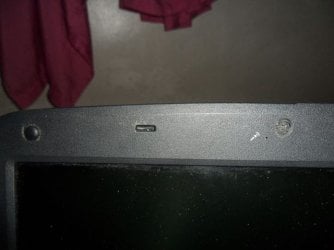
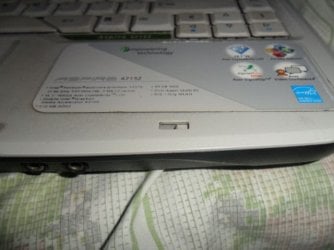
First off was the Acer Aspire, there were no physical damages except for the broken hinges that locked the LCD at the front. Take note that these are not the hinges at the back which allow the LCD move.


http://www.sevenforums.com/attachment.php?attachmentid=197897&stc=1&d=1329027070

http://www.sevenforums.com/attachment.php?attachmentid=197896&stc=1&d=1329027070


I'm guessing there's no more fix to that?

Secondly, I've done some brutal testing with almost all the hardware components.

Here's what I used for said testing:

TestMem support page. TestVideoRAM

Then, luckily enough, no damage to those either.

After testing, I tested the speakers and webcam too. They were still functioning correctly.

Second was Western Digital MyBook Essentials

The hardware damage was the shell at side was not aligned with body. This happened only on one side. I managed to carefully stick it back on it's proper alignment and I see no physical sign that it got misaligned in the first place. I'm thinking it was removed from the latch when it dropped and I simply put it back in.

Then, the first thing I did after seeing that Windows was still happily able to detect it is back up all mission critical for me and family data.

Then I wen't on ahead and used HDTune to test it, which took about 700 minutes :sleepy:

http://www.sevenforums.com/attachment.php?attachmentid=197898&stc=1&d=1329027523

Anything else I can do in this situation? I feel terrible up until now and would like some advice.
 

Attachments
  • Hinge-Bottom.jpg
    Hinge-Bottom.jpg
    31.6 KB · Views: 11
  • Hinge-Top.jpg
    Hinge-Top.jpg
    24.3 KB · Views: 14
  • Western-Digital-MyBook-EssentialsHD-Tune.jpg
    Western-Digital-MyBook-EssentialsHD-Tune.jpg
    74.1 KB · Views: 15

My Computer My Computer

At a glance

Windows 7 Ultimate x64 Service Pack 1AMD Athlon II x4 Propus 2.9 GHz2 x 4GB Corsair XMS 3 DDR3 -1600 CL9AMD Radeon HD 5850 1GB GDDR5
Computer type
PC/Desktop
Computer Manufacturer/Model Number
Custom Build
OS
Windows 7 Ultimate x64 Service Pack 1
CPU
AMD Athlon II x4 Propus 2.9 GHz
Motherboard
ASRock N68C-GS FX
Memory
2 x 4GB Corsair XMS 3 DDR3 -1600 CL9
Graphics Card(s)
AMD Radeon HD 5850 1GB GDDR5
Sound Card
On-board 6-Channel HD Audio
Monitor(s) Displays
18' LG Flatron E1942TC-BN on DVI, 18' Chimei 95ND on HDMI
Screen Resolution
1366 x 768 x 2
Hard Drives
1 x 500 GB Seagate
1 x 1 TB Western Digital Caviar Green
1 x 1 TB Hitachi Touro Mobile USB 3
PSU
Seasonic S12II 520W
Case
Generic with Cable Management
Cooling
Deep Cool Gammaxx 200
Keyboard
Dragonwar Desert Eagle
Mouse
Logitech B85
Internet Speed
5Mb/s DL, 0.9Mb/s UL
Antivirus
ESET Nod32
Browser
Google Chrome 64 Bit
Other Info
LG G4 H818P - Rooted with Xposed Framework
Hi,

To be honest I think everything looks OK to me. You might also consider running a chkdsk on all the drives, incl. the USB drive.

What you need to do is watch for anomalies as you work with our system on a daily basis. Is anything not working as you are used to?

If the data on the USB is that critical to you, you might consider getting another external drive and copying the data to it just to be on the safe side.

Regards,
Golden
 

My Computer My Computer

At a glance

Windows 10 Pro x64 ; Xubuntu x64Intel i7 860 @ 2.80 GHz O/C'ed to 4.0GHz16GB Corsair Vengance DDR3 @ 661 MHz Dual Cha...EVGA NVidia GTX 560 1024MB
Computer type
PC/Desktop
Computer Manufacturer/Model Number
Golden Mk. I.4
OS
Windows 10 Pro x64 ; Xubuntu x64
CPU
Intel i7 860 @ 2.80 GHz O/C'ed to 4.0GHz
Motherboard
Gigabyte P55A-UD3R Rev.1. Award BIOS F13
Memory
16GB Corsair Vengance DDR3 @ 661 MHz Dual Channel (9-9-9-24)
Graphics Card(s)
EVGA NVidia GTX 560 1024MB
Sound Card
Realtek Integrated
Monitor(s) Displays
Dual Samsung SyncMaster 2494HS
Screen Resolution
1920*1080 and 1920*1080
Hard Drives
1*Samsung 840 EVO 120GB SSD;
1*OCZ Vertex 2 60GB SSD;
2*Samsung F3 SpinPoint 1TB in RAID0;
1*Samsung F1 SpinPoint 1TB;
2*Western Digital 1TB External USB 3.0
1*Western Digital 500GB External USB 3.0
1*Seagate 500GB External USB 2.0
PSU
Thermaltake ToughPower QFan 750W
Case
Thermaltake Element S VK60001W2Z
Cooling
Corsair H60 Water Cooling, 2*230mm and 2*80mm case fans
Keyboard
Logitech G110
Mouse
Logitech MX518
Hi oreo27, If you are worried about the cosmetic issues , you could have a look on Ebay for spare parts , Many people "break" laptops and sell for spares as they can get more for the parts than the laptop is worth as a whole :)
 

My Computer My Computer

At a glance

win 7 ultimate32bit, Win8.1pro wmc 32bitamd phenom x4 9600corsair twinxs 2x2gb2x nvidia 1gb 8500gt
Computer type
PC/Desktop
Computer Manufacturer/Model Number
self build
OS
win 7 ultimate32bit, Win8.1pro wmc 32bit
CPU
amd phenom x4 9600
Motherboard
asus m2n32-sli deluxe
Memory
corsair twinxs 2x2gb
Graphics Card(s)
2x nvidia 1gb 8500gt
Sound Card
onboard
Monitor(s) Displays
23" PB Viseo 233d
Screen Resolution
1920x1080
Hard Drives
maxtor sata 500gb
maxtor sata 320gb
fujitsu sata200gb
PSU
oryxx tornado 750w
Case
thermaltake xaser lll
Cooling
artic freezer64 pro + 7 case fans
Hi,

To be honest I think everything looks OK to me. You might also consider running a chkdsk on all the drives, incl. the USB drive.

What you need to do is watch for anomalies as you work with our system on a daily basis. Is anything not working as you are used to?

If the data on the USB is that critical to you, you might consider getting another external drive and copying the data to it just to be on the safe side.

Regards,
Golden

That's also what I thought but I wanted to be sure. Chkdsk was also performed with no errors found on both the drive in the laptop and the exteral usb drive.

Well, everything seems in order up to now so no.

I was actually thinking of upgrading for a long time now but the budget never seems to be available. I've been wanting to upgrade to a 2.5 in. external drive for the longest time but it'll have to wait.

Thanks for the advice. I feel a bit better about this whole fiasco that I've gotten myself into. :D

Edit -


Hi oreo27, If you are worried about the cosmetic issues , you could have a look on Ebay for spare parts , Many people "break" laptops and sell for spares as they can get more for the parts than the laptop is worth as a whole :)

Yes, I'm indeed the type of person to be worried about such issues. If I have the extra time and budget, I'll definitely be doing this. In fact, we even have a site dedicated to PC parts (new and used) in the Philippines.

http://www.tipidpc.com/
 
Last edited:

My Computer My Computer

At a glance

Windows 7 Ultimate x64 Service Pack 1AMD Athlon II x4 Propus 2.9 GHz2 x 4GB Corsair XMS 3 DDR3 -1600 CL9AMD Radeon HD 5850 1GB GDDR5
Computer type
PC/Desktop
Computer Manufacturer/Model Number
Custom Build
OS
Windows 7 Ultimate x64 Service Pack 1
CPU
AMD Athlon II x4 Propus 2.9 GHz
Motherboard
ASRock N68C-GS FX
Memory
2 x 4GB Corsair XMS 3 DDR3 -1600 CL9
Graphics Card(s)
AMD Radeon HD 5850 1GB GDDR5
Sound Card
On-board 6-Channel HD Audio
Monitor(s) Displays
18' LG Flatron E1942TC-BN on DVI, 18' Chimei 95ND on HDMI
Screen Resolution
1366 x 768 x 2
Hard Drives
1 x 500 GB Seagate
1 x 1 TB Western Digital Caviar Green
1 x 1 TB Hitachi Touro Mobile USB 3
PSU
Seasonic S12II 520W
Case
Generic with Cable Management
Cooling
Deep Cool Gammaxx 200
Keyboard
Dragonwar Desert Eagle
Mouse
Logitech B85
Internet Speed
5Mb/s DL, 0.9Mb/s UL
Antivirus
ESET Nod32
Browser
Google Chrome 64 Bit
Other Info
LG G4 H818P - Rooted with Xposed Framework
Back
Top