Dual Boot Default OS Change

wptski

New member
Local time
5:38 AM
Messages
38
I have W7 and W10TP on different physical hard drives.

If needed, how can I change the default boot OS from the command prompt from WinRE or W7 Repair Disk and/or W10 Recovery USB flash drive.

I've searched and found many with two OS's on the same physical HD but not on separate HD. They state to just mark the desired HD partition as Active and run the OS Repair function three times. Would that be the same procedure as well for separate HD?
 

My Computer

OS
W7 Pro 64bit
If you had the other hard drive disconnected during the installs, then simply go into the bios and set the proper hard drive to boot first.

When you want to boot from the other OS, you simply use the 1 time boot menu key to choose the other hard drive.

If not, you simply use msconfig or EasyBCD to set the default OS.

Do you have a dual boot screen to choose the OS now ?
 

My Computer

Computer type
PC/Desktop
Computer Manufacturer/Model Number
Skylake Special #666
OS
Windows 10 Pro x64
CPU
Intel Core i7 6700K
Motherboard
Asus Sabertooth Z170 Mark 1
Memory
GSkill TridentZ RGB 16GB 3600 16-16-16-36
Graphics Card(s)
EVGA GTX 980 Ti SC x2
Sound Card
Realtek High Definition
Monitor(s) Displays
AOC G2460PG
Screen Resolution
1920 x 1080 144Hz
Hard Drives
Samsung 860 Pro 256GB, Seagate Barracuda 4TB x2
PSU
EVGA 1000 P2, EVGA White Custom Braided Cables
Case
Corsair Vengeance C70 Gunmetal Black
Cooling
Corsair H100i v2, Corsair ML120 x2, Thermal Grizzly Kryonaut
Keyboard
Logitech G910 Orion Spectrum
Mouse
Logitech G700s
Internet Speed
Verizon Fios Quantum Gateway 75/75
Antivirus
Windows Defender, Malwarebytes Free 3.8.3
Browser
Chrome
Other Info
Corsair SP120 x4, LG Blu-ray Drive, Durabrand HT-395 100 Watt Dolby Digital Amp, Corsair H2100 Wireless 7.1 Headset
I really didn't want to explain the situation but I guess that I will.

I added an extra HD to put W10TP on but installed W10TP three times because I'd get into a W10TP has run into a problem, checking and a reboot loop. Since the install sets W10TP as the default, you go in circles as you never get a chance to get into MSCONFIG. IIRC, after about three loops or so you get other options like a Repair or use another OS. If I powered down, I'd get an OS selection screen but also a CHKDSK for every partition on both drives. I found the cause of the problem but from then on I kept W7 as my default boot OS.

So I was wondering if/how to make the change other than getting back to an working OS "if" this ever happens again.

Yes, I get a dual boot screen. If I powered down from W10TP I get a blue colored OS option screen and if powered down from W7 I get the black/grey screen. Reboots from W10TP, no OS choice and it boots into W10TP. Even if I hit F12 and select W7, I boot into W10TP!

Using F12, I can select the CD/DVD or a USB Flash Drive but either HD gives me W10TP.
 

My Computer

OS
W7 Pro 64bit
Sorry you had to explain things, as we are not mind readers ;)

Let us know if you ever get 10 installed properly.

Without answering questions I can`t help you, Good Luck :rolleyes:
 

My Computer

Computer type
PC/Desktop
Computer Manufacturer/Model Number
Skylake Special #666
OS
Windows 10 Pro x64
CPU
Intel Core i7 6700K
Motherboard
Asus Sabertooth Z170 Mark 1
Memory
GSkill TridentZ RGB 16GB 3600 16-16-16-36
Graphics Card(s)
EVGA GTX 980 Ti SC x2
Sound Card
Realtek High Definition
Monitor(s) Displays
AOC G2460PG
Screen Resolution
1920 x 1080 144Hz
Hard Drives
Samsung 860 Pro 256GB, Seagate Barracuda 4TB x2
PSU
EVGA 1000 P2, EVGA White Custom Braided Cables
Case
Corsair Vengeance C70 Gunmetal Black
Cooling
Corsair H100i v2, Corsair ML120 x2, Thermal Grizzly Kryonaut
Keyboard
Logitech G910 Orion Spectrum
Mouse
Logitech G700s
Internet Speed
Verizon Fios Quantum Gateway 75/75
Antivirus
Windows Defender, Malwarebytes Free 3.8.3
Browser
Chrome
Other Info
Corsair SP120 x4, LG Blu-ray Drive, Durabrand HT-395 100 Watt Dolby Digital Amp, Corsair H2100 Wireless 7.1 Headset
Sorry you had to explain things, as we are not mind readers ;)

Let us know if you ever get 10 installed properly.

Without answering questions I can`t help you, Good Luck :rolleyes:
I wouldn't say that it isn't installed properly, it just works funny on dual-boot. I even posted in Technet about the startup blue selection screen and they stated that they couldn't reproduce it. I happened to turn OFF the Fast Boot option and that stopped it.

Well one can mark a partition as active from the Disk Management Screen and from the command prompt using DISKPART so I was just asking how to change the default OS other than the normal every day way.
 

My Computer

OS
W7 Pro 64bit
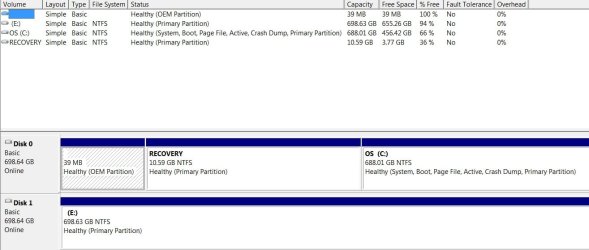
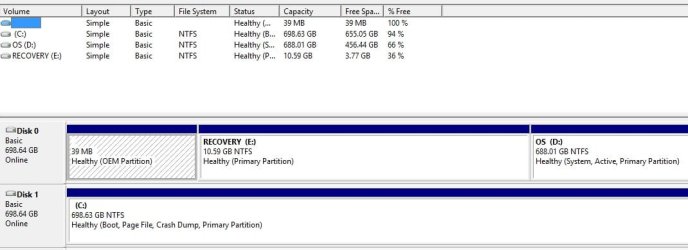
With W7 set as my default OS, first screen is from W7 and the second from W10TP.

DM W7.jpg

DM W10TP.jpg
 

My Computer

OS
W7 Pro 64bit

My Computer

Computer Manufacturer/Model Number
HP, Dell, Gateway, Toshiba - 4 laptops and 2 desktops
OS
Vista, Windows7, Mint Mate, Zorin, Windows 8
CPU
from 1.6GHz Duo to i7
Monitor(s) Displays
2x HP w2207
Hard Drives
5x HDD, 7x SSD, 12x Externals
Keyboard
with trackball - no mices
Mouse
Trackball mice
Internet Speed
DSL 6000
Yep 10 screws it up with every major update that requires a restart so the conventional way is the easiest way,
10 sets boot at 0 seconds so that throws most other ways down the drain unless your pretty quick to get to the bios screen :p
 

My Computer

Computer type
PC/Desktop
Computer Manufacturer/Model Number
Custom assembled by me :}
OS
Win-7-Pro64bit 7-H-Prem-64bit
CPU
i7-5930K 2nd i9-9940x both water blocked VRM's too
Motherboard
ASUS SABERTOOTH X99 2nd ASUS x299 Apex
Memory
Trident-z 3200C14 2nd Trident-z 3600C16
Graphics Card(s)
EVGA 1080ti ftw3 2nd Titan Xp both water blocked
Sound Card
Built-in Realtek
Monitor(s) Displays
1-AOC G2460PG 24"G-Sync 144Hz/ 2nd 1-ASUS VG248QE 24" 144Hz
Screen Resolution
1920 x 1080 144Hz
Hard Drives
2-Samsung M.2 Evo & Evo Plus
2-Samsung 850 EVO 500GB SSD's/ 3-2.5 W.D. Black 1tb-&3-1tb/3-3.5 WD Black 1tb hdd's
PSU
EVGA SuperNOVA 1000-P2 2nd 1200-P2
Case
2-Corsair Obsidian Series 450D Black ATX Mid Tower
Cooling
Custom water loops
Keyboard
Logitech G710+/ 2nd Logitech G910
Mouse
2-RedDragon M901 Perdition 16400 dpi Gaming mouse = wired
Internet Speed
Comcast Ping 19ms 89.31mbps download speed 6.12mbps upload
Antivirus
Malwarebytes Pro/ Superantispyware Pro
Browser
FireFox & Pale moon
Other Info
2nd ASUS X299 Apex/Intel i9-9940x with Custom water loop/7H-Prem-x64/Corsair 450D case/Ram Trident-z 3600C16 4x8gb / Samsung970Evo plus 500gb SSD/Dual ssd EZ swap evo/PSU EVGA SuperNova 1200w-P2 80+Platinum/GPU Titan Xp /8-ML-140 on push-pull on 2-280GTX rads
Is that the original factory install for HP or Dell? That's the worst possible install of 7 one can have. It would possibly have been booted by Recovery which could have caused problems when installing 10 with it connected. Did you move the System partition to C by marking itActive to run 3 Startup Repairs or another method?

This is another reason why its best to unplug the other HD when installing anotherOS lest it merely Update the boot files on the old System partition making the new OS dependent upon it to boot.

You can reinstall 10 correctly or try marking it Active to run Automatic Repair with 7 drive unplugged. If this fails you will need to use more advanced methods possibly known at EightForums since they are its specialists.

Either way once 8 is System Active and boots itself if you don't like booting Secondary via BIOS Boot Menu keyyou can install EasyBCD to add the other from your choice of Primary Drives set first to boot, getting the Boot Menu you prefer. The drives will remain independently bootable.
 
That's an W7 factory install on a Dell. I haven't moved, marked or repaired anything after adding the second HD and installing W10. IIRC, on 9860 build, W10 as default OS, I could reboot into W7 but could no longer do that on 9879 but put W7. Maybe an update changed that.

Having W7 as the default is no problem, it doesn't matter as long as I have a path to change. My question was, how to change the default OS from the command prompt? One solution from my TechNet post was to use BCDEDIT /Default (boot loader identifier) which should work.
 

My Computer

OS
W7 Pro 64bit
I've just looked at from what 10 wants to be stand point,
10 wants to be the default and changes to that goal every shut down or boot for updates,
What I've done is added a hot swap ssd case,
Only one ssd is ever inserted or hot at any one time so each boot loader is independent of each other and works best that way,
If I want to use 7 I insert that ssd and 10 the same no possible corruption from 10 to 7's booting :p
Alpha 10 will not frustrate me anymore on startup or complete removal of 10 to clean install anther build if I feel the need too ;)
 

My Computer

Computer type
PC/Desktop
Computer Manufacturer/Model Number
Custom assembled by me :}
OS
Win-7-Pro64bit 7-H-Prem-64bit
CPU
i7-5930K 2nd i9-9940x both water blocked VRM's too
Motherboard
ASUS SABERTOOTH X99 2nd ASUS x299 Apex
Memory
Trident-z 3200C14 2nd Trident-z 3600C16
Graphics Card(s)
EVGA 1080ti ftw3 2nd Titan Xp both water blocked
Sound Card
Built-in Realtek
Monitor(s) Displays
1-AOC G2460PG 24"G-Sync 144Hz/ 2nd 1-ASUS VG248QE 24" 144Hz
Screen Resolution
1920 x 1080 144Hz
Hard Drives
2-Samsung M.2 Evo & Evo Plus
2-Samsung 850 EVO 500GB SSD's/ 3-2.5 W.D. Black 1tb-&3-1tb/3-3.5 WD Black 1tb hdd's
PSU
EVGA SuperNOVA 1000-P2 2nd 1200-P2
Case
2-Corsair Obsidian Series 450D Black ATX Mid Tower
Cooling
Custom water loops
Keyboard
Logitech G710+/ 2nd Logitech G910
Mouse
2-RedDragon M901 Perdition 16400 dpi Gaming mouse = wired
Internet Speed
Comcast Ping 19ms 89.31mbps download speed 6.12mbps upload
Antivirus
Malwarebytes Pro/ Superantispyware Pro
Browser
FireFox & Pale moon
Other Info
2nd ASUS X299 Apex/Intel i9-9940x with Custom water loop/7H-Prem-x64/Corsair 450D case/Ram Trident-z 3600C16 4x8gb / Samsung970Evo plus 500gb SSD/Dual ssd EZ swap evo/PSU EVGA SuperNova 1200w-P2 80+Platinum/GPU Titan Xp /8-ML-140 on push-pull on 2-280GTX rads
Back
Top