Dual Boot Installation with Windows 7 and XP

How to Setup a Dual Boot Installation with Windows 7 and XP


   Information
This will show you how to install Windows 7 and XP to dual boot with when you already have either Windows 7 or XP installed first.
   Note
With a dual boot installaton, you will have two operating systems (OS) installed. When you start the computer, you will have the choice to choose which OS you would like to start up to. This method is the easiest way of doing a dual boot with these two operating systems.
   Tip
When dual booting with another OS (ex: Vista or XP), you may not always have that OS partition show up in Computer with a driver letter in Windows 7. If this happens, then you will just need to add a drive letter to the OS (ex: Vista or XP) partition in Windows 7 Disk Management for it to show up in Computer with a driver letter.
   Warning
To stop XP from deleting your Windows 7 System Restore Points everytime XP is started, then see System Restore Points - Stop XP Dual Boot Delete to hide Windows 7 from XP.

Windows 7 Minimum Hardware Requirements


NOTE: For more information on this, see: Windows 7 system requirements
  • 1 GHz 32-bit or 64-bit processor
  • 1 GB RAM for 32-bit Windows 7 OR 2 GB RAM for 64-bit Windows 7
  • 16 GB available disk space 32-bit Windows 7 OR 20 GB for 64-bit Windows 7
  • Support for DirectX 9 graphics with 128 MB memory (in order to enable Aero theme)
  • DVD-R/W Drive
  • Internet or phone access to activate Windows 7.
Windows XP Minimum Hardware Requirements

NOTE: For more information on this, see: System requirements for Windows XP operating systems
  • PC with 300 megahertz (MHz) or higher processor clock speed recommended; 233-MHz minimum required;* Intel Pentium/Celeron family, AMD K6/Athlon/Duron family, or compatible processor recommended
  • 128 megabytes (MB) of RAM or higher recommended (64 MB minimum supported; may limit performance and some features)
  • 1.5 gigabyte (GB) of available hard disk space.*
  • Super VGA (800 × 600) or higher resolution video adapter and monitor
  • CD-ROM or DVD drive
  • Keyboard and Microsoft Mouse or compatible pointing device
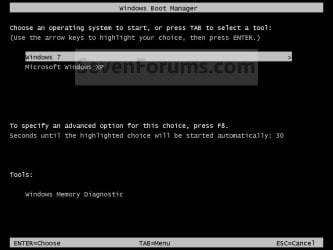
EXAMPLE: Windows Boot Manager
NOTE: This is the boot screen where you select what operating system that you would like to start. By default, you have 30 seconds to choose another operating system before the default operating system will start automatically.
Example.jpg


OPTION ONE

When XP is Installed First


NOTE: If you have a RAID setup, you will need to have the Windows 7 RAID drivers on a USB flash drive available to select and load while installing Windows 7.
1. Do step 2 or 3 below for where you wanted to install Windows 7 at.

2. To Create a New Partition from the XP Hard Disk Drive
A) With your Windows 7 installation disc boot into the Command Prompt from the System Recovery Options screen.
NOTE: Make sure that the CD/DVD drive is selected first in the boot order in the BIOS.

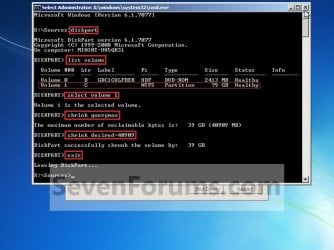
B) In the command prompt, select and shrink the XP volume by how many MB (1024 MB = 1 GB) you want to have for this Windows 7 partition. (See screenshot below)
NOTE: You would do steps 2 to 9 in METHOD TWO at that link. Windows 7 will need a minimum of 16 GB (16384 MB).
XP-W7_1.jpg
C) Click on the X at the top right corner to close the command prompt. (See screenshot above)

D) Click on the X at the top right corner to close System Recovery Options. (See screenshot below)
XP-W7_2.jpg
E) Go to step 4.
3. To Use a Separate Hard Disk Drive than the XP Drive
A) Boot from your Windows 7 installation disc.
NOTE: Make sure that the CD/DVD drive is selected first in the boot order in the BIOS.
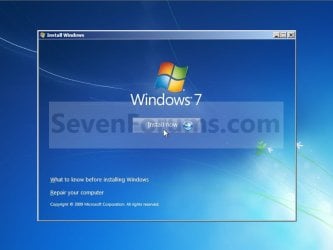
4. Click on the Install now button. (See screenshot below)
XP-W7_3.jpg
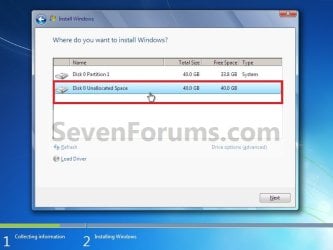
5. When you get to this point, select the partition (step 2) or hard drive to install Windows 7 on. (See screenshot below)
XP-W7_4.jpg
6. Finish installing Windows 7.
NOTE: You would start at step 9 in that link to finish installing Windows 7.

7. When finished, restart the computer to have the option to boot from XP (Earlier Verision of Windows) or Windows 7. (See screenshot below)

   Note
If you are only booting into Windows 7 and do not have XP listed in the Windows Boot Manager, then you can install only EasyBCD (step 8 Option Two below) to add XP (or Windows 7) while started in Windows 7 the same way to the boot list.

Example.jpg


OPTION TWO

When Windows 7 is Installed First


   Warning

1. To Create a New Partition from the Windows 7 Hard Disk Drive
NOTE: If you want to install XP on a separate internal hard drive instead, then skip this step and go to step 2.
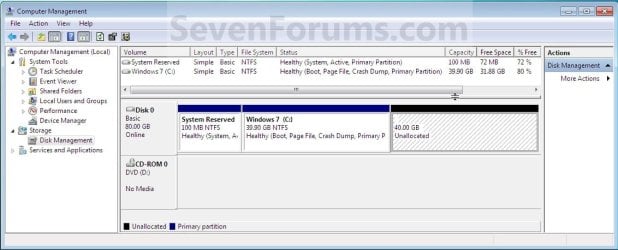
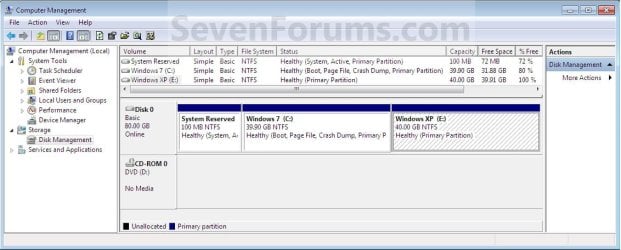
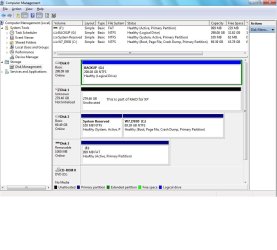
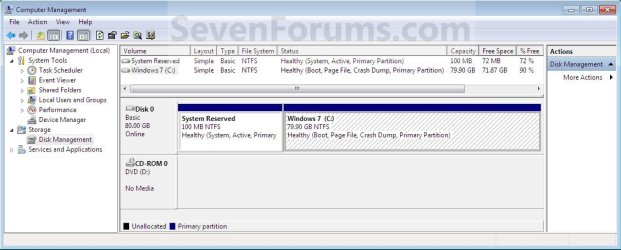
A) In Windows 7, select and shrink the Windows 7 volume in Disk Management by how many MB (1024 MB = 1 GB) you want to have for this XP partition. (See screenshots below)
NOTE: You would do all of Method One at that link.
W7-XP-1.jpg

W7-XP-2.jpg

W7-XP-3.jpg
2. Insert your XP installation disc, then restart the computer and press any key to boot from it when prompted. (See screenshot below)
NOTE: Make sure that the CD/DVD drive is selected first in the boot order in the BIOS.

Step1.jpg
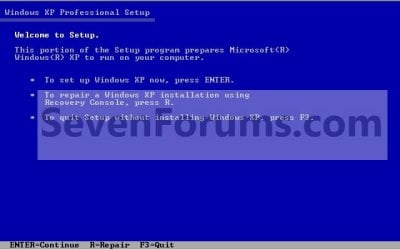
3. From XP Setup, Press Enter. (See screenshot below)


   Warning

W7-XP-4.jpg
4. Press F8. (See screenshot below)
NOTE: On some multimedia keyboards, you may need to press the F-Lock or Function key before pressing F8.
W7-XP-5.jpg
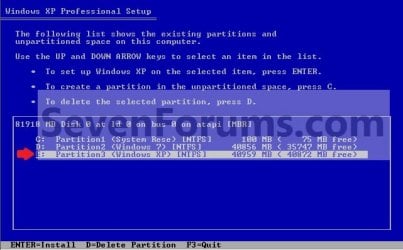
5. Select the partition (step 1) or hard drive that you want to install XP on using the arrow keys and press Enter.
W7-XP-6.jpg
6. Finish installing XP.


   Tip
If you get Error loading Operating System after XP restarts:
  • Using your Windows 7 installation disc, boot to the command prompt at startup.
  • Type in these comands below, and press enter after each one.
    • bootrec /FixMbr
    • bootrec /FixBoot
    • bootrec /RebuildBcd
  • Exit the command prompt and restart the computer.
  • At this point, Windows 7 should boot up the same way before trying to install XP.
  • Continue to step 8 below and run EasyBCD from Windows 7 instead.

7. In XP, download and install .Net Framework 2.0 (32-bit) version or .Net Framework 2.0 (64-bit) version first, and EasyBCD (free version) for your 32-bit (x86) or 64-bit (x86) XP.
NOTE: In XP, Net Framework is required to be installed to run EasyBCD. After you click on Register (at bottom of link) for the free EasyBCD, registration is not required to download it.

8. Run EasyBCD (free version).
NOTE: This is required to repair the Windows 7 boot file and add XP to the Windows Boot Manager list.

9. On the left side of EasyBCD, click on the Add New Entry button. (See screenshot below)
A) In the top section under Operating Systems, click on the Windows tab. (See screenshot below)
B) To the right of Type, select Windows NT/2k/XP/2k3 from the drop down menu. (See screenshot below)
:warn:WARNING: Be sure to leave the Automatically detect correct drive box checked.

C) To the right of Name, you can leave the default Microsoft Windows XP as the name to be displayed in the Windows Boot Manager, or you can type whatever name you would like to have instead. (See screenshot below)
D) Click on the Add Entry button. (See screenshot below)
W7-XP-7.jpg
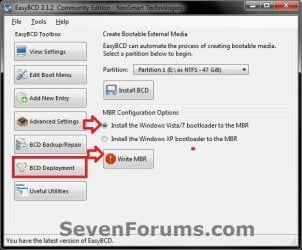
10. On the left side of EasyBCD, click on the BCD Deployment button, select (dot) the Install the Windows Vista/7 bootloader to the MBR option, and click on the Write MBR button. (See screenshot below)
W7-XP-9.jpg
11. Close EasyBCD.

12. Restart the computer to have the option to boot from Microsoft Windows XP or Windows 7. (See screenshot below)
Example2.jpg
   Tip
If Windows 7 will not start up when selected, then use your Windows 7 installation DVD to do a Startup Repair.

That's it,
Shawn


Last edited:
Your'e welcome Alex. Well, at least it will be easier to remove XP in the future, if you decide to later, without affecting Windows 7 since it was installed 2nd.
 

My Computer My Computer

At a glance

64-bit Windows 11 Pro for WorkstationsIntel i7-8700K OC'd to 5 GHz64 GB (4x16GB) G.SKILL TridentZ RGB DDR4 3600...ASUS ROG-STRIX-GTX1080TI-O11G-GAMING
Computer type
PC/Desktop
Computer Manufacturer/Model Number
Self built custom
OS
64-bit Windows 11 Pro for Workstations
CPU
Intel i7-8700K OC'd to 5 GHz
Motherboard
ASUS ROG Maximus XI Formula Z390
Memory
64 GB (4x16GB) G.SKILL TridentZ RGB DDR4 3600 MHz
Graphics Card(s)
ASUS ROG-STRIX-GTX1080TI-O11G-GAMING
Sound Card
Integrated
Monitor(s) Displays
2 x Samsung Odyssey G7 27"
Screen Resolution
2560x1440
Hard Drives
1TB Samsung 990 PRO M.2,
4TB Samsung 990 PRO PRO M.2,
TerraMaster F8 SSD Plus NAS
PSU
Seasonic Prime Titanium 850W
Case
Thermaltake Core P3
Cooling
Corsair Hydro H115i
Keyboard
Logitech wireless K800
Mouse
Logitech MX Master 4
Internet Speed
2 Gb/s Download and 100 Mb/s Upload
Antivirus
Malwarebyte Anti-Malware Premium
Browser
Google Chrome
Other Info
Logitech Z625 speaker system,
Logitech BRIO 4K Pro webcam,
HP Color LaserJet Pro MFP M477fdn,
APC SMART-UPS RT 1000 XL - SURT1000XLI,
Galaxy S23 Plus phone
Dear Alex

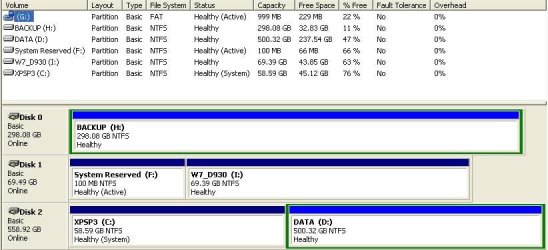
Primary partitions are always get first drive letters (in windows XP primary & active partition is C drive)

if you Install Windows XP first & then Install Windows 7 from withing Windows XP, you will get wht you are looking for otherwise Install Windows 7 without creating System reserved partition.

when you delete partition & create new partition during Windows 7 Installation. You are asked to create 100MB parition that time you can skip & select no. Windows 7 will be installed on one partition...
then Install Windows XP
am still not shur, i think Windows 7 will be still C Drive.

else if you have Dual boot Windows then assign drive letter to system reserved
copy/move "boot" folder && bootmgr from system reserved partition to Windows 7 partition
Note: also move boot.ini, NTDETECT.COM, ntldr to Windows 7 Partition
delete system reserved partition & make Windows 7 partition active

atleast you will get rid of system reserved small size parition as C Drive in Windows XP

Best Regards,
EverWin
 

My Computer My Computer

At a glance

Windows 7AMD Phenom II X4 925A-DATA 2GB DDR3ATI 4200 256MB
Computer Manufacturer/Model Number
AMD.ATI.ASUS
OS
Windows 7
CPU
AMD Phenom II X4 925
Motherboard
Asus M4A785T-M
Memory
A-DATA 2GB DDR3
Graphics Card(s)
ATI 4200 256MB
Sound Card
VIA Vinyl HD Audio
Monitor(s) Displays
Samsung 22" 2233
Hard Drives
WD Sata II 500GB X2 (RAID 0)
PSU
VIP 400W Gold
Case
iBall Gamer
Cooling
AMD Cooler
Keyboard
Logitech Wired
Mouse
Logitech Wired
Internet Speed
512kbps Unlimited
EverWin,

Among the many installations I did yesterday & today, I remember that once the 100MB system reserve was left out, and indeed like you say, I mean to remember that Windows 7 became C: drive while XP D: drive. Unfortunately I thought something was totally wrong as I received error after error when trying to connect to my wireless router, so I started reinstalling the two OS' again.

If the 100MB system reserve on Windows 7 isn't a very important thing, I would like to do another attempt on reinstalling everything.

Unfortunately I didn't understand anything of what you said about "assigning drive letter to system reserved copy/move "boot" folder && bootmgr from system reserved partition to Windows 7 partition
Note: also move boot.ini, NTDETECT.COM, ntldr to Windows 7 Partition
delete system reserved partition & make Windows 7 partition active".

This is new to me and I feeel dumb now :o

Anyway I can acknowledge that what you say is quite the answer to a more cleaner impression. Unfortunately I don't know exactly how to proceed :D

You guys here are very nice and polite.

I am glad I came here to read and finally registered as a member.

Regards,

Alex
 

My Computer My Computer

At a glance

Windows 7 & XP
OS
Windows 7 & XP
Hi again - it's been so awfully long ago since I posted here :-) ...,

I wonder whether there's one possibility to get all the benefits I was looking for. (Meaning: An 'aligned' formatting for the SSD drive, and only one system (C: ) drive independent on whether one logs onto Windows 7 or XP.)

Here's my last theoriatical solution to the problem: I have this external adapter where I can plug in all kinds of hard drives. What if I pick out the SSD drive from the laptop, run Windows 7 on another machine that I have, and format the SSD drive as an external drive? First of all I will obtain the correct alignment for the SSD drive. Then (still the drive as an external drive), I will be making two partitions, one for XP and one for Windows 7.... and then after having done these few things I'll plug the SSD disc again into the laptop and first install XP (like I did a month ago), and next install Windows 7 on the other partition. Theoretically I would assume that I then will get the correct 'alignment' and also will get an identical installation like the one I did a month ago where each OS only had one 'neat' C: drive.

What do you think about that theory? Do you think it will be able to be put into practice?

Regards,

Alex
 

My Computer My Computer

At a glance

Windows 7 & XP
OS
Windows 7 & XP
You ask for a floppy disc, but uh, I have a laptop that doesn't have a floppy disc drive (isn't that a bit retro?)

I'm pretty sure my PC's a SATA-based one. What do I do if I don't have a floppy drive, I have Windows 7, and I want to put XP on a 50GB partition? :s
 

My Computer My Computer

At a glance

Windows 7 64-bit2.0GHZ4.0GB SDRAM256MB Mobility Radeon HD 4550
Computer Manufacturer/Model Number
Dell 1545
OS
Windows 7 64-bit
CPU
2.0GHZ
Motherboard
Intel Core 2 Duo P7350
Memory
4.0GB SDRAM
Graphics Card(s)
256MB Mobility Radeon HD 4550
Sound Card
Sound Blaster
Monitor(s) Displays
15"
Hard Drives
300GB
Keyboard
Integrated
Mouse
Integrated
Internet Speed
2,500kb/down; 800kb/up
Other Info
I hate Dell. I have a laptop.

My Computer My Computer

At a glance

64-bit Windows 11 Pro for WorkstationsIntel i7-8700K OC'd to 5 GHz64 GB (4x16GB) G.SKILL TridentZ RGB DDR4 3600...ASUS ROG-STRIX-GTX1080TI-O11G-GAMING
Computer type
PC/Desktop
Computer Manufacturer/Model Number
Self built custom
OS
64-bit Windows 11 Pro for Workstations
CPU
Intel i7-8700K OC'd to 5 GHz
Motherboard
ASUS ROG Maximus XI Formula Z390
Memory
64 GB (4x16GB) G.SKILL TridentZ RGB DDR4 3600 MHz
Graphics Card(s)
ASUS ROG-STRIX-GTX1080TI-O11G-GAMING
Sound Card
Integrated
Monitor(s) Displays
2 x Samsung Odyssey G7 27"
Screen Resolution
2560x1440
Hard Drives
1TB Samsung 990 PRO M.2,
4TB Samsung 990 PRO PRO M.2,
TerraMaster F8 SSD Plus NAS
PSU
Seasonic Prime Titanium 850W
Case
Thermaltake Core P3
Cooling
Corsair Hydro H115i
Keyboard
Logitech wireless K800
Mouse
Logitech MX Master 4
Internet Speed
2 Gb/s Download and 100 Mb/s Upload
Antivirus
Malwarebyte Anti-Malware Premium
Browser
Google Chrome
Other Info
Logitech Z625 speaker system,
Logitech BRIO 4K Pro webcam,
HP Color LaserJet Pro MFP M477fdn,
APC SMART-UPS RT 1000 XL - SURT1000XLI,
Galaxy S23 Plus phone
So much stuff to take into consideration xD

Thanks, though. I'll try my best to get it to work o.o So I hafta reburn the XP image and put the SATA drivers on the disc? How do I find my SATA drivers?

>is a noob kinda<
 

My Computer My Computer

At a glance

Windows 7 64-bit2.0GHZ4.0GB SDRAM256MB Mobility Radeon HD 4550
Computer Manufacturer/Model Number
Dell 1545
OS
Windows 7 64-bit
CPU
2.0GHZ
Motherboard
Intel Core 2 Duo P7350
Memory
4.0GB SDRAM
Graphics Card(s)
256MB Mobility Radeon HD 4550
Sound Card
Sound Blaster
Monitor(s) Displays
15"
Hard Drives
300GB
Keyboard
Integrated
Mouse
Integrated
Internet Speed
2,500kb/down; 800kb/up
Other Info
I hate Dell. I have a laptop.

My Computer My Computer

At a glance

64-bit Windows 11 Pro for WorkstationsIntel i7-8700K OC'd to 5 GHz64 GB (4x16GB) G.SKILL TridentZ RGB DDR4 3600...ASUS ROG-STRIX-GTX1080TI-O11G-GAMING
Computer type
PC/Desktop
Computer Manufacturer/Model Number
Self built custom
OS
64-bit Windows 11 Pro for Workstations
CPU
Intel i7-8700K OC'd to 5 GHz
Motherboard
ASUS ROG Maximus XI Formula Z390
Memory
64 GB (4x16GB) G.SKILL TridentZ RGB DDR4 3600 MHz
Graphics Card(s)
ASUS ROG-STRIX-GTX1080TI-O11G-GAMING
Sound Card
Integrated
Monitor(s) Displays
2 x Samsung Odyssey G7 27"
Screen Resolution
2560x1440
Hard Drives
1TB Samsung 990 PRO M.2,
4TB Samsung 990 PRO PRO M.2,
TerraMaster F8 SSD Plus NAS
PSU
Seasonic Prime Titanium 850W
Case
Thermaltake Core P3
Cooling
Corsair Hydro H115i
Keyboard
Logitech wireless K800
Mouse
Logitech MX Master 4
Internet Speed
2 Gb/s Download and 100 Mb/s Upload
Antivirus
Malwarebyte Anti-Malware Premium
Browser
Google Chrome
Other Info
Logitech Z625 speaker system,
Logitech BRIO 4K Pro webcam,
HP Color LaserJet Pro MFP M477fdn,
APC SMART-UPS RT 1000 XL - SURT1000XLI,
Galaxy S23 Plus phone
Oh! Thanks a lot xD I'll give you feedback if I ever manage to successfully install it :D
 

My Computer My Computer

At a glance

Windows 7 64-bit2.0GHZ4.0GB SDRAM256MB Mobility Radeon HD 4550
Computer Manufacturer/Model Number
Dell 1545
OS
Windows 7 64-bit
CPU
2.0GHZ
Motherboard
Intel Core 2 Duo P7350
Memory
4.0GB SDRAM
Graphics Card(s)
256MB Mobility Radeon HD 4550
Sound Card
Sound Blaster
Monitor(s) Displays
15"
Hard Drives
300GB
Keyboard
Integrated
Mouse
Integrated
Internet Speed
2,500kb/down; 800kb/up
Other Info
I hate Dell. I have a laptop.
I have a problem with dual boot.
I used metod two to do it.
When i'm on xp i can't acces my files on D:, I just can do it on windows 7..
I hope you can fix this problem
I have two print screen from my desktop....

http://img205.imageshack.us/img205/5333/sevenkt.png

http://img341.imageshack.us/img341/6172/74435766.png

Dear ffarmmir

i think you need to reset NTFS Folder Permission

read the below articles & follow the steps...

How to set required NTFS permissions and user rights for an IIS 5.0, IIS 5.1, or IIS 6.0 Web server

How to set, view, change, or remove special permissions for files and folders in Windows XP

How to take ownership of a file or a folder in Windows XP

Regards,
EverWin
 

My Computer My Computer

At a glance

Windows 7AMD Phenom II X4 925A-DATA 2GB DDR3ATI 4200 256MB
Computer Manufacturer/Model Number
AMD.ATI.ASUS
OS
Windows 7
CPU
AMD Phenom II X4 925
Motherboard
Asus M4A785T-M
Memory
A-DATA 2GB DDR3
Graphics Card(s)
ATI 4200 256MB
Sound Card
VIA Vinyl HD Audio
Monitor(s) Displays
Samsung 22" 2233
Hard Drives
WD Sata II 500GB X2 (RAID 0)
PSU
VIP 400W Gold
Case
iBall Gamer
Cooling
AMD Cooler
Keyboard
Logitech Wired
Mouse
Logitech Wired
Internet Speed
512kbps Unlimited
Didn't work ...
Thanks anyway...
 

My Computer My Computer

At a glance

windows 7
OS
windows 7
Hi, i need help, my desktop is a hp pavillion media center m7790y and i have windows 7 already installed on my desktop pc and i want to install xp so i can have a dual boot of both operating system, but i have no idea what kind of sata drivers i have or where to get them so i can copy them to a external usb floppy ?
 

My Computer My Computer

At a glance

Windows 7 Ultimate
OS
Windows 7 Ultimate
Hi, i need help, my desktop is a hp pavillion media center m7790y and i have windows 7 already installed on my desktop pc and i want to install xp so i can have a dual boot of both operating system, but i have no idea what kind of sata drivers i have or where to get them so i can copy them to a external usb floppy ?
Try here:
http://downloadcenter.intel.com/Sea...t=Intel®+Rapid+Storage+Technology+(Intel®+RST

Have a read:

http://www.sevenforums.com/tutorials/66010-sata-drivers-load-windows-xp-setup-dual-boot.html

General XP Downgrade Guide for HP Laptops - HP Support Forum
 

My Computer My Computer

At a glance

ME/XP/Vista/Win7
OS
ME/XP/Vista/Win7
I'v always wanted to try duel boot or triple boot (Possible?)

And thus, how do you duel boot on a netbook? No rom drive

And I have like 210 GB which is all windows 7 os, and thus no recovery drive or nothing for some weird reason and so I know I'd have to partion it,

Would I have to get a usb or a seperate hard drive and get the installation files onto that usb/hard drive the plug it in and install it on that partion?
 

My Computer My Computer

At a glance

Windows 7 Home Premium 64-bit (6.1, Build 7601)Intel(R) Pentium(R) CPU B950 @ 2.10GHz (2 CPU...6GB DDR3 Dual 6034 MbytesIntel HD Graphics
Computer Manufacturer/Model Number
Toshiba Satellite C855-1GP
OS
Windows 7 Home Premium 64-bit (6.1, Build 7601)
CPU
Intel(R) Pentium(R) CPU B950 @ 2.10GHz (2 CPUs), ~2.1GHz
Motherboard
Intel Sandy Bridge ID1E59
Memory
6GB DDR3 Dual 6034 Mbytes
Graphics Card(s)
Intel HD Graphics
Sound Card
Realtek High Definition Audio
Monitor(s) Displays
LGD033A
Screen Resolution
1366 x 768 (32 bit) (60Hz)
Hard Drives
Hitachi HTS547575A9E384 600GB
Keyboard
Normal Keyboard
Mouse
Techair 3D Optical Mouse
Internet Speed
4.04mbps download speed 0.54mbps upload speed
Other Info
Awesome Laptop.

My Computer My Computer

At a glance

Windows 7 Professional x64Intel i7 2600K OC'd @ 4620 MHz16GB GSkill Sniper 2133 Mhz (4x4GB)EVGA GeForce GTX 480 SuperClocked+
Computer Manufacturer/Model Number
Custom
OS
Windows 7 Professional x64
CPU
Intel i7 2600K OC'd @ 4620 MHz
Motherboard
Asus P8Z68-V Pro
Memory
16GB GSkill Sniper 2133 Mhz (4x4GB)
Graphics Card(s)
EVGA GeForce GTX 480 SuperClocked+
Sound Card
Realtek High Definition Audio
Monitor(s) Displays
2x Acer S273HLbmii 27"
Screen Resolution
2 x 1920x1080
Hard Drives
64GB Crucial M4 SSD

Storage: Hitachi 1TB 5400RPM, Samsung 1.5TB 5400RPM
PSU
Corsair HW Series 750w (modular)
Case
Cooler Master HAF 932 Advanced Blue Edition
Cooling
CM Hyper 212+ CPU cooler, 3x 230mm + 1x 140mm case fans
Keyboard
Logitech MK320 (wireless)
Mouse
Logitech MK320 (wireless)
Internet Speed
30 Mb/s : 2 Mb/s
Hi, i need help, my desktop is a hp pavillion media center m7790y and i have windows 7 already installed on my desktop pc and i want to install xp so i can have a dual boot of both operating system, but i have no idea what kind of sata drivers i have or where to get them so i can copy them to a external usb floppy ?
Try here:
http://downloadcenter.intel.com/SearchResult.aspx?lang=eng&ProductFamily=Chipsets&ProductLine=Chipset+Software&ProductProduct=Intel%c2%ae+Rapid+Storage+Technology+(Intel%c2%ae+RST

Have a read:

http://www.sevenforums.com/tutorials/66010-sata-drivers-load-windows-xp-setup-dual-boot.html

General XP Downgrade Guide for HP Laptops - HP Support Forum
Hi, thanks for the help, just wanted to confirm if this is exactly the one i need for the F6 floppy installation ? it only says raid driver, but nothing about sata or is it the same thing ?

Is this the right one that i need ? - 32-bit Intel® RST Driver Files for F6 Install
 

My Computer My Computer

At a glance

Windows 7 Ultimate
OS
Windows 7 Ultimate
Hi, i need help, my desktop is a hp pavillion media center m7790y and i have windows 7 already installed on my desktop pc and i want to install xp so i can have a dual boot of both operating system, but i have no idea what kind of sata drivers i have or where to get them so i can copy them to a external usb floppy ?
Try here:
http://downloadcenter.intel.com/SearchResult.aspx?lang=eng&ProductFamily=Chipsets&ProductLine=Chipset+Software&ProductProduct=Intel%c2%ae+Rapid+Storage+Technology+(Intel%c2%ae+RST

Have a read:

http://www.sevenforums.com/tutorials/66010-sata-drivers-load-windows-xp-setup-dual-boot.html

General XP Downgrade Guide for HP Laptops - HP Support Forum
Hi, thanks for the help, just wanted to confirm if this is exactly the one i need for the F6 floppy installation ? it only says raid driver, but nothing about sata or is it the same thing ?

Is this the right one that i need ? - 32-bit Intel® RST Driver Files for F6 Install

For Intel 32bit, yes.
 

My Computer My Computer

At a glance

ME/XP/Vista/Win7
OS
ME/XP/Vista/Win7
Thanks, will do..First i have to wait for my external usb floppy to arrive which i just ordered..
 

My Computer My Computer

At a glance

Windows 7 Ultimate
OS
Windows 7 Ultimate
Dual boot Method 3

If installation has been done on 1 HDD (XP or W7) and is working then disconect it by removing sata data cable at HDD. Unplug power cable for that HDD. Power down PC.

Connect different HDD and install other OS. Check it and then power down PC. Plug first HDD and its power cable. Boot with selecting "boot options" Gigabyte F12 and select HDD for desired OS.

DONE.

If interaction XP W7 is NOT desirable then just disable particular serial ATA controler in device manager.

Done it on GA 8N SLI Royal nVidia chipset, GA EP45 3udr intel chipset, Ga X58 UD3R Intel chipset.
 

Attachments

  • Disk Manager 1 XP.JPG
    Disk Manager 1 XP.JPG
    47.8 KB · Views: 675
  • W7 Device manager.jpg
    W7 Device manager.jpg
    28.4 KB · Views: 383
  • W 7 Disks.jpg
    W 7 Disks.jpg
    89.3 KB · Views: 718
Last edited:

My Computer My Computer

At a glance

Me, XP, Vista, W7, MepisIntel AMD
Computer Manufacturer/Model Number
selfbuild
OS
Me, XP, Vista, W7, Mepis
CPU
Intel AMD
Motherboard
Gigabyte Asus
Hard Drives
Seagate
Cooling
Air
Back
Top