Dual Boot Installation with Windows 7 and XP

How to Setup a Dual Boot Installation with Windows 7 and XP


   Information
This will show you how to install Windows 7 and XP to dual boot with when you already have either Windows 7 or XP installed first.
   Note
With a dual boot installaton, you will have two operating systems (OS) installed. When you start the computer, you will have the choice to choose which OS you would like to start up to. This method is the easiest way of doing a dual boot with these two operating systems.
   Tip
When dual booting with another OS (ex: Vista or XP), you may not always have that OS partition show up in Computer with a driver letter in Windows 7. If this happens, then you will just need to add a drive letter to the OS (ex: Vista or XP) partition in Windows 7 Disk Management for it to show up in Computer with a driver letter.
   Warning
To stop XP from deleting your Windows 7 System Restore Points everytime XP is started, then see System Restore Points - Stop XP Dual Boot Delete to hide Windows 7 from XP.

Windows 7 Minimum Hardware Requirements


NOTE: For more information on this, see: Windows 7 system requirements
  • 1 GHz 32-bit or 64-bit processor
  • 1 GB RAM for 32-bit Windows 7 OR 2 GB RAM for 64-bit Windows 7
  • 16 GB available disk space 32-bit Windows 7 OR 20 GB for 64-bit Windows 7
  • Support for DirectX 9 graphics with 128 MB memory (in order to enable Aero theme)
  • DVD-R/W Drive
  • Internet or phone access to activate Windows 7.
Windows XP Minimum Hardware Requirements

NOTE: For more information on this, see: System requirements for Windows XP operating systems
  • PC with 300 megahertz (MHz) or higher processor clock speed recommended; 233-MHz minimum required;* Intel Pentium/Celeron family, AMD K6/Athlon/Duron family, or compatible processor recommended
  • 128 megabytes (MB) of RAM or higher recommended (64 MB minimum supported; may limit performance and some features)
  • 1.5 gigabyte (GB) of available hard disk space.*
  • Super VGA (800 × 600) or higher resolution video adapter and monitor
  • CD-ROM or DVD drive
  • Keyboard and Microsoft Mouse or compatible pointing device
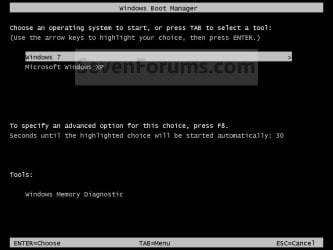
EXAMPLE: Windows Boot Manager
NOTE: This is the boot screen where you select what operating system that you would like to start. By default, you have 30 seconds to choose another operating system before the default operating system will start automatically.
Example.jpg


OPTION ONE

When XP is Installed First


NOTE: If you have a RAID setup, you will need to have the Windows 7 RAID drivers on a USB flash drive available to select and load while installing Windows 7.
1. Do step 2 or 3 below for where you wanted to install Windows 7 at.

2. To Create a New Partition from the XP Hard Disk Drive
A) With your Windows 7 installation disc boot into the Command Prompt from the System Recovery Options screen.
NOTE: Make sure that the CD/DVD drive is selected first in the boot order in the BIOS.

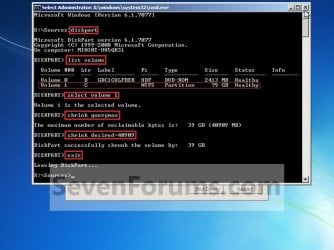
B) In the command prompt, select and shrink the XP volume by how many MB (1024 MB = 1 GB) you want to have for this Windows 7 partition. (See screenshot below)
NOTE: You would do steps 2 to 9 in METHOD TWO at that link. Windows 7 will need a minimum of 16 GB (16384 MB).
XP-W7_1.jpg
C) Click on the X at the top right corner to close the command prompt. (See screenshot above)

D) Click on the X at the top right corner to close System Recovery Options. (See screenshot below)
XP-W7_2.jpg
E) Go to step 4.
3. To Use a Separate Hard Disk Drive than the XP Drive
A) Boot from your Windows 7 installation disc.
NOTE: Make sure that the CD/DVD drive is selected first in the boot order in the BIOS.
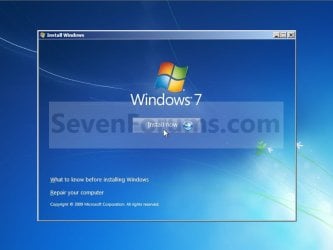
4. Click on the Install now button. (See screenshot below)
XP-W7_3.jpg
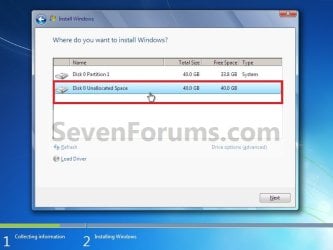
5. When you get to this point, select the partition (step 2) or hard drive to install Windows 7 on. (See screenshot below)
XP-W7_4.jpg
6. Finish installing Windows 7.
NOTE: You would start at step 9 in that link to finish installing Windows 7.

7. When finished, restart the computer to have the option to boot from XP (Earlier Verision of Windows) or Windows 7. (See screenshot below)

   Note
If you are only booting into Windows 7 and do not have XP listed in the Windows Boot Manager, then you can install only EasyBCD (step 8 Option Two below) to add XP (or Windows 7) while started in Windows 7 the same way to the boot list.

Example.jpg


OPTION TWO

When Windows 7 is Installed First


   Warning

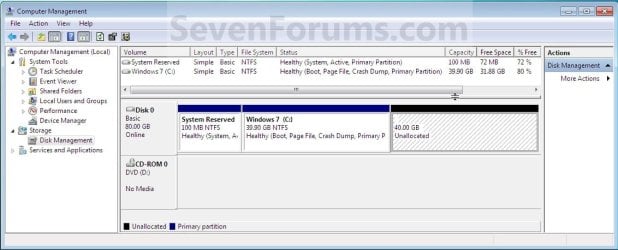
1. To Create a New Partition from the Windows 7 Hard Disk Drive
NOTE: If you want to install XP on a separate internal hard drive instead, then skip this step and go to step 2.
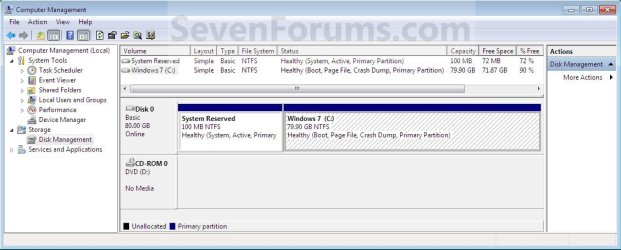
A) In Windows 7, select and shrink the Windows 7 volume in Disk Management by how many MB (1024 MB = 1 GB) you want to have for this XP partition. (See screenshots below)
NOTE: You would do all of Method One at that link.
W7-XP-1.jpg

W7-XP-2.jpg

W7-XP-3.jpg
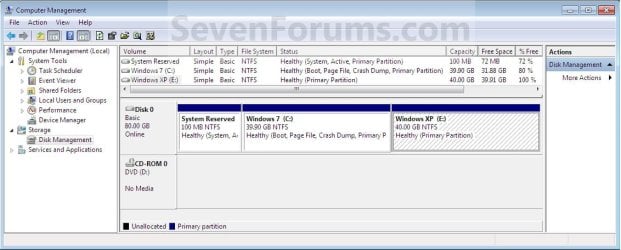
2. Insert your XP installation disc, then restart the computer and press any key to boot from it when prompted. (See screenshot below)
NOTE: Make sure that the CD/DVD drive is selected first in the boot order in the BIOS.

Step1.jpg
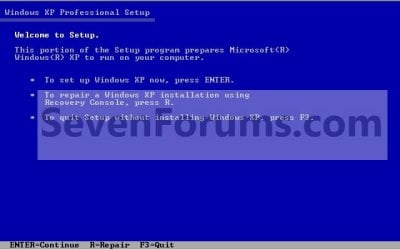
3. From XP Setup, Press Enter. (See screenshot below)


   Warning

W7-XP-4.jpg
4. Press F8. (See screenshot below)
NOTE: On some multimedia keyboards, you may need to press the F-Lock or Function key before pressing F8.
W7-XP-5.jpg
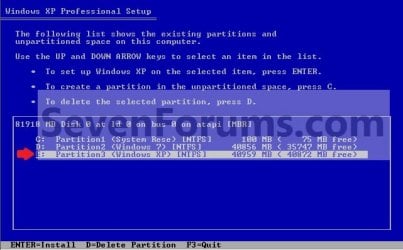
5. Select the partition (step 1) or hard drive that you want to install XP on using the arrow keys and press Enter.
W7-XP-6.jpg
6. Finish installing XP.


   Tip
If you get Error loading Operating System after XP restarts:
  • Using your Windows 7 installation disc, boot to the command prompt at startup.
  • Type in these comands below, and press enter after each one.
    • bootrec /FixMbr
    • bootrec /FixBoot
    • bootrec /RebuildBcd
  • Exit the command prompt and restart the computer.
  • At this point, Windows 7 should boot up the same way before trying to install XP.
  • Continue to step 8 below and run EasyBCD from Windows 7 instead.

7. In XP, download and install .Net Framework 2.0 (32-bit) version or .Net Framework 2.0 (64-bit) version first, and EasyBCD (free version) for your 32-bit (x86) or 64-bit (x86) XP.
NOTE: In XP, Net Framework is required to be installed to run EasyBCD. After you click on Register (at bottom of link) for the free EasyBCD, registration is not required to download it.

8. Run EasyBCD (free version).
NOTE: This is required to repair the Windows 7 boot file and add XP to the Windows Boot Manager list.

9. On the left side of EasyBCD, click on the Add New Entry button. (See screenshot below)
A) In the top section under Operating Systems, click on the Windows tab. (See screenshot below)
B) To the right of Type, select Windows NT/2k/XP/2k3 from the drop down menu. (See screenshot below)
:warn:WARNING: Be sure to leave the Automatically detect correct drive box checked.

C) To the right of Name, you can leave the default Microsoft Windows XP as the name to be displayed in the Windows Boot Manager, or you can type whatever name you would like to have instead. (See screenshot below)
D) Click on the Add Entry button. (See screenshot below)
W7-XP-7.jpg
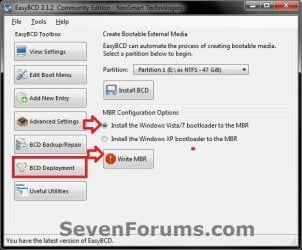
10. On the left side of EasyBCD, click on the BCD Deployment button, select (dot) the Install the Windows Vista/7 bootloader to the MBR option, and click on the Write MBR button. (See screenshot below)
W7-XP-9.jpg
11. Close EasyBCD.

12. Restart the computer to have the option to boot from Microsoft Windows XP or Windows 7. (See screenshot below)
Example2.jpg
   Tip
If Windows 7 will not start up when selected, then use your Windows 7 installation DVD to do a Startup Repair.

That's it,
Shawn


Last edited:
Thanks. I was confused with the EasyBCD settings. Then it remind me of you. :)
 

My Computer My Computer

At a glance

Windows® 8 Pro (64-bit)Intel® Core™ i5 Processor 2467M (1.60GHz, 3MB...6GB DDR3 System Memory at 1,333MHz (on BD 4GB...AMD Radeon™ HD7550M 1GB DDR3 (Ext. Graphic)
Computer Manufacturer/Model Number
Samsung NP530U4B-S02IN
OS
Windows® 8 Pro (64-bit)
CPU
Intel® Core™ i5 Processor 2467M (1.60GHz, 3MB L3 Cache)
Motherboard
Samsung Electronics
Memory
6GB DDR3 System Memory at 1,333MHz (on BD 4GB + 2GB x 1)
Graphics Card(s)
AMD Radeon™ HD7550M 1GB DDR3 (Ext. Graphic)
Sound Card
Realtek High Definition Audio
Monitor(s) Displays
35.56cm (14.0) SuperBright 300nit HD LED Display
Screen Resolution
1366x768
Hard Drives
1TB S-ATA II Hard Drive (5400RPM) with ExpressCache 16GB SSD
Internet Speed
sucks
Antivirus
Microsoft Security Essentials
Browser
Google Chrome (Sync enabled)
Lost xp dual boot

I have lost the dual boot to xp after installing windows 7 on second partition.
I have attempted to use the DB Tool described previously.
Question:
Should the "view settings" show both operating systems set to c:\ ??

The Windows XP keeps showing D:\...

I DO get the dual boot prompt when booting up, and it looks correct, but just keeps looping if i choose the Windows XP OS..
 

My Computer My Computer

At a glance

winxpIntel Dual Core 73002G
Computer Manufacturer/Model Number
gigabyte
OS
winxp
CPU
Intel Dual Core 7300
Memory
2G

My Computers My Computers

  • At a glance

    7 X64i5 84002x8gb 3200mhz
    Computer type
    PC/Desktop
    OS
    7 X64
    CPU
    i5 8400
    Motherboard
    gigabyte b365m ds3h
    Memory
    2x8gb 3200mhz
    Hard Drives
    various
    PSU
    pure power 11 400w cm
    Case
    Coolermaster
    Cooling
    cryorig m9i
  • At a glance

    7x64g54008gb ddr4 2400
    Computer type
    PC/Desktop
    OS
    7x64
    CPU
    g5400
    Motherboard
    ga b365m ds3h
    Memory
    8gb ddr4 2400
    PSU
    xfx pro 450w
Hi,

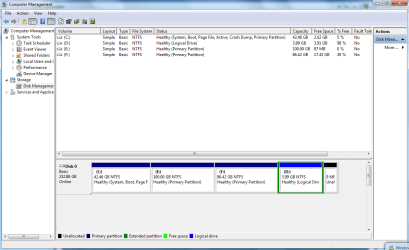
I want to have dual boot .. but i've a problem

2n1x8ih.png

as you can see the windows 7 is installed at C:
which is " system, Boot,... etc "
There's no system partition " 200 MB " to allocate a drive letter to it

BTW the partition i want to install xp in .. is D:
which is located at the end of the HD.

So .. What i should do now ??

waiting your reply
 

My Computer My Computer

At a glance

Windows 7P4 3g/2 M Cache3 GB RamBuilt-in
OS
Windows 7
CPU
P4 3g/2 M Cache
Motherboard
xfx nForce
Memory
3 GB Ram
Graphics Card(s)
Built-in
Sound Card
Built-in
Monitor(s) Displays
Philips 19"
Drive letter help

Hello Brink,

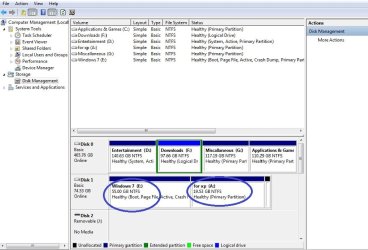
I'm currently running Windows 7 in hard drive 1 with two partitions E & A

I have windows 7 installed in E:
And gonna install xp in A:

I'm clear with all your steps except the 10th step in PART 2..
Just tell me what drive letter i should assign in EASYBCD in order to have a dual-boot of WIN 7 & WIN XP..
At tis time i wanna make clear that DRIVES A & E belong to a same hard disk and rest of the drives belong to another hard disk..

Thank you...
 

Attachments

  • sys.jpg
    sys.jpg
    61 KB · Views: 147

My Computer My Computer

At a glance

windows 7Intel P4 5241GbATI xpress 200(256mb)
Computer Manufacturer/Model Number
Hp Pavilion a1320 in Desktop PC
OS
windows 7
CPU
Intel P4 524
Motherboard
ATI
Memory
1Gb
Graphics Card(s)
ATI xpress 200(256mb)
Sound Card
Creative Audio pCI ES1371
Monitor(s) Displays
CRT HPm705
Hard Drives
DISK 1: WDD 80gb SATA
DISK 2: Seagate 500gb SATA
Case
ATX
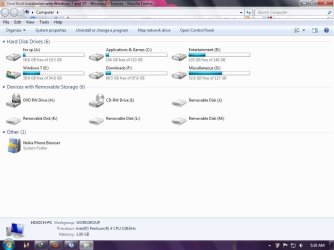
Please post a screenshot of the Disk Management window.
 

My Computers My Computers

  • At a glance

    7 X64i5 84002x8gb 3200mhz
    Computer type
    PC/Desktop
    OS
    7 X64
    CPU
    i5 8400
    Motherboard
    gigabyte b365m ds3h
    Memory
    2x8gb 3200mhz
    Hard Drives
    various
    PSU
    pure power 11 400w cm
    Case
    Coolermaster
    Cooling
    cryorig m9i
  • At a glance

    7x64g54008gb ddr4 2400
    Computer type
    PC/Desktop
    OS
    7x64
    CPU
    g5400
    Motherboard
    ga b365m ds3h
    Memory
    8gb ddr4 2400
    PSU
    xfx pro 450w
:o


Hello Brink,

I'm currently running Windows 7 in hard drive 1 with two partitions E & A

I have windows 7 installed in E:

And gonna install xp in A:

I'm clear with all your steps except the 10th step in PART 2..

Just tell me what drive letter i should assign in EASYBCD in order to have a dual-boot of WIN 7 & WIN XP..

At tis time i wanna make clear that DRIVES A & E belong to a same hard disk and rest of the drives belong to another hard disk..

Thank you..
 

Attachments

  • finsys.jpg
    finsys.jpg
    79.8 KB · Views: 146

My Computer My Computer

At a glance

windows 7Intel P4 5241GbATI xpress 200(256mb)
Computer Manufacturer/Model Number
Hp Pavilion a1320 in Desktop PC
OS
windows 7
CPU
Intel P4 524
Motherboard
ATI
Memory
1Gb
Graphics Card(s)
ATI xpress 200(256mb)
Sound Card
Creative Audio pCI ES1371
Monitor(s) Displays
CRT HPm705
Hard Drives
DISK 1: WDD 80gb SATA
DISK 2: Seagate 500gb SATA
Case
ATX
Hello mrwaseem,

You can install XP on D, then point Easybcd at C.
 

My Computers My Computers

  • At a glance

    7 X64i5 84002x8gb 3200mhz
    Computer type
    PC/Desktop
    OS
    7 X64
    CPU
    i5 8400
    Motherboard
    gigabyte b365m ds3h
    Memory
    2x8gb 3200mhz
    Hard Drives
    various
    PSU
    pure power 11 400w cm
    Case
    Coolermaster
    Cooling
    cryorig m9i
  • At a glance

    7x64g54008gb ddr4 2400
    Computer type
    PC/Desktop
    OS
    7x64
    CPU
    g5400
    Motherboard
    ga b365m ds3h
    Memory
    8gb ddr4 2400
    PSU
    xfx pro 450w
Hi funpicee,


- if you post a screenshot of Disk Management window - I will let you know.
 

My Computers My Computers

  • At a glance

    7 X64i5 84002x8gb 3200mhz
    Computer type
    PC/Desktop
    OS
    7 X64
    CPU
    i5 8400
    Motherboard
    gigabyte b365m ds3h
    Memory
    2x8gb 3200mhz
    Hard Drives
    various
    PSU
    pure power 11 400w cm
    Case
    Coolermaster
    Cooling
    cryorig m9i
  • At a glance

    7x64g54008gb ddr4 2400
    Computer type
    PC/Desktop
    OS
    7x64
    CPU
    g5400
    Motherboard
    ga b365m ds3h
    Memory
    8gb ddr4 2400
    PSU
    xfx pro 450w
Hello SIW2,
Thanks for d immediate response

I hav posted d screenshot of my DISK MANAGEMENT WINDOW

Plz help me to dual boot win 7 & xp

Thanking you
 

My Computer My Computer

At a glance

windows 7Intel P4 5241GbATI xpress 200(256mb)
Computer Manufacturer/Model Number
Hp Pavilion a1320 in Desktop PC
OS
windows 7
CPU
Intel P4 524
Motherboard
ATI
Memory
1Gb
Graphics Card(s)
ATI xpress 200(256mb)
Sound Card
Creative Audio pCI ES1371
Monitor(s) Displays
CRT HPm705
Hard Drives
DISK 1: WDD 80gb SATA
DISK 2: Seagate 500gb SATA
Case
ATX
Oh, I see - you attached it in to your earlier post.

If I were you :

Go into Bios and make sure the HD with 7 is the first in the HD boot order.

Install XP to partition A.

Boot 7 dvd and run startup repair 3 times.

You will then boot into 7.

Install Easybcd on 7 - click add/remove entry, select Drive E and Windows NT/2K/XP/2K3 .

Click Add entry.
 

My Computers My Computers

  • At a glance

    7 X64i5 84002x8gb 3200mhz
    Computer type
    PC/Desktop
    OS
    7 X64
    CPU
    i5 8400
    Motherboard
    gigabyte b365m ds3h
    Memory
    2x8gb 3200mhz
    Hard Drives
    various
    PSU
    pure power 11 400w cm
    Case
    Coolermaster
    Cooling
    cryorig m9i
  • At a glance

    7x64g54008gb ddr4 2400
    Computer type
    PC/Desktop
    OS
    7x64
    CPU
    g5400
    Motherboard
    ga b365m ds3h
    Memory
    8gb ddr4 2400
    PSU
    xfx pro 450w
SIW 2

I havnt installed xp til now as Win 7 may not function..
Im planning to install xp on A drive....

If i install ter wat al i must do in EASYBCD
 

My Computer My Computer

At a glance

windows 7Intel P4 5241GbATI xpress 200(256mb)
Computer Manufacturer/Model Number
Hp Pavilion a1320 in Desktop PC
OS
windows 7
CPU
Intel P4 524
Motherboard
ATI
Memory
1Gb
Graphics Card(s)
ATI xpress 200(256mb)
Sound Card
Creative Audio pCI ES1371
Monitor(s) Displays
CRT HPm705
Hard Drives
DISK 1: WDD 80gb SATA
DISK 2: Seagate 500gb SATA
Case
ATX
See my previous post.
 

My Computers My Computers

  • At a glance

    7 X64i5 84002x8gb 3200mhz
    Computer type
    PC/Desktop
    OS
    7 X64
    CPU
    i5 8400
    Motherboard
    gigabyte b365m ds3h
    Memory
    2x8gb 3200mhz
    Hard Drives
    various
    PSU
    pure power 11 400w cm
    Case
    Coolermaster
    Cooling
    cryorig m9i
  • At a glance

    7x64g54008gb ddr4 2400
    Computer type
    PC/Desktop
    OS
    7x64
    CPU
    g5400
    Motherboard
    ga b365m ds3h
    Memory
    8gb ddr4 2400
    PSU
    xfx pro 450w
thank you SIW 2..
Will try
 

My Computer My Computer

At a glance

windows 7Intel P4 5241GbATI xpress 200(256mb)
Computer Manufacturer/Model Number
Hp Pavilion a1320 in Desktop PC
OS
windows 7
CPU
Intel P4 524
Motherboard
ATI
Memory
1Gb
Graphics Card(s)
ATI xpress 200(256mb)
Sound Card
Creative Audio pCI ES1371
Monitor(s) Displays
CRT HPm705
Hard Drives
DISK 1: WDD 80gb SATA
DISK 2: Seagate 500gb SATA
Case
ATX
Lost WinXP boot....after Win7 install to 2nd partition

Here is my settings:
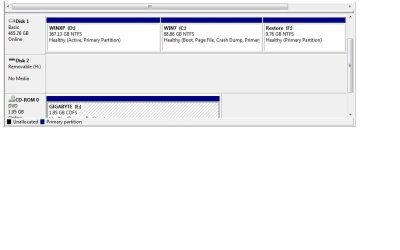
WinXP first installed on 1st partition, then Win7 installed on 2nd. I only can boot to Win7...
 

Attachments

  • Easybd111009.jpg
    Easybd111009.jpg
    18.9 KB · Views: 140
  • DiskMan111009.jpg
    DiskMan111009.jpg
    34.9 KB · Views: 149

My Computer My Computer

At a glance

winxpIntel Dual Core 73002G
Computer Manufacturer/Model Number
gigabyte
OS
winxp
CPU
Intel Dual Core 7300
Memory
2G
Hello Jlm86,

Try using EasyBCD to removed the current XP entry, and with steps 8 on in METHOD TWO to re-add the XP partition in Windows 7 using the C: drive letter at step 10.

Hope this helps,
Shawn
 

My Computer My Computer

At a glance

64-bit Windows 11 Pro for WorkstationsIntel i7-8700K OC'd to 5 GHz64 GB (4x16GB) G.SKILL TridentZ RGB DDR4 3600...ASUS ROG-STRIX-GTX1080TI-O11G-GAMING
Computer type
PC/Desktop
Computer Manufacturer/Model Number
Self built custom
OS
64-bit Windows 11 Pro for Workstations
CPU
Intel i7-8700K OC'd to 5 GHz
Motherboard
ASUS ROG Maximus XI Formula Z390
Memory
64 GB (4x16GB) G.SKILL TridentZ RGB DDR4 3600 MHz
Graphics Card(s)
ASUS ROG-STRIX-GTX1080TI-O11G-GAMING
Sound Card
Integrated
Monitor(s) Displays
2 x Samsung Odyssey G7 27"
Screen Resolution
2560x1440
Hard Drives
1TB Samsung 990 PRO M.2,
4TB Samsung 990 PRO PRO M.2,
TerraMaster F8 SSD Plus NAS
PSU
Seasonic Prime Titanium 850W
Case
Thermaltake Core P3
Cooling
Corsair Hydro H115i
Keyboard
Logitech wireless K800
Mouse
Logitech MX Master 4
Internet Speed
2 Gb/s Download and 100 Mb/s Upload
Antivirus
Malwarebyte Anti-Malware Premium
Browser
Google Chrome
Other Info
Logitech Z625 speaker system,
Logitech BRIO 4K Pro webcam,
HP Color LaserJet Pro MFP M477fdn,
APC SMART-UPS RT 1000 XL - SURT1000XLI,
Galaxy S23 Plus phone
NTLDR missing?

I did the recreate Windows XP to c:\ . And i get the "missing or corrupt file" screen that says "\NTLDR" problem???
 

My Computer My Computer

At a glance

winxpIntel Dual Core 73002G
Computer Manufacturer/Model Number
gigabyte
OS
winxp
CPU
Intel Dual Core 7300
Memory
2G
Not working so far...? any other suggestions?

Hello Jlm86,

Try using EasyBCD to removed the current XP entry, and with steps 8 on in METHOD TWO to re-add the XP partition in Windows 7 using the C: drive letter at step 10.

Hope this helps,
Shawn


Nothing so far. BTW: When i tried to download Netframework 2.0 that is suggested to download with EasyBCD, it won't let me due to 64bit Windows 7 OS i am running?
 

My Computer My Computer

At a glance

winxpIntel Dual Core 73002G
Computer Manufacturer/Model Number
gigabyte
OS
winxp
CPU
Intel Dual Core 7300
Memory
2G
Is that an installtion dvd in the drive in your screenie?

Can you boot without any other drives apart from the HD and post a screenshot of Disk Management?

If you install Easybcd on 7 - you don't need to install .net 2.0

That is only if you install Easy on XP.
 

My Computers My Computers

  • At a glance

    7 X64i5 84002x8gb 3200mhz
    Computer type
    PC/Desktop
    OS
    7 X64
    CPU
    i5 8400
    Motherboard
    gigabyte b365m ds3h
    Memory
    2x8gb 3200mhz
    Hard Drives
    various
    PSU
    pure power 11 400w cm
    Case
    Coolermaster
    Cooling
    cryorig m9i
  • At a glance

    7x64g54008gb ddr4 2400
    Computer type
    PC/Desktop
    OS
    7x64
    CPU
    g5400
    Motherboard
    ga b365m ds3h
    Memory
    8gb ddr4 2400
    PSU
    xfx pro 450w
I installed Xp on Drive D: and completed the steps and everything gone well and now have the dual boot working :)

Brink and SIW2
Thanks for your help .. My Regards
 

My Computer My Computer

At a glance

Windows 7P4 3g/2 M Cache3 GB RamBuilt-in
OS
Windows 7
CPU
P4 3g/2 M Cache
Motherboard
xfx nForce
Memory
3 GB Ram
Graphics Card(s)
Built-in
Sound Card
Built-in
Monitor(s) Displays
Philips 19"
Back
Top