Dual Boot Installation with Windows 7 and XP

How to Setup a Dual Boot Installation with Windows 7 and XP


   Information
This will show you how to install Windows 7 and XP to dual boot with when you already have either Windows 7 or XP installed first.
   Note
With a dual boot installaton, you will have two operating systems (OS) installed. When you start the computer, you will have the choice to choose which OS you would like to start up to. This method is the easiest way of doing a dual boot with these two operating systems.
   Tip
When dual booting with another OS (ex: Vista or XP), you may not always have that OS partition show up in Computer with a driver letter in Windows 7. If this happens, then you will just need to add a drive letter to the OS (ex: Vista or XP) partition in Windows 7 Disk Management for it to show up in Computer with a driver letter.
   Warning
To stop XP from deleting your Windows 7 System Restore Points everytime XP is started, then see System Restore Points - Stop XP Dual Boot Delete to hide Windows 7 from XP.

Windows 7 Minimum Hardware Requirements


NOTE: For more information on this, see: Windows 7 system requirements
  • 1 GHz 32-bit or 64-bit processor
  • 1 GB RAM for 32-bit Windows 7 OR 2 GB RAM for 64-bit Windows 7
  • 16 GB available disk space 32-bit Windows 7 OR 20 GB for 64-bit Windows 7
  • Support for DirectX 9 graphics with 128 MB memory (in order to enable Aero theme)
  • DVD-R/W Drive
  • Internet or phone access to activate Windows 7.
Windows XP Minimum Hardware Requirements

NOTE: For more information on this, see: System requirements for Windows XP operating systems
  • PC with 300 megahertz (MHz) or higher processor clock speed recommended; 233-MHz minimum required;* Intel Pentium/Celeron family, AMD K6/Athlon/Duron family, or compatible processor recommended
  • 128 megabytes (MB) of RAM or higher recommended (64 MB minimum supported; may limit performance and some features)
  • 1.5 gigabyte (GB) of available hard disk space.*
  • Super VGA (800 × 600) or higher resolution video adapter and monitor
  • CD-ROM or DVD drive
  • Keyboard and Microsoft Mouse or compatible pointing device
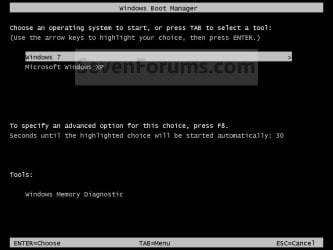
EXAMPLE: Windows Boot Manager
NOTE: This is the boot screen where you select what operating system that you would like to start. By default, you have 30 seconds to choose another operating system before the default operating system will start automatically.
Example.jpg


OPTION ONE

When XP is Installed First


NOTE: If you have a RAID setup, you will need to have the Windows 7 RAID drivers on a USB flash drive available to select and load while installing Windows 7.
1. Do step 2 or 3 below for where you wanted to install Windows 7 at.

2. To Create a New Partition from the XP Hard Disk Drive
A) With your Windows 7 installation disc boot into the Command Prompt from the System Recovery Options screen.
NOTE: Make sure that the CD/DVD drive is selected first in the boot order in the BIOS.

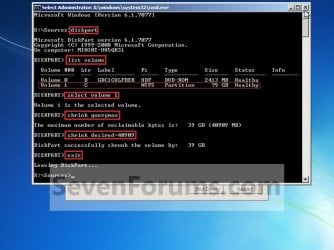
B) In the command prompt, select and shrink the XP volume by how many MB (1024 MB = 1 GB) you want to have for this Windows 7 partition. (See screenshot below)
NOTE: You would do steps 2 to 9 in METHOD TWO at that link. Windows 7 will need a minimum of 16 GB (16384 MB).
XP-W7_1.jpg
C) Click on the X at the top right corner to close the command prompt. (See screenshot above)

D) Click on the X at the top right corner to close System Recovery Options. (See screenshot below)
XP-W7_2.jpg
E) Go to step 4.
3. To Use a Separate Hard Disk Drive than the XP Drive
A) Boot from your Windows 7 installation disc.
NOTE: Make sure that the CD/DVD drive is selected first in the boot order in the BIOS.
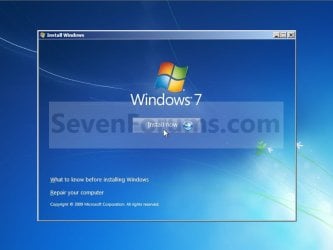
4. Click on the Install now button. (See screenshot below)
XP-W7_3.jpg
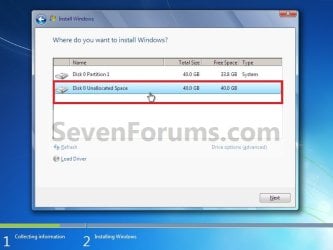
5. When you get to this point, select the partition (step 2) or hard drive to install Windows 7 on. (See screenshot below)
XP-W7_4.jpg
6. Finish installing Windows 7.
NOTE: You would start at step 9 in that link to finish installing Windows 7.

7. When finished, restart the computer to have the option to boot from XP (Earlier Verision of Windows) or Windows 7. (See screenshot below)

   Note
If you are only booting into Windows 7 and do not have XP listed in the Windows Boot Manager, then you can install only EasyBCD (step 8 Option Two below) to add XP (or Windows 7) while started in Windows 7 the same way to the boot list.

Example.jpg


OPTION TWO

When Windows 7 is Installed First


   Warning

1. To Create a New Partition from the Windows 7 Hard Disk Drive
NOTE: If you want to install XP on a separate internal hard drive instead, then skip this step and go to step 2.
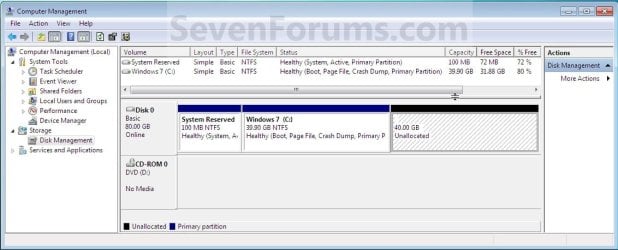
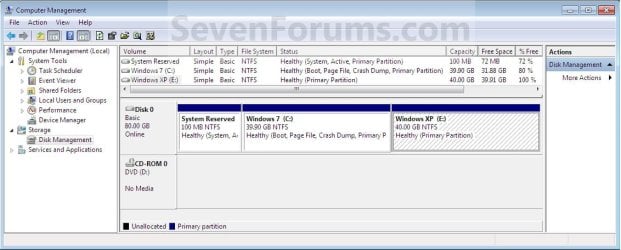
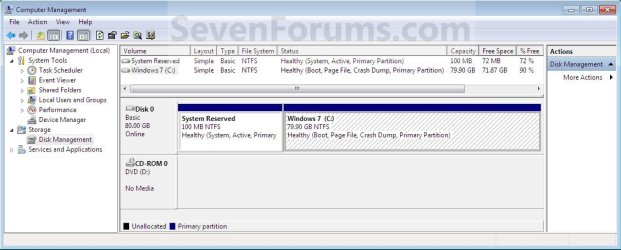
A) In Windows 7, select and shrink the Windows 7 volume in Disk Management by how many MB (1024 MB = 1 GB) you want to have for this XP partition. (See screenshots below)
NOTE: You would do all of Method One at that link.
W7-XP-1.jpg

W7-XP-2.jpg

W7-XP-3.jpg
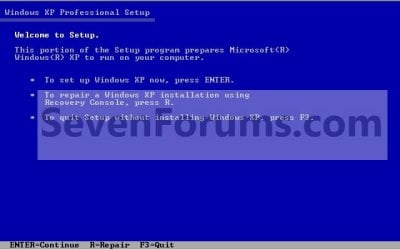
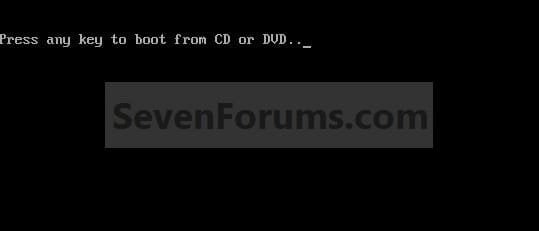
2. Insert your XP installation disc, then restart the computer and press any key to boot from it when prompted. (See screenshot below)
NOTE: Make sure that the CD/DVD drive is selected first in the boot order in the BIOS.
Step1.jpg
3. From XP Setup, Press Enter. (See screenshot below)


   Warning

W7-XP-4.jpg
4. Press F8. (See screenshot below)
NOTE: On some multimedia keyboards, you may need to press the F-Lock or Function key before pressing F8.
W7-XP-5.jpg
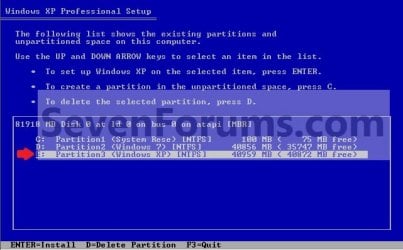
5. Select the partition (step 1) or hard drive that you want to install XP on using the arrow keys and press Enter.
W7-XP-6.jpg
6. Finish installing XP.


   Tip
If you get Error loading Operating System after XP restarts:
  • Using your Windows 7 installation disc, boot to the command prompt at startup.
  • Type in these comands below, and press enter after each one.
    • bootrec /FixMbr
    • bootrec /FixBoot
    • bootrec /RebuildBcd
  • Exit the command prompt and restart the computer.
  • At this point, Windows 7 should boot up the same way before trying to install XP.
  • Continue to step 8 below and run EasyBCD from Windows 7 instead.

7. In XP, download and install .Net Framework 2.0 (32-bit) version or .Net Framework 2.0 (64-bit) version first, and EasyBCD (free version) for your 32-bit (x86) or 64-bit (x86) XP.
NOTE: In XP, Net Framework is required to be installed to run EasyBCD. After you click on Register (at bottom of link) for the free EasyBCD, registration is not required to download it.

8. Run EasyBCD (free version).
NOTE: This is required to repair the Windows 7 boot file and add XP to the Windows Boot Manager list.

9. On the left side of EasyBCD, click on the Add New Entry button. (See screenshot below)
A) In the top section under Operating Systems, click on the Windows tab. (See screenshot below)
B) To the right of Type, select Windows NT/2k/XP/2k3 from the drop down menu. (See screenshot below)
:warn:WARNING: Be sure to leave the Automatically detect correct drive box checked.

C) To the right of Name, you can leave the default Microsoft Windows XP as the name to be displayed in the Windows Boot Manager, or you can type whatever name you would like to have instead. (See screenshot below)
D) Click on the Add Entry button. (See screenshot below)
W7-XP-7.jpg
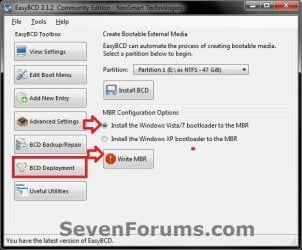
10. On the left side of EasyBCD, click on the BCD Deployment button, select (dot) the Install the Windows Vista/7 bootloader to the MBR option, and click on the Write MBR button. (See screenshot below)
W7-XP-9.jpg
11. Close EasyBCD.

12. Restart the computer to have the option to boot from Microsoft Windows XP or Windows 7. (See screenshot below)
Example2.jpg
   Tip
If Windows 7 will not start up when selected, then use your Windows 7 installation DVD to do a Startup Repair.

That's it,
Shawn


Last edited:
brink I want to thank you for the tutorial on dual booting win 7 and xp , I have tried to dual boot many times before with no luck at all, but with your tutorial help it was just great . It took me 2 times to get it right , but I have at last a dual boot with your great tutorial excellent !!!! rep point on way . now at last I can play my xp games again whoopee!!!!!
 

My Computer My Computer

At a glance

windows 7 profi7 920 quad3gb triple memory 1333nvidia gts 250 1gb
Computer Manufacturer/Model Number
asus
OS
windows 7 prof
CPU
i7 920 quad
Motherboard
asus
Memory
3gb triple memory 1333
Graphics Card(s)
nvidia gts 250 1gb
Sound Card
on board
Monitor(s) Displays
22inch hannsg
Screen Resolution
1680 x1050
Hard Drives
1x1tb 1x 250gb 1x320 ext
PSU
650
Case
wizard
Cooling
3 fans
Keyboard
microsoft laser wireless
Mouse
microsoft laser wireless
Internet Speed
20mb
Other Info
wireless network n netgear 2000
One more question. If I shrink my C drive partition to make room for a XP partition would I be able to merge then back together if I decide I don't want to duel boot anymore? Or could I create and run XP off a virtual partition so I don't have to worry about it?
 

My Computer My Computer

At a glance

Windows 7 Pro X64AMD Phenom II X4 975 Black EditionCORSAIR Vengeance 8GB (2 x 4GB) 240-Pin DDR3 ...ASUS EN9800GT HB/HTDI/512M GeForce 9800 GT 51...
Computer Manufacturer/Model Number
custom build
OS
Windows 7 Pro X64
CPU
AMD Phenom II X4 975 Black Edition
Motherboard
MSI 870A-G54 (FX)
Memory
CORSAIR Vengeance 8GB (2 x 4GB) 240-Pin DDR3 SDRAM DDR3 1600
Graphics Card(s)
ASUS EN9800GT HB/HTDI/512M GeForce 9800 GT 512MB 256-bit GDD
Sound Card
Realtek ALC892
Monitor(s) Displays
Viewsonic 19' 16:10
Screen Resolution
1680X1050
Hard Drives
Western Digital Caviar Black WD6401AALS 640GB 7200 RPM SATA,
Western Digital Caviar Black 1TB 7200RPM SATA
PSU
Thermaltake Purepower W0100RU 500W ATX 12V
Case
COOLER MASTER Elite RC-331-KKN1-GP Black SECC ATX Mid Tower
Cooling
Nothing beyond what etch part came with
Keyboard
Logitech G11
Mouse
USB Logitech gaming mouse
Internet Speed
Cable
Other Info
New CPU, Motherboard, and Ram installed 02/2012

Logitech G35 Headset
all you need to do is delete xp from the bcd program so that win 7 is left ,then boot up and go to disk man and then delete the partition that xp was on ,then extend your win 7 partition
 

My Computer My Computer

At a glance

windows 7 profi7 920 quad3gb triple memory 1333nvidia gts 250 1gb
Computer Manufacturer/Model Number
asus
OS
windows 7 prof
CPU
i7 920 quad
Motherboard
asus
Memory
3gb triple memory 1333
Graphics Card(s)
nvidia gts 250 1gb
Sound Card
on board
Monitor(s) Displays
22inch hannsg
Screen Resolution
1680 x1050
Hard Drives
1x1tb 1x 250gb 1x320 ext
PSU
650
Case
wizard
Cooling
3 fans
Keyboard
microsoft laser wireless
Mouse
microsoft laser wireless
Internet Speed
20mb
Other Info
wireless network n netgear 2000
all you need to do is delete xp from the bcd program so that win 7 is left ,then boot up and go to disk man and then delete the partition that xp was on ,then extend your win 7 partition
That's good I was hopping I was not stuck with a 6GB partition when I decided to remove XP

Thanks for the help
 

My Computer My Computer

At a glance

Windows 7 Pro X64AMD Phenom II X4 975 Black EditionCORSAIR Vengeance 8GB (2 x 4GB) 240-Pin DDR3 ...ASUS EN9800GT HB/HTDI/512M GeForce 9800 GT 51...
Computer Manufacturer/Model Number
custom build
OS
Windows 7 Pro X64
CPU
AMD Phenom II X4 975 Black Edition
Motherboard
MSI 870A-G54 (FX)
Memory
CORSAIR Vengeance 8GB (2 x 4GB) 240-Pin DDR3 SDRAM DDR3 1600
Graphics Card(s)
ASUS EN9800GT HB/HTDI/512M GeForce 9800 GT 512MB 256-bit GDD
Sound Card
Realtek ALC892
Monitor(s) Displays
Viewsonic 19' 16:10
Screen Resolution
1680X1050
Hard Drives
Western Digital Caviar Black WD6401AALS 640GB 7200 RPM SATA,
Western Digital Caviar Black 1TB 7200RPM SATA
PSU
Thermaltake Purepower W0100RU 500W ATX 12V
Case
COOLER MASTER Elite RC-331-KKN1-GP Black SECC ATX Mid Tower
Cooling
Nothing beyond what etch part came with
Keyboard
Logitech G11
Mouse
USB Logitech gaming mouse
Internet Speed
Cable
Other Info
New CPU, Motherboard, and Ram installed 02/2012

Logitech G35 Headset
XP will not load / Win 7 loads fine

Hello!

Having some issues... I followed the directions (i think!) and XP Pro will not load. The Windows 7 Home Premium loads fine and works as it should. When I try to load the XP OS the splash screen for XP comes up and then it goes away and you can see a flash of what seems to be a BSOD. It does not stay on that BSOD and the computer just reboots. The flash is so quick that reading anything off of it is impossible. I can tell that there are some hex error codes, but it just goes away so fact!

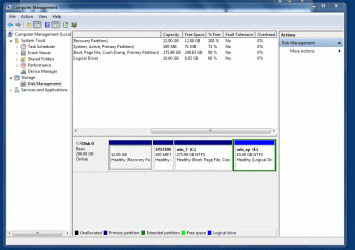
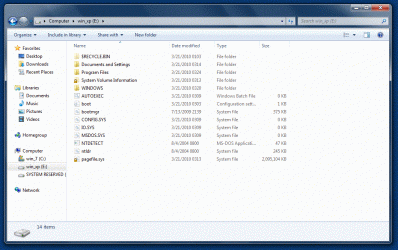
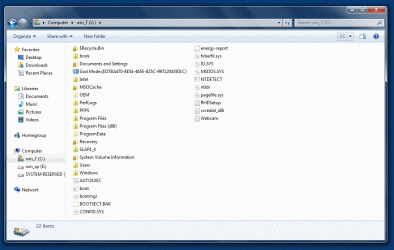
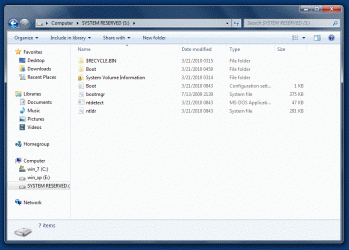
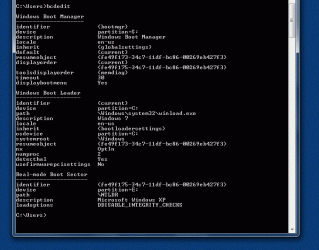
The below images are of my machine and what the file structure looks like. The computer came pre-installed with Windows 7 Home Premium and I need XP to run some older software.

I also have pasted in what the boot.ini files look like. I have 3 of them, one in each of the partitions. The only one that points to the installation of XP on the e: drive is the one that was created by easybcd.

boot.ini file on XP partition

[boot loader]
timeout=30
default=multi(0)disk(0)rdisk(0)partition(4)\WINDOWS
[operating systems]
multi(0)disk(0)rdisk(0)partition(4)\WINDOWS="Microsoft Windows XP Professional" /noexecute=optin /fastdetect

boot.ini on Window 7 partition

[boot loader]
timeout=30
default=multi(0)disk(0)rdisk(0)partition(4)\WINDOWS
[operating systems]
multi(0)disk(0)rdisk(0)partition(4)\WINDOWS="Microsoft Windows XP Professional" /noexecute=optin /fastdetect

boot.ini on System Reserved partition

; This boot.ini was automatically generated by NeoSmart Technologies' BootGrabber.exe
; Use EasyBCD from Download EasyBCD 1.7.2 - NeoSmart Technologies to manage your bootloader

[boot loader]
timeout=15
default=multi(0)disk(0)rdisk(0)partition(4)\WINDOWS
[operating systems]
multi(0)disk(0)rdisk(0)partition(4)\WINDOWS="Windows XP on E:\" /fastdetect

Any help would be much appreciated. It has been a long evening/morning and right now I am just glad that it boots into one of the Operating Systems.
 

Attachments

  • Capture4.GIF
    Capture4.GIF
    145.1 KB · Views: 181
  • Capture3.GIF
    Capture3.GIF
    181 KB · Views: 177
  • Capture2.GIF
    Capture2.GIF
    181.3 KB · Views: 164
  • Capture1.GIF
    Capture1.GIF
    141.3 KB · Views: 188
  • Capture.GIF
    Capture.GIF
    145.2 KB · Views: 163
  • Capture5.GIF
    Capture5.GIF
    50.9 KB · Views: 189

My Computer My Computer

At a glance

Windows 7
OS
Windows 7
Just what I've been looking for! Thanks a lot! :)
 

My Computer My Computer

At a glance

Windows 7C2D E8500 @3.16GHz2 x 2GB @ 800MHzGalaxy GTX 260 overclocked edition
OS
Windows 7
CPU
C2D E8500 @3.16GHz
Motherboard
Gigabyte G31M-S2L
Memory
2 x 2GB @ 800MHz
Graphics Card(s)
Galaxy GTX 260 overclocked edition
Monitor(s) Displays
LG 2252WS
Hard Drives
WD (320GB + 1TB + 1.5TB) + Seagate (750GB + 2TB)
PSU
Corsair VX450W
Internet Speed
2Mbps
hi shawn
i have a questions about loading sata drivers
there is 2 way for this first:
http://www.sevenforums.com/tutorials/66010-sata-drivers-load-windows-xp-setup-dual-boot.html
second :
http://www.sevenforums.com/tutorials/72185-sata-drivers-slipstream-into-windows-xp-cd.html

but ıs that neccessary?

some people says: all of new mothercard have sata off mode.Just swich off its and it's ok!
also older cards allready working in IDE mode and therefore no problem just install xp!

so what you say?
 

My Computer My Computer

At a glance

vistat77002 gb8600M
Computer Manufacturer/Model Number
asus f3sv240dr
OS
vista
CPU
t7700
Memory
2 gb
Graphics Card(s)
8600M
Hard Drives
250 GB
BIOS Options.

hi shawn
i have a questions about loading sata drivers
there is 2 way for this first:
http://www.sevenforums.com/tutorials/66010-sata-drivers-load-windows-xp-setup-dual-boot.html
second :
http://www.sevenforums.com/tutorials/72185-sata-drivers-slipstream-into-windows-xp-cd.html

but ıs that neccessary?

some people says: all of new mothercard have sata off mode.Just swich off its and it's ok!
also older cards allready working in IDE mode and therefore no problem just install xp!

so what you say?

If you have the BIOS options, NO.

But if you have Win 7 installed, than change BIOS options you will need to do a Startup repair.
http://www.sevenforums.com/tutorials/681-startup-repair.html?ltr=S
Note: You may need to do startup repair 3 to 4 times.

http://www.sevenforums.com/tutorials/2083-system-repair-disc-create.html
http://www.sevenforums.com/tutorials/668-system-recovery-options.html

http://www.sevenforums.com/tutorials/61869-ahci-enable-windows-7-vista.html?ltr=A
 
Last edited:

My Computer My Computer

At a glance

ME/XP/Vista/Win7
OS
ME/XP/Vista/Win7
hi shawn
i have a questions about loading sata drivers
there is 2 way for this first:
http://www.sevenforums.com/tutorials/66010-sata-drivers-load-windows-xp-setup-dual-boot.html
second :
http://www.sevenforums.com/tutorials/72185-sata-drivers-slipstream-into-windows-xp-cd.html

but ıs that neccessary?

some people says: all of new mothercard have sata off mode.Just swich off its and it's ok!
also older cards allready working in IDE mode and therefore no problem just install xp!

so what you say?

If you have the BIOS options, NO.

But if you have Win 7 installed, than change BIOS options you will need to do a Startup repair.
http://www.sevenforums.com/tutorials/681-startup-repair.html?ltr=S
Note: You may need to do startup repair 3 to 4 times.

http://www.sevenforums.com/tutorials/2083-system-repair-disc-create.html
http://www.sevenforums.com/tutorials/668-system-recovery-options.html

http://www.sevenforums.com/tutorials/61869-ahci-enable-windows-7-vista.html?ltr=A

ok i understand
thans for explaining :D
 

My Computer My Computer

At a glance

vistat77002 gb8600M
Computer Manufacturer/Model Number
asus f3sv240dr
OS
vista
CPU
t7700
Memory
2 gb
Graphics Card(s)
8600M
Hard Drives
250 GB
Very Simple Answer
Use the Boot menu.
Boot the PC and it will boot using the original hard drive (in my case XP) with the the new hard drive power and Sata Signal cables connected. Reboot.
The computer will recognize new hardware (your second hard drive containing Win 7 in my case) and it will install this. Reboot.
The BOOT Menu will now show both hard drives.
In the Future to choose the desired hard drive to boot press the F key that brings up the boot menu during start up for your computer (in my case F 12). using the down arrow choose the hard drive you want to boot. Press enter.
It will boot the chosen hard drive. Works every time! (The computer will by default choose the hard drive that is first in the boot menue so for this drive accessing the Boot Menu is not needed)
 

My Computer My Computer

At a glance

win 7 vista xp
OS
win 7 vista xp
Windows XP doesn't load when dual booting with Win7

Trevor. I appreciate the suggestions you made to Crusnik, but I too have run into that exact problem of not getting XP to do a restart after it reaches the final installation stage.

I have used the W7 disc to repair so I can do a W7 boot at least.

Afterwards while in W7 I have found that the XP files are all on the new partition I made in W7. In fact, using bcdedit while in W7, I was able to get a bootladder that showed both W7 and XP when I did a restart. But when choosing XP it would never boot in to XP. It would just give me an error and freeze and i would have to do a repair with the W7 disc to start all over again.

Did this entire process a half dozen times, from the very first step to the last. Each time redoing each step anew.

I do believe that it would have worked if I would have installed XP first and then W7, but I didn't.

I believe this all has to do with the issue that XP never really really completes a full installation since it was unable to restart at the final stage. Wish I could just get that XP to restart after the install...Dang.

Any further thoughts or similiar problems or comments is appreciated.

I know this is an old question, but I had the same issue, looked everywhere and didn't see anyone saying that, despite the good tutorials about EasyBCD we can find:

In order to boot from the Windows 7 hard disk/partition, you must have NTDETECT.COM, NTLDR and BOOT.INI in Windows 7 partition, and that's the point: you MUST EDIT the boot.ini file that is in Windows 7 partition so that it points to the partition where Windows XP is installed!

When booting from Windows 7 hard disk and choosing Windows XP, bootmanager will look for those XP related files in 7 partition, and then will look for Windows XP where the boot.ini in Windows 7 partition tells it is installed. If you just copy boot.ini from XP partition to 7 partition without any changes, it will be like XP was installed in 7 partition and it will never load because it is just not there!

Edit boot.ini copied to 7 partition and change the rdisk number. There are plenty of tutorials explaing how to edit boot.ini file around if you don't know how to do it.

Do not change or edit original boot.ini or any system files in Windows XP partition, or, if in the future you want to load Windows XP from its own hard disk/partition (let's say you format or remove Win7 hard disk) you would not be able to do it anymore. Just let those as they are and edit boot.ini copied to Win7 partition.

Hope it helps someone.
 

My Computer My Computer

At a glance

Windows 7Intel Core 2 Duo E66003 GBNVidia GeForce 7600 GT
OS
Windows 7
CPU
Intel Core 2 Duo E6600
Motherboard
Asus P5B-Deluxe WiFi
Memory
3 GB
Graphics Card(s)
NVidia GeForce 7600 GT
Monitor(s) Displays
Samsung
Hard Drives
Samsung 1,5 TB
Seagate 500 GB
Seagate 320 GB
PSU
Seventeam
I didnt have any problems ,I had win 7 installed and then shrunk my c drive and gave it a simple volume drive letter ,then I clean booted xp and told it to quick format the new partition (quick) and it installed to that partition . it then rebooted to xp ,I then used ebc to configure the boot loader , and it was just great .mind you had to use ebc twice , but now all running great
 

My Computer My Computer

At a glance

windows 7 profi7 920 quad3gb triple memory 1333nvidia gts 250 1gb
Computer Manufacturer/Model Number
asus
OS
windows 7 prof
CPU
i7 920 quad
Motherboard
asus
Memory
3gb triple memory 1333
Graphics Card(s)
nvidia gts 250 1gb
Sound Card
on board
Monitor(s) Displays
22inch hannsg
Screen Resolution
1680 x1050
Hard Drives
1x1tb 1x 250gb 1x320 ext
PSU
650
Case
wizard
Cooling
3 fans
Keyboard
microsoft laser wireless
Mouse
microsoft laser wireless
Internet Speed
20mb
Other Info
wireless network n netgear 2000
I am running a dual boot of XP and 7 both 32 bit works good but I have 4 gigs of ram and 1 gig built into the memory card so it only uses 3 gigs I was wondering if a could dual boot xp 32 bit and 7 64 bit. If so would it be worth it for the extra gig of ram.
Thanks
Paul
 

My Computer My Computer

At a glance

windows7
OS
windows7
Hello Paul,

Yes, you could dual boot XP 32 bit and 7 64 bit if you would like to as long as you have a 64-bit supported CPU and 64-bit Windows 7 driver versions for all of your devices.

32-bit would normally use up to 3.25 out of your total RAM anyways. If you wanted to all 4GB, or more if added later, you would need to have 64-bit installed. For now though, I would not see you gaining much from going to 64-bit, but it will not hurt anything either other than having to reinstall it.

Hope this helps,
Shawn
 

My Computer My Computer

At a glance

64-bit Windows 11 Pro for WorkstationsIntel i7-8700K OC'd to 5 GHz64 GB (4x16GB) G.SKILL TridentZ RGB DDR4 3600...ASUS ROG-STRIX-GTX1080TI-O11G-GAMING
Computer type
PC/Desktop
Computer Manufacturer/Model Number
Self built custom
OS
64-bit Windows 11 Pro for Workstations
CPU
Intel i7-8700K OC'd to 5 GHz
Motherboard
ASUS ROG Maximus XI Formula Z390
Memory
64 GB (4x16GB) G.SKILL TridentZ RGB DDR4 3600 MHz
Graphics Card(s)
ASUS ROG-STRIX-GTX1080TI-O11G-GAMING
Sound Card
Integrated
Monitor(s) Displays
2 x Samsung Odyssey G7 27"
Screen Resolution
2560x1440
Hard Drives
1TB Samsung 990 PRO M.2,
4TB Samsung 990 PRO PRO M.2,
TerraMaster F8 SSD Plus NAS
PSU
Seasonic Prime Titanium 850W
Case
Thermaltake Core P3
Cooling
Corsair Hydro H115i
Keyboard
Logitech wireless K800
Mouse
Logitech MX Master 4
Internet Speed
2 Gb/s Download and 100 Mb/s Upload
Antivirus
Malwarebyte Anti-Malware Premium
Browser
Google Chrome
Other Info
Logitech Z625 speaker system,
Logitech BRIO 4K Pro webcam,
HP Color LaserJet Pro MFP M477fdn,
APC SMART-UPS RT 1000 XL - SURT1000XLI,
Galaxy S23 Plus phone
Hey brink, thanks for the guide. I've encountered a little problem (I have no dualbooting experience):
I tried to install windows XP as I've done before, everything went well until the reboot after the disk format and file copy, when it loads the OS, it says: "Error loading operating system. Press ctrl+alt+del to restart" (which doesn't change anything). I had to use my windows 7 CD to restore booting settings to be able to use windows 7 again and post my message.
Also, I have Windows 7 Home Premium, so virtual XP isn't an option. And setting XP compatibility on executables didn't work either.
Any ideas?

Thanks,
Dave.
 

My Computer My Computer

At a glance

Windows 7 Home Pemium x32AM3 Duo PHENOM 550 64Bits 7mb 3.10Ghz4gb DDR3ATI SAPPHIRE HD5850 1GB
OS
Windows 7 Home Pemium x32
CPU
AM3 Duo PHENOM 550 64Bits 7mb 3.10Ghz
Motherboard
Gigabyte 790XT
Memory
4gb DDR3
Graphics Card(s)
ATI SAPPHIRE HD5850 1GB
Sound Card
Integrated
Monitor(s) Displays
ASUS VH222H-P 22'' 20000:1 5ms
Hard Drives
1000GB, SATA 7200RPM 32MB WD BLACK
PSU
EA650W
Case
9Hundred
Keyboard
RetailPlus+
Mouse
Logitech M-BZ96C
Internet Speed
Videotron Cable Ultimate High Speed
Hello Dave, and welcome to Seven Forums.

Did you need to load SATA or RAID drivers during the start of the XP installation first?
 

My Computer My Computer

At a glance

64-bit Windows 11 Pro for WorkstationsIntel i7-8700K OC'd to 5 GHz64 GB (4x16GB) G.SKILL TridentZ RGB DDR4 3600...ASUS ROG-STRIX-GTX1080TI-O11G-GAMING
Computer type
PC/Desktop
Computer Manufacturer/Model Number
Self built custom
OS
64-bit Windows 11 Pro for Workstations
CPU
Intel i7-8700K OC'd to 5 GHz
Motherboard
ASUS ROG Maximus XI Formula Z390
Memory
64 GB (4x16GB) G.SKILL TridentZ RGB DDR4 3600 MHz
Graphics Card(s)
ASUS ROG-STRIX-GTX1080TI-O11G-GAMING
Sound Card
Integrated
Monitor(s) Displays
2 x Samsung Odyssey G7 27"
Screen Resolution
2560x1440
Hard Drives
1TB Samsung 990 PRO M.2,
4TB Samsung 990 PRO PRO M.2,
TerraMaster F8 SSD Plus NAS
PSU
Seasonic Prime Titanium 850W
Case
Thermaltake Core P3
Cooling
Corsair Hydro H115i
Keyboard
Logitech wireless K800
Mouse
Logitech MX Master 4
Internet Speed
2 Gb/s Download and 100 Mb/s Upload
Antivirus
Malwarebyte Anti-Malware Premium
Browser
Google Chrome
Other Info
Logitech Z625 speaker system,
Logitech BRIO 4K Pro webcam,
HP Color LaserJet Pro MFP M477fdn,
APC SMART-UPS RT 1000 XL - SURT1000XLI,
Galaxy S23 Plus phone
Dual booting XP/7

Hey, actually, the message was: "A disk read error occured. Press ctrl....."

And how do i tell if i need to load SATA or RAID drivers first?
When I tried installing XP i just ignored the "Press F6if you need to ...." because I didn't know.
 

My Computer My Computer

At a glance

Windows 7 Home Pemium x32AM3 Duo PHENOM 550 64Bits 7mb 3.10Ghz4gb DDR3ATI SAPPHIRE HD5850 1GB
OS
Windows 7 Home Pemium x32
CPU
AM3 Duo PHENOM 550 64Bits 7mb 3.10Ghz
Motherboard
Gigabyte 790XT
Memory
4gb DDR3
Graphics Card(s)
ATI SAPPHIRE HD5850 1GB
Sound Card
Integrated
Monitor(s) Displays
ASUS VH222H-P 22'' 20000:1 5ms
Hard Drives
1000GB, SATA 7200RPM 32MB WD BLACK
PSU
EA650W
Case
9Hundred
Keyboard
RetailPlus+
Mouse
Logitech M-BZ96C
Internet Speed
Videotron Cable Ultimate High Speed
It depends on if you have a SATA (current standard with narrow cable) hard drive instead of IDE (older standard with wide ribbon cable), and if it is setup in RAID or not. If either one, then you will need to install the appropriate XP driver version for it during the XP installation first.
 

My Computer My Computer

At a glance

64-bit Windows 11 Pro for WorkstationsIntel i7-8700K OC'd to 5 GHz64 GB (4x16GB) G.SKILL TridentZ RGB DDR4 3600...ASUS ROG-STRIX-GTX1080TI-O11G-GAMING
Computer type
PC/Desktop
Computer Manufacturer/Model Number
Self built custom
OS
64-bit Windows 11 Pro for Workstations
CPU
Intel i7-8700K OC'd to 5 GHz
Motherboard
ASUS ROG Maximus XI Formula Z390
Memory
64 GB (4x16GB) G.SKILL TridentZ RGB DDR4 3600 MHz
Graphics Card(s)
ASUS ROG-STRIX-GTX1080TI-O11G-GAMING
Sound Card
Integrated
Monitor(s) Displays
2 x Samsung Odyssey G7 27"
Screen Resolution
2560x1440
Hard Drives
1TB Samsung 990 PRO M.2,
4TB Samsung 990 PRO PRO M.2,
TerraMaster F8 SSD Plus NAS
PSU
Seasonic Prime Titanium 850W
Case
Thermaltake Core P3
Cooling
Corsair Hydro H115i
Keyboard
Logitech wireless K800
Mouse
Logitech MX Master 4
Internet Speed
2 Gb/s Download and 100 Mb/s Upload
Antivirus
Malwarebyte Anti-Malware Premium
Browser
Google Chrome
Other Info
Logitech Z625 speaker system,
Logitech BRIO 4K Pro webcam,
HP Color LaserJet Pro MFP M477fdn,
APC SMART-UPS RT 1000 XL - SURT1000XLI,
Galaxy S23 Plus phone
I'm quite sure I have a SATA drive (I dont see wide ribbon cable; I only see a narrow orange cable). As of if it is setup in RAID or not, I have no idea. Is there a way for me to find out? And where do I find the RAID drivers?? Sorry if I dont know a lot about this; never did it before.

Thanks,
Dave.
 

My Computer My Computer

At a glance

Windows 7 Home Pemium x32AM3 Duo PHENOM 550 64Bits 7mb 3.10Ghz4gb DDR3ATI SAPPHIRE HD5850 1GB
OS
Windows 7 Home Pemium x32
CPU
AM3 Duo PHENOM 550 64Bits 7mb 3.10Ghz
Motherboard
Gigabyte 790XT
Memory
4gb DDR3
Graphics Card(s)
ATI SAPPHIRE HD5850 1GB
Sound Card
Integrated
Monitor(s) Displays
ASUS VH222H-P 22'' 20000:1 5ms
Hard Drives
1000GB, SATA 7200RPM 32MB WD BLACK
PSU
EA650W
Case
9Hundred
Keyboard
RetailPlus+
Mouse
Logitech M-BZ96C
Internet Speed
Videotron Cable Ultimate High Speed

My Computer My Computer

At a glance

64-bit Windows 11 Pro for WorkstationsIntel i7-8700K OC'd to 5 GHz64 GB (4x16GB) G.SKILL TridentZ RGB DDR4 3600...ASUS ROG-STRIX-GTX1080TI-O11G-GAMING
Computer type
PC/Desktop
Computer Manufacturer/Model Number
Self built custom
OS
64-bit Windows 11 Pro for Workstations
CPU
Intel i7-8700K OC'd to 5 GHz
Motherboard
ASUS ROG Maximus XI Formula Z390
Memory
64 GB (4x16GB) G.SKILL TridentZ RGB DDR4 3600 MHz
Graphics Card(s)
ASUS ROG-STRIX-GTX1080TI-O11G-GAMING
Sound Card
Integrated
Monitor(s) Displays
2 x Samsung Odyssey G7 27"
Screen Resolution
2560x1440
Hard Drives
1TB Samsung 990 PRO M.2,
4TB Samsung 990 PRO PRO M.2,
TerraMaster F8 SSD Plus NAS
PSU
Seasonic Prime Titanium 850W
Case
Thermaltake Core P3
Cooling
Corsair Hydro H115i
Keyboard
Logitech wireless K800
Mouse
Logitech MX Master 4
Internet Speed
2 Gb/s Download and 100 Mb/s Upload
Antivirus
Malwarebyte Anti-Malware Premium
Browser
Google Chrome
Other Info
Logitech Z625 speaker system,
Logitech BRIO 4K Pro webcam,
HP Color LaserJet Pro MFP M477fdn,
APC SMART-UPS RT 1000 XL - SURT1000XLI,
Galaxy S23 Plus phone
Back
Top