Dual Boot Installation with Windows 7 and XP

How to Setup a Dual Boot Installation with Windows 7 and XP


   Information
This will show you how to install Windows 7 and XP to dual boot with when you already have either Windows 7 or XP installed first.
   Note
With a dual boot installaton, you will have two operating systems (OS) installed. When you start the computer, you will have the choice to choose which OS you would like to start up to. This method is the easiest way of doing a dual boot with these two operating systems.
   Tip
When dual booting with another OS (ex: Vista or XP), you may not always have that OS partition show up in Computer with a driver letter in Windows 7. If this happens, then you will just need to add a drive letter to the OS (ex: Vista or XP) partition in Windows 7 Disk Management for it to show up in Computer with a driver letter.
   Warning
To stop XP from deleting your Windows 7 System Restore Points everytime XP is started, then see System Restore Points - Stop XP Dual Boot Delete to hide Windows 7 from XP.

Windows 7 Minimum Hardware Requirements


NOTE: For more information on this, see: Windows 7 system requirements
  • 1 GHz 32-bit or 64-bit processor
  • 1 GB RAM for 32-bit Windows 7 OR 2 GB RAM for 64-bit Windows 7
  • 16 GB available disk space 32-bit Windows 7 OR 20 GB for 64-bit Windows 7
  • Support for DirectX 9 graphics with 128 MB memory (in order to enable Aero theme)
  • DVD-R/W Drive
  • Internet or phone access to activate Windows 7.
Windows XP Minimum Hardware Requirements

NOTE: For more information on this, see: System requirements for Windows XP operating systems
  • PC with 300 megahertz (MHz) or higher processor clock speed recommended; 233-MHz minimum required;* Intel Pentium/Celeron family, AMD K6/Athlon/Duron family, or compatible processor recommended
  • 128 megabytes (MB) of RAM or higher recommended (64 MB minimum supported; may limit performance and some features)
  • 1.5 gigabyte (GB) of available hard disk space.*
  • Super VGA (800 × 600) or higher resolution video adapter and monitor
  • CD-ROM or DVD drive
  • Keyboard and Microsoft Mouse or compatible pointing device
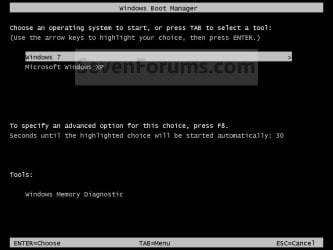
EXAMPLE: Windows Boot Manager
NOTE: This is the boot screen where you select what operating system that you would like to start. By default, you have 30 seconds to choose another operating system before the default operating system will start automatically.
Example.jpg


OPTION ONE

When XP is Installed First


NOTE: If you have a RAID setup, you will need to have the Windows 7 RAID drivers on a USB flash drive available to select and load while installing Windows 7.
1. Do step 2 or 3 below for where you wanted to install Windows 7 at.

2. To Create a New Partition from the XP Hard Disk Drive
A) With your Windows 7 installation disc boot into the Command Prompt from the System Recovery Options screen.
NOTE: Make sure that the CD/DVD drive is selected first in the boot order in the BIOS.

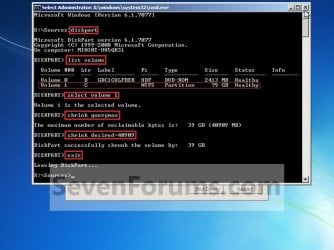
B) In the command prompt, select and shrink the XP volume by how many MB (1024 MB = 1 GB) you want to have for this Windows 7 partition. (See screenshot below)
NOTE: You would do steps 2 to 9 in METHOD TWO at that link. Windows 7 will need a minimum of 16 GB (16384 MB).
XP-W7_1.jpg
C) Click on the X at the top right corner to close the command prompt. (See screenshot above)

D) Click on the X at the top right corner to close System Recovery Options. (See screenshot below)
XP-W7_2.jpg
E) Go to step 4.
3. To Use a Separate Hard Disk Drive than the XP Drive
A) Boot from your Windows 7 installation disc.
NOTE: Make sure that the CD/DVD drive is selected first in the boot order in the BIOS.
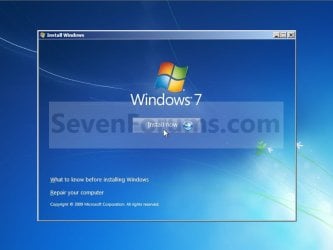
4. Click on the Install now button. (See screenshot below)
XP-W7_3.jpg
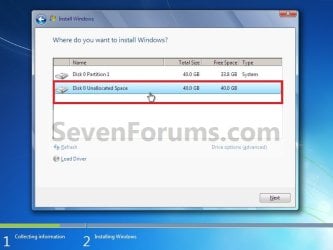
5. When you get to this point, select the partition (step 2) or hard drive to install Windows 7 on. (See screenshot below)
XP-W7_4.jpg
6. Finish installing Windows 7.
NOTE: You would start at step 9 in that link to finish installing Windows 7.

7. When finished, restart the computer to have the option to boot from XP (Earlier Verision of Windows) or Windows 7. (See screenshot below)

   Note
If you are only booting into Windows 7 and do not have XP listed in the Windows Boot Manager, then you can install only EasyBCD (step 8 Option Two below) to add XP (or Windows 7) while started in Windows 7 the same way to the boot list.

Example.jpg


OPTION TWO

When Windows 7 is Installed First


   Warning

1. To Create a New Partition from the Windows 7 Hard Disk Drive
NOTE: If you want to install XP on a separate internal hard drive instead, then skip this step and go to step 2.
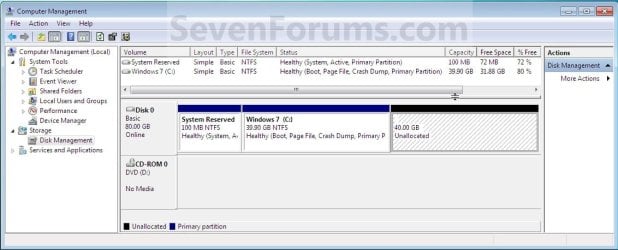
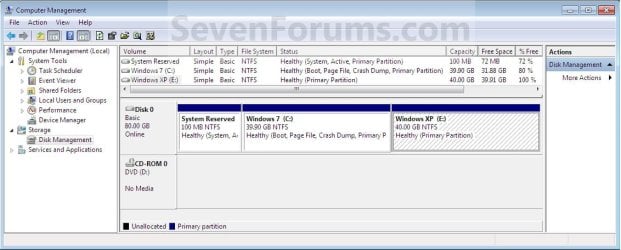
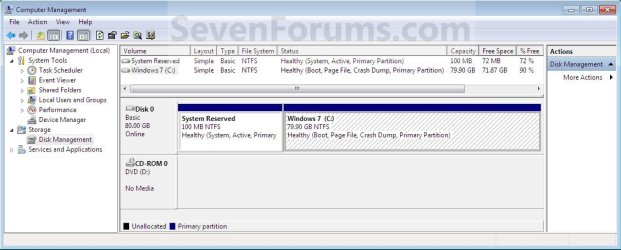
A) In Windows 7, select and shrink the Windows 7 volume in Disk Management by how many MB (1024 MB = 1 GB) you want to have for this XP partition. (See screenshots below)
NOTE: You would do all of Method One at that link.
W7-XP-1.jpg

W7-XP-2.jpg

W7-XP-3.jpg
2. Insert your XP installation disc, then restart the computer and press any key to boot from it when prompted. (See screenshot below)
NOTE: Make sure that the CD/DVD drive is selected first in the boot order in the BIOS.

Step1.jpg
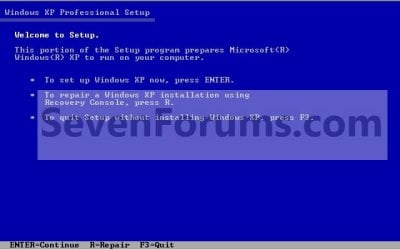
3. From XP Setup, Press Enter. (See screenshot below)


   Warning

W7-XP-4.jpg
4. Press F8. (See screenshot below)
NOTE: On some multimedia keyboards, you may need to press the F-Lock or Function key before pressing F8.
W7-XP-5.jpg
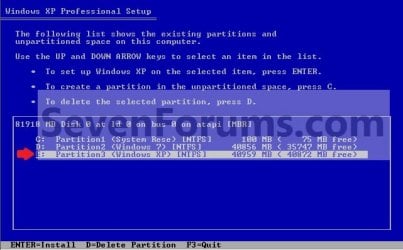
5. Select the partition (step 1) or hard drive that you want to install XP on using the arrow keys and press Enter.
W7-XP-6.jpg
6. Finish installing XP.


   Tip
If you get Error loading Operating System after XP restarts:
  • Using your Windows 7 installation disc, boot to the command prompt at startup.
  • Type in these comands below, and press enter after each one.
    • bootrec /FixMbr
    • bootrec /FixBoot
    • bootrec /RebuildBcd
  • Exit the command prompt and restart the computer.
  • At this point, Windows 7 should boot up the same way before trying to install XP.
  • Continue to step 8 below and run EasyBCD from Windows 7 instead.

7. In XP, download and install .Net Framework 2.0 (32-bit) version or .Net Framework 2.0 (64-bit) version first, and EasyBCD (free version) for your 32-bit (x86) or 64-bit (x86) XP.
NOTE: In XP, Net Framework is required to be installed to run EasyBCD. After you click on Register (at bottom of link) for the free EasyBCD, registration is not required to download it.

8. Run EasyBCD (free version).
NOTE: This is required to repair the Windows 7 boot file and add XP to the Windows Boot Manager list.

9. On the left side of EasyBCD, click on the Add New Entry button. (See screenshot below)
A) In the top section under Operating Systems, click on the Windows tab. (See screenshot below)
B) To the right of Type, select Windows NT/2k/XP/2k3 from the drop down menu. (See screenshot below)
:warn:WARNING: Be sure to leave the Automatically detect correct drive box checked.

C) To the right of Name, you can leave the default Microsoft Windows XP as the name to be displayed in the Windows Boot Manager, or you can type whatever name you would like to have instead. (See screenshot below)
D) Click on the Add Entry button. (See screenshot below)
W7-XP-7.jpg
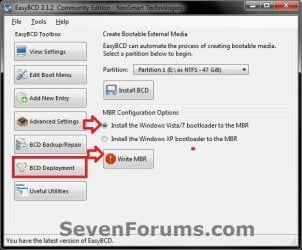
10. On the left side of EasyBCD, click on the BCD Deployment button, select (dot) the Install the Windows Vista/7 bootloader to the MBR option, and click on the Write MBR button. (See screenshot below)
W7-XP-9.jpg
11. Close EasyBCD.

12. Restart the computer to have the option to boot from Microsoft Windows XP or Windows 7. (See screenshot below)
Example2.jpg
   Tip
If Windows 7 will not start up when selected, then use your Windows 7 installation DVD to do a Startup Repair.

That's it,
Shawn


Last edited:
is it possible to make dual boot windows 7 and xp with windows7 home premium install first?

I read somewhere that we can only make dual boot win7 and xp only if we have win7 professional or higher.

Thanks.
 

My Computer My Computer

At a glance

windows 7 home premium
OS
windows 7 home premium
Welcome to SevenForums feua.. This thread has a tutorial for just your question 7 first is the second option. I think you are mistaking dual boat with xp mode which is different thing. XP mode is only available with win 7 pro and above. Good luck to you! :D
 

My Computer My Computer

At a glance

Windows 7 Ulti. x64AMD Phenom 8450 triple-core 2.10 ghz4GBATI Radion HD 3200
Computer Manufacturer/Model Number
Gateway GT5692
OS
Windows 7 Ulti. x64
CPU
AMD Phenom 8450 triple-core 2.10 ghz
Memory
4GB
Graphics Card(s)
ATI Radion HD 3200
Monitor(s) Displays
Gateway FPD1775W
Screen Resolution
1280x720
Hard Drives
465.6613 Gibibytes
Thank you for warm welcome.

so, i am right that i cannot make dual boot from my win7 home premium with win xp?

Correct?

If it it correct, is there anyway that i can make dual boot?

Or because i bought new win7 home premium in japanese with no original installation dvd and i am not good in japanese. i want to change to English.

I have 2gb ram.

I am thinking of using win7 home premiun 64 in C as it is and install win7 ultimate 32 in D. Do you think it is a good idea to do so?

Thanks in advance for your helps.
 

My Computer My Computer

At a glance

windows 7 home premium
OS
windows 7 home premium
Thank you for warm welcome.

so, i am right that i cannot make dual boot from my win7 home premium with win xp?

Correct?

If it it correct, is there anyway that i can make dual boot?

Or because i bought new win7 home premium in japanese with no original installation dvd and i am not good in japanese. i want to change to English.

I have 2gb ram.

I am thinking of using win7 home premiun 64 in C as it is and install win7 ultimate 32 in D. Do you think it is a good idea to do so?

Thanks in advance for your helps.

No, you can use any Windows 7 from starter to Ultimate.
 

My Computer My Computer

At a glance

ME/XP/Vista/Win7
OS
ME/XP/Vista/Win7
thank you.

how about win7 home premium in C and win7 ultimate in D? Is it a good idea than dual booth with xp?
 

My Computer My Computer

At a glance

windows 7 home premium
OS
windows 7 home premium
Hello Feua, and welcome to Seven Forums.

If you would like to dual boot with Windows 7 Home Premium and Windows 7 Ultimate, then the tutorial below can help show you how to. It's the same procedure except substitute Vista for the other Windows 7 instead. It doesn't matter which one you install first. Plus, it will be a lot easier to do than trying to dual boot with XP.

http://www.sevenforums.com/tutorials/5166-dual-boot-installation-windows-7-vista.html

Hope this helps,
Shawn
 

My Computer My Computer

At a glance

64-bit Windows 11 Pro for WorkstationsIntel i7-8700K OC'd to 5 GHz64 GB (4x16GB) G.SKILL TridentZ RGB DDR4 3600...ASUS ROG-STRIX-GTX1080TI-O11G-GAMING
Computer type
PC/Desktop
Computer Manufacturer/Model Number
Self built custom
OS
64-bit Windows 11 Pro for Workstations
CPU
Intel i7-8700K OC'd to 5 GHz
Motherboard
ASUS ROG Maximus XI Formula Z390
Memory
64 GB (4x16GB) G.SKILL TridentZ RGB DDR4 3600 MHz
Graphics Card(s)
ASUS ROG-STRIX-GTX1080TI-O11G-GAMING
Sound Card
Integrated
Monitor(s) Displays
2 x Samsung Odyssey G7 27"
Screen Resolution
2560x1440
Hard Drives
1TB Samsung 990 PRO M.2,
4TB Samsung 990 PRO PRO M.2,
TerraMaster F8 SSD Plus NAS
PSU
Seasonic Prime Titanium 850W
Case
Thermaltake Core P3
Cooling
Corsair Hydro H115i
Keyboard
Logitech wireless K800
Mouse
Logitech MX Master 4
Internet Speed
2 Gb/s Download and 100 Mb/s Upload
Antivirus
Malwarebyte Anti-Malware Premium
Browser
Google Chrome
Other Info
Logitech Z625 speaker system,
Logitech BRIO 4K Pro webcam,
HP Color LaserJet Pro MFP M477fdn,
APC SMART-UPS RT 1000 XL - SURT1000XLI,
Galaxy S23 Plus phone
Fire in the hole, problem incomiiiiiiing...

I created a 30gig partition for my WinXP ( i want to create a dual-boot from Windows 7 Pro x64). I inserted my XP disc, booted from it, proceeded with standard installation procedure, selecting the newly created 30g partition as the system partition for the XP.

The files have copied succesfully, and the PC rebooted, as expected. Then, when the installation screen would normally pop up, THIS appeared:

img_084581.jpg


The text reads (in Polish) "Press any key to load from CD...". The weird thing are the colored squares, one of which blinks with a SMILEY inside, like a little emoticon (the camera didn't pick it). I went "WTF?!" after seeing this.

Honestly, it's either a virus, or aliens attacking my PC, or Microsoft programmers making fun of us.

I tried waiting a couple of minutes for something to happen, to no avail. I rebooted the PC, set booting from HDD, and after the bios screen loaded, a "_" went blinking on a dark screen, in the left-right corner, like in old DOS screens. Waiting also didn't help here.

I "repaired" my Win 7 from the Windows 7 install screen, and managed to get back to my 7. The XP partition is still there with some Windows files in, but that's pretty much it.

Thinking dual-booting was easy, I nearly got my PC messed up. I'd appreciate any help, and apologeze for language mistakes, I'm Polish.
 

My Computer My Computer

At a glance

7 Pro x64
OS
7 Pro x64
Viral perhaps

Ekhangel,

One must wonder about the source of the install disk. That is weird and possibly viral nonsense.
I would recover the data, run AVG on the recovered data, and then wipe the drive with a fresh install from proper sources. Good luck.

iLL
 

My Computer My Computer

At a glance

XP/7 64
OS
XP/7 64
Honestly, it's either a virus, or aliens attacking my PC, or Microsoft programmers making fun of us.

Hello Ekhangel, and welcome to Seven Forums.

LOL, nope I (alien) haven't been playing or attacking your PC. ;)

Where did you get the installation file or DVD?

I agree. It looks like you have a virus modified copy. I would recommend to ditch it, format the hard drives, and make sure that you are using a genuine Windows 7 installation DVD.
 

My Computer My Computer

At a glance

64-bit Windows 11 Pro for WorkstationsIntel i7-8700K OC'd to 5 GHz64 GB (4x16GB) G.SKILL TridentZ RGB DDR4 3600...ASUS ROG-STRIX-GTX1080TI-O11G-GAMING
Computer type
PC/Desktop
Computer Manufacturer/Model Number
Self built custom
OS
64-bit Windows 11 Pro for Workstations
CPU
Intel i7-8700K OC'd to 5 GHz
Motherboard
ASUS ROG Maximus XI Formula Z390
Memory
64 GB (4x16GB) G.SKILL TridentZ RGB DDR4 3600 MHz
Graphics Card(s)
ASUS ROG-STRIX-GTX1080TI-O11G-GAMING
Sound Card
Integrated
Monitor(s) Displays
2 x Samsung Odyssey G7 27"
Screen Resolution
2560x1440
Hard Drives
1TB Samsung 990 PRO M.2,
4TB Samsung 990 PRO PRO M.2,
TerraMaster F8 SSD Plus NAS
PSU
Seasonic Prime Titanium 850W
Case
Thermaltake Core P3
Cooling
Corsair Hydro H115i
Keyboard
Logitech wireless K800
Mouse
Logitech MX Master 4
Internet Speed
2 Gb/s Download and 100 Mb/s Upload
Antivirus
Malwarebyte Anti-Malware Premium
Browser
Google Chrome
Other Info
Logitech Z625 speaker system,
Logitech BRIO 4K Pro webcam,
HP Color LaserJet Pro MFP M477fdn,
APC SMART-UPS RT 1000 XL - SURT1000XLI,
Galaxy S23 Plus phone
This will surprise you, but both of my CD's (XP and 7) are purely original, genuine, legit, certificed Microsoft copies. I asked one guy about it and he said it's probably a "bios virus", or something.

He also said that it would be the best to install XP first and then go with 7. I am considering wiping out all of the systems from my HDD, leaving only a partition with my private files for later use on 7, and then install an XP, followed by install of 7.

Would that cause me any problems?

I'm starting to think playing Heroes 3 and Gothic 2 freezelessly is a too small prize for all this hell I'm experiencing here.

EDIT:

What's weird is that the colored squares appear only after the XP installer reboots the PC. When trying to boot from the CD in the first place, nothing like that appears. Furthermore; the Win XP CD has already been used before, a couple of years ago, to install XP on the very same machine, with the same BIOS (I was updated in the meantime, perhaps I should ask the guy who updated it about where he got the files from...) But still, would it be so much a BIOS issue?
 

My Computer My Computer

At a glance

7 Pro x64
OS
7 Pro x64
He also said that it would be the best to install XP first and then go with 7. I am considering wiping out all of the systems from my HDD, leaving only a partition with my private files for later use on 7, and then install an XP, followed by install of 7.

Would that cause me any problems?

No, you shouldn't have a problem doing that if you wanted to dual boot them. If you just wanted Windows 7, then a clean install is always best.


If you have another monitor and graphics card you can test using them one at a time instead to see if you may have some sort of hardware issue with your current ones.

It wouldn't hurt to flash your BIOS with a newer version (if available) to make sure that is not corrupted.
 

My Computer My Computer

At a glance

64-bit Windows 11 Pro for WorkstationsIntel i7-8700K OC'd to 5 GHz64 GB (4x16GB) G.SKILL TridentZ RGB DDR4 3600...ASUS ROG-STRIX-GTX1080TI-O11G-GAMING
Computer type
PC/Desktop
Computer Manufacturer/Model Number
Self built custom
OS
64-bit Windows 11 Pro for Workstations
CPU
Intel i7-8700K OC'd to 5 GHz
Motherboard
ASUS ROG Maximus XI Formula Z390
Memory
64 GB (4x16GB) G.SKILL TridentZ RGB DDR4 3600 MHz
Graphics Card(s)
ASUS ROG-STRIX-GTX1080TI-O11G-GAMING
Sound Card
Integrated
Monitor(s) Displays
2 x Samsung Odyssey G7 27"
Screen Resolution
2560x1440
Hard Drives
1TB Samsung 990 PRO M.2,
4TB Samsung 990 PRO PRO M.2,
TerraMaster F8 SSD Plus NAS
PSU
Seasonic Prime Titanium 850W
Case
Thermaltake Core P3
Cooling
Corsair Hydro H115i
Keyboard
Logitech wireless K800
Mouse
Logitech MX Master 4
Internet Speed
2 Gb/s Download and 100 Mb/s Upload
Antivirus
Malwarebyte Anti-Malware Premium
Browser
Google Chrome
Other Info
Logitech Z625 speaker system,
Logitech BRIO 4K Pro webcam,
HP Color LaserJet Pro MFP M477fdn,
APC SMART-UPS RT 1000 XL - SURT1000XLI,
Galaxy S23 Plus phone
I'm afraid the BIOS i'm using now is the newest.

Hell with that, I think I'll forget about the issue for now.

Thanks for the answers, everybody.
 

My Computer My Computer

At a glance

7 Pro x64
OS
7 Pro x64
do i need to buy a windows xp installation disk?
 

My Computer My Computer

At a glance

Windows 7 Home PremiumPentium(R) Dual-Core E5300 @ 2.60GHz4GB RAMNVIDIA GeForce 9500 GT
Computer Manufacturer/Model Number
7600
OS
Windows 7 Home Premium
CPU
Pentium(R) Dual-Core E5300 @ 2.60GHz
Motherboard
ASUS P5KPL-AM/PS
Memory
4GB RAM
Graphics Card(s)
NVIDIA GeForce 9500 GT
Monitor(s) Displays
Benq 22"
Screen Resolution
1920 x 1080
Hard Drives
600GB NTFS HDD WD, 1TB External HDD HP simple save , 1TB External WD HDD, 250GB External WD HDD.
Case
Cooler Master Scout
Keyboard
Razer Lycosa
Mouse
Razer Imperator
Other Info
Windows®. Life without Walls™.

Love Steam

My Computer My Computer

At a glance

64-bit Windows 11 Pro for WorkstationsIntel i7-8700K OC'd to 5 GHz64 GB (4x16GB) G.SKILL TridentZ RGB DDR4 3600...ASUS ROG-STRIX-GTX1080TI-O11G-GAMING
Computer type
PC/Desktop
Computer Manufacturer/Model Number
Self built custom
OS
64-bit Windows 11 Pro for Workstations
CPU
Intel i7-8700K OC'd to 5 GHz
Motherboard
ASUS ROG Maximus XI Formula Z390
Memory
64 GB (4x16GB) G.SKILL TridentZ RGB DDR4 3600 MHz
Graphics Card(s)
ASUS ROG-STRIX-GTX1080TI-O11G-GAMING
Sound Card
Integrated
Monitor(s) Displays
2 x Samsung Odyssey G7 27"
Screen Resolution
2560x1440
Hard Drives
1TB Samsung 990 PRO M.2,
4TB Samsung 990 PRO PRO M.2,
TerraMaster F8 SSD Plus NAS
PSU
Seasonic Prime Titanium 850W
Case
Thermaltake Core P3
Cooling
Corsair Hydro H115i
Keyboard
Logitech wireless K800
Mouse
Logitech MX Master 4
Internet Speed
2 Gb/s Download and 100 Mb/s Upload
Antivirus
Malwarebyte Anti-Malware Premium
Browser
Google Chrome
Other Info
Logitech Z625 speaker system,
Logitech BRIO 4K Pro webcam,
HP Color LaserJet Pro MFP M477fdn,
APC SMART-UPS RT 1000 XL - SURT1000XLI,
Galaxy S23 Plus phone
Dual Boot & Dual Raid1

Hi, I have only just found your site, but think I have done all that you reccomend, everything seems to be working, but I dont know how to check it. this is what I did.

Installed 2 new Sata Raptor 160Gb Drives. (both in Caddies)
Formatted them and partitioned each in half. (using Gparted)
Set the Bios to raid
Loaded Windows XP pro using F6 floppy for the intel drivers
Loaded Intel's Matrix Manager
Set raid to 1 (for safety) these are just for the Operating Systems
and called the raid volume XP_32Bit
Loaded W7 Pro 64bit on the other partition
Loaded the Intel Matrix Manager and it confirms Raid configured (even though I didnt do anything) but it is calling the volume XP_32Bit
Both Operating Systems boot fine
Both Matrix Managers report Raid 1
But are they I know the XP is, but is the W7? ? ? ?
Intel support say, this evening, I should have created the raid, THEN partitioned them for dual boot, Is that what I have done in a convoluted way or did I get it wrong
Many thanks for your time
PS I intend to add 2 more 300GB HD and partition them dual Raid0 for my editing and games later
 

My Computer My Computer

At a glance

XP Pro & W7Q6700Crucial 1333 4GbATI 4850
Computer Manufacturer/Model Number
SelfBuild
OS
XP Pro & W7
CPU
Q6700
Motherboard
Rampage Extreme
Memory
Crucial 1333 4Gb
Graphics Card(s)
ATI 4850
Sound Card
SB HiFi X
Monitor(s) Displays
2 x 19" Ilyama
Hard Drives
2 x Sata 160Gb Raptor
PSU
Antec 850w
Case
Antec 910
Cooling
Thermalite 120
Hello Cameraman, and welcome to Seven Forums.

Well, if your dual boot setup is working for you, then that is all the checking you need. Great job. :)

When you set up a RAID, it would have formatted the entire drive anyway, so you would usually have had no choice but to create a new partition afterwards. It really doesn't matter when you create the new partition though as long as it's created before installing the second OS.

The 2 300GB drives in RAID 0 should help with storage.
 

My Computer My Computer

At a glance

64-bit Windows 11 Pro for WorkstationsIntel i7-8700K OC'd to 5 GHz64 GB (4x16GB) G.SKILL TridentZ RGB DDR4 3600...ASUS ROG-STRIX-GTX1080TI-O11G-GAMING
Computer type
PC/Desktop
Computer Manufacturer/Model Number
Self built custom
OS
64-bit Windows 11 Pro for Workstations
CPU
Intel i7-8700K OC'd to 5 GHz
Motherboard
ASUS ROG Maximus XI Formula Z390
Memory
64 GB (4x16GB) G.SKILL TridentZ RGB DDR4 3600 MHz
Graphics Card(s)
ASUS ROG-STRIX-GTX1080TI-O11G-GAMING
Sound Card
Integrated
Monitor(s) Displays
2 x Samsung Odyssey G7 27"
Screen Resolution
2560x1440
Hard Drives
1TB Samsung 990 PRO M.2,
4TB Samsung 990 PRO PRO M.2,
TerraMaster F8 SSD Plus NAS
PSU
Seasonic Prime Titanium 850W
Case
Thermaltake Core P3
Cooling
Corsair Hydro H115i
Keyboard
Logitech wireless K800
Mouse
Logitech MX Master 4
Internet Speed
2 Gb/s Download and 100 Mb/s Upload
Antivirus
Malwarebyte Anti-Malware Premium
Browser
Google Chrome
Other Info
Logitech Z625 speaker system,
Logitech BRIO 4K Pro webcam,
HP Color LaserJet Pro MFP M477fdn,
APC SMART-UPS RT 1000 XL - SURT1000XLI,
Galaxy S23 Plus phone
:D Best tutorial I've seen!
Thank you for this, I often come here but never wanted/needed to register, but this time I had to just to say Thank You!! :D
I really loved this tut!
Well done Friend!
Keep it up.
:thumbsup:
 

My Computer My Computer

At a glance

Win 7
OS
Win 7
You're most welcome Lurbe, and welcome to Seven Forums. :)
 

My Computer My Computer

At a glance

64-bit Windows 11 Pro for WorkstationsIntel i7-8700K OC'd to 5 GHz64 GB (4x16GB) G.SKILL TridentZ RGB DDR4 3600...ASUS ROG-STRIX-GTX1080TI-O11G-GAMING
Computer type
PC/Desktop
Computer Manufacturer/Model Number
Self built custom
OS
64-bit Windows 11 Pro for Workstations
CPU
Intel i7-8700K OC'd to 5 GHz
Motherboard
ASUS ROG Maximus XI Formula Z390
Memory
64 GB (4x16GB) G.SKILL TridentZ RGB DDR4 3600 MHz
Graphics Card(s)
ASUS ROG-STRIX-GTX1080TI-O11G-GAMING
Sound Card
Integrated
Monitor(s) Displays
2 x Samsung Odyssey G7 27"
Screen Resolution
2560x1440
Hard Drives
1TB Samsung 990 PRO M.2,
4TB Samsung 990 PRO PRO M.2,
TerraMaster F8 SSD Plus NAS
PSU
Seasonic Prime Titanium 850W
Case
Thermaltake Core P3
Cooling
Corsair Hydro H115i
Keyboard
Logitech wireless K800
Mouse
Logitech MX Master 4
Internet Speed
2 Gb/s Download and 100 Mb/s Upload
Antivirus
Malwarebyte Anti-Malware Premium
Browser
Google Chrome
Other Info
Logitech Z625 speaker system,
Logitech BRIO 4K Pro webcam,
HP Color LaserJet Pro MFP M477fdn,
APC SMART-UPS RT 1000 XL - SURT1000XLI,
Galaxy S23 Plus phone
I'm trying to get windows xp next to my pre-installed windows 7 but as many others I gte the blue screen and I was wandering if there is an other way to boot the extra sata driver besides floppy (have no floppy drive)
 

My Computer My Computer

At a glance

Windows 7
OS
Windows 7

My Computer My Computer

At a glance

64-bit Windows 11 Pro for WorkstationsIntel i7-8700K OC'd to 5 GHz64 GB (4x16GB) G.SKILL TridentZ RGB DDR4 3600...ASUS ROG-STRIX-GTX1080TI-O11G-GAMING
Computer type
PC/Desktop
Computer Manufacturer/Model Number
Self built custom
OS
64-bit Windows 11 Pro for Workstations
CPU
Intel i7-8700K OC'd to 5 GHz
Motherboard
ASUS ROG Maximus XI Formula Z390
Memory
64 GB (4x16GB) G.SKILL TridentZ RGB DDR4 3600 MHz
Graphics Card(s)
ASUS ROG-STRIX-GTX1080TI-O11G-GAMING
Sound Card
Integrated
Monitor(s) Displays
2 x Samsung Odyssey G7 27"
Screen Resolution
2560x1440
Hard Drives
1TB Samsung 990 PRO M.2,
4TB Samsung 990 PRO PRO M.2,
TerraMaster F8 SSD Plus NAS
PSU
Seasonic Prime Titanium 850W
Case
Thermaltake Core P3
Cooling
Corsair Hydro H115i
Keyboard
Logitech wireless K800
Mouse
Logitech MX Master 4
Internet Speed
2 Gb/s Download and 100 Mb/s Upload
Antivirus
Malwarebyte Anti-Malware Premium
Browser
Google Chrome
Other Info
Logitech Z625 speaker system,
Logitech BRIO 4K Pro webcam,
HP Color LaserJet Pro MFP M477fdn,
APC SMART-UPS RT 1000 XL - SURT1000XLI,
Galaxy S23 Plus phone
Back
Top