Solved Dual boot - not

With the HD on HDD0 and the SSD on HDD1/2/3:..
The SSD was then attached to SATA0


What is the exact model you have? Are they not all sata ports?
 

My Computers

System One System Two

  • Computer type
    PC/Desktop
    OS
    7 X64
    CPU
    i5 8400
    Motherboard
    gigabyte b365m ds3h
    Memory
    2x8gb 3200mhz
    Hard Drives
    various
    PSU
    pure power 11 400w cm
    Case
    Coolermaster
    Cooling
    cryorig m9i
  • Computer type
    PC/Desktop
    OS
    7x64
    CPU
    g5400
    Motherboard
    ga b365m ds3h
    Memory
    8gb ddr4 2400
    PSU
    xfx pro 450w
What is the exact model you have? Are they not all sata ports?


SIW2, My machine is a Dell Precision T3600. The DVD (optical drive) port is labelled SATA0, and the one adjacent to it SATA1. The other slots are labelled HDD0, HDD1/2 and HDD3.
 

My Computer

Computer type
PC/Desktop
Computer Manufacturer/Model Number
Dell Precision
OS
Windows 7 Pro 64 bit and Windows 10 Pro 64 bit

My Computers

System One System Two

  • Computer type
    PC/Desktop
    OS
    7 X64
    CPU
    i5 8400
    Motherboard
    gigabyte b365m ds3h
    Memory
    2x8gb 3200mhz
    Hard Drives
    various
    PSU
    pure power 11 400w cm
    Case
    Coolermaster
    Cooling
    cryorig m9i
  • Computer type
    PC/Desktop
    OS
    7x64
    CPU
    g5400
    Motherboard
    ga b365m ds3h
    Memory
    8gb ddr4 2400
    PSU
    xfx pro 450w

Thanks for this, SIW2. I thought I had replied yesterday but evidently not. I did have the A18 BIOS update but have installed it again just in case. Sadly, the SSD (on SATA1-only place it will boot) still cannot see the HD. (I do have the manual too but it is not very helpful on firmware, motherboard connector type, RAID arrangements etc.)

video here for anybody who is curious about this machine sata connectors

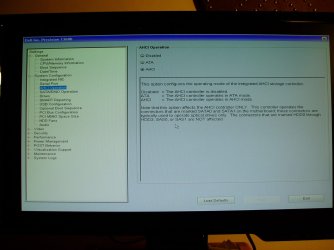
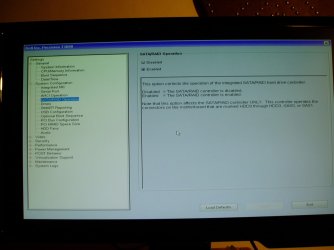
This was an interesting video because Wooley believes that HDD1, 2 & 3 are "SAS" ports. I don't know if that's part of the problem. One of my BIOS pages does mention SAS ports. There is a distinction between them and SATA ports; see attached.
 

Attachments

  • BIOS_3.jpg
    BIOS_3.jpg
    146 KB · Views: 0
  • BIOS_4.jpg
    BIOS_4.jpg
    115.6 KB · Views: 0

My Computer

Computer type
PC/Desktop
Computer Manufacturer/Model Number
Dell Precision
OS
Windows 7 Pro 64 bit and Windows 10 Pro 64 bit
From your images, SATA 0 & 1 are for ODD only.
The SSD should be used on HDD0 - HDD3 and if you're not going to have any RAID array, RAID controller should be set to Disabled.
General - Boot sequence set to HDD0 - HDD3 (where the SSD is placed)
 

My Computers

System One System Two

  • Computer type
    PC/Desktop
    Computer Manufacturer/Model Number
    custom build
    OS
    Windows 7 HP 64
    CPU
    i5 6600K - 800MHz to 4200MHz
    Motherboard
    GA-Z170-HD3P
    Memory
    4+4G GSkill DDR4 3000
    Graphics Card(s)
    IG - Intel 530
    Monitor(s) Displays
    Samsung 226BW
    Screen Resolution
    1680x1050
    Hard Drives
    (1) -1 SM951 – 128GB M.2 AHCI PCIe SSD drive for Windows 7 and Lubuntu
    (2) -1 WD SATA 3 - 1T for Data
    (3) -1 WD SATA 3 - 1T for backup
    PSU
    Thermaltake 450W TR2 gold
    Keyboard
    Old and good Chicony mechanical keyboard
    Mouse
    Logitech mX performance - 9 buttons (had to disable some)
    Internet Speed
    500Mb/s
    Browser
    Firefox 64
    Other Info
    TinyWall firewall
  • Computer type
    Laptop
    System Manufacturer/Model Number
    Asus Q550LF
    OS
    Windows 7 Pro
    CPU
    i7-4500U 800MHz to 3.0GHz
    Motherboard
    Asus Q550LF
    Memory
    (4+4)G DDR3 1600
    Graphics Card(s)
    IG intel 4400 + NVIDIA GeForce GT 745M
    Sound Card
    Realtek
    Monitor(s) Displays
    LG Display LP156WF4-SPH1
    Screen Resolution
    1920 x 1080
    Hard Drives
    BX500 120G SSD for Windows and programs +
    1T HDD for data
    Internet Speed
    500 Mb/s
    Browser
    Firefox
    Other Info
    TinyWall firewall
Orcadian

HDD1, 2 & 3 are "SAS" ports. I don't know if that's part of the problem.

That is why I linked you to that section of the video


I purchased a Samsung 840 128 to use as a boot drive on a Dell Precision T3600. When I check the BIOS, it has the SSD listed as a SAS device and will not let me install the OS. I'm using the same port (HDD0) that was used before with a 250 SATA HDD.


I was able to find the problem. I needed to load the Intel C600 controller drivers as part of the install. I would have figured it out sooner, but as far as I can tell, they are not listed on Dell's website and I had to get them from Intel. The hardest part was figured out which controller was being used in the first place.

dell-precision-t3600-detects-ssd-as-a-sas


The Precision Workstation systems mentioned have integrated SAS ports on the system board. Users may be attempting to use them as additional SATA ports. Users need to ensure to remove any SATA drives connected in the ports marked HDD 0-3. Users must install the hard drives into the ports marked SATA, or the drives will not detect in the system

https://www.dell.com/support/articl...r-integrated-sas-ports-on-motherboard?lang=en

I’ve been told by an online Dell rep that I am unable to use both SSD and SATA Drive together whilst another said it should be fine.

Installing SSD in Dell Precision T3600


Struggling with a Dell Precision T3600, Boot Image does not see Hard drive.

https://www.dell.com/community/Ente...w-do-I-add-drives-to-the-other-4/td-p/4016271
 
Last edited:

My Computers

System One System Two

  • Computer type
    PC/Desktop
    OS
    7 X64
    CPU
    i5 8400
    Motherboard
    gigabyte b365m ds3h
    Memory
    2x8gb 3200mhz
    Hard Drives
    various
    PSU
    pure power 11 400w cm
    Case
    Coolermaster
    Cooling
    cryorig m9i
  • Computer type
    PC/Desktop
    OS
    7x64
    CPU
    g5400
    Motherboard
    ga b365m ds3h
    Memory
    8gb ddr4 2400
    PSU
    xfx pro 450w
From your images, SATA 0 & 1 are for ODD only. The SSD should be used on HDD0 - HDD3 and if you're not going to have any RAID array, RAID controller should be set to Disabled. ...


Thanks, Megahertz07. SATA0 and SATA1 are the only connectors where the SSD will boot. When I disabled the RAID array, Windows 7 would not boot. (Please see my earlier posts.)
 

My Computer

Computer type
PC/Desktop
Computer Manufacturer/Model Number
Dell Precision
OS
Windows 7 Pro 64 bit and Windows 10 Pro 64 bit
@SIW2, Thank you for these helpful links. The Kelvinreview post was interesting. He talks about a 'PERC H310 RAID card' but I don't know if I have one of these. (However, there is no ref. to it in the manual.) He says you can D/L drivers for the PERC from Dell but the link is broken. The Forumsanandtech link too is interesting. He says he sourced a 'C600 controller driver' from Intel but gives no link. The Dell 'support' note about 'covers over SAS ports' just seems to say that if you've plugged your SATA drive into an HDDn port -tough.

I'm not sure what a SAS port looks like, and there is no label saying "SAS" on the motherboard, therefore I don't know if I have any. The HDDn ports all look ordinary to me, and all take standard SATA data connectors. For all my disks, the power supply and data connector are separate. When connected to HDDn, all disks are listed in BIOS as SAS devices.

It seems significant to me that Windows 7 has no difficulty - evidently there ARE drivers that sort out the SATA/RAID/SAS buisness - it's just that Windows 10 doesn't have them. (I wonder if this absence happened because, as mentioned, I installed my 'throwaway' Windows 7 with the SSD on HDD0 but when I upgraded this to W10, it would only install with the SSD on SATA0.)

I have discovered a video on how to install a "SAS RAID driver for C600" that (reportedly) fixes the 'disk visibility' problem on Dell Precisions: YouTube. However, the driver itself does not appear to come from Intel. It is supplied by an outfit called World Electroparts, who have mounted the driver package on google drive. I am therefore wary. Any advice on this appreciated.
 

My Computer

Computer type
PC/Desktop
Computer Manufacturer/Model Number
Dell Precision
OS
Windows 7 Pro 64 bit and Windows 10 Pro 64 bit
I would try it. Why not? Make a system restore point/or better still make an image before installing the driver.

A couple of good imaging programs with Pro versions on giveaway atm, if you don't already have a fave one.

It looks ok. Seems to be the original drivers.

View attachment DRVR_AHCI_SCU_Intel_A03_JV4JN_f6flpy-setup_ZPE.zip

According to the enclosed version.txt:

Code:
Title: Storage Controller: Intel Rapid Storage Technology,Intel C600 Storage Controller,Intel C600 SCUr...
Version: A03
OEM Name: 
OEM Version: 3.7.0.1093
Computers: Precision: T5600, T3600, T7600, T5600XL, T3600XL
OS: Windows Vista 64-bit - Home Basic, Windows Vista 64-bit - Ultimate, Windows 7 32-bit - Home Premium, Windows 8 64-bit - Pro, Windows Vista 64-bit - Home Premium, Windows XP x64 - Professional Client, Windows 7 64-bit - Professional, Windows 8 32-bit - Pro, Windows 7 32-bit - Home Basic, Windows Vista 32-bit - Ultimate, Windows 7 32-bit - Starter, Windows 7 32-bit - Professional, Windows Vista 32-bit - Starter, Windows Vista 32-bit - Home Basic, Windows Vista 32-bit - Home Premium, Windows Vista 64-bit - Business, Windows Vista 32-bit - Business, Windows 7 64-bit - Home Premium, Windows 7 64-bit - Home Basic, Windows 7 64-bit - Ultimate, Windows 8 64-bit - H, Windows 8 32-bit - H, Windows 8 64-bit - EM, Windows 8 32-bit - EM, Windows 7 32-bit - Ultimate
Languages: English
Created: 11/10/2013
 
Last edited:

My Computers

System One System Two

  • Computer type
    PC/Desktop
    OS
    7 X64
    CPU
    i5 8400
    Motherboard
    gigabyte b365m ds3h
    Memory
    2x8gb 3200mhz
    Hard Drives
    various
    PSU
    pure power 11 400w cm
    Case
    Coolermaster
    Cooling
    cryorig m9i
  • Computer type
    PC/Desktop
    OS
    7x64
    CPU
    g5400
    Motherboard
    ga b365m ds3h
    Memory
    8gb ddr4 2400
    PSU
    xfx pro 450w
Found the DELL download.For T5600, T3600, T7600, T5600XL, T3600XL
Supports vista-win10

DRVR_AHCI_SCU_Intel_A03_JV4JN_f6flpy-setup_ZPE.exe

info
https://www.dell.com/support/driver/uk/en/ukbsdt1/DriversDetails?driverId=JV4JN


There is a slightly newer version for T5610 below:

Supports win7-win10

DRVR_AHCI_SCU_Intel_A04_4JGTT_f6flpy-setup_ZPE.exe

info:
https://www.dell.com/support/home/uk/en/ukbsdt1/drivers/driversdetails?driverid=4jgtt

Code:
Title: Storage Controller: Intel IRST F6 Driver for T5610,Intel Rapid Storage Technology,Intel IRST F6r...
Version: A00-00        WP0000033533
OEM Name: 
OEM Version: 3.8.0.1108
Computers: Precision: T5610
OS: Windows 7 32-bit - Professional, Windows 8.1 64-bit - 8.1, Windows 8.1 32-bit - 8.1, Windows 8.1 32-bit - 8.1 SL (Single Language), Windows 7 32-bit - Home Premium, Windows 8.1 64-bit - 8.1 SL (Single Language), Windows 8 64-bit - Pro, Windows 7 64-bit - Home Premium, Windows 7 64-bit - Home Basic, Windows 8.1 32-bit - 8.1 Pro, Windows 8 64-bit - H, Windows 7 64-bit - Ultimate, Windows 8.1 64-bit - 8.1 Pro, Windows 7 64-bit - Professional, Windows 8 32-bit - H, Windows 8 32-bit - Pro, Windows 7 32-bit - Home Basic, Windows 8 64-bit - EM, Windows 8 32-bit - EM, Windows 7 32-bit - Starter, Windows 7 32-bit - Ultimate
Languages: English
Created: 11/12/2014


Fix:
Error msg during install Win7 to RAID volume after load IRST driver
 

My Computers

System One System Two

  • Computer type
    PC/Desktop
    OS
    7 X64
    CPU
    i5 8400
    Motherboard
    gigabyte b365m ds3h
    Memory
    2x8gb 3200mhz
    Hard Drives
    various
    PSU
    pure power 11 400w cm
    Case
    Coolermaster
    Cooling
    cryorig m9i
  • Computer type
    PC/Desktop
    OS
    7x64
    CPU
    g5400
    Motherboard
    ga b365m ds3h
    Memory
    8gb ddr4 2400
    PSU
    xfx pro 450w
Thanks again, SIW2. (Good to know there is a fix if I get an error.) I do not see Windows 10 mentioned in either case, but AIUI a lot of 'low-level' stuff is usually upwards-compatible. I am going to give it a go! Watch this space.
 

My Computer

Computer type
PC/Desktop
Computer Manufacturer/Model Number
Dell Precision
OS
Windows 7 Pro 64 bit and Windows 10 Pro 64 bit
In the video he says use the win8 x64 driver
 

My Computers

System One System Two

  • Computer type
    PC/Desktop
    OS
    7 X64
    CPU
    i5 8400
    Motherboard
    gigabyte b365m ds3h
    Memory
    2x8gb 3200mhz
    Hard Drives
    various
    PSU
    pure power 11 400w cm
    Case
    Coolermaster
    Cooling
    cryorig m9i
  • Computer type
    PC/Desktop
    OS
    7x64
    CPU
    g5400
    Motherboard
    ga b365m ds3h
    Memory
    8gb ddr4 2400
    PSU
    xfx pro 450w
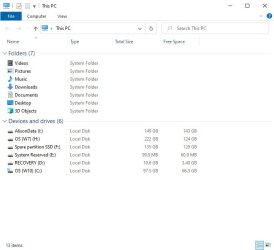
Wahay - success at last! This worked like a charm: no errors, no reboot (and no re-install of W10). Windows 10 can now see anything attached to HDDn (As you'll see, I have the second SSD on there too.)

Since all owners of older, high-end Dell's are in the same position, I cannot imagine why Dell didn't just issue a Windows 10 driver update. At the least they could have put out an advisory. Thanks for your investigations, SIW2, and for your encouragement to give this a try.

Interestingly, the successful Windows 10 driver seems to be just the standard Windows 7 driver from 2013! (For W10 Microsoft has thrown in something else but fortunately this is included in the driver download.)


It has taken months of almost continuous research & effort to make dual boot work properly with a hard disk and an SSD. And in the end the fix took just 10 minutes. That's two months of my life I'll never get back! I don't know whether I feel angry, relieved or elated. Probably all three. :shock: Anyway, it's the pub and a pint tonight.. :party:

.


Attachments

  • MyComputer (W10) post C600 drive install - SSD on HDD1.jpg
    MyComputer (W10) post C600 drive install - SSD on HDD1.jpg
    28.4 KB · Views: 9
  • DevMgr W10, post-install of C600 driver.jpg
    DevMgr W10, post-install of C600 driver.jpg
    32.8 KB · Views: 0

My Computer

Computer type
PC/Desktop
Computer Manufacturer/Model Number
Dell Precision
OS
Windows 7 Pro 64 bit and Windows 10 Pro 64 bit
Great

:D
 

My Computers

System One System Two

  • Computer type
    PC/Desktop
    OS
    7 X64
    CPU
    i5 8400
    Motherboard
    gigabyte b365m ds3h
    Memory
    2x8gb 3200mhz
    Hard Drives
    various
    PSU
    pure power 11 400w cm
    Case
    Coolermaster
    Cooling
    cryorig m9i
  • Computer type
    PC/Desktop
    OS
    7x64
    CPU
    g5400
    Motherboard
    ga b365m ds3h
    Memory
    8gb ddr4 2400
    PSU
    xfx pro 450w
Back
Top