Dual boot: remove original OS and keep W7?

binni

New member
Local time
11:49 AM
Messages
15
I wasn't quite sure which subforum to post this in, but this seemed the most appropriate one.

My laptop is dual booted with Vista as the original OS and Windows 7 as the other on a different partition. I've decided to use only W7 and get rid of Vista. Is there any way I can accomplish this, seeing as Vista is the original OS?

I was thinking about just formatting the partition that Vista is on and if it were to mess with the bootloaders, I'd just use the recover function on the Windows 7 installation disc, but I'm not able to format the Vista partition.

What are my options?
 

My Computer My Computer

Computer Manufacturer/Model Number
Acer Aspire 4935G
OS
Windows 7 Ultimate x64
CPU
Intel Mobile Core 2 Duo T6400 @ 2.00GHz
Motherboard
Acer Aspire 4935 (uPGA-478)
Memory
4.0GB Dual-Channel DDR2 @ 332MHz
Graphics Card(s)
512MB GeForce 9300M GS
It will not let you delete or reformat as it;s a system partition.

If you;d like to wipe out the old Vista drive, try GParted
GParted -- Download

Now you can choose the partition to delete Make sure you get the right one!.

Now go back to Windows and open Disk Management and you can great a partition in the unallocated space.
 

My Computer My Computer

Computer Manufacturer/Model Number
Cheap $399.00 E-Machine
OS
Windows 7 Pro & Vista Home Premium
CPU
Athlon 64 3800+ (Orleans) 2.40GHz
Motherboard
Winfast
Memory
2GB DDR2 RAM DIMM
Graphics Card(s)
NVIDIA GeForce 8500 GT 512 MB memory HDMI out
Sound Card
creative X-Fi Exteme 7..1 channel
Monitor(s) Displays
Acer V223W 22" widescreen DVI
Screen Resolution
1680x1050
Hard Drives
WDC WD5 500GB
WDC WD25 250GB
PSU
OCZ 550 watt
Case
Gateway
Cooling
2 fans
Keyboard
Dell
Mouse
Sony Vaio
Internet Speed
18MB/s down - .72MB /s up
Thanks for your reply :)

Just to make sure, if I do this and thus most likely remove the bootloader files (which I'm told should be on the same partition as the original OS) would the repair function on the Windows 7 installation disc fix the problems I would encounter due to the lack of bootloader files?
 

My Computer My Computer

Computer Manufacturer/Model Number
Acer Aspire 4935G
OS
Windows 7 Ultimate x64
CPU
Intel Mobile Core 2 Duo T6400 @ 2.00GHz
Motherboard
Acer Aspire 4935 (uPGA-478)
Memory
4.0GB Dual-Channel DDR2 @ 332MHz
Graphics Card(s)
512MB GeForce 9300M GS
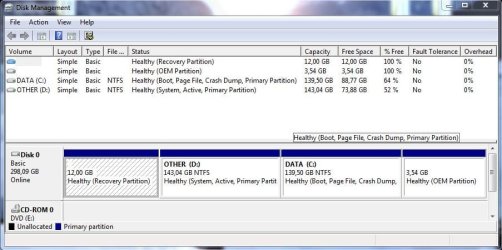
Could you post a screen shot of Disk Management?
 

My Computer My Computer

Computer Manufacturer/Model Number
Cheap $399.00 E-Machine
OS
Windows 7 Pro & Vista Home Premium
CPU
Athlon 64 3800+ (Orleans) 2.40GHz
Motherboard
Winfast
Memory
2GB DDR2 RAM DIMM
Graphics Card(s)
NVIDIA GeForce 8500 GT 512 MB memory HDMI out
Sound Card
creative X-Fi Exteme 7..1 channel
Monitor(s) Displays
Acer V223W 22" widescreen DVI
Screen Resolution
1680x1050
Hard Drives
WDC WD5 500GB
WDC WD25 250GB
PSU
OCZ 550 watt
Case
Gateway
Cooling
2 fans
Keyboard
Dell
Mouse
Sony Vaio
Internet Speed
18MB/s down - .72MB /s up
Here you go :)

attachment.php


Windows 7 is on DATA and Vista is on OTHER
 

Attachments

  • diskmanagement.JPG
    diskmanagement.JPG
    68.2 KB · Views: 992

My Computer My Computer

Computer Manufacturer/Model Number
Acer Aspire 4935G
OS
Windows 7 Ultimate x64
CPU
Intel Mobile Core 2 Duo T6400 @ 2.00GHz
Motherboard
Acer Aspire 4935 (uPGA-478)
Memory
4.0GB Dual-Channel DDR2 @ 332MHz
Graphics Card(s)
512MB GeForce 9300M GS
You need to delete the D partition.

Not the size of the partition as GParted idebtifies the drive as sbv1
 

My Computer My Computer

Computer Manufacturer/Model Number
Cheap $399.00 E-Machine
OS
Windows 7 Pro & Vista Home Premium
CPU
Athlon 64 3800+ (Orleans) 2.40GHz
Motherboard
Winfast
Memory
2GB DDR2 RAM DIMM
Graphics Card(s)
NVIDIA GeForce 8500 GT 512 MB memory HDMI out
Sound Card
creative X-Fi Exteme 7..1 channel
Monitor(s) Displays
Acer V223W 22" widescreen DVI
Screen Resolution
1680x1050
Hard Drives
WDC WD5 500GB
WDC WD25 250GB
PSU
OCZ 550 watt
Case
Gateway
Cooling
2 fans
Keyboard
Dell
Mouse
Sony Vaio
Internet Speed
18MB/s down - .72MB /s up
After downloading GParted, I am at a loss. I have no idea how to run the program :confused: - Do you know where I could find instructions for it or if there is a more simple program I could use for this purpose?

And if I do manage to delete the Vista partition and thus most likely remove the bootloader files (which I'm told should be on the same partition as the original OS) would the repair function on the Windows 7 installation disc fix the problems I would encounter due to the lack of bootloader files?
 

My Computer My Computer

Computer Manufacturer/Model Number
Acer Aspire 4935G
OS
Windows 7 Ultimate x64
CPU
Intel Mobile Core 2 Duo T6400 @ 2.00GHz
Motherboard
Acer Aspire 4935 (uPGA-478)
Memory
4.0GB Dual-Channel DDR2 @ 332MHz
Graphics Card(s)
512MB GeForce 9300M GS
Let's try the automated route:

Download and burn to CD Partition Wizard. http://www.partitionwizard.com/download.html

Boot into it. Right click on the first two partitions and delete each.

Now right click on your Windows 7 partition and mark it active.

Now right click again Windows 7 partition and choose Resize/Move and move the left border over to include all of the deleted Recovery and D: partition unallocated space before it. Further resize the partition as you wish. Execute all tasks.

Now boot into the Windows 7 installer Repair console and run Startup Repair at least 3 times, as it will try multiple repairs before finally rewriting the MBR to the moved C: drive.

When finished, use Win7 backup imaging to make an image of your HDD stored externally (and in a primary formatted partiton if you want) so that you never have to install again, just reimage the HDD or a replacement using the booted repair disk.
 

My Computer My Computer

Computer Manufacturer/Model Number
Cheap $399.00 E-Machine
OS
Windows 7 Pro & Vista Home Premium
CPU
Athlon 64 3800+ (Orleans) 2.40GHz
Motherboard
Winfast
Memory
2GB DDR2 RAM DIMM
Graphics Card(s)
NVIDIA GeForce 8500 GT 512 MB memory HDMI out
Sound Card
creative X-Fi Exteme 7..1 channel
Monitor(s) Displays
Acer V223W 22" widescreen DVI
Screen Resolution
1680x1050
Hard Drives
WDC WD5 500GB
WDC WD25 250GB
PSU
OCZ 550 watt
Case
Gateway
Cooling
2 fans
Keyboard
Dell
Mouse
Sony Vaio
Internet Speed
18MB/s down - .72MB /s up
Thank you both for your help. I'll try the method gregrocker posted and report back afterwards :). It won't be till a couple of weeks from now, though, since I don't want to do anything risky until after my exams :).

One question: I have no need for the recovery partition any more?
 

My Computer My Computer

Computer Manufacturer/Model Number
Acer Aspire 4935G
OS
Windows 7 Ultimate x64
CPU
Intel Mobile Core 2 Duo T6400 @ 2.00GHz
Motherboard
Acer Aspire 4935 (uPGA-478)
Memory
4.0GB Dual-Channel DDR2 @ 332MHz
Graphics Card(s)
512MB GeForce 9300M GS
Almost all recov partitions except some Dell become disabled when you take out Vista.

Now is the time, however, to make your Vista recovery disks if you haven't already.

However the only reason you'll need to reinstall Vista in the future is if you want to recover to factory condition for resale or because your maker requires that to service hardware warranty. And you could order the recov disks then if needed.

You can always clean install a Win7 upgrade without Vista, and by making a Win7 Backup image stored externally you never have to reinstall again, anyway - just reimage in 15 minutes.
 
Thank you, that's all I needed to know for now :)
 

My Computer My Computer

Computer Manufacturer/Model Number
Acer Aspire 4935G
OS
Windows 7 Ultimate x64
CPU
Intel Mobile Core 2 Duo T6400 @ 2.00GHz
Motherboard
Acer Aspire 4935 (uPGA-478)
Memory
4.0GB Dual-Channel DDR2 @ 332MHz
Graphics Card(s)
512MB GeForce 9300M GS
I just wanted to drop by and let you know that everything went smoothly. I am now running Windows 7 on one big partition, just like I wanted. Thanks for your help :)
 

My Computer My Computer

Computer Manufacturer/Model Number
Acer Aspire 4935G
OS
Windows 7 Ultimate x64
CPU
Intel Mobile Core 2 Duo T6400 @ 2.00GHz
Motherboard
Acer Aspire 4935 (uPGA-478)
Memory
4.0GB Dual-Channel DDR2 @ 332MHz
Graphics Card(s)
512MB GeForce 9300M GS
Great to hear back from you, binni.

You're most welcome.

Remember to make your Win7 backup image stored externally (and in a primary formatted partition if you want) so that you never need to reinstall Win7 again, just reimage the HD or a replacement in 15-20 minutes.
 
I'll do that as soon as I get my hands on a bunch of DVDs (or even just a new external drive). Thanks again :)
 

My Computer My Computer

Computer Manufacturer/Model Number
Acer Aspire 4935G
OS
Windows 7 Ultimate x64
CPU
Intel Mobile Core 2 Duo T6400 @ 2.00GHz
Motherboard
Acer Aspire 4935 (uPGA-478)
Memory
4.0GB Dual-Channel DDR2 @ 332MHz
Graphics Card(s)
512MB GeForce 9300M GS
Back
Top