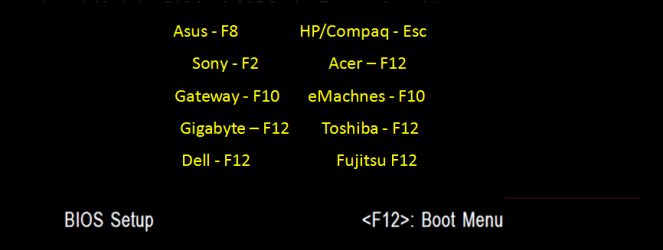
I am currently running Win 7 Ultimate x64 on (2) HDDs. To chose which to boot from I go into my bios boot menu. This was working fine when I was DBing Ubuntu/Win 7 but now that I am DBing Win 7/Win 7 its causing issues. I keep getting a start up file system error then check disk starts but wont run. It eventually boots up properly after the 2nd check disk attempt.
I'm thinking its because I now have (2) C drives and Windows doesn't like it. I will eventually be installing yet another HDD with Ubuntu on it so I would like to get it working now but be set up for the triple boot in the near future. I've never done a dual boot before win/Ubuntu so any help will be much appreciated.
Also both of my boot drives have a 100MB partition. Not sure what that's about or if it matters but Windows put it there.
That's the one I've been using. But all of the sudden its coming up with the file system error.
I have noticed that when I'm using my main win 7 boot drive my secondary Win 7 boot drive becomes I: and the same when I go to boot off the secondary, the main Win 7 drive becomes I:. I believe its the changing of the drive letters that's screwing things up.
Is there a way for me to use the windows boot manager to do this?
When it comes to the Ubuntu option, because you are installing that to a totally separate disk, it makes it a whole lot easier. Once you have installed Ubuntu to the 2nd disk, you have two options for boot:
1. Use the one time boot menu that theog referenced above, or
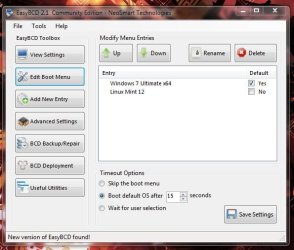
2. Use the FREE version of EasyBCD to add the Ubuntu boot option to the bootloader, as shown in my Windows 7+Linux Mint 12 bootloader image below.
Note : the FREE version of BCD is at the very bottom of the page - no payment or registration is required.
Let is know if you need more help when you get around to that - its quite straightforward if you keep Ubuntu to its own disk.
1*Samsung 840 EVO 120GB SSD;
1*OCZ Vertex 2 60GB SSD;
2*Samsung F3 SpinPoint 1TB in RAID0;
1*Samsung F1 SpinPoint 1TB;
2*Western Digital 1TB External USB 3.0
1*Western Digital 500GB External USB 3.0
1*Seagate 500GB External USB 2.0
PSU
Thermaltake ToughPower QFan 750W
Case
Thermaltake Element S VK60001W2Z
Cooling
Corsair H60 Water Cooling, 2*230mm and 2*80mm case fans
OK thank you I'll take a look at that. It sounds simple enough. Is that a Linux program or will that run in windows so I can do something with my Dual Win 7 issue I'm having now?
I'd continue using the one-time BIOS Boot menu to keep the HD's independent and unaffected by GRUB which won't be needed if you do this. GRUB can irreparably corrupt Win7.
The problem with the auto-Disk Check is not related to dual booting via BIOS since Windows cannot even see the other OS(es) in that case. It is more likely disk corruption of some sort requiring testing the HD with maker's HD Diagnostic extended CD scan, or wiping the HD with Diskpart Clean Command before reinstall to remove boot sector corruption - possibly GRUB? Follow the HD Diagnostics with full Disk Check run from Command Line.
I'm not using GRUB since I no longer have a boot drive with Ubuntu on it. When I had the Ubuntu /Win7 dual HDD set up the bios 1 time boot was working because Windows (C did not recognize the Ubuntu drive (C. Now that I have switched to 2 HDDs both with Win 7 on them and both C: when I boot from one it changes the others drive letter to I: then once I switch back its having issues due to the drive letter change. I'm only speculating as I have no idea really. As of right now I installed EasyBCD and one of the 2 drives booted fine. I have not tried my main yet. Oddly enough now that I'm thinking about it none of this started till last night when I plugged my TV back into my machine to watch a movie. I have another thread on that which is a whole other mess. Ill update again once I boot to my second drive and see if the error still happens. Both HDDs are only a month old. One is a WD the other a Seagate. I can't see them both getting corrupt at the exact same time. That's entirely too hokey.
If you correctly install Win7 by booting the installer it will always see itself as C when booted into it. It doesn't matter what letter is given when it's not booted.
I would keep the HD's independent booted via BIOS Boot Order and one-time Boot Menu key - always the best arrangement when Dual Booting with separate HD's.
Your HD's are not independent but are booting off of the one System partition on Disk0 - as shown by it being the only one marked System.
To correct this unplug Disk0, boot the Win7 DVD to run Startup Repair 3 Separate Times
on Disk1 to write the System boot files to its SysReserved partition which is already marked Active and correct any Startup issues triggering repair loop.
Once it starts on it's own by setting it first to boot in BIOS setup after DVD drive, or using one-time BIOS Boot Menu key, reboot several times to make sure the autoStartup Repair is not still looping.
If not, plug back in the other HD and see how it runs. If either still loop into Repair unplug Disk 1 to run the same Repairs on it while the other HD is not plugged in.
OK Ill try that and let you know how it goes. But some info I didn't mention which may be part of the issue or help my cause:
Disk 1 was my original Win7 install before changing my MOB and CPU.
Disk 0 was my original Ubuntu install before the change.
The day after changing my MOBO I was getting drive error and the PC would not boot. After messing with it for a good day I decided to reload Win 7 onto Disk1 figuring the issue was I changed the MOBO. Turns out it was an update I needed to do to the BIOS. So I was left with Disk0 - original win 7 install and Disk1 new win 7 install. I never until a few days ago had them both plugged in at the same time. I used to do a shut down and unplug and re plug. So both 100MB partitions are actually system partitions.
OK Ill try that and let you know how it goes. But some info I didn't mention which may be part of the issue or help my cause:
Disk 1 was my original Win7 install before changing my MOB and CPU.
Disk 0 was my original Ubuntu install before the change.
The day after changing my MOBO I was getting drive error and the PC would not boot. After messing with it for a good day I decided to reload Win 7 onto Disk1 figuring the issue was I changed the MOBO. Turns out it was an update I needed to do to the BIOS. So I was left with Disk0 - original win 7 install and Disk1 new win 7 install. I never until a few days ago had them both plugged in at the same time. I used to do a shut down and unplug and re plug. So both 100MB partitions are actually system partitions.
I don't think its GRUB because I never installed it when I was running Ubuntu and I did delete all partitions on the drive and formatted it before the 7 install. First a quick format then a thorough format. I'm going to try your idea above (unlpug and run repair) today and will let you know how it goes.





 did not recognize the Ubuntu drive (C

