

Good afternoon,
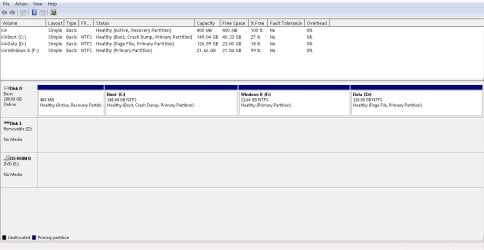
I want to install Windows 8.1 Pro (x64) on a newly created primary partition for testing purposes in a dual boot (windows7 Pro (x64), however my hard drive is already partitioned into C and D. D basically has all my data on it. What I noticed was that my D partition is also marked as primary, don’t know how that happened. Booting from the Windows 8 disc I choose to custom install which should give me the option to install on the newly created partition F but this does not show up in the available partitions to install on. I thought maybe by converting my D partition to a logical drive (extended) would fix the problem but this just results in the D partition no longer showing up in Windows. This is all a little embarrassing as although I haven’t set up a dual boot machine for years I should know where I’m going wrong, think age is catching up with me.
I’d appreciate some assistance with fixing this issue please. Oh just as a footnote, I decided to take 20GB or so from D partition to create the new F partition, this and formatting etc was done in Aomei 5.5 Pro as it was the only one of a few softwares I tried that allowed me to not only see unallocated space but also create a primary partition. I think there is a 3 primary partition limitation as far as I recall although there are workarounds I don’t care to complicate this further as I stated previously, I only want to run Win 8.1 for testing purposes.
Kindly
Tek
I want to install Windows 8.1 Pro (x64) on a newly created primary partition for testing purposes in a dual boot (windows7 Pro (x64), however my hard drive is already partitioned into C and D. D basically has all my data on it. What I noticed was that my D partition is also marked as primary, don’t know how that happened. Booting from the Windows 8 disc I choose to custom install which should give me the option to install on the newly created partition F but this does not show up in the available partitions to install on. I thought maybe by converting my D partition to a logical drive (extended) would fix the problem but this just results in the D partition no longer showing up in Windows. This is all a little embarrassing as although I haven’t set up a dual boot machine for years I should know where I’m going wrong, think age is catching up with me.
I’d appreciate some assistance with fixing this issue please. Oh just as a footnote, I decided to take 20GB or so from D partition to create the new F partition, this and formatting etc was done in Aomei 5.5 Pro as it was the only one of a few softwares I tried that allowed me to not only see unallocated space but also create a primary partition. I think there is a 3 primary partition limitation as far as I recall although there are workarounds I don’t care to complicate this further as I stated previously, I only want to run Win 8.1 for testing purposes.
Kindly
Tek
Attachments

My Computer
At a glance
Windows 7 Professional 64 bitToo slow
- Computer type
- Laptop
- Computer Manufacturer/Model Number
- Toshiba Satellite C660
- OS
- Windows 7 Professional 64 bit
- CPU
- Too slow
- Internet Speed
- ha ha
- Antivirus
- Emsisoft Anti-Malware
- Browser
- Waterfox


 ok gonna try this now but I must say in my experience I've had very little success using start-up repair so I fundamentally never use it. Apart from regular back ups i tend to rely more on Rollback RX which gets the PC back to a working environment quickly and efficiently 99.9% of the time.

