Dual boot Windows 7 with Windows 7

toddmike

New member
Local time
7:11 AM
Messages
7
I have two installations of Windows 7 (same install disk and same key) on two separate hard drives, and would like two have the option to boot to either one. I can boot to either drive just fine when either one is the only drive connected to the motherboard. But when both are connected it just boots straight to one of them without giving me the option to choose.

When I view the Operating Systems listed under (Right click My Computer -> Properties -> Advanced System Settings -> Advanced Tab -> Startup and Recovery -> Settings -> System Startup) only one install of Windows 7 is listed.

This type of install may seem odd. The reason I want to do this is so that I can have my own hard drive and my son can have his own. I'd rather not have all of his "junk" on my drive.

I have this exact setup with Windows XP on another computer and it works perfectly. It lists two operating systems in the System Startup menu.

Does anyone know how to make it work with Windows 7?
 

My Computer

Computer Manufacturer/Model Number
Home build
OS
Windows 7
CPU
Core 2 Duo 3.0Ghz
Motherboard
Gygabyte GA-EP45-UD3P
Memory
4 Gb Kingston
Graphics Card(s)
EVGA
Sound Card
On board
Monitor(s) Displays
Acer 22 inch
Hard Drives
1 Terrabyte
You can create a Windows-managed dual boot like the one you have for XP, however a less complicated way to configure this is to boot from the BIOS. You would set the preferred HD as first HD to boot in BIOS setup, then if you want to boot the other HD, use the key given on first bootup screen for Boot Menu.

This way the two HD's remain independent and can come and go as you please. With a Windows-managed Dual Boot menu, the HD's become interdependent and harder to extricate.

However, if a Windows Dual Boot is what you want, download and install Easy BCD 2.0 beta then use the Add/Remove tab to add the Win7 which is not listed on its front panel listings, by name, type and drive letter. Highlight new listing above and Save. Rename other 7 In Change Settings if desired.
 

Attachments

  • Capture.PNG
    Capture.PNG
    27.6 KB · Views: 62
  • Capture2.PNG
    Capture2.PNG
    29.7 KB · Views: 67
Hello toddmike Welcome to the Se7en Forums!

One thing to know ahead of time is the need to sign up over at neosmart before you can download any beta version. The finished public release is still in wait for the present time.

When mentioning two separate installations of 7 on two separate are they both the 32bit or 64bit or is one 32bit while the other is the 64bit version? This will make a difference since a clean install of the same on a first drive while an existing installation resides on a second hard drive will not automatically add the previous installation in. The 32bit will add the 64bit in however with ease.

The same problem was seen here when adding in a new lately with the 64bit already on the first host boot drive. When installing the 32bit to a 3rd sata by chance that also ignored the earliest 64bit but immediately added in the latest 64bit into it's own BCD store as an option.

What posed an interesting problem later proved to be one solution when going to install a Linux distro on a usb flash drive and unintended install of Grub on the new drive's mbr there. When using the startup repair tool on the 64bit's dvd it recovered the first 64bit installation instead! The repair tool was then used on the 32bit dvd to see both 64bit installs along the 32bit making them a triple boot.

Drawbacks? Apparently when tow of the same are seen as options problems with starting Windows up after a restart tend to come up! This is between two 64bit installations. Between the 32bit and 64bit retail dual booting the problems of hanging at the logo don't seem to appear.

This has nothing to do with EasyBCD however. That's one free program found to be well written from the start.
 

My Computers

System One System Two

  • Computer type
    PC/Desktop
    Computer Manufacturer/Model Number
    Custom builds = 2
    OS
    W7 Ultimate x64/W10 Pro x64/W11 Pro Triple Boot - Main PC W7 Remote PC Micro ATX W7 Pro x64/W11 Pro
    CPU
    AMD Phenom II X4 975 Deneb 3.6ghz - 965 2nd remote pc
    Motherboard
    Gigabyte GA-790XTA-UD4-Gigabyte GA-880GM-D2H remote pc
    Memory
    Kingston Hyper X DDR3 1600 1.5v 16gb - Hyper X Fury 8gb 2nd
    Graphics Card(s)
    MSI HD Radeon 5750 1gb - MSI HD Radeon 6450 on mini tower
    Sound Card
    Creative Labs X-Fi Xtreme Audio P - Realtek onooard 2nd case
    Monitor(s) Displays
    ASUS VW199T-P 19" HP 2082a Main-HP 2082a 20" remote pc
    Screen Resolution
    Asus 1440x900 - HP 1600x900
    Hard Drives
    WD Black 1TB HD per OS W7, W10, and pending W11 presently on 500gb OS Drive - Pending Triple 1TB HDs for Spanned Storage/backup volume
    Single 2TB external USB enclosure, single 1TB System 7 Host/Boot drive, Pending 8TB external HD for system image b
    PSU
    Corsair 750TX - primary / Corsair CX600 - second
    Case
    Antec 900-2 - SSD compatible / NZXT Vulcan mini tower
    Cooling
    Zalman CNPS9900A
    Keyboard
    AZIO L70 Backlit Letters Gaming - ONN Cordless/USB
    Mouse
    MSI DS200 Programmable, Logitech Cordless
    Internet Speed
    30mbps upgrade - primary hard wired - mini tower usb WiFi
    Antivirus
    GFI VIPRE Internet Security 2014 on W7 2016 beta on W10,
    Browser
    Cyberfox, WaterFox 64bit FF variants, FireFox x64, Pale Moon
    Other Info
    Accomdata fan cooled usb 2.0 PIDE/Sata II, III external enclosure.
    Sambient usb/eSata PATA/Sata II, III external enclosure.
  • Computer type
    PC/Desktop
    System Manufacturer/Model Number
    CUSTOM ASSEMBLY
    OS
    W7 Pro x64/W11 Pro
    CPU
    AMD Deneb 3.6ghz - 965
    Motherboard
    Gigabyte GA-880GM-D2H remote pc
    Memory
    Kingston Hyper X Fury 8gb
    Graphics Card(s)
    MSI HD Radeon 6450 DVI Output
    Sound Card
    Realtek onooard Creative or Other separate PENDING
    Monitor(s) Displays
    VIZIO 32" LCD TV Separate LCD Pending
    Screen Resolution
    1600x1080
    Hard Drives
    WD 500GB OS Host/Boot WD Green 1TB Storage/Backup
    PSU
    Corsair 600W - THERMALTAKE 600W spare case
    Case
    NZXT Vulcan mini tower
    Cooling
    Twin 120mm Top Fans - 240mm Side Cover
    Keyboard
    ONN Cordless/USB Logitech Cordless
    Mouse
    ONN USB/Cordless - Logitech Cordless
    Internet Speed
    DSL 5G
    Browser
    MS Edge, FireFox, WaterFox x64, FireFox Nightly
    Other Info
    OS Testing-Remote Access to Main TeamViewer
Thank you both for the help.

Night Hawk, it is two 64bit installs. Its good to know that I'm not the only one who has seen this problem.

Gregrocker, I like the idea of contolling the boot sequence using the bios. But, I'd rather not have my son making these changes when I'm not around. I'll try the Easy BCD tool and see what happens.
 

My Computer

Computer Manufacturer/Model Number
Home build
OS
Windows 7
CPU
Core 2 Duo 3.0Ghz
Motherboard
Gygabyte GA-EP45-UD3P
Memory
4 Gb Kingston
Graphics Card(s)
EVGA
Sound Card
On board
Monitor(s) Displays
Acer 22 inch
Hard Drives
1 Terrabyte
Hi guys,

I also need two independent Windows 7 installation, but even with boot managers like "OSL2000" or "Boot-us" seems to me that Windows 7 recognize only 1st installation on 1st HDD. Is there any help with this, I need it badly because if one OS sees other OS there might be a problems with both instances and craches. :(

Thanks
 

My Computer

OS
WINDOWS 7
Thank you both for the help.

Night Hawk, it is two 64bit installs. Its good to know that I'm not the only one who has seen this problem.

Gregrocker, I like the idea of contolling the boot sequence using the bios. But, I'd rather not have my son making these changes when I'm not around. I'll try the Easy BCD tool and see what happens.

The EasyBCD tool will work best without the need to press the F key to bring up the bios boot device menu constantly. Once I removed the original by chance entry seen when recovering the install on the now second drive with the 64bit dvd the new entry with the EasyBCD tool worked as it always has.

The 2.0 beta won't lose the new 7 boot splash screen like the present 1.7.2 showing it is near completion. I've been using first the 1.5.2 and later 1.7.2 version on occasion for over 2yrs. now.

Hi guys,

I also need two independent Windows 7 installation, but even with boot managers like "OSL2000" or "Boot-us" seems to me that Windows 7 recognize only 1st installation on 1st HDD. Is there any help with this, I need it badly because if one OS sees other OS there might be a problems with both instances and craches. :(

Thanks

Welcomee to the Se7en Forums! frkatonac

With any version of Windows the installer will always look for and place the boot files and mbr entries on the first drive. If you have an ide along with a sata the boot files/mbr entries go right to the ide first!

To set up a second Windows installation as a stand alone install followed by adding it into the first drives own boot options you first unplug the first drive. The fresh install will then see the second HD as the first drive and proceed to install everything there.

Once that installation is complete you replug the first drive back in and go for EasyBCD! That will not only see the second HD's installation added in on the first's bootloader but you can set the default OS as the second and even rename the entry for either at any time as well as adjust the displayed onsbreen time.

You can also move the second installation's entry above or below the first's on the boot options screen as well. It's far more versatile then other 3rd party boot apps.
 

My Computers

System One System Two

  • Computer type
    PC/Desktop
    Computer Manufacturer/Model Number
    Custom builds = 2
    OS
    W7 Ultimate x64/W10 Pro x64/W11 Pro Triple Boot - Main PC W7 Remote PC Micro ATX W7 Pro x64/W11 Pro
    CPU
    AMD Phenom II X4 975 Deneb 3.6ghz - 965 2nd remote pc
    Motherboard
    Gigabyte GA-790XTA-UD4-Gigabyte GA-880GM-D2H remote pc
    Memory
    Kingston Hyper X DDR3 1600 1.5v 16gb - Hyper X Fury 8gb 2nd
    Graphics Card(s)
    MSI HD Radeon 5750 1gb - MSI HD Radeon 6450 on mini tower
    Sound Card
    Creative Labs X-Fi Xtreme Audio P - Realtek onooard 2nd case
    Monitor(s) Displays
    ASUS VW199T-P 19" HP 2082a Main-HP 2082a 20" remote pc
    Screen Resolution
    Asus 1440x900 - HP 1600x900
    Hard Drives
    WD Black 1TB HD per OS W7, W10, and pending W11 presently on 500gb OS Drive - Pending Triple 1TB HDs for Spanned Storage/backup volume
    Single 2TB external USB enclosure, single 1TB System 7 Host/Boot drive, Pending 8TB external HD for system image b
    PSU
    Corsair 750TX - primary / Corsair CX600 - second
    Case
    Antec 900-2 - SSD compatible / NZXT Vulcan mini tower
    Cooling
    Zalman CNPS9900A
    Keyboard
    AZIO L70 Backlit Letters Gaming - ONN Cordless/USB
    Mouse
    MSI DS200 Programmable, Logitech Cordless
    Internet Speed
    30mbps upgrade - primary hard wired - mini tower usb WiFi
    Antivirus
    GFI VIPRE Internet Security 2014 on W7 2016 beta on W10,
    Browser
    Cyberfox, WaterFox 64bit FF variants, FireFox x64, Pale Moon
    Other Info
    Accomdata fan cooled usb 2.0 PIDE/Sata II, III external enclosure.
    Sambient usb/eSata PATA/Sata II, III external enclosure.
  • Computer type
    PC/Desktop
    System Manufacturer/Model Number
    CUSTOM ASSEMBLY
    OS
    W7 Pro x64/W11 Pro
    CPU
    AMD Deneb 3.6ghz - 965
    Motherboard
    Gigabyte GA-880GM-D2H remote pc
    Memory
    Kingston Hyper X Fury 8gb
    Graphics Card(s)
    MSI HD Radeon 6450 DVI Output
    Sound Card
    Realtek onooard Creative or Other separate PENDING
    Monitor(s) Displays
    VIZIO 32" LCD TV Separate LCD Pending
    Screen Resolution
    1600x1080
    Hard Drives
    WD 500GB OS Host/Boot WD Green 1TB Storage/Backup
    PSU
    Corsair 600W - THERMALTAKE 600W spare case
    Case
    NZXT Vulcan mini tower
    Cooling
    Twin 120mm Top Fans - 240mm Side Cover
    Keyboard
    ONN Cordless/USB Logitech Cordless
    Mouse
    ONN USB/Cordless - Logitech Cordless
    Internet Speed
    DSL 5G
    Browser
    MS Edge, FireFox, WaterFox x64, FireFox Nightly
    Other Info
    OS Testing-Remote Access to Main TeamViewer
The Easy BCD did the trick. The dual boot his working flawlessly. Thanks.
 

My Computer

Computer Manufacturer/Model Number
Home build
OS
Windows 7
CPU
Core 2 Duo 3.0Ghz
Motherboard
Gygabyte GA-EP45-UD3P
Memory
4 Gb Kingston
Graphics Card(s)
EVGA
Sound Card
On board
Monitor(s) Displays
Acer 22 inch
Hard Drives
1 Terrabyte
A lot of work went into that program over the last 3yrs. and it's free! :D
 

My Computers

System One System Two

  • Computer type
    PC/Desktop
    Computer Manufacturer/Model Number
    Custom builds = 2
    OS
    W7 Ultimate x64/W10 Pro x64/W11 Pro Triple Boot - Main PC W7 Remote PC Micro ATX W7 Pro x64/W11 Pro
    CPU
    AMD Phenom II X4 975 Deneb 3.6ghz - 965 2nd remote pc
    Motherboard
    Gigabyte GA-790XTA-UD4-Gigabyte GA-880GM-D2H remote pc
    Memory
    Kingston Hyper X DDR3 1600 1.5v 16gb - Hyper X Fury 8gb 2nd
    Graphics Card(s)
    MSI HD Radeon 5750 1gb - MSI HD Radeon 6450 on mini tower
    Sound Card
    Creative Labs X-Fi Xtreme Audio P - Realtek onooard 2nd case
    Monitor(s) Displays
    ASUS VW199T-P 19" HP 2082a Main-HP 2082a 20" remote pc
    Screen Resolution
    Asus 1440x900 - HP 1600x900
    Hard Drives
    WD Black 1TB HD per OS W7, W10, and pending W11 presently on 500gb OS Drive - Pending Triple 1TB HDs for Spanned Storage/backup volume
    Single 2TB external USB enclosure, single 1TB System 7 Host/Boot drive, Pending 8TB external HD for system image b
    PSU
    Corsair 750TX - primary / Corsair CX600 - second
    Case
    Antec 900-2 - SSD compatible / NZXT Vulcan mini tower
    Cooling
    Zalman CNPS9900A
    Keyboard
    AZIO L70 Backlit Letters Gaming - ONN Cordless/USB
    Mouse
    MSI DS200 Programmable, Logitech Cordless
    Internet Speed
    30mbps upgrade - primary hard wired - mini tower usb WiFi
    Antivirus
    GFI VIPRE Internet Security 2014 on W7 2016 beta on W10,
    Browser
    Cyberfox, WaterFox 64bit FF variants, FireFox x64, Pale Moon
    Other Info
    Accomdata fan cooled usb 2.0 PIDE/Sata II, III external enclosure.
    Sambient usb/eSata PATA/Sata II, III external enclosure.
  • Computer type
    PC/Desktop
    System Manufacturer/Model Number
    CUSTOM ASSEMBLY
    OS
    W7 Pro x64/W11 Pro
    CPU
    AMD Deneb 3.6ghz - 965
    Motherboard
    Gigabyte GA-880GM-D2H remote pc
    Memory
    Kingston Hyper X Fury 8gb
    Graphics Card(s)
    MSI HD Radeon 6450 DVI Output
    Sound Card
    Realtek onooard Creative or Other separate PENDING
    Monitor(s) Displays
    VIZIO 32" LCD TV Separate LCD Pending
    Screen Resolution
    1600x1080
    Hard Drives
    WD 500GB OS Host/Boot WD Green 1TB Storage/Backup
    PSU
    Corsair 600W - THERMALTAKE 600W spare case
    Case
    NZXT Vulcan mini tower
    Cooling
    Twin 120mm Top Fans - 240mm Side Cover
    Keyboard
    ONN Cordless/USB Logitech Cordless
    Mouse
    ONN USB/Cordless - Logitech Cordless
    Internet Speed
    DSL 5G
    Browser
    MS Edge, FireFox, WaterFox x64, FireFox Nightly
    Other Info
    OS Testing-Remote Access to Main TeamViewer
EasyBCD works, I try it!
But now I have one more thing to do: how to hide one Windows 7 system (partitions) from another?
For me this is esential!
 

My Computer

OS
WINDOWS 7
In WIndows 7, click Start>right click Computer>Properties>Advanced drive tools>Startup & Recovery>Settings>select default OS from drop down menu, set Menu timeout or untick box to hide.
 
I mean really hide, when first windows 7 partition/installation can't share, use and even see second windows 7 partition/installation.
I hope now is clear what I want to do?
 

My Computer

OS
WINDOWS 7

My Computers

System One System Two

  • Computer type
    PC/Desktop
    OS
    7 X64
    CPU
    i5 8400
    Motherboard
    gigabyte b365m ds3h
    Memory
    2x8gb 3200mhz
    Hard Drives
    various
    PSU
    pure power 11 400w cm
    Case
    Coolermaster
    Cooling
    cryorig m9i
  • Computer type
    PC/Desktop
    OS
    7x64
    CPU
    g5400
    Motherboard
    ga b365m ds3h
    Memory
    8gb ddr4 2400
    PSU
    xfx pro 450w
As far simply having an installation of your own the logon with password will also help. The problem with having PM installed on the same drive your son uses is that he would be able to unhide the other installation as well if he knows the program is on or simply comes acrossed it.
 

My Computers

System One System Two

  • Computer type
    PC/Desktop
    Computer Manufacturer/Model Number
    Custom builds = 2
    OS
    W7 Ultimate x64/W10 Pro x64/W11 Pro Triple Boot - Main PC W7 Remote PC Micro ATX W7 Pro x64/W11 Pro
    CPU
    AMD Phenom II X4 975 Deneb 3.6ghz - 965 2nd remote pc
    Motherboard
    Gigabyte GA-790XTA-UD4-Gigabyte GA-880GM-D2H remote pc
    Memory
    Kingston Hyper X DDR3 1600 1.5v 16gb - Hyper X Fury 8gb 2nd
    Graphics Card(s)
    MSI HD Radeon 5750 1gb - MSI HD Radeon 6450 on mini tower
    Sound Card
    Creative Labs X-Fi Xtreme Audio P - Realtek onooard 2nd case
    Monitor(s) Displays
    ASUS VW199T-P 19" HP 2082a Main-HP 2082a 20" remote pc
    Screen Resolution
    Asus 1440x900 - HP 1600x900
    Hard Drives
    WD Black 1TB HD per OS W7, W10, and pending W11 presently on 500gb OS Drive - Pending Triple 1TB HDs for Spanned Storage/backup volume
    Single 2TB external USB enclosure, single 1TB System 7 Host/Boot drive, Pending 8TB external HD for system image b
    PSU
    Corsair 750TX - primary / Corsair CX600 - second
    Case
    Antec 900-2 - SSD compatible / NZXT Vulcan mini tower
    Cooling
    Zalman CNPS9900A
    Keyboard
    AZIO L70 Backlit Letters Gaming - ONN Cordless/USB
    Mouse
    MSI DS200 Programmable, Logitech Cordless
    Internet Speed
    30mbps upgrade - primary hard wired - mini tower usb WiFi
    Antivirus
    GFI VIPRE Internet Security 2014 on W7 2016 beta on W10,
    Browser
    Cyberfox, WaterFox 64bit FF variants, FireFox x64, Pale Moon
    Other Info
    Accomdata fan cooled usb 2.0 PIDE/Sata II, III external enclosure.
    Sambient usb/eSata PATA/Sata II, III external enclosure.
  • Computer type
    PC/Desktop
    System Manufacturer/Model Number
    CUSTOM ASSEMBLY
    OS
    W7 Pro x64/W11 Pro
    CPU
    AMD Deneb 3.6ghz - 965
    Motherboard
    Gigabyte GA-880GM-D2H remote pc
    Memory
    Kingston Hyper X Fury 8gb
    Graphics Card(s)
    MSI HD Radeon 6450 DVI Output
    Sound Card
    Realtek onooard Creative or Other separate PENDING
    Monitor(s) Displays
    VIZIO 32" LCD TV Separate LCD Pending
    Screen Resolution
    1600x1080
    Hard Drives
    WD 500GB OS Host/Boot WD Green 1TB Storage/Backup
    PSU
    Corsair 600W - THERMALTAKE 600W spare case
    Case
    NZXT Vulcan mini tower
    Cooling
    Twin 120mm Top Fans - 240mm Side Cover
    Keyboard
    ONN Cordless/USB Logitech Cordless
    Mouse
    ONN USB/Cordless - Logitech Cordless
    Internet Speed
    DSL 5G
    Browser
    MS Edge, FireFox, WaterFox x64, FireFox Nightly
    Other Info
    OS Testing-Remote Access to Main TeamViewer
It does for me.

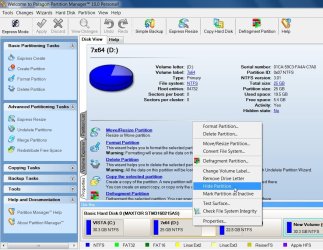
I just hid the system partition ( C ) from the partition I am currently booted into (D).

I have no idea why you can't make it work.:confused:

PM 10 can still see it of course - otherwise there would be no way to ever unhide it.

If you don't want anyone else to be able to unhide it - then uninstall PM10.

You can reinstall PM 10 , or use the boot cd to unhide it later.
 

Attachments

  • HIDE-1-2010-01-12_190552.jpg
    HIDE-1-2010-01-12_190552.jpg
    24.2 KB · Views: 12

My Computers

System One System Two

  • Computer type
    PC/Desktop
    OS
    7 X64
    CPU
    i5 8400
    Motherboard
    gigabyte b365m ds3h
    Memory
    2x8gb 3200mhz
    Hard Drives
    various
    PSU
    pure power 11 400w cm
    Case
    Coolermaster
    Cooling
    cryorig m9i
  • Computer type
    PC/Desktop
    OS
    7x64
    CPU
    g5400
    Motherboard
    ga b365m ds3h
    Memory
    8gb ddr4 2400
    PSU
    xfx pro 450w
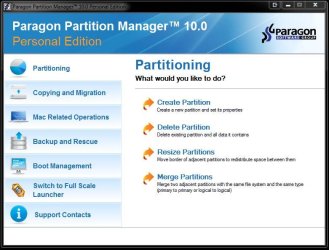
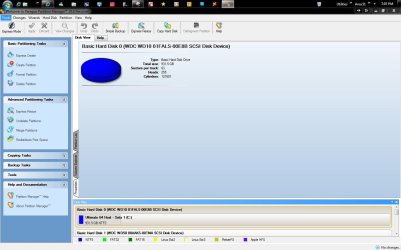
This is the main gui seen when first opening the giveaway version of 10 up. The second is the full screen option.The 3rd is going upto the view tab and checking off the command task bar option there.

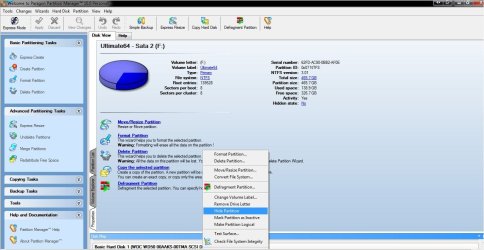
At the bottom of the screen you right click on the intended partition/drive there to bring up the options menu.
 

Attachments

  • Paragon Partition Manager 10.jpg
    Paragon Partition Manager 10.jpg
    66.1 KB · Views: 4
  • Paragon Partition Manager 10B.jpg
    Paragon Partition Manager 10B.jpg
    86 KB · Views: 4
  • Paragon Partition Manager 10C.jpg
    Paragon Partition Manager 10C.jpg
    105.9 KB · Views: 8
  • Paragon Partition Manager 10D Hide Drive.jpg
    Paragon Partition Manager 10D Hide Drive.jpg
    116.4 KB · Views: 8

My Computers

System One System Two

  • Computer type
    PC/Desktop
    Computer Manufacturer/Model Number
    Custom builds = 2
    OS
    W7 Ultimate x64/W10 Pro x64/W11 Pro Triple Boot - Main PC W7 Remote PC Micro ATX W7 Pro x64/W11 Pro
    CPU
    AMD Phenom II X4 975 Deneb 3.6ghz - 965 2nd remote pc
    Motherboard
    Gigabyte GA-790XTA-UD4-Gigabyte GA-880GM-D2H remote pc
    Memory
    Kingston Hyper X DDR3 1600 1.5v 16gb - Hyper X Fury 8gb 2nd
    Graphics Card(s)
    MSI HD Radeon 5750 1gb - MSI HD Radeon 6450 on mini tower
    Sound Card
    Creative Labs X-Fi Xtreme Audio P - Realtek onooard 2nd case
    Monitor(s) Displays
    ASUS VW199T-P 19" HP 2082a Main-HP 2082a 20" remote pc
    Screen Resolution
    Asus 1440x900 - HP 1600x900
    Hard Drives
    WD Black 1TB HD per OS W7, W10, and pending W11 presently on 500gb OS Drive - Pending Triple 1TB HDs for Spanned Storage/backup volume
    Single 2TB external USB enclosure, single 1TB System 7 Host/Boot drive, Pending 8TB external HD for system image b
    PSU
    Corsair 750TX - primary / Corsair CX600 - second
    Case
    Antec 900-2 - SSD compatible / NZXT Vulcan mini tower
    Cooling
    Zalman CNPS9900A
    Keyboard
    AZIO L70 Backlit Letters Gaming - ONN Cordless/USB
    Mouse
    MSI DS200 Programmable, Logitech Cordless
    Internet Speed
    30mbps upgrade - primary hard wired - mini tower usb WiFi
    Antivirus
    GFI VIPRE Internet Security 2014 on W7 2016 beta on W10,
    Browser
    Cyberfox, WaterFox 64bit FF variants, FireFox x64, Pale Moon
    Other Info
    Accomdata fan cooled usb 2.0 PIDE/Sata II, III external enclosure.
    Sambient usb/eSata PATA/Sata II, III external enclosure.
  • Computer type
    PC/Desktop
    System Manufacturer/Model Number
    CUSTOM ASSEMBLY
    OS
    W7 Pro x64/W11 Pro
    CPU
    AMD Deneb 3.6ghz - 965
    Motherboard
    Gigabyte GA-880GM-D2H remote pc
    Memory
    Kingston Hyper X Fury 8gb
    Graphics Card(s)
    MSI HD Radeon 6450 DVI Output
    Sound Card
    Realtek onooard Creative or Other separate PENDING
    Monitor(s) Displays
    VIZIO 32" LCD TV Separate LCD Pending
    Screen Resolution
    1600x1080
    Hard Drives
    WD 500GB OS Host/Boot WD Green 1TB Storage/Backup
    PSU
    Corsair 600W - THERMALTAKE 600W spare case
    Case
    NZXT Vulcan mini tower
    Cooling
    Twin 120mm Top Fans - 240mm Side Cover
    Keyboard
    ONN Cordless/USB Logitech Cordless
    Mouse
    ONN USB/Cordless - Logitech Cordless
    Internet Speed
    DSL 5G
    Browser
    MS Edge, FireFox, WaterFox x64, FireFox Nightly
    Other Info
    OS Testing-Remote Access to Main TeamViewer
In PM10 there is a option to hide another primary partitions on boot time sequence.
But it does'n hide it. So if I have to hide it manualy than PM10 must be installed on every primary partiotion - on every OS. Am i wrong?
 

My Computer

OS
WINDOWS 7
No idea , I never tried it.
 

My Computers

System One System Two

  • Computer type
    PC/Desktop
    OS
    7 X64
    CPU
    i5 8400
    Motherboard
    gigabyte b365m ds3h
    Memory
    2x8gb 3200mhz
    Hard Drives
    various
    PSU
    pure power 11 400w cm
    Case
    Coolermaster
    Cooling
    cryorig m9i
  • Computer type
    PC/Desktop
    OS
    7x64
    CPU
    g5400
    Motherboard
    ga b365m ds3h
    Memory
    8gb ddr4 2400
    PSU
    xfx pro 450w
:rolleyes:The only thing I saw when downloading the giveaway was unzipping the setup on C which then includes another software updater program unnecessary to look and see which programs you have on see newer versions.
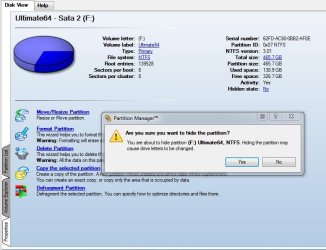
Finally once that is unpacked into a separate folder and you get past the software updater prompts you are asked where you want 10 unpacked to then start the separate setup for PM 10! :rolleyes:

The installation proceeds normally from there into the Program Files directory like any other software creating it's own folder as well as desktop shortcut. You run it from the Windows you are booted in that it is installed to.

That's all there is to that. The only time you want it on more then one drive is if you want to hide the host from a second installation when setting that as default. Once you click the hide partition item in the right click menu you will be prompted to confirm. You expect to see that type of prompt with any program.
 

Attachments

  • Paragon Partition Manager 10D Hide Drive Confirm.jpg
    Paragon Partition Manager 10D Hide Drive Confirm.jpg
    66.9 KB · Views: 5

My Computers

System One System Two

  • Computer type
    PC/Desktop
    Computer Manufacturer/Model Number
    Custom builds = 2
    OS
    W7 Ultimate x64/W10 Pro x64/W11 Pro Triple Boot - Main PC W7 Remote PC Micro ATX W7 Pro x64/W11 Pro
    CPU
    AMD Phenom II X4 975 Deneb 3.6ghz - 965 2nd remote pc
    Motherboard
    Gigabyte GA-790XTA-UD4-Gigabyte GA-880GM-D2H remote pc
    Memory
    Kingston Hyper X DDR3 1600 1.5v 16gb - Hyper X Fury 8gb 2nd
    Graphics Card(s)
    MSI HD Radeon 5750 1gb - MSI HD Radeon 6450 on mini tower
    Sound Card
    Creative Labs X-Fi Xtreme Audio P - Realtek onooard 2nd case
    Monitor(s) Displays
    ASUS VW199T-P 19" HP 2082a Main-HP 2082a 20" remote pc
    Screen Resolution
    Asus 1440x900 - HP 1600x900
    Hard Drives
    WD Black 1TB HD per OS W7, W10, and pending W11 presently on 500gb OS Drive - Pending Triple 1TB HDs for Spanned Storage/backup volume
    Single 2TB external USB enclosure, single 1TB System 7 Host/Boot drive, Pending 8TB external HD for system image b
    PSU
    Corsair 750TX - primary / Corsair CX600 - second
    Case
    Antec 900-2 - SSD compatible / NZXT Vulcan mini tower
    Cooling
    Zalman CNPS9900A
    Keyboard
    AZIO L70 Backlit Letters Gaming - ONN Cordless/USB
    Mouse
    MSI DS200 Programmable, Logitech Cordless
    Internet Speed
    30mbps upgrade - primary hard wired - mini tower usb WiFi
    Antivirus
    GFI VIPRE Internet Security 2014 on W7 2016 beta on W10,
    Browser
    Cyberfox, WaterFox 64bit FF variants, FireFox x64, Pale Moon
    Other Info
    Accomdata fan cooled usb 2.0 PIDE/Sata II, III external enclosure.
    Sambient usb/eSata PATA/Sata II, III external enclosure.
  • Computer type
    PC/Desktop
    System Manufacturer/Model Number
    CUSTOM ASSEMBLY
    OS
    W7 Pro x64/W11 Pro
    CPU
    AMD Deneb 3.6ghz - 965
    Motherboard
    Gigabyte GA-880GM-D2H remote pc
    Memory
    Kingston Hyper X Fury 8gb
    Graphics Card(s)
    MSI HD Radeon 6450 DVI Output
    Sound Card
    Realtek onooard Creative or Other separate PENDING
    Monitor(s) Displays
    VIZIO 32" LCD TV Separate LCD Pending
    Screen Resolution
    1600x1080
    Hard Drives
    WD 500GB OS Host/Boot WD Green 1TB Storage/Backup
    PSU
    Corsair 600W - THERMALTAKE 600W spare case
    Case
    NZXT Vulcan mini tower
    Cooling
    Twin 120mm Top Fans - 240mm Side Cover
    Keyboard
    ONN Cordless/USB Logitech Cordless
    Mouse
    ONN USB/Cordless - Logitech Cordless
    Internet Speed
    DSL 5G
    Browser
    MS Edge, FireFox, WaterFox x64, FireFox Nightly
    Other Info
    OS Testing-Remote Access to Main TeamViewer
Like I say, seem to me that PM10 must be inistaled on every OS!? But what is with "Boot management" option, I need that but don't work like it have to :-(
 

My Computer

OS
WINDOWS 7
Back
Top