Solved Dual Boot Windows 7 & XP on 2 separate drives on Acer laptop

Okay, so I took your instructions to point nLite to the DVD drive (where my XP PRO\SP3 was) and proceeded on my merry way. I joyous whirring sound filled my ears which didn't happen the first couple times. Then I pointed nLite to my image folder on my desktop and I got to enjoy a copying progress bar complete its progress. A couple clicks later, I'm just at the step of integrating my Drivers and creating Bootable ISO and I need to Copy & Paste my Drivers folder (C:\Drivers). At this point I want to confirm with you what I need to do next.
Kaktussoft provided a bundle of drivers in a lengthy list for my laptop and in his words, the most important one was the very first one in that list. So I am only going to use that ONE for the slipstreaming process. I used Extract All to open the original downloaded driver. and in there were a couple more zipped folders and two setup files.
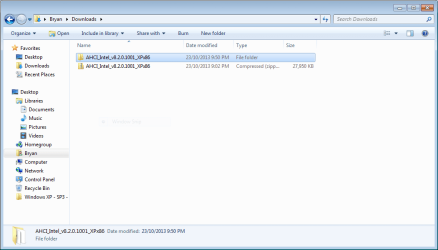
1st extract all.PNG

From inside that folder I did a second Extract All on the f6flpy32 zipped folder getting me to this point.
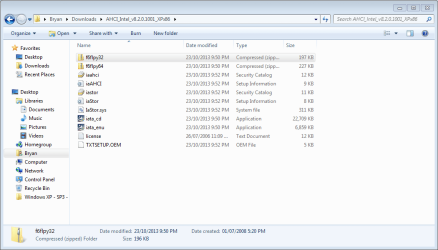
2nd extract all.PNG

Now is what I am going to do is Delete the two zipped folders from the screenshot, "2nd extract all". Getting me to this screenshot.
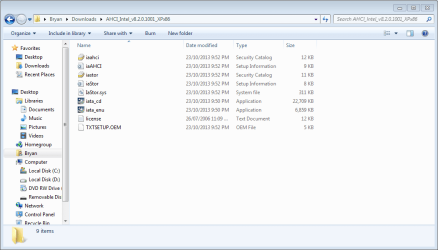
3rd step.PNG

So now comes the CUT & PASTE of my Drivers into my Windows XP - SP3 - SATA. I am going to Cut and Paste the whole folder titled AHCI_Intel_v8.2.0.1001_XPx86 into the image folder. Check out my screenshot to confirm AOK.
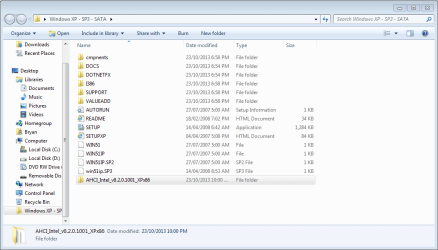
4th step.PNG

So here I sit waiting for confirmation for a couple things. ONE - that the one downloaded driver that I'm using from Kaktussoft's list of drivers is sufficient to get XP installed and that the others in his list can wait till later. TWO - that I have the right driver now correctly placed in the image folder Windows XP - SP3 - SATA with all the correct/necessary files and that nothing's missing.

Until I get a reply, I won't do the next steps of IMPORT, then SINGLE DRIVER, then LOCATE Sata Setup Inf file which from Step 12 of the Slipstreaming Instructions looks like it ought to be one of the files in the screenshot below but I don't know which one.

3rd step.PNG

So how am I looking?

By the way, you both are AMAZING to be helping me like this!!!


EDIT: I need to get to bed but I'm going to put my laptop into Hibernate and I'll get back to this around 9 am. Hope to hear from you soon. Good night, guys.
 
Last edited:

My Computer My Computer

At a glance

Windows 7 Home Premium 64 bitIntel(R) Core(TM)2 Duo CPU T6400 @ 2.00 GHz4.00 GBNVIDIA GeForce 9600M GT
Computer type
Laptop
Computer Manufacturer/Model Number
Acer Aspire 8730
OS
Windows 7 Home Premium 64 bit
CPU
Intel(R) Core(TM)2 Duo CPU T6400 @ 2.00 GHz
Motherboard
?
Memory
4.00 GB
Graphics Card(s)
NVIDIA GeForce 9600M GT
Hard Drives
Disk partition (C:) 282 GB
Disk partition (D:) 298 GB

these are separate disk drives and not a case of 1 drive being partitioned.
Antivirus
none yet
Browser
Internet Explorer 9
Follow the tutorial from Step 7 on to browse into the AHCI folder to pick up any drivers that Nlite will accept. It looks for a certain file type and will list only those from the folder. I would select and add them all.

It's been long enough ago that I used Nlite that AHCI drivers were rarer so we were mostly using SATA drivers, but AHCI are common now and should work. But you can add the SATA drivers it will accept too, just in case.

Again, remember to set your SATA controller in BIOS to the corresponding AHCI setting.

If you have any further problems Theog will be online in the morning so message him from the tutorial author's link to ask for his expert help for your thread. Be sure to post your exact issues in the thread for others to help too. Kaktussoft may check in from Holland when he wakes up.
 
You only need f6flpy32 folder.
 

My Computer My Computer

At a glance

Microsoft Windows 7 Home Premium 64-bits 7601...Intel(R) Core(TM) i3 CPU M 370 @ 2.40GHz4,00 GBATI Mobility Radeon HD 5400 Series
Computer type
Laptop
Computer Manufacturer/Model Number
ACER ASPIRE 5742G
OS
Microsoft Windows 7 Home Premium 64-bits 7601 Multiprocessor Free Service Pack 1
CPU
Intel(R) Core(TM) i3 CPU M 370 @ 2.40GHz
Motherboard
Acer Aspire 5742G
Memory
4,00 GB
Graphics Card(s)
ATI Mobility Radeon HD 5400 Series
Sound Card
(1) AMD High Definition Audio Device (2) Realtek High Defi
Screen Resolution
1366 x 768 x 32 bits (4294967296 colors) @ 60 Hz
Hard Drives
WDC WD5000BEVT-22ZAT0
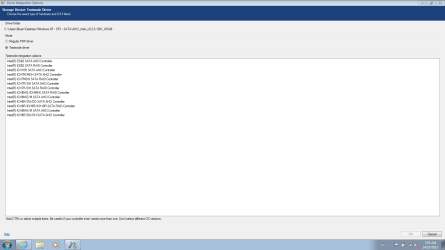
Here is a screenshot of another popup screen that isn't mentioned in the nLite slipstreaming instructions. Which one(s) do I select?

integrate driver.PNG

EDIT: yes it does appear in the instructions. sorry about that but it doesn't list any OSs to help me out.
 
Last edited:

My Computer My Computer

At a glance

Windows 7 Home Premium 64 bitIntel(R) Core(TM)2 Duo CPU T6400 @ 2.00 GHz4.00 GBNVIDIA GeForce 9600M GT
Computer type
Laptop
Computer Manufacturer/Model Number
Acer Aspire 8730
OS
Windows 7 Home Premium 64 bit
CPU
Intel(R) Core(TM)2 Duo CPU T6400 @ 2.00 GHz
Motherboard
?
Memory
4.00 GB
Graphics Card(s)
NVIDIA GeForce 9600M GT
Hard Drives
Disk partition (C:) 282 GB
Disk partition (D:) 298 GB

these are separate disk drives and not a case of 1 drive being partitioned.
Antivirus
none yet
Browser
Internet Explorer 9
c:\users\bryan\desktop\windows XP -SP3 - SATA\AHCI_Intel_v8.2.0.1001_XPx86 folder is actually the unzipped f6flpy32 folder?
 

My Computer My Computer

At a glance

Microsoft Windows 7 Home Premium 64-bits 7601...Intel(R) Core(TM) i3 CPU M 370 @ 2.40GHz4,00 GBATI Mobility Radeon HD 5400 Series
Computer type
Laptop
Computer Manufacturer/Model Number
ACER ASPIRE 5742G
OS
Microsoft Windows 7 Home Premium 64-bits 7601 Multiprocessor Free Service Pack 1
CPU
Intel(R) Core(TM) i3 CPU M 370 @ 2.40GHz
Motherboard
Acer Aspire 5742G
Memory
4,00 GB
Graphics Card(s)
ATI Mobility Radeon HD 5400 Series
Sound Card
(1) AMD High Definition Audio Device (2) Realtek High Defi
Screen Resolution
1366 x 768 x 32 bits (4294967296 colors) @ 60 Hz
Hard Drives
WDC WD5000BEVT-22ZAT0
Here is a screenshot of another popup screen that isn't mentioned in the nLite slipstreaming instructions. Which one(s) do I select?

View attachment 291015

EDIT: yes it does appear in the instructions. sorry about that but it doesn't list any OSs to help me out.
Did you read the last line on screenhot "hold ctrl to select multiple item"? Just select all AHCI stuff (don't select items with RAID in name.)
 

My Computer My Computer

At a glance

Microsoft Windows 7 Home Premium 64-bits 7601...Intel(R) Core(TM) i3 CPU M 370 @ 2.40GHz4,00 GBATI Mobility Radeon HD 5400 Series
Computer type
Laptop
Computer Manufacturer/Model Number
ACER ASPIRE 5742G
OS
Microsoft Windows 7 Home Premium 64-bits 7601 Multiprocessor Free Service Pack 1
CPU
Intel(R) Core(TM) i3 CPU M 370 @ 2.40GHz
Motherboard
Acer Aspire 5742G
Memory
4,00 GB
Graphics Card(s)
ATI Mobility Radeon HD 5400 Series
Sound Card
(1) AMD High Definition Audio Device (2) Realtek High Defi
Screen Resolution
1366 x 768 x 32 bits (4294967296 colors) @ 60 Hz
Hard Drives
WDC WD5000BEVT-22ZAT0

My Computer My Computer

At a glance

Microsoft Windows 7 Home Premium 64-bits 7601...Intel(R) Core(TM) i3 CPU M 370 @ 2.40GHz4,00 GBATI Mobility Radeon HD 5400 Series
Computer type
Laptop
Computer Manufacturer/Model Number
ACER ASPIRE 5742G
OS
Microsoft Windows 7 Home Premium 64-bits 7601 Multiprocessor Free Service Pack 1
CPU
Intel(R) Core(TM) i3 CPU M 370 @ 2.40GHz
Motherboard
Acer Aspire 5742G
Memory
4,00 GB
Graphics Card(s)
ATI Mobility Radeon HD 5400 Series
Sound Card
(1) AMD High Definition Audio Device (2) Realtek High Defi
Screen Resolution
1366 x 768 x 32 bits (4294967296 colors) @ 60 Hz
Hard Drives
WDC WD5000BEVT-22ZAT0
All right everyone, I've got a DVD disc burned with something on it after finishing the nLite process. At this point though, Kaktussoft, I will follow the link you provided for that ...F6 AHCI/RAID drivers... just in case. I'm the kind of person who always likes to have options. After I do that, I will try using the slipstreamed disc to try an install.

But before I do that, do I need to do anything within DOS? I was reading other threads before starting my own, and there was one the required "format" and "make drive primary" and "make drive active" and a bunch of other steps too.

EDIT: after reading the link, Kaktussoft, the instructions show the final step is actually the installation. Therefore, I will try the slipstream now, and should that go awry, I will reconnect my C: drive (Windows 7 - which I've been using all this time) and go that route.
 
Last edited:

My Computer My Computer

At a glance

Windows 7 Home Premium 64 bitIntel(R) Core(TM)2 Duo CPU T6400 @ 2.00 GHz4.00 GBNVIDIA GeForce 9600M GT
Computer type
Laptop
Computer Manufacturer/Model Number
Acer Aspire 8730
OS
Windows 7 Home Premium 64 bit
CPU
Intel(R) Core(TM)2 Duo CPU T6400 @ 2.00 GHz
Motherboard
?
Memory
4.00 GB
Graphics Card(s)
NVIDIA GeForce 9600M GT
Hard Drives
Disk partition (C:) 282 GB
Disk partition (D:) 298 GB

these are separate disk drives and not a case of 1 drive being partitioned.
Antivirus
none yet
Browser
Internet Explorer 9
As I said earlier in the thead, boot the XP CD with only the target HD plugged in or enabled, delete all partitions, full format a new partition for XP of the size desired, continue with install.

I'd keep plugged in by ethernet to have a chance it will start up ready to connect. If not install the XP LAN drivers from the model's Support Downloads webpage, run all Important and Optional Updates, with reboots, until no more are offered.
 
Yup, I remembered that. I just wanted to know in case there was the slightest chance you thought it was a given that I would deal with the necessary DOS stuff before hand or at the appropriate time. Thanks, Greg. :)

Here we go......
 

My Computer My Computer

At a glance

Windows 7 Home Premium 64 bitIntel(R) Core(TM)2 Duo CPU T6400 @ 2.00 GHz4.00 GBNVIDIA GeForce 9600M GT
Computer type
Laptop
Computer Manufacturer/Model Number
Acer Aspire 8730
OS
Windows 7 Home Premium 64 bit
CPU
Intel(R) Core(TM)2 Duo CPU T6400 @ 2.00 GHz
Motherboard
?
Memory
4.00 GB
Graphics Card(s)
NVIDIA GeForce 9600M GT
Hard Drives
Disk partition (C:) 282 GB
Disk partition (D:) 298 GB

these are separate disk drives and not a case of 1 drive being partitioned.
Antivirus
none yet
Browser
Internet Explorer 9
Ghee, why all this trouble. I would run XP in a virtual VMware Player partition. Then you are done in 30 minutes and have no hardware problems whatsoever with the added advantage that you can run Windows 7 and XP side by side.
 

My Computer My Computer

At a glance

Vista, Windows7, Mint Mate, Zorin, Windows 8from 1.6GHz Duo to i7
Computer Manufacturer/Model Number
HP, Dell, Gateway, Toshiba - 4 laptops and 2 desktops
OS
Vista, Windows7, Mint Mate, Zorin, Windows 8
CPU
from 1.6GHz Duo to i7
Monitor(s) Displays
2x HP w2207
Hard Drives
5x HDD, 7x SSD, 12x Externals
Keyboard
with trackball - no mices
Mouse
Trackball mice
Internet Speed
DSL 6000
With separate HD's it's best to install each OS with the other HD unplugged, then boot via the BIOS boot order or one-time BIOS boot menu key. This avoids problems with the Windows 7 boot files being put on XP where it is installed first and Windows 7 second to configure a Windows Dual Boot menu, requiring repairs to remove the XP HD. Or if you install XP second it will steal the boot from Windows 7 if it is on the same HD or its HD is plugged in when installing to a second HD. Keeping the other HD unplugged or disabled in BIOS setup avoids these problems.

Later if you don't like booting XP using the one-time BIOS Boot Menu key, you can install EasyBCD to Windows 7 to add XP to a Dual Boot menu, but since the boot files are already safely on each OS capable of booting itself, each drive can be removed without repairing the other.

Let us know if you have any further questions.

This is what you posted way back in #11, Greg.Sorry for the Copy/Pate method, I've not yet figured out the Quote technique within this forum. In there somewhere is reference to a one-time BIOS Boot Menu key or to use EasyBCD to Windows 7 and have a dual boot option. I'm somewhat familiar with the idea of dual booting. You see, I had a dinosaur of a laptop that had XP on it so using your dual boot tutorial worked flawlessly. Trying that tutorial on my newest laptop with Windows 7 on first didn't work out at all. Which is where all this thread started from. Anyway, with that said, what exactly is the one-time BIOS Boot Menu key? And what are the advantages & disadvantages of each of those options?

Btw, setup seems to be going well, I made it far enough to be able to do the format which is much further than ever got before.

Additional, I don't know how it's going to work keeping the laptop connected via ethernet cable. Up until now my laptop has worked wirelessly through our homes network. As I understand it though, all computers in a group need to be running the same OS. Do you see problems coming knowing this?
 
Last edited:

My Computer My Computer

At a glance

Windows 7 Home Premium 64 bitIntel(R) Core(TM)2 Duo CPU T6400 @ 2.00 GHz4.00 GBNVIDIA GeForce 9600M GT
Computer type
Laptop
Computer Manufacturer/Model Number
Acer Aspire 8730
OS
Windows 7 Home Premium 64 bit
CPU
Intel(R) Core(TM)2 Duo CPU T6400 @ 2.00 GHz
Motherboard
?
Memory
4.00 GB
Graphics Card(s)
NVIDIA GeForce 9600M GT
Hard Drives
Disk partition (C:) 282 GB
Disk partition (D:) 298 GB

these are separate disk drives and not a case of 1 drive being partitioned.
Antivirus
none yet
Browser
Internet Explorer 9
Installing to separate HD's with the other one unplugged, in order to keep each separately bootable via the BIOS Boot order and one-time BIOS Boot Menu key (given on first screen) doesn't often work on a laptop.

If you cannot easily and safely unplug your other HD during install of each OS, then install XP first to the first-in-order HD, followed by Win7 to it's HD. This will configure a Windows Dual Boot menu.

If you can install these separately with the other HD unplugged, then after install of each set the Win7 HD first to boot in BIOS setup, trigger the XP HD to boot using the F12 Boot Menu key, to see how that works.
If you dont like it or it doesn't work correctly, boot into Win7 to install EasyBCD (click Download - no Name or Email required) to add XP to a Windows Dual Boot menu. The HD's will remain independent so either can come or go.

The point in keeping the ethernet cable plugged into router and PC during install is that it gives a 70% chance of starting connected to your network, whereas not doing so only has a a 50 % chance it will start after install ready to connect to your wireless network. If not then have your wireless driver in your backup so you can install it to get online to enable Automatically deliver drivers via Windows Update (Step 3), then run all rounds of Important and Optional WIndows Updates, with reboots, until there are no more when you go back to Check for Updates after each reboot.
 
Yes, trouble it seems for sure, but I do have a reason. With all those old PC games that I want to play again, each of them has their own version of Quicktime and with each install, things go goofy with XP. I anticipate having to do periodic clean installs (the only thing I know even a smidgen about) so that I can play the next one, then the next one, etc., etc. The idea of doing Repairs is absolutely foreign to me and sounds even harder than this was. As I understand it, there's files that need locating and moving and swapping all over the place. That sound much more difficult to me as any single file that gets missed or done out of order likely screws up the works. That's why I went this route, difficult though it is. So long as there is a way that the 2 hard drives have no crossing over and thereby stay independent from each other, I will be able to do what I need to to my XP drive without flubbing up my Windows 7 drive.
 
Last edited:

My Computer My Computer

At a glance

Windows 7 Home Premium 64 bitIntel(R) Core(TM)2 Duo CPU T6400 @ 2.00 GHz4.00 GBNVIDIA GeForce 9600M GT
Computer type
Laptop
Computer Manufacturer/Model Number
Acer Aspire 8730
OS
Windows 7 Home Premium 64 bit
CPU
Intel(R) Core(TM)2 Duo CPU T6400 @ 2.00 GHz
Motherboard
?
Memory
4.00 GB
Graphics Card(s)
NVIDIA GeForce 9600M GT
Hard Drives
Disk partition (C:) 282 GB
Disk partition (D:) 298 GB

these are separate disk drives and not a case of 1 drive being partitioned.
Antivirus
none yet
Browser
Internet Explorer 9
I would try all programs on Win7 first, since XP is a dead OS and won't even be supported long into 2014. That's also another good reason to install them independently so the Win7 boot files aren't made dependent upon XP at all.

You really only need XP for programs you know for sure won't install in Win7, after trying to install them in XP or earlier Compatibility Mode.
 
I like those words, Greg "The HD's will remain independent so either can come or go." That's what I'm hoping for for all the reasons described in my last post.

I remember reading in many different places that Compatibility Mode is only in Windows 7 Pro and Ultimate. I just have Home Premium so to my knowledge, I don't have Compatibility Mode.

Formatting is going well, up tho 91% now. Fingers crossed.:)
 
Last edited:

My Computer My Computer

At a glance

Windows 7 Home Premium 64 bitIntel(R) Core(TM)2 Duo CPU T6400 @ 2.00 GHz4.00 GBNVIDIA GeForce 9600M GT
Computer type
Laptop
Computer Manufacturer/Model Number
Acer Aspire 8730
OS
Windows 7 Home Premium 64 bit
CPU
Intel(R) Core(TM)2 Duo CPU T6400 @ 2.00 GHz
Motherboard
?
Memory
4.00 GB
Graphics Card(s)
NVIDIA GeForce 9600M GT
Hard Drives
Disk partition (C:) 282 GB
Disk partition (D:) 298 GB

these are separate disk drives and not a case of 1 drive being partitioned.
Antivirus
none yet
Browser
Internet Explorer 9
OH WOW!!! WINDOW XP INSTALLED!! I'M SO HAPPY, I'M SO HAPPY, I'M SO HAPPY!!!!

I even restarted it before plugging back in the Windows 7 hard drive just to see if it would start and it did!!!!!

As I thought, there was no internet connection but then I haven't yet reconnected Windows 7 hard rive and started windows xp to browse for those drivers that are zipped up and safe inside Windows 7 C:\Drivers. As I type this though there is a small voice in my head saying don't get too excited, I might have disconnected the wrong drive and just overwrote my Windows 7 with XP. Wouldn't that just suck?!

Anyway just before I turn it on what can I expect to see or need to do to have access to both OSs?
 

My Computer My Computer

At a glance

Windows 7 Home Premium 64 bitIntel(R) Core(TM)2 Duo CPU T6400 @ 2.00 GHz4.00 GBNVIDIA GeForce 9600M GT
Computer type
Laptop
Computer Manufacturer/Model Number
Acer Aspire 8730
OS
Windows 7 Home Premium 64 bit
CPU
Intel(R) Core(TM)2 Duo CPU T6400 @ 2.00 GHz
Motherboard
?
Memory
4.00 GB
Graphics Card(s)
NVIDIA GeForce 9600M GT
Hard Drives
Disk partition (C:) 282 GB
Disk partition (D:) 298 GB

these are separate disk drives and not a case of 1 drive being partitioned.
Antivirus
none yet
Browser
Internet Explorer 9
I couldn't wait so I turned it on. Just for an instant I saw the words in the bottom left of the screen "Press F2 to enter <SETUP>. I didn't touch anything and on it's own it booted into Windows 7. I still don't know which is better for me, Dual Boot using EasyBCD or the one-time F12 Boot Menu Key. I know that I need to do one of these options so that I can get into XP again and then using Computer browse to the C:\Drivers folder and start unzipping those to possibly gain internet connection. How is that going to work, Kaktussoft? I will review your post about that to see if there's an answer there already but I'm hoping it's just a matter of Cutting from Windows 7 C:\Drivers and Pasting to Windows XP D:\Drivers, Extract All for each of those drivers and Double Clicking on any of the Setup Files I see inside each hardware component.

I think I would prefer to go with EasyBCD just so long as that method doesn't make either Operating System dependent on the presence of the other. As I said not that many posts ago, I foresee possible reinstalls of Windows XP as I'm playing those old PC Games and QuickTime keeps mucking things up with it's different versions. I'll wait though for feed back on EasyBCD vs. that one-time F12 Boot Menu Key Greg mentioned.

EDIT: I reread Greg's post #53 and he explained that one-time Boot Menu Key I hope well enough for me to try it to see if I like. If I don't I can use EasyBCD. Again though, I just want to be sure that whichever method I choose provides complete independence of the two OS on their respective drives.
 
Last edited:

My Computer My Computer

At a glance

Windows 7 Home Premium 64 bitIntel(R) Core(TM)2 Duo CPU T6400 @ 2.00 GHz4.00 GBNVIDIA GeForce 9600M GT
Computer type
Laptop
Computer Manufacturer/Model Number
Acer Aspire 8730
OS
Windows 7 Home Premium 64 bit
CPU
Intel(R) Core(TM)2 Duo CPU T6400 @ 2.00 GHz
Motherboard
?
Memory
4.00 GB
Graphics Card(s)
NVIDIA GeForce 9600M GT
Hard Drives
Disk partition (C:) 282 GB
Disk partition (D:) 298 GB

these are separate disk drives and not a case of 1 drive being partitioned.
Antivirus
none yet
Browser
Internet Explorer 9
I found the one-time boot menu key option and it works just fine for me. I'm gonna go with this for now but I will keep EasyBCD on standby just incae there ever comes a time when I would prefer not to have to hover over my machine to make my choice.

I'll wait on the Driver update stuff for XP. I was able find them and unzip them by browsing to the Windows 7 drive but once I've got them unzipped, what do I do with each of them? And do I need alll of them? One in particular has the word Vista and I'm not using that. Anyway, I'll wait for that help. Once that's done, this thread can be marked solved.

Did I mention, I'M SO HAPPY!!!!!!!!!! What can I do to express my enormous thanks? You guys aren't just Seven Gurus, you guys ought to be recognized as Seven Gods. As I said before, it's amazing that you had the hearts to want to help me and did, but that you were able to help me with only verbal descriptions of my troubles and understood enough to be able to help. That's truly amazing to me!!! Thankyou!
 

My Computer My Computer

At a glance

Windows 7 Home Premium 64 bitIntel(R) Core(TM)2 Duo CPU T6400 @ 2.00 GHz4.00 GBNVIDIA GeForce 9600M GT
Computer type
Laptop
Computer Manufacturer/Model Number
Acer Aspire 8730
OS
Windows 7 Home Premium 64 bit
CPU
Intel(R) Core(TM)2 Duo CPU T6400 @ 2.00 GHz
Motherboard
?
Memory
4.00 GB
Graphics Card(s)
NVIDIA GeForce 9600M GT
Hard Drives
Disk partition (C:) 282 GB
Disk partition (D:) 298 GB

these are separate disk drives and not a case of 1 drive being partitioned.
Antivirus
none yet
Browser
Internet Explorer 9
Congratulations and nice work! :thumbsup:

Look in the System Tray in bottom right. Do you have a network to connect to when you click on the wireless icon, or is there a wired icon already connected perchance?

If not browse to the XP wireless driver you downloaded, double click on it to run it, watch for wireless networks to become available in bottom right System tray, connect to your Network. Then immediately go to Windows Updates to run all rounds of Important and Optional Updates, with reboots, until no more are offered when you Check for Updates.

You can set up your desktop, AV, etc while the updates are running, just keep up with the reboots, check for more Updates.

I remember reading in many different places that Compatibility Mode is only in Windows 7 Pro and Ultimate. I just have Home Premium so to my knowledge, I don't have Compatibility Mode.

I dragged the link into my post so you could click on it to read about Compatibility Mode which is in all versions.
 
Back
Top