Solved Dual Boot Windows 7 & XP on 2 separate drives on Acer laptop

Serenity

New member
Member
Local time
4:03 PM
Messages
47
Hello, everyone. What an abundance of help there is here. I might say too much as all the threads I've looked at trying to find my precise issue has left me scratching my head. Without a doubt folks here are far more knowledgeable than I.

I bought a laptop about 2 years ago second hand and it had Vista on it. I took it to a shop and asked if they would please put on Windows 7. Because of cost constraints, I had to go with Windows 7 Upgrade though I really wanted a full Install. They set it up for me and it ran flawlessly all this time. I have since bought an XP Pro/SP3 and Windows 7 Home Premium and started to faithfully follow the instructions found here on how to get these 2 OSs to dual boot. Thread - Dual Boot Installation with Windows 7 and XP. Here are my System Properties.

image of system properties.PNG

This is what it looks like after successfully installing Windows 7 to what I intended to be C: drive. I do so hope that's the case. I am including a couple other screenshots so experts here can confirm this or not.

image after entering diskpart.PNG

disk management summary inside Windows 7.PNG

I found threads here referring to hidden drives and Restore partitions and material that wasn't clear enough to such a computer newbie as myself. I don't understand what to do with those 2 little Volumes or even fully understand what they are for. For all I know they aren't relevant anymore since they may refer to Vista/Windows 7 Upgrade instead of the full version I now have. Advice and explanation here would be much appreciated. Please though, write it for a simpleton. I also read something about Raid setups Raid-0 and Raid-1 but I don't know what mine looks like when it comes to my laptops two separate harddrives. All I know is that I would like Windows 7 on C: drive which is what I use most for Internet and Microsoft Office and Windows XP Pro on D: drive for old PC games like the Myst series and Sims 1, 2 and Sims Medieval. All these take up a lot of space and that's why I want them on such a big drive like D:

This last screenshot below is the error message that pops up after all the Windows XP files load before I can even select where I want it to go on my laptop as per step 2 of Option 2 when Windows 7 is installed first as per the thread underlined above.

error after trying to install XP.jpg

So are there any willing to have a crack at this?

Thanks in advance one and all.
 
Last edited:

My Computer My Computer

At a glance

Windows 7 Home Premium 64 bitIntel(R) Core(TM)2 Duo CPU T6400 @ 2.00 GHz4.00 GBNVIDIA GeForce 9600M GT
Computer type
Laptop
Computer Manufacturer/Model Number
Acer Aspire 8730
OS
Windows 7 Home Premium 64 bit
CPU
Intel(R) Core(TM)2 Duo CPU T6400 @ 2.00 GHz
Motherboard
?
Memory
4.00 GB
Graphics Card(s)
NVIDIA GeForce 9600M GT
Hard Drives
Disk partition (C:) 282 GB
Disk partition (D:) 298 GB

these are separate disk drives and not a case of 1 drive being partitioned.
Antivirus
none yet
Browser
Internet Explorer 9
In latest screenshot: E=DVD, F=reomovable (maybe usb stick or floppy drive). Both unimportant now.
C= boot drive with bootmenu. also win7. You made screenshot in win7 (must be ... winxp doesn't work).

D=where you want winxp to be installed?
 

My Computer My Computer

At a glance

Microsoft Windows 7 Home Premium 64-bits 7601...Intel(R) Core(TM) i3 CPU M 370 @ 2.40GHz4,00 GBATI Mobility Radeon HD 5400 Series
Computer type
Laptop
Computer Manufacturer/Model Number
ACER ASPIRE 5742G
OS
Microsoft Windows 7 Home Premium 64-bits 7601 Multiprocessor Free Service Pack 1
CPU
Intel(R) Core(TM) i3 CPU M 370 @ 2.40GHz
Motherboard
Acer Aspire 5742G
Memory
4,00 GB
Graphics Card(s)
ATI Mobility Radeon HD 5400 Series
Sound Card
(1) AMD High Definition Audio Device (2) Realtek High Defi
Screen Resolution
1366 x 768 x 32 bits (4294967296 colors) @ 60 Hz
Hard Drives
WDC WD5000BEVT-22ZAT0
There are 2 problems btw:
  1. system boots from win7 drive (you call it C ) . winxp will install his bootloader in win7 partition ... not a thing you want. We must force it to come on other harddrive
  2. You must install AHCI drivers in winxp!
Please post screenshot of "device management" with "IDE/ATAPI" branch expanded. Afterwards
Steps to do:
  1. detach disk 0 (the win7 disk from system). Simple disconnect the cable when system is TOTALLY power off
  2. Put BIOS SATA in "legacy mode" or "IDE mode"
  3. install winxp
Post back if it installs now? Further steps follow if you respond with results. You have to undo step 1 and 2 later in procedure (so remember the BIOS setting!)
 

My Computer My Computer

At a glance

Microsoft Windows 7 Home Premium 64-bits 7601...Intel(R) Core(TM) i3 CPU M 370 @ 2.40GHz4,00 GBATI Mobility Radeon HD 5400 Series
Computer type
Laptop
Computer Manufacturer/Model Number
ACER ASPIRE 5742G
OS
Microsoft Windows 7 Home Premium 64-bits 7601 Multiprocessor Free Service Pack 1
CPU
Intel(R) Core(TM) i3 CPU M 370 @ 2.40GHz
Motherboard
Acer Aspire 5742G
Memory
4,00 GB
Graphics Card(s)
ATI Mobility Radeon HD 5400 Series
Sound Card
(1) AMD High Definition Audio Device (2) Realtek High Defi
Screen Resolution
1366 x 768 x 32 bits (4294967296 colors) @ 60 Hz
Hard Drives
WDC WD5000BEVT-22ZAT0
Installing Windows XP With F6 AHCI/RAID Drivers From USB Only
3. What should I do if I don't have floppy disk drive, but I must use F6 floppy drivers?

First of all, you can try to disable AHCI mode in your BIOS setup and turn your SATA disk controller into ATA compatible mode.

That's what I want you to do and the cause of the problem. Rest of article is to difficult for you
 

My Computer My Computer

At a glance

Microsoft Windows 7 Home Premium 64-bits 7601...Intel(R) Core(TM) i3 CPU M 370 @ 2.40GHz4,00 GBATI Mobility Radeon HD 5400 Series
Computer type
Laptop
Computer Manufacturer/Model Number
ACER ASPIRE 5742G
OS
Microsoft Windows 7 Home Premium 64-bits 7601 Multiprocessor Free Service Pack 1
CPU
Intel(R) Core(TM) i3 CPU M 370 @ 2.40GHz
Motherboard
Acer Aspire 5742G
Memory
4,00 GB
Graphics Card(s)
ATI Mobility Radeon HD 5400 Series
Sound Card
(1) AMD High Definition Audio Device (2) Realtek High Defi
Screen Resolution
1366 x 768 x 32 bits (4294967296 colors) @ 60 Hz
Hard Drives
WDC WD5000BEVT-22ZAT0
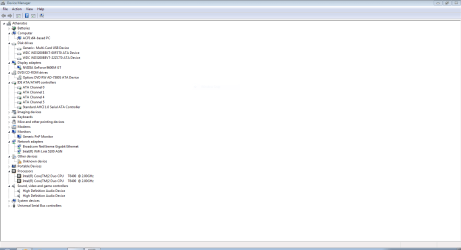
Hello, Kaktussoft. Thank you for the nearly instaneous reply. Here is the Device Manager with hopefully your desired information. I expanded a bunch of other stuff that may prove important.

Device Manager Expanded.PNG

As well, I have a laptop and the thought of opening it up is frightening. I have no idea what it looks like inside nor how to really open it up to disconnect the drives as you suggested. Are you able to walk me through that?

What is BIOS SATA? How do I change that and what do I need to take note of so I can change it back.

And lastly does the last post above 3. What should I do if I don't have floppy disk drive, but I must use F6 floppy drivers? pertain to me?
 

My Computer My Computer

At a glance

Windows 7 Home Premium 64 bitIntel(R) Core(TM)2 Duo CPU T6400 @ 2.00 GHz4.00 GBNVIDIA GeForce 9600M GT
Computer type
Laptop
Computer Manufacturer/Model Number
Acer Aspire 8730
OS
Windows 7 Home Premium 64 bit
CPU
Intel(R) Core(TM)2 Duo CPU T6400 @ 2.00 GHz
Motherboard
?
Memory
4.00 GB
Graphics Card(s)
NVIDIA GeForce 9600M GT
Hard Drives
Disk partition (C:) 282 GB
Disk partition (D:) 298 GB

these are separate disk drives and not a case of 1 drive being partitioned.
Antivirus
none yet
Browser
Internet Explorer 9
And lastly does the last post above 3. What should I do if I don't have floppy disk drive, but I must use F6 floppy drivers? pertain to me? =>winxp allows to add driver on the fly on installation time. But only using floppy!! You don't have a floppy drive I assume(?) Or slipstream the driver with install media (to difficult for you).

i can guide you through the whole process. What exact system do you have (Acer Aspire 8730 ) isn't it? I gonna google the specs
 

My Computer My Computer

At a glance

Microsoft Windows 7 Home Premium 64-bits 7601...Intel(R) Core(TM) i3 CPU M 370 @ 2.40GHz4,00 GBATI Mobility Radeon HD 5400 Series
Computer type
Laptop
Computer Manufacturer/Model Number
ACER ASPIRE 5742G
OS
Microsoft Windows 7 Home Premium 64-bits 7601 Multiprocessor Free Service Pack 1
CPU
Intel(R) Core(TM) i3 CPU M 370 @ 2.40GHz
Motherboard
Acer Aspire 5742G
Memory
4,00 GB
Graphics Card(s)
ATI Mobility Radeon HD 5400 Series
Sound Card
(1) AMD High Definition Audio Device (2) Realtek High Defi
Screen Resolution
1366 x 768 x 32 bits (4294967296 colors) @ 60 Hz
Hard Drives
WDC WD5000BEVT-22ZAT0
I have an old 5 1/4" Toshiba drive that might work on this laptop (never hooked it up before to see if it will load the necessary drivers? to work. I will have to take a trip to a computer store or second hand shop to see if I might be able to find any of these floppies.

Yes, you did get the model correct. It's one of the big 18+ inch machines.

Along time ago, I did use a program to Slipstream my XP disk with 2 Service Packs and it supposedly would have worked. I say this because when I did try to install that onto a now dead and gone laptop (it was the laptop it was installed on originally) there were numberous .dll issues. I think the program was AutoStreamer. I might still be able to do this with your help. If you think I have what it takes to tinker with my laptop's innards, I might be able to try slipstreaming.
 

My Computer My Computer

At a glance

Windows 7 Home Premium 64 bitIntel(R) Core(TM)2 Duo CPU T6400 @ 2.00 GHz4.00 GBNVIDIA GeForce 9600M GT
Computer type
Laptop
Computer Manufacturer/Model Number
Acer Aspire 8730
OS
Windows 7 Home Premium 64 bit
CPU
Intel(R) Core(TM)2 Duo CPU T6400 @ 2.00 GHz
Motherboard
?
Memory
4.00 GB
Graphics Card(s)
NVIDIA GeForce 9600M GT
Hard Drives
Disk partition (C:) 282 GB
Disk partition (D:) 298 GB

these are separate disk drives and not a case of 1 drive being partitioned.
Antivirus
none yet
Browser
Internet Explorer 9
Right off the bat you have a misunderstanding thinking that you needed a full version of Win7 instead of Upgrade version which is the exact same OS and can be Clean Installed just like a full version, so long as you have a qualifying XP or VIsta license which doesn't even need to be installed. So if an in-place Upgrade was done from Vista this was unnecessary as had you asked us we would have advised a superior Clean Install Windows 7 .

XP is very old now and hard to install on modern hardware. Better to virualize it from Win7 using freeware like Virtual Player, VMWare or other. If that isn't satisfactory then you'll need to slipstream the XP SATA drivers for your PC or mobo model, providing that XP drivers are even available for that chipset. Once the chipset model is determined if it or the SATA controller driver (a component of the chipset) is not on the PC or Mobo's SUpport Downloads webpage then you can google chipset make+model+XP driver, or we will help you find the SATA Drivers - Slipstream into Windows XP CD

If you can get an XP installer created which will install then boot it and delete all partitions on the HD since the Recovery partition has Vista and won't run anyway after reinstall. Create and full format a new partition for XP, leaving room to later do the same for Win7. Then install XP, install if necessary it's network driver to get online and install all WIndows Updates, including Optional, with reboots until there are no more. Then check Device Manager for any drivers still missing, report back.

Next boot installer to Clean Install Windows 7 using the Drive Options in Steps 7 and 8 to create and format a New partition you left for it. Again, put your network driver in backup so if it's not provided you can install it to get online, enable Automatically deliver drivers via Windows Update (Step 3) then run all rounds of Important and Optional Windows Updates until there are no more offered when you Check for Updates.

There are more tips here to assure a perfect Clean Reinstall - Factory OEM Windows 7, same for retail .

I would keep plugged in by ethernet cable during install, but unplug all other peripherals except mouse and keyboard. This increases the likelihood it will start up ready to connect to internet with the network driver supplied by the installer. Otherwise you'll need the network driver from the PC's Support Downloads webpage for both Win7 and XP. If none for XP determine the exact adapter model and google for it, or ask back for our help.
 
Power on pc. quickly press F2 multiple times. Now you see bios screen? Goto tab "MAIN" , sataMODE =AHCI on bottom?
winxp can be installed on this system, winxp drivers are on ACER site (Acer Aspire 8730)
 

My Computer My Computer

At a glance

Microsoft Windows 7 Home Premium 64-bits 7601...Intel(R) Core(TM) i3 CPU M 370 @ 2.40GHz4,00 GBATI Mobility Radeon HD 5400 Series
Computer type
Laptop
Computer Manufacturer/Model Number
ACER ASPIRE 5742G
OS
Microsoft Windows 7 Home Premium 64-bits 7601 Multiprocessor Free Service Pack 1
CPU
Intel(R) Core(TM) i3 CPU M 370 @ 2.40GHz
Motherboard
Acer Aspire 5742G
Memory
4,00 GB
Graphics Card(s)
ATI Mobility Radeon HD 5400 Series
Sound Card
(1) AMD High Definition Audio Device (2) Realtek High Defi
Screen Resolution
1366 x 768 x 32 bits (4294967296 colors) @ 60 Hz
Hard Drives
WDC WD5000BEVT-22ZAT0
Well first off, I mentioned a 5 1/4 Toshiba. It's a 3 1/2 Toshiba that connects to a USB port. Still don't have any floppies though but I have seen them around in some stores.

Next, thanks for weighing in Greg. Your second paragraph about chipsets Sata driver controllers and mobos is above my head. I will have to ask for help with all that you mentioned. Somewhere in your post was talk of setting up new partitions for XP first then Windows 7. I hope that setting up XP and Windows 7 on the two separate harddrives is what you meant when you wrote about partitioning.

And Kaktussoft, is taking apart my laptop no longer the plan? As for the F2 - Sata Mode - AHCI instructions, when I got into that, the setting was aready AHCI. That being the case (that is to say, I didn't make any changes), if I had restarted and booted from my XP disk, would I have just hit the same error message as before and XP would have failed to install again?
 

My Computer My Computer

At a glance

Windows 7 Home Premium 64 bitIntel(R) Core(TM)2 Duo CPU T6400 @ 2.00 GHz4.00 GBNVIDIA GeForce 9600M GT
Computer type
Laptop
Computer Manufacturer/Model Number
Acer Aspire 8730
OS
Windows 7 Home Premium 64 bit
CPU
Intel(R) Core(TM)2 Duo CPU T6400 @ 2.00 GHz
Motherboard
?
Memory
4.00 GB
Graphics Card(s)
NVIDIA GeForce 9600M GT
Hard Drives
Disk partition (C:) 282 GB
Disk partition (D:) 298 GB

these are separate disk drives and not a case of 1 drive being partitioned.
Antivirus
none yet
Browser
Internet Explorer 9
With separate HD's it's best to install each OS with the other HD unplugged, then boot via the BIOS boot order or one-time BIOS boot menu key. This avoids problems with the Win7 boot files being put on XP where it is installed first and Win7 second to configure a Windows Dual Boot menu, requiring repairs to remove the XP HD. Or if you install XP second it will steal the boot from Win7 if it is on the same HD or its HD is plugged in when installing to a second HD. Keeping the other HD unplugged or disabled in BIOS setup avoids these problems.

Later if you don't like booting XP using the one-time BIOS Boot Menu key, you can install EasyBCD to Win7 to add XP to a Dual Boot menu, but since the boot files are already safely on each OS capable of booting itself, each drive can be removed without repairing the other.

Let us know if you have any further questions.

Did you even read SATA Drivers - Slipstream into Windows XP CD before assuming it's above your head? If you need help finding the drivers we can help you. Check the Acer support page for your model first, for XP drivers. If none determine the chipset by running Belarc Advisor
 
As for the F2 - Sata Mode - AHCI instructions, when I got into that, the setting was aready AHCI.
Select that entry and press ENTER. What possible other possible values have you there? You can set it to "IDE" or "legacy mode"?

Do you have "win7 system repair disc"? If not create it please, you need it later in the process. http://www.sevenforums.com/tutorials/2083-system-repair-disc-create.html

I alreayd found the correct WINXP sata drivers btw. I'll post them later in the process.
 

My Computer My Computer

At a glance

Microsoft Windows 7 Home Premium 64-bits 7601...Intel(R) Core(TM) i3 CPU M 370 @ 2.40GHz4,00 GBATI Mobility Radeon HD 5400 Series
Computer type
Laptop
Computer Manufacturer/Model Number
ACER ASPIRE 5742G
OS
Microsoft Windows 7 Home Premium 64-bits 7601 Multiprocessor Free Service Pack 1
CPU
Intel(R) Core(TM) i3 CPU M 370 @ 2.40GHz
Motherboard
Acer Aspire 5742G
Memory
4,00 GB
Graphics Card(s)
ATI Mobility Radeon HD 5400 Series
Sound Card
(1) AMD High Definition Audio Device (2) Realtek High Defi
Screen Resolution
1366 x 768 x 32 bits (4294967296 colors) @ 60 Hz
Hard Drives
WDC WD5000BEVT-22ZAT0
Good morning everyone. I have gone through the link you gave me Greg with instructions for slipstreaming and they look very easy to follow. It wasn't slipstreaming that I was doubting myself with. It was your talk of Sata Controller Drivers, and Chipset Configuration if Drivers cannot be found that had me scared. I went to the Acer Driver site and did a Search for Drivers and that site had them. What looked like a problem was that it seemed to me to require XP Pro to already be on my laptop and it would scan my laptop and install them as needed. I understood your post to say that I needed to find the drivers, download them into some kind of file as individual/separate files so that at the appropriate time during the nLite slipstreaming process I would point nLite to the right place. Thankfully, Kaktussoft has found the correct drivers and is willing to help me with this slipstreaming. Just in case some of those drivers might be incorrect I ran BelArc Advisor and have a profile of my laptop but I don't know what to use Snip Tool to show what the Chipset is. There's alot of stuff in that profile and I don't know what is the info you might need to determine what the Chipset is.

I did the System Recovery disc for Windows 7 64 bit as Kaktussoft said and have downloaded nLite and think I am ready to begin the slipstreaming process though there is some confusion on my end regarding relevant/necessary "runtimes" asking after .NET Framework 2.0 SP1 (x86 or x64). I believe the x64 is what pertains to me as I have a 64 bit version and x86 refers to 32 bit version. But I'm not sure if I need to download that or not. Past that it starts asking for Windows Installer 3.1 though from the list, only version 4.5 is a link that I can click but again, I'm not sure it's relevant/necessary. A little advice here will be most welcome.

I went into the F2 Bios and "IDE" is also available but for the time being I left it at AHCI. As well Greg, said that physically unplugging the drive I want Windows 7 on while installing XP Pro/SP 3 and vice versa. I have my crowbar, universal screwdriver, hammer, crescent wrenches ready to take this puppy apart though if at all possible I would prefer to use Greg's suggestion that disabling them in Bios so long as the result would be the same.

Anywho..... what do I need to do next? I'm ready to get 'er done with your help. :D
 

My Computer My Computer

At a glance

Windows 7 Home Premium 64 bitIntel(R) Core(TM)2 Duo CPU T6400 @ 2.00 GHz4.00 GBNVIDIA GeForce 9600M GT
Computer type
Laptop
Computer Manufacturer/Model Number
Acer Aspire 8730
OS
Windows 7 Home Premium 64 bit
CPU
Intel(R) Core(TM)2 Duo CPU T6400 @ 2.00 GHz
Motherboard
?
Memory
4.00 GB
Graphics Card(s)
NVIDIA GeForce 9600M GT
Hard Drives
Disk partition (C:) 282 GB
Disk partition (D:) 298 GB

these are separate disk drives and not a case of 1 drive being partitioned.
Antivirus
none yet
Browser
Internet Explorer 9
If you're not familar with how to remove a HD from your laptop, you can google a video to see how by model + replace remove Hard Drive or disassemble. Otherwise enter BIOS setup to see if you can easily disable a drive - sometimes they are listed by serial which if googled will give you the make/model/specs.

You can also leave both HD's plugged in but install in order of XP first then WIn7 to allow Win7 to configure a Dual Boot menu as it will when installed last. The only problem is that it will place the boot files for both on XP so if you ever want to remove XP you'll need to Mark Win7 Partition Active first to run Startup Repair - Run up to 3 Separate Times

You can print the Belarc Advisor to file using XPS Document writer, then attach it with paper clip in reply box and we'll help you find your chipset if needed.
 
Good morning, Greg. How are you today? I am eager to do this. First thing this morning I did the System Recovery Disc for windows 7 but since burning that to a DVD, I have had 56 more Windows Automatic Updates. Does that mean I should do another System Recovery Disk?
As well, while I've been waiting for your and Kaktussoft's help today, in a moment of bravery, I took off the bottom panels on my laptop and practiced removing the two hard drives. One drive is under a much larger panel which includes I presume motherboard and cooling fan and a bunch of other stuff. This I presume is the C: drive because the second hard drive is all alone in it's own little compartment next door. It makes sense to me that C: would be with all the important stuff and D: would be the one alone. So I'm totally on board with doing what needs doing with Hard Drives pulled.

I just need to know what to do. Kaktussoft found all the drivers but I don't know where or how he has "obtained" them. Do you want to help me with the drivers and the slipstreaming of my XP PRO/SP3 disc next?

I tried to attach the BelArc summary but it has a .XPS extension and that is not one that can be uploaded to attach to this post. What else can I try to show this to you?
 

My Computer My Computer

At a glance

Windows 7 Home Premium 64 bitIntel(R) Core(TM)2 Duo CPU T6400 @ 2.00 GHz4.00 GBNVIDIA GeForce 9600M GT
Computer type
Laptop
Computer Manufacturer/Model Number
Acer Aspire 8730
OS
Windows 7 Home Premium 64 bit
CPU
Intel(R) Core(TM)2 Duo CPU T6400 @ 2.00 GHz
Motherboard
?
Memory
4.00 GB
Graphics Card(s)
NVIDIA GeForce 9600M GT
Hard Drives
Disk partition (C:) 282 GB
Disk partition (D:) 298 GB

these are separate disk drives and not a case of 1 drive being partitioned.
Antivirus
none yet
Browser
Internet Explorer 9
If it requires removing your mobo along with a lot of other parts I would not remove that HDD as it is extremely risky with a laptop involving hundreds of parts which are easily broken or wrongly reassembled. I only do this with laptops which would otherwise go in the trash, and have never had it go without problems.

Just attempt to disable the other HDD in BIOS and if that fails install XP first and WIn7 second with both plugged in.

Whether to make another Recovery disk is up to you. It wouldn't hurt to have a second so you could make the less complete one be backup. It's extremely rare anyone wants to go back to the factory bloatware.

For the slipstream you want the XP AHCI and/or SATA drivers added to the image, that's all. If it clearly provides AHCI then for install use that mode in BIOS under SATA controller. It seems you already have the drivers so don't need to know the chipset now. But for the level of expertise required to slipstream, one should now their chipset.
 
Is it winxp 32 bits english? Please confirm. Then I'll post the drivers
 

My Computer My Computer

At a glance

Microsoft Windows 7 Home Premium 64-bits 7601...Intel(R) Core(TM) i3 CPU M 370 @ 2.40GHz4,00 GBATI Mobility Radeon HD 5400 Series
Computer type
Laptop
Computer Manufacturer/Model Number
ACER ASPIRE 5742G
OS
Microsoft Windows 7 Home Premium 64-bits 7601 Multiprocessor Free Service Pack 1
CPU
Intel(R) Core(TM) i3 CPU M 370 @ 2.40GHz
Motherboard
Acer Aspire 5742G
Memory
4,00 GB
Graphics Card(s)
ATI Mobility Radeon HD 5400 Series
Sound Card
(1) AMD High Definition Audio Device (2) Realtek High Defi
Screen Resolution
1366 x 768 x 32 bits (4294967296 colors) @ 60 Hz
Hard Drives
WDC WD5000BEVT-22ZAT0
Here are winxp 32bits drivers for Aspire 8730 . most important for now is the AHCI one (the first in list). It has a folder called "f6flpy32" in it. that folder you you need for winxp 32bits

CategorieFabrikantOmschrijvingVersieGrootteDatumAHCIIntelStuurprogramma voor SATA AHCI8.2.0.100127.3 MB2009/01/15Downloaden AudioRealtekStuurprogramma voor audio5.10.0.570455.3 MB2009/01/15Downloaden BluetoothBroadcomStuurprogramma voor Bluetooth5.1.0.450097.0 MB2009/01/15Downloaden CIRNuvotonStuurprogramma voor infra-rood (CIR)7.1.81.10073.6 MB2009/01/15Downloaden CameraChiconyStuurprogramma voor camera5.8.33.4029.0 MB2009/08/21Downloaden CameraSuyinStuurprogramma voor camera Suyin fo 1.0M5.8.48.5019.4 MB2009/08/21Downloaden CameraSuyinStuurprogramma voor camera Suyin for 0.3M5.8.33.5018.5 MB2009/08/21Downloaden CameraSuyinStuurprogramma voor camera5.8.48.5016.6 MB2009/01/15Downloaden CardReaderRealtekStuurprogramma voor Card Reader3.0.1.35.7 MB2009/01/15Downloaden ChipsetIntelStuurprogramma voor chipset8.7.0.10072.1 MB2009/01/15Downloaden FingerprintUPEKStuurprogramma voor vingerprint-scanner6.2.3998.4 MB2009/07/23Downloaden LanBroadcomStuurprogramma voor LAN10.86.0.095.8 MB2009/01/15Downloaden ModemliteonStuurprogramma voor modem7.62.0.01.7 MB2009/01/15Downloaden TV TunerliteonStuurprogramma voor TV Tuner3.10.0.75.9 MB2009/01/15Downloaden TouchPadSynapticsStuurprogramma voor touchpad13.2.2.028.6 MB2009/12/16Downloaden VGAATIStuurprogramma voor VGA8.672228.9 MB2009/12/15Downloaden VGAIntelStuurprogramma voor VGA6.14.10.499020.0 MB2009/01/15Downloaden VGANVIDIAStuurprogramma voor VGA6.14.11.792473.7 MB2009/01/15Downloaden Wireless LANAtherosStuurprogramma voor draadloos-netwerk7.6.0.2645.3 MB2009/01/15Downloaden Wireless LANIntelStuurprogramma voor draadloos-netwerk12.0.0.78202.5 MB2009/01/15Downloaden Wireless LANRalinkStuurprogramma voor draadloos-netwerk1.01.05.00003.0 MB2009/01/15Downloaden
 

My Computer My Computer

At a glance

Microsoft Windows 7 Home Premium 64-bits 7601...Intel(R) Core(TM) i3 CPU M 370 @ 2.40GHz4,00 GBATI Mobility Radeon HD 5400 Series
Computer type
Laptop
Computer Manufacturer/Model Number
ACER ASPIRE 5742G
OS
Microsoft Windows 7 Home Premium 64-bits 7601 Multiprocessor Free Service Pack 1
CPU
Intel(R) Core(TM) i3 CPU M 370 @ 2.40GHz
Motherboard
Acer Aspire 5742G
Memory
4,00 GB
Graphics Card(s)
ATI Mobility Radeon HD 5400 Series
Sound Card
(1) AMD High Definition Audio Device (2) Realtek High Defi
Screen Resolution
1366 x 768 x 32 bits (4294967296 colors) @ 60 Hz
Hard Drives
WDC WD5000BEVT-22ZAT0
Unzip the chipset file and browse into it from Nlite which will show you the drivers to choose from.
 
Maybe simpler than slipstreaming. Create an bootable usb stick and let it think usb stick is called A (floppy). put ahci drivers on stick as well

Installing Windows XP With F6 AHCI/RAID Drivers From DVD Without Floppy Drive

After that you can install winxp on second harddrive. But it will update the bootcode on win7 disk (unless you detach it or disable in bios). To put back original bootcode:

run "startup repair" from win7 install dvd or system repair disk. http://www.sevenforums.com/tutorials/681-startup-repair.html . win7 boots fine again afterwards.

Later we can move ntldr.exe, boot.ini, ntdetect.exe to winxp partition. And repair that partition bootsector if you want to boot on its own if you want.

Or we can give instructions how to add winxp to the win7 bootmenu using easybcd

All info here http://www.sevenforums.com/tutorials/8057-dual-boot-installation-windows-7-xp.html

No need to detach win7 drive physically from system (of course that's the simplest way to do it. But opening a laptop is not easy for most people).

@Greg: Correct me if I'm wrong please
 

My Computer My Computer

At a glance

Microsoft Windows 7 Home Premium 64-bits 7601...Intel(R) Core(TM) i3 CPU M 370 @ 2.40GHz4,00 GBATI Mobility Radeon HD 5400 Series
Computer type
Laptop
Computer Manufacturer/Model Number
ACER ASPIRE 5742G
OS
Microsoft Windows 7 Home Premium 64-bits 7601 Multiprocessor Free Service Pack 1
CPU
Intel(R) Core(TM) i3 CPU M 370 @ 2.40GHz
Motherboard
Acer Aspire 5742G
Memory
4,00 GB
Graphics Card(s)
ATI Mobility Radeon HD 5400 Series
Sound Card
(1) AMD High Definition Audio Device (2) Realtek High Defi
Screen Resolution
1366 x 768 x 32 bits (4294967296 colors) @ 60 Hz
Hard Drives
WDC WD5000BEVT-22ZAT0
Back
Top