Dual Boot with Windows 7 and 8! Windows 7 not working!

maxell505

New member
Local time
3:34 PM
Messages
25
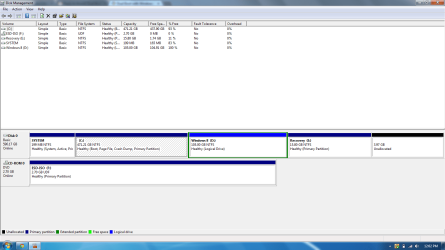
Hi everyone. I posted yesterday on my dual booting problem with my partitions but a forum member named gregrocker kindly helped me out throughout the process. Windows 8 worked fine after I installed it and I even signed in and did everything I could on a normal Windows 8 PC. When I booted up my system, I even saw the Windows bootloader menu asking me if I wanted Windows 8 or Windows 7. I picked Windows 8 the first 2 times and it worked fine and then I picked Windows 7 and it launched the HP Automatic Recovery instead of Windows 7. I panicked and I just did I full system restore back to factory condition. Now I can successfully boot into Windows 7 but Windows 8 is gone and the partition that I had created for Windows 8, I just formatted it so it erased everything. The reason I did this is because I want to start over with dual-booting. Can somebody please guide me through the correct steps in dual booting Windows 7 and Windows 8 without having this problem again. I still have the partition I created for Windows 8 consisting of 105 GB but its empty right now.
 

My Computer My Computer

At a glance

Windows 7 Home Premium 64bitIntel Core i5 2450M @ 2.50GHz Sandy Bridge 32...6.00GB Dual-Channel DDR3 @ 665MHzGeneric PnP Monitor (1600x900@40Hz) Intel HD ...
Computer type
Laptop
Computer Manufacturer/Model Number
HP DM4-3099se
OS
Windows 7 Home Premium 64bit
CPU
Intel Core i5 2450M @ 2.50GHz Sandy Bridge 32nm Technology
Motherboard
Hewlett-Packard 1793 (CPU1)
Memory
6.00GB Dual-Channel DDR3 @ 665MHz
Graphics Card(s)
Generic PnP Monitor (1600x900@40Hz) Intel HD Graphics 3000 (
Sound Card
IDT High Definition Audio CODEC
Screen Resolution
1600x900
Hard Drives
596GB Hitachi HTS547564A9E384 (SATA)
Browser
Google Chrome
Here is the screenshot
 

Attachments

  • screenshot 1.png
    screenshot 1.png
    36.7 KB · Views: 5

My Computer My Computer

At a glance

Windows 7 Home Premium 64bitIntel Core i5 2450M @ 2.50GHz Sandy Bridge 32...6.00GB Dual-Channel DDR3 @ 665MHzGeneric PnP Monitor (1600x900@40Hz) Intel HD ...
Computer type
Laptop
Computer Manufacturer/Model Number
HP DM4-3099se
OS
Windows 7 Home Premium 64bit
CPU
Intel Core i5 2450M @ 2.50GHz Sandy Bridge 32nm Technology
Motherboard
Hewlett-Packard 1793 (CPU1)
Memory
6.00GB Dual-Channel DDR3 @ 665MHz
Graphics Card(s)
Generic PnP Monitor (1600x900@40Hz) Intel HD Graphics 3000 (
Sound Card
IDT High Definition Audio CODEC
Screen Resolution
1600x900
Hard Drives
596GB Hitachi HTS547564A9E384 (SATA)
Browser
Google Chrome
When a Dual Boot Menu is not configured or doesn't work correctly after OS install, install EasyBCD (click Download - no Name or Email required) to delete the failed OS menu listing and then add it again.

Try installing Win8 again.

This is also an opportunity to get a perfect Clean Reinstall - Factory OEM Windows 7 while deleting all partitions during 7 install. The HP factory preinstalled Win7 is a corrupt install smothered by bloatware.

I just got done deleting the bloatware right now haha. I want the fingerprint software that comes with my laptop to still be there which is why I am not doing a clean install. So you want me to install Windows 8 again right? What if the same problem happens. Can you guide me step by step on how to fix it with easy bcd?
 

My Computer My Computer

At a glance

Windows 7 Home Premium 64bitIntel Core i5 2450M @ 2.50GHz Sandy Bridge 32...6.00GB Dual-Channel DDR3 @ 665MHzGeneric PnP Monitor (1600x900@40Hz) Intel HD ...
Computer type
Laptop
Computer Manufacturer/Model Number
HP DM4-3099se
OS
Windows 7 Home Premium 64bit
CPU
Intel Core i5 2450M @ 2.50GHz Sandy Bridge 32nm Technology
Motherboard
Hewlett-Packard 1793 (CPU1)
Memory
6.00GB Dual-Channel DDR3 @ 665MHz
Graphics Card(s)
Generic PnP Monitor (1600x900@40Hz) Intel HD Graphics 3000 (
Sound Card
IDT High Definition Audio CODEC
Screen Resolution
1600x900
Hard Drives
596GB Hitachi HTS547564A9E384 (SATA)
Browser
Google Chrome
I don't know why Win8 doesn't configure a Dual Boot. Try in Partition Wizard right clicking Win8 partition to Modify>Set to Primary, OK, Apply. Or delete it and recreate Primary. Then install 8.
 
I don't know why Win8 doesn't configure a Dual Boot. Try in Partition Wizard right clicking Win8 partition to Modify>Set to Primary, OK, Apply. Or delete it and recreate Primary. Then install 8.

I tried "right clicking Win8 partition to Modify>Set to Primary, OK, Apply" but when I click apply it tells me that it is a demo version and to buy the full version. I am using the MiniTool Partition Wizard you showed me in the other forum.
 

My Computer My Computer

At a glance

Windows 7 Home Premium 64bitIntel Core i5 2450M @ 2.50GHz Sandy Bridge 32...6.00GB Dual-Channel DDR3 @ 665MHzGeneric PnP Monitor (1600x900@40Hz) Intel HD ...
Computer type
Laptop
Computer Manufacturer/Model Number
HP DM4-3099se
OS
Windows 7 Home Premium 64bit
CPU
Intel Core i5 2450M @ 2.50GHz Sandy Bridge 32nm Technology
Motherboard
Hewlett-Packard 1793 (CPU1)
Memory
6.00GB Dual-Channel DDR3 @ 665MHz
Graphics Card(s)
Generic PnP Monitor (1600x900@40Hz) Intel HD Graphics 3000 (
Sound Card
IDT High Definition Audio CODEC
Screen Resolution
1600x900
Hard Drives
596GB Hitachi HTS547564A9E384 (SATA)
Browser
Google Chrome
Didn't know that is now a paid feature in latest Home version. Delete the partition and recreate it as Primary.
 
ok that worked. Should I now install Windows 8?
 

My Computer My Computer

At a glance

Windows 7 Home Premium 64bitIntel Core i5 2450M @ 2.50GHz Sandy Bridge 32...6.00GB Dual-Channel DDR3 @ 665MHzGeneric PnP Monitor (1600x900@40Hz) Intel HD ...
Computer type
Laptop
Computer Manufacturer/Model Number
HP DM4-3099se
OS
Windows 7 Home Premium 64bit
CPU
Intel Core i5 2450M @ 2.50GHz Sandy Bridge 32nm Technology
Motherboard
Hewlett-Packard 1793 (CPU1)
Memory
6.00GB Dual-Channel DDR3 @ 665MHz
Graphics Card(s)
Generic PnP Monitor (1600x900@40Hz) Intel HD Graphics 3000 (
Sound Card
IDT High Definition Audio CODEC
Screen Resolution
1600x900
Hard Drives
596GB Hitachi HTS547564A9E384 (SATA)
Browser
Google Chrome
Here is the screenshot

Windows 8 does not play happy with Logical Drives.

You can upgrade your Windows 7 with the Windows 8 upgrade, but to dual boot you will need the full version.

Upgrade to Windows 8 - Microsoft Windows

Microsoft said:
Purchasing a full version of Windows 8


If you want to build your own PC and install Windows 8 or Windows 8 Pro, or want an additional operating system running in either a local virtual machine or separate partition (including a Mac), you can purchase the Windows 8 or Windows 8 Pro System Builder products (OEM versions). If available in your country or region, Windows 8 and Windows 8 Pro System Builder products can be purchased at participating stores, you'll need to ask a sales rep for more info. This version doesn't include customer support.
 

My Computer My Computer

At a glance

ME/XP/Vista/Win7
OS
ME/XP/Vista/Win7

My Computer My Computer

At a glance

Windows 7 Home Premium 64bitIntel Core i5 2450M @ 2.50GHz Sandy Bridge 32...6.00GB Dual-Channel DDR3 @ 665MHzGeneric PnP Monitor (1600x900@40Hz) Intel HD ...
Computer type
Laptop
Computer Manufacturer/Model Number
HP DM4-3099se
OS
Windows 7 Home Premium 64bit
CPU
Intel Core i5 2450M @ 2.50GHz Sandy Bridge 32nm Technology
Motherboard
Hewlett-Packard 1793 (CPU1)
Memory
6.00GB Dual-Channel DDR3 @ 665MHz
Graphics Card(s)
Generic PnP Monitor (1600x900@40Hz) Intel HD Graphics 3000 (
Sound Card
IDT High Definition Audio CODEC
Screen Resolution
1600x900
Hard Drives
596GB Hitachi HTS547564A9E384 (SATA)
Browser
Google Chrome
Thank you guys SO MUCH!!! It finally works perfectly. Thank You guys because without you guys this wouldn't have even gotten past the partitioning problem haha. Now I just have to get used to Windows 8 haha. But I have one more question, is their anyway i can install the synaptics driver for multi-touch features on Windows 8 because I have a multi-touch trackpad but it is not letting me use the multi-touch for Windows 8
 

My Computer My Computer

At a glance

Windows 7 Home Premium 64bitIntel Core i5 2450M @ 2.50GHz Sandy Bridge 32...6.00GB Dual-Channel DDR3 @ 665MHzGeneric PnP Monitor (1600x900@40Hz) Intel HD ...
Computer type
Laptop
Computer Manufacturer/Model Number
HP DM4-3099se
OS
Windows 7 Home Premium 64bit
CPU
Intel Core i5 2450M @ 2.50GHz Sandy Bridge 32nm Technology
Motherboard
Hewlett-Packard 1793 (CPU1)
Memory
6.00GB Dual-Channel DDR3 @ 665MHz
Graphics Card(s)
Generic PnP Monitor (1600x900@40Hz) Intel HD Graphics 3000 (
Sound Card
IDT High Definition Audio CODEC
Screen Resolution
1600x900
Hard Drives
596GB Hitachi HTS547564A9E384 (SATA)
Browser
Google Chrome
If you'd like to graft on the Win7 Start button menu to Win8 this program works perfectly. You can toggle back and forth between Start Button Menu and Metro: Windows 7 Start Menu for Windows 8 . Click Download button, Extract and run Setup as Admin.

First find the Control Panel in Win8, search for Devices and Printers to enable Automatically get recommended drivers and updates for your hardware (Step 3), then in Windows Updates Check for Updates and run all Important and Optional Updates repeatedly with reboots.

If it doesn't provide an adequate touchpad driver then import it from the HP Support Downloads webpage for your exact model PC.

Go to the Support Downloads webpage for your model PC
 
Back
Top