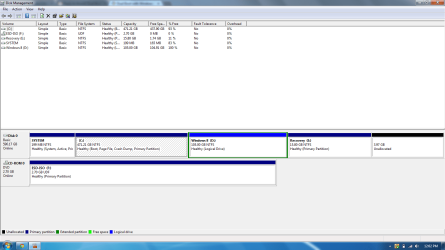
Hi everyone. I posted yesterday on my dual booting problem with my partitions but a forum member named gregrocker kindly helped me out throughout the process. Windows 8 worked fine after I installed it and I even signed in and did everything I could on a normal Windows 8 PC. When I booted up my system, I even saw the Windows bootloader menu asking me if I wanted Windows 8 or Windows 7. I picked Windows 8 the first 2 times and it worked fine and then I picked Windows 7 and it launched the HP Automatic Recovery instead of Windows 7. I panicked and I just did I full system restore back to factory condition. Now I can successfully boot into Windows 7 but Windows 8 is gone and the partition that I had created for Windows 8, I just formatted it so it erased everything. The reason I did this is because I want to start over with dual-booting. Can somebody please guide me through the correct steps in dual booting Windows 7 and Windows 8 without having this problem again. I still have the partition I created for Windows 8 consisting of 105 GB but its empty right now.
My Computer
At a glance
Windows 7 Home Premium 64bitIntel Core i5 2450M @ 2.50GHz Sandy Bridge 32...6.00GB Dual-Channel DDR3 @ 665MHzGeneric PnP Monitor (1600x900@40Hz) Intel HD ...
- Computer type
- Laptop
- Computer Manufacturer/Model Number
- HP DM4-3099se
- OS
- Windows 7 Home Premium 64bit
- CPU
- Intel Core i5 2450M @ 2.50GHz Sandy Bridge 32nm Technology
- Motherboard
- Hewlett-Packard 1793 (CPU1)
- Memory
- 6.00GB Dual-Channel DDR3 @ 665MHz
- Graphics Card(s)
- Generic PnP Monitor (1600x900@40Hz) Intel HD Graphics 3000 (
- Sound Card
- IDT High Definition Audio CODEC
- Screen Resolution
- 1600x900
- Hard Drives
- 596GB Hitachi HTS547564A9E384 (SATA)
- Browser
- Google Chrome