Solved Dual Boot: XP and 7: Want to Format the XP and move MBR to 7

JLPicard

New member
Local time
5:38 PM
Messages
4
I have two internal hard drives. I had XP for many years until the recent loss of support for XP by Microsoft, so I decided at that time to install Windows 7 on one of my other hard drives. To make my transition to 7 smoother, I installed 7 on a previous storage drive, basically dual-booting for a little while. Now I would like to format and clean out the XP drive and make that my storage drive - but my system is still viewing the XP drive as the "active, boot drive" and won't allow me to format it. Even if I unplug that drive and attempt to boot only to the 7 drive, it won't let me.

I did some searching and found this thread, many years old, that describes my problem exactly:

http://www.sevenforums.com/installation-setup/128052-moving-mbr-windows-7-drive.html

I DL'ed, burnt to a CD Mini Tools Partition Wizard, and was able to convert my Windows 7 Drive to Active. It displays the Windows 7 HD as: Primary Active & System, but with the XP disk removed from the computer, I am still unable to boot to this HD. I attempted the x3 repair process with my Windows Disks, and it isn't even seeing the Windows 7 OS for some reason, and is asking for HD drivers...

I think I am failing to apply the MBR to the Windows 7 HD and not sure which way to go now.

One other thing, not sure if it is related, but the Windows 7 disk also has a 8MB Unallocated partition on it.
 

My Computer My Computer

At a glance

Windows 7 Ultimate x64
Computer type
PC/Desktop
OS
Windows 7 Ultimate x64
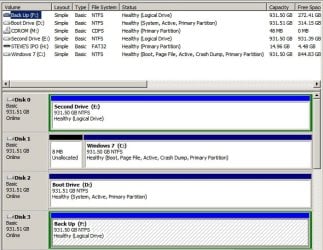
Can you post a screenshot of disk management in windows 7?

Show the disk management and wait on advice before doing the below, but I think that would work. Just want to make sure my answer won't cause you to not be able to start windows.

Have you tried a ubuntu live cd to boot and format your drive? That is an easy option.
 

My Computer My Computer

At a glance

Windows 10 ProAMD Ryzen 5 2400G Processor with Radeon RX Ve...G.SKILL Ripjaws V Series 16GB (2 x 8GB) 288-P...2047MB NVIDIA GeForce GTX 1060 6GB (EVGA)
Computer type
PC/Desktop
Computer Manufacturer/Model Number
Custom Built
OS
Windows 10 Pro
CPU
AMD Ryzen 5 2400G Processor with Radeon RX Vega 11 Graphics
Motherboard
ASRock X470 Master SLI/AC AM4 AMD Promontory X470 SATA 6Gb/s
Memory
G.SKILL Ripjaws V Series 16GB (2 x 8GB) 288-Pin DDR4 SDRAM D
Graphics Card(s)
2047MB NVIDIA GeForce GTX 1060 6GB (EVGA)
Sound Card
Motherboard Built in
Monitor(s) Displays
Acer R240HY bidx 23.8-Inch IPS HDMI DVI VGA (1920 x 1080) Wi
Screen Resolution
1920 x 1080
Hard Drives
1TB Sandisk SSD PLUS (Main drive)
500 GB Seagate 7200 RPM (Games)
500 GB Western Digital 7200 RPM (Virtual Machines)
PSU
CORSAIR TX Series TX650M 650W 80+ Gold Modular Power Supply
Case
CORSAIR CARBIDE SPEC-02 Mid-Tower Gaming Case, Red LED Fan
Cooling
220mm, two 120mm, and four 60mm fans
Keyboard
Wired Dell keyboard
Mouse
Wireless Logitech mouse
Internet Speed
250mb down, 30mb up
Antivirus
Panda Cloud Antivirus
Browser
Chrome-ish x64
Other Info
Your awesome for reading this.
Screenshot of Disk Management

Here's the Screenshot of the Disk Management for my computer, Boot Drive D: is my previous XP drive.
 

Attachments

  • Disk Management.jpg
    Disk Management.jpg
    64.6 KB · Views: 0

My Computer My Computer

At a glance

Windows 7 Ultimate x64
Computer type
PC/Desktop
OS
Windows 7 Ultimate x64
Unplug the XP hard drive, boot into BIOS setup to set Win7 hard drive as first hard drive to boot, save changes and exit.

Reboot into the Win7 installation media to run Startup Repair - Run 3 Separate Times until Win7 starts and holds the System flag signifying it is booting itself.

You can then plug back in the XP HD, boot it when needed using the one-time BIOS Boot Menu key. When the time comes I would wipe it with Diskpart Clean Command to get it cleanest before repartitioning in Disk Mgmt as a data drive.

You are wise to have your data drives as Logical so they can stay plugged in during these operations, since boot files cannot be derailed to a Logical drive. Otherwise the installer may place the boot files on the first Primary partition in order.
 
I have done that as mentioned in my initial post, I tried it again after your response. There are no OS's even listed in the OS window asking me to repair. The only time an OS shows up is if my XP is plugged in.
 

My Computer My Computer

At a glance

Windows 7 Ultimate x64
Computer type
PC/Desktop
OS
Windows 7 Ultimate x64
Since you have another OS you can use this method which also works well and doesn't depend on Repair console:

http://www.sevenforums.com/tutorials/209885-bootmgr-move-c-easybcd.html

If it fails then try the repairs with all drives unplugged. I notice you reported that the repair prompted for drivers. This almost always means a bad Win7 installer.

If no installation continues to show up for repair you can try to force it using the bootrec commands from Step 9 of Troubleshooting Windows 7 Failure to Start . The installer and tool to burn to DVD or flash stick is provided in Step 6.
 
Last edited:
Thanks for the help, I got a copy of Easy Recovery Essentials, burnt it to a CD, and booted up into it. It detected my OS, ran some repairs, and now I am booting into Windows 7 with no problems. Disk Management now lists it as Boot & System. I am now wiping my old XP disk. Glad I found this forum, I can see a lot of problems solved in this place.
 

My Computer My Computer

At a glance

Windows 7 Ultimate x64
Computer type
PC/Desktop
OS
Windows 7 Ultimate x64
I've been waiting to hear some reports about their boot disk. Thanks. We should add it to tutorial.
 
Thank you greg :)
 

My Computer My Computer

At a glance

Windows 10 ProAMD Ryzen 5 2400G Processor with Radeon RX Ve...G.SKILL Ripjaws V Series 16GB (2 x 8GB) 288-P...2047MB NVIDIA GeForce GTX 1060 6GB (EVGA)
Computer type
PC/Desktop
Computer Manufacturer/Model Number
Custom Built
OS
Windows 10 Pro
CPU
AMD Ryzen 5 2400G Processor with Radeon RX Vega 11 Graphics
Motherboard
ASRock X470 Master SLI/AC AM4 AMD Promontory X470 SATA 6Gb/s
Memory
G.SKILL Ripjaws V Series 16GB (2 x 8GB) 288-Pin DDR4 SDRAM D
Graphics Card(s)
2047MB NVIDIA GeForce GTX 1060 6GB (EVGA)
Sound Card
Motherboard Built in
Monitor(s) Displays
Acer R240HY bidx 23.8-Inch IPS HDMI DVI VGA (1920 x 1080) Wi
Screen Resolution
1920 x 1080
Hard Drives
1TB Sandisk SSD PLUS (Main drive)
500 GB Seagate 7200 RPM (Games)
500 GB Western Digital 7200 RPM (Virtual Machines)
PSU
CORSAIR TX Series TX650M 650W 80+ Gold Modular Power Supply
Case
CORSAIR CARBIDE SPEC-02 Mid-Tower Gaming Case, Red LED Fan
Cooling
220mm, two 120mm, and four 60mm fans
Keyboard
Wired Dell keyboard
Mouse
Wireless Logitech mouse
Internet Speed
250mb down, 30mb up
Antivirus
Panda Cloud Antivirus
Browser
Chrome-ish x64
Other Info
Your awesome for reading this.
Hi there

People often make this stuff too complicated

Windows 7 drive. As it's a separate HDD - simple.

ON THE W7 HDD (not the XP one)

1) load W7 install or recovery disk
2) choose repair system
3) command mode and type the following

cd /bootrec
fixmbr
fixboot

Now you can install / boot windows.

Forget about bootmanagers etc - if you want to dual boot I'd simply use the BIOS menu when starting your machine and choose the HDD you want to boot from - XP or W7. As you've got two separate HDD's then this IMO is the best way.

Once you've got XP finished with simply set the Disk order in the BIOS so W7 HDD boots.

Can't understand all this other complicated stuff like easyBCD and whatever.

Cheers
jimbo
 

My Computer My Computer

At a glance

Linux CENTOS 7 / various Windows OS'es and se...Intel i7 Intel i58GB, 16GBOn Motherboard
Computer type
PC/Desktop
Computer Manufacturer/Model Number
Custom built, several laptops HP/ASUS
OS
Linux CENTOS 7 / various Windows OS'es and servers
CPU
Intel i7 Intel i5
Memory
8GB, 16GB
Graphics Card(s)
On Motherboard
Sound Card
Realtek HD audio
Monitor(s) Displays
Apple Cinema display, Samsung LCD
Screen Resolution
1920 X 1080
Hard Drives
4 X 1TB SATA
Mouse
Toshiba wireless laser
Internet Speed
> 20MB up
Back
Top