Win 7 on D: Win XP on C: How do i remove XP and move 7?

Basil

New member
Member
Local time
7:39 PM
Messages
97
I have a dual boot PC with XP installed initially on the C: drive. I added Win 7 64 BitPpro on D: I would like to remove XP and ideally move Win 7 to the C: drive I have some programs D: that run under Win 7 will I break links if I try to move the Win 7 installation? Presumably I need to back up the Win 7 installation and apps first? and delete partitions? Thanks. Link to a known good guide very welcome!
 

My Computer My Computer

At a glance

Win 7 Pro 64 BitIntel i5-4670K @ 3.4 GHz16 gigOn board
Computer type
PC/Desktop
Computer Manufacturer/Model Number
Custom
OS
Win 7 Pro 64 Bit
CPU
Intel i5-4670K @ 3.4 GHz
Motherboard
Gigabyte GA-Z97X-Gaming 3
Memory
16 gig
Graphics Card(s)
On board
Hard Drives
SSD C: Drive
2 off 1 gig SATA in software RAID1 as D: Drive
Antivirus
Avast
Browser
Firefox
Probably easiest to make an image of your win7 partition, then when running the image restore, delete the c and d partitions and restore to the unallocated space.

First, you will need to make sure you have the boot files on your restored windows7. Most likely they are currently on the first partition.

Boot into your win7. Open an elevated cmd prompt. If the OS letter of win7 is C when you are booted into it , Type:

bcdboot c:\windows /s c:

(then press enter)

If your win7 os letter is D when you are booted into it , Type:

bcdboot d:\windows /s d:

Then make your image.

There are several free imaging programs. I suggest aomei backupper as the simplest to use. Install it. Then get it to make boot media before creating the image.


Best Windows Backup and Restore Software | AOMEI Backupper
 

My Computers My Computers

  • At a glance

    7 X64i5 84002x8gb 3200mhz
    Computer type
    PC/Desktop
    OS
    7 X64
    CPU
    i5 8400
    Motherboard
    gigabyte b365m ds3h
    Memory
    2x8gb 3200mhz
    Hard Drives
    various
    PSU
    pure power 11 400w cm
    Case
    Coolermaster
    Cooling
    cryorig m9i
  • At a glance

    7x64g54008gb ddr4 2400
    Computer type
    PC/Desktop
    OS
    7x64
    CPU
    g5400
    Motherboard
    ga b365m ds3h
    Memory
    8gb ddr4 2400
    PSU
    xfx pro 450w
Video here shows you how to do it.

YouTube

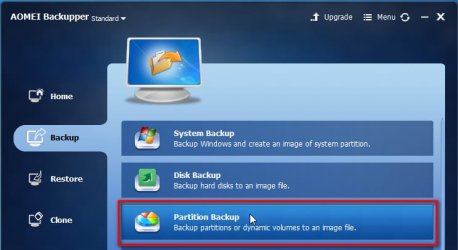
One important difference - you do not want a system image backup. You want a partition backup, so you click Partition Backup instead of System backup. The rest is the same.

aomei-backupper-part-backup.jpg


Remember, in your case, you must run the bcdboot command before creating the image
 

My Computers My Computers

  • At a glance

    7 X64i5 84002x8gb 3200mhz
    Computer type
    PC/Desktop
    OS
    7 X64
    CPU
    i5 8400
    Motherboard
    gigabyte b365m ds3h
    Memory
    2x8gb 3200mhz
    Hard Drives
    various
    PSU
    pure power 11 400w cm
    Case
    Coolermaster
    Cooling
    cryorig m9i
  • At a glance

    7x64g54008gb ddr4 2400
    Computer type
    PC/Desktop
    OS
    7x64
    CPU
    g5400
    Motherboard
    ga b365m ds3h
    Memory
    8gb ddr4 2400
    PSU
    xfx pro 450w
Back
Top