Dual boot XP/W7 help please

Exreaver

New member
Hello,
I resently tried to dual boot Windows 7 with XP, but XP won't boot anymore. I Started of with XP as my OS, repartitioned the harddrive to free up 70GB and installed Windows 7 on the new partition. After installing Windows 7, the computer would show me a dual boot screen, but after i would select the earlier version of windows (windows XP) all i'd get was a black screen. Please help me
 

My Computer

Computer Manufacturer/Model Number
Acer Aspire One
OS
XP
CPU
Intel Atom 1.6 Ghz
Memory
1gb
Exreaver, Welcome to SevenForums
Did you boot windows xp after you repartitioned? Just to make sure you did not mess up during repartitioning. Can you post a snip of your disk management from Win 7 so we can see what you have in the way of partitions. Good luck with your problem.
 

My Computer

Computer Manufacturer/Model Number
Gateway GT5692
OS
Windows 7 Ulti. x64
CPU
AMD Phenom 8450 triple-core 2.10 ghz
Memory
4GB
Graphics Card(s)
ATI Radion HD 3200
Monitor(s) Displays
Gateway FPD1775W
Screen Resolution
1280x720
Hard Drives
465.6613 Gibibytes
Yeah, you could have messed up Windows XP.
 

My Computer

Computer Manufacturer/Model Number
Advent
OS
banned for piracy
CPU
2.4Ghz Quad-Core P4
Motherboard
FOXCONN A6VMX
Memory
4GB
Graphics Card(s)
256MB X1200 On-board graphics
Sound Card
On-board
Monitor(s) Displays
19" TFT Mointer
Hard Drives
500GB WD Hard-drive.
Case
Mid-tower
Keyboard
Usb HP Keyboard
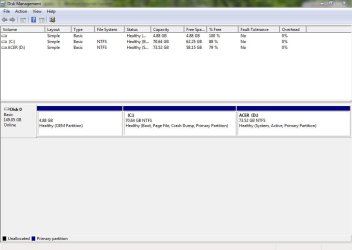
Thank you, and here is my pic of my disk management
 

Attachments

  • Capture.JPG
    Capture.JPG
    75.4 KB · Views: 72

My Computer

Computer Manufacturer/Model Number
Acer Aspire One
OS
XP
CPU
Intel Atom 1.6 Ghz
Memory
1gb
Assuming you made the Win7 partition in the middle, as it has the Boot files so it should be Win7.

The XP if D: is set Active as it should be since it holds the MBR.

If I am assuming incorrectly, and WIn7 is now D: and XP:C then something has caused the boot config to be incorrect.

I notice the OEM partition sitting on the lower address is empty. I would delete and recover it into C using free Partition Wizard CD, then run Startup Repair 3 times to recover Win7's boot.

After restarting Win7, keep the DVD in the drive and run a Repair install to correctly reconfigure the Dual Boot which is what Win7 does when not interfered with - probably by that OEM partition sitting on the boot sector.
 
Well, my XP is on my D drive and Win7 is on my C drive. So i should use free partition wizard and recover and delete and it some sorta thing called a OEM? then use the setup repair that Win7 comes with?
 

My Computer

Computer Manufacturer/Model Number
Acer Aspire One
OS
XP
CPU
Intel Atom 1.6 Ghz
Memory
1gb
How did the D:XP partition which came with the Acer end up way out in right field, with the new C:Win7 partition sandwiched in between XP and the first OEM partition, which is now disabled after Win7 install?

This apparently messed up the XP partition's MBR and derailed the dual boot which should have been correctly configured by Windows 7 installer. So I am not sure that even a Repair install of Win 7 done from it's desktop would correctly configure the dual boot until the XP MBR is repaired.

Can you please download and install EasyBCD 2.0 and post back a screenshot of its front page listings?

View attachment 40788
 
Back
Top