- Local time
- 12:26 PM
- Messages
- 29
Hi all,
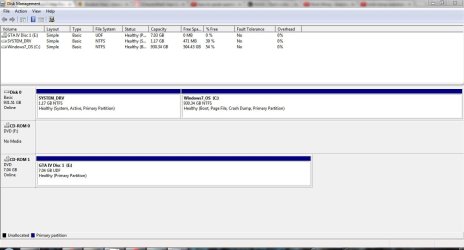
I dual booted Windows 7 with Windows 8. But Windows 8 sucked too much so I deleted the Windows 8 Partition of my 1Tb HDD.
Normally (last time,) it should boot directly to windows 7. But this time, when I restarted, it still uses the windows 8 start screen and it starts it's own automatic repair. I need to use advanced options to boot into another os (aka windows 7).
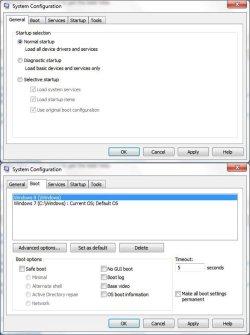
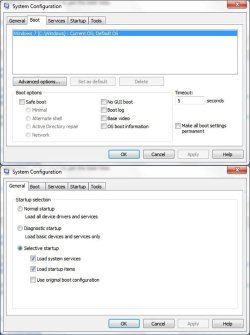
In msconfig (in windows 7,) I deleted Windows 8 entry in the boot tab. In the startup tab, it says selective startup. But when I put it back in Normal boot, Windows 8 Appears again!
How do I fix this?
(Also, my windows 7 boot time is very slow- around 5 mins)
My specs are:
Intel Core i7 3612QM 2.1-3.1
16 GB DDR3
1TB 5200 RPM <-- Yeah I know it's slow. But it can't make the boot time 5 mins right?
nVidia GT630 + Intel HD4000
I have attached some screenshots.
I dual booted Windows 7 with Windows 8. But Windows 8 sucked too much so I deleted the Windows 8 Partition of my 1Tb HDD.
Normally (last time,) it should boot directly to windows 7. But this time, when I restarted, it still uses the windows 8 start screen and it starts it's own automatic repair. I need to use advanced options to boot into another os (aka windows 7).
In msconfig (in windows 7,) I deleted Windows 8 entry in the boot tab. In the startup tab, it says selective startup. But when I put it back in Normal boot, Windows 8 Appears again!
How do I fix this?
(Also, my windows 7 boot time is very slow- around 5 mins)
My specs are:
Intel Core i7 3612QM 2.1-3.1
16 GB DDR3
1TB 5200 RPM <-- Yeah I know it's slow. But it can't make the boot time 5 mins right?
nVidia GT630 + Intel HD4000
I have attached some screenshots.
Attachments
My Computer
At a glance
Windows 7 Professional 64BitIntel Core i7 3612QM (2.1Ghz)4GB DDR3 1600nVidia GT 630M
- Computer Manufacturer/Model Number
- ThinkPad x61, ThinkPad T420i, ThinkPad Edge E430, ThinkPad x230t
- OS
- Windows 7 Professional 64Bit
- CPU
- Intel Core i7 3612QM (2.1Ghz)
- Memory
- 4GB DDR3 1600
- Graphics Card(s)
- nVidia GT 630M
- Sound Card
- Dolby Home Theater V4
- Monitor(s) Displays
- LG 72' 3D Smart TV/ Thinkpad 1366x768
- Screen Resolution
- 1920x1080/1366x768
- Hard Drives
- 1 TB Hitachi/320GB Hitachi 7200 RPM
- Internet Speed
- 1000MB Fibre