Solved Dual Booting

Hi guys, I'm sorry for not posting before about the problems, or if I fixed them. And I've discovered WHY the dual-booting was screwing up: It was because I had my stupid flash drive plugged in while trying to install the second OS! Major "DOH!" moment. Anyway, for roughly the last 2 weeks, my dual-OS has been working fine. I can switch between both OS's without a problem.

I also have a question, and a little explanation with the question: Roughly 7 years ago, I had a roomate in my house named Mike. Now, Mike was a better computer user than I was 6 years ago, and roughly about this time, XP had been released for 3 years or so. Mike hated XP versus Windows 98 at the time, and he had a dual-boot of XP and 98. He also really hated the "choose an OS screen" when you started up the machine, so he created 2 little icons in his Quick Launch area. Both icons were created with the 98 and XP inside the icon, what the buttons did however, was if you clicked on one of them, it would restart the machine, skip the "choose an OS" screen, and go straight to the other OS, and if he shut down the machine, whichever button he had clicked on last, it would have started up into that OS without having to choose from the menu.

Now, does anyone else here know how to do that? I would like to do that, too. Except that it's of course, between XP and Windows 7 instead.

Probably quite easy to do. What they probably do is execute a batch file which sets the appropriate OS as the default, and set the delay to 0 which means that the default OS will be loaded upon restart. It could also be possible to choose whether to shutdown, restart, or continue in the current OS after executing the file, in which case the next boot will launch into the desired OS. I'm not sure on the implications of UAC though, since the required command BCDEDIT (from W7's perspective) needs to be invoked with administrative credentials and privileges.

This should work with both dual-boot and multi-boot systems. In both cases, if the desired OS isn't already the default (i.e. first in the boot order), the 2 entries involved (the current and desired) will be swapped over.

Well I'm the only person who uses this machine, so I only have 1 Admin account, that's not going to be a problem.

Edit: Just need a way to do it, but I'm no programmer, so I don't have a clue how.
 
Last edited:

My Computer

Computer Manufacturer/Model Number
Custom
OS
Windows 7 Ultimate 32-Bit
CPU
Intel(R) Core(TM) i7 CPU 920 @ 2.67GHz
Motherboard
Gigabyte Technology Co., Ltd. EX58-UD3R
Memory
Corsair DDR3 4Gb
Graphics Card(s)
Nvidia Ge-Force GTS250
Sound Card
High Definition Audio Device
Monitor(s) Displays
Envision 19 inch
Screen Resolution
1280x1024
Hard Drives
2 physical hard drives (4 letter drives) that equal up to 626.3 gigs of space all together. I think both are Maxtors, but primary is a SATA drive, secondary is a SATA, too.
Case
"Elite" style case
Cooling
"Cooler Master"
Mouse
Microsoft Optical USB Mouse.
Internet Speed
Verizon DSL Internet
So does anyone else know how I could make what I said above? It'd be a lot easier for me.
 

My Computer

Computer Manufacturer/Model Number
Custom
OS
Windows 7 Ultimate 32-Bit
CPU
Intel(R) Core(TM) i7 CPU 920 @ 2.67GHz
Motherboard
Gigabyte Technology Co., Ltd. EX58-UD3R
Memory
Corsair DDR3 4Gb
Graphics Card(s)
Nvidia Ge-Force GTS250
Sound Card
High Definition Audio Device
Monitor(s) Displays
Envision 19 inch
Screen Resolution
1280x1024
Hard Drives
2 physical hard drives (4 letter drives) that equal up to 626.3 gigs of space all together. I think both are Maxtors, but primary is a SATA drive, secondary is a SATA, too.
Case
"Elite" style case
Cooling
"Cooler Master"
Mouse
Microsoft Optical USB Mouse.
Internet Speed
Verizon DSL Internet
Alright, I'll give that thing a try. Thanks!
 

My Computer

Computer Manufacturer/Model Number
Custom
OS
Windows 7 Ultimate 32-Bit
CPU
Intel(R) Core(TM) i7 CPU 920 @ 2.67GHz
Motherboard
Gigabyte Technology Co., Ltd. EX58-UD3R
Memory
Corsair DDR3 4Gb
Graphics Card(s)
Nvidia Ge-Force GTS250
Sound Card
High Definition Audio Device
Monitor(s) Displays
Envision 19 inch
Screen Resolution
1280x1024
Hard Drives
2 physical hard drives (4 letter drives) that equal up to 626.3 gigs of space all together. I think both are Maxtors, but primary is a SATA drive, secondary is a SATA, too.
Case
"Elite" style case
Cooling
"Cooler Master"
Mouse
Microsoft Optical USB Mouse.
Internet Speed
Verizon DSL Internet
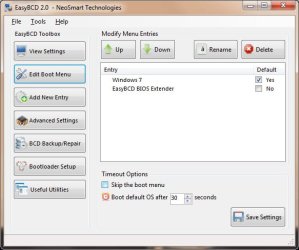
Okay, I tried using that program, but it isn't taking away the Selection List like it was supposed to do. I don't know why it isn't.
 

My Computer

Computer Manufacturer/Model Number
Custom
OS
Windows 7 Ultimate 32-Bit
CPU
Intel(R) Core(TM) i7 CPU 920 @ 2.67GHz
Motherboard
Gigabyte Technology Co., Ltd. EX58-UD3R
Memory
Corsair DDR3 4Gb
Graphics Card(s)
Nvidia Ge-Force GTS250
Sound Card
High Definition Audio Device
Monitor(s) Displays
Envision 19 inch
Screen Resolution
1280x1024
Hard Drives
2 physical hard drives (4 letter drives) that equal up to 626.3 gigs of space all together. I think both are Maxtors, but primary is a SATA drive, secondary is a SATA, too.
Case
"Elite" style case
Cooling
"Cooler Master"
Mouse
Microsoft Optical USB Mouse.
Internet Speed
Verizon DSL Internet
Okay, I tried using that program, but it isn't taking away the Selection List like it was supposed to do. I don't know why it isn't.

EasyBCD is used to add a Dual Boot. If you delete a boot listing on the Edit OS Menu tab, then that OS will not be available to boot.
 

My Computer

Computer Manufacturer/Model Number
* BFK Customs *
OS
W 7 64-bit Ultimate
CPU
Intel Q9550 Yorkfield
Motherboard
ASUS P5Q Pro
Memory
8GB Dominator 8500C5D
Graphics Card(s)
ATI : XFX 5870
Sound Card
Realtek HD Audio 7-1
Monitor(s) Displays
1x 47" LCD HDMI & 3x 26" LCD HDMI
Screen Resolution
1920x1080P & 1920x1200
Hard Drives
1x 80GB Intel X25-M G2 SSD : 1x 500GB & 1x 640GB WD Caviar Black(s)
PSU
Corsair 620HX
Case
Cooler Master RC-690
Cooling
Tuniq Tower 120, 2x 140mm and 3x 120mm case fans
Keyboard
Microsoft 500
Mouse
Razer Diamondback 3G
Internet Speed
14 Mb/s
Other Info
1x Koutech 3Gb/s SATA HDD Hot Swap Rack
I didn't delete it from the list, I told it to take away the 30 second decision window. I think it worked after it was shutdown though, instead of restarted. Haven't tried it since this morning.

Edit: Thanks, SiW.
 
Last edited:

My Computer

Computer Manufacturer/Model Number
Custom
OS
Windows 7 Ultimate 32-Bit
CPU
Intel(R) Core(TM) i7 CPU 920 @ 2.67GHz
Motherboard
Gigabyte Technology Co., Ltd. EX58-UD3R
Memory
Corsair DDR3 4Gb
Graphics Card(s)
Nvidia Ge-Force GTS250
Sound Card
High Definition Audio Device
Monitor(s) Displays
Envision 19 inch
Screen Resolution
1280x1024
Hard Drives
2 physical hard drives (4 letter drives) that equal up to 626.3 gigs of space all together. I think both are Maxtors, but primary is a SATA drive, secondary is a SATA, too.
Case
"Elite" style case
Cooling
"Cooler Master"
Mouse
Microsoft Optical USB Mouse.
Internet Speed
Verizon DSL Internet
Well...this really effing stinks! I turned off my machine before going to bed last night, went to bed, woke up this morning; and found out my hard drive with both of my OS installations on it died last night! So I lost all of my super important information on my F drive last night! *sighs* This really sucks. I'm reinstalling Windows 7 right now. I can't even get the dead hard drive working. Oh well. I hopefully still have all of my info on my D drive. At least I had 1 working drive. I just put in another 500GB drive with the other 500GB I have. Thankfully my father had a second drive sittin' around. I can copy crap I need from my D drive to another one and format the old C & D drives. This just really stinks.

Maybe someday in the future I hopefully can get the old info off of my dead drive. Just thought I'd let you guys know what was going on.
 

My Computer

Computer Manufacturer/Model Number
Custom
OS
Windows 7 Ultimate 32-Bit
CPU
Intel(R) Core(TM) i7 CPU 920 @ 2.67GHz
Motherboard
Gigabyte Technology Co., Ltd. EX58-UD3R
Memory
Corsair DDR3 4Gb
Graphics Card(s)
Nvidia Ge-Force GTS250
Sound Card
High Definition Audio Device
Monitor(s) Displays
Envision 19 inch
Screen Resolution
1280x1024
Hard Drives
2 physical hard drives (4 letter drives) that equal up to 626.3 gigs of space all together. I think both are Maxtors, but primary is a SATA drive, secondary is a SATA, too.
Case
"Elite" style case
Cooling
"Cooler Master"
Mouse
Microsoft Optical USB Mouse.
Internet Speed
Verizon DSL Internet

My Computer

Computer Manufacturer/Model Number
Custom
OS
Windows 7 Ultimate 32-Bit
CPU
Intel(R) Core(TM) i7 CPU 920 @ 2.67GHz
Motherboard
Gigabyte Technology Co., Ltd. EX58-UD3R
Memory
Corsair DDR3 4Gb
Graphics Card(s)
Nvidia Ge-Force GTS250
Sound Card
High Definition Audio Device
Monitor(s) Displays
Envision 19 inch
Screen Resolution
1280x1024
Hard Drives
2 physical hard drives (4 letter drives) that equal up to 626.3 gigs of space all together. I think both are Maxtors, but primary is a SATA drive, secondary is a SATA, too.
Case
"Elite" style case
Cooling
"Cooler Master"
Mouse
Microsoft Optical USB Mouse.
Internet Speed
Verizon DSL Internet
Back
Top