
You are using an out of date browser. It may not display this or other websites correctly.
You should upgrade or use an alternative browser.
You should upgrade or use an alternative browser.
Dual boots
- Thread starter mickrg123
- Start date

Hi Mick, can you give us a bit for info on what you are tying to do, it sounds like you are trying to dual boot Vista and Windows 7, have you installed Windows 7 yet or are you just asking how it is done?
My Computer
- Computer Manufacturer/Model Number
- Home Brew
- OS
- Windows 7 Ultimate Vista Ultimate x64
- CPU
- Core 2 Duo E8500 3.16Ghz @ 3.8Ghz
- Motherboard
- eVGA 750i FTW
- Memory
- 2x2Gigs Patriot PC2-6400 LL
- Graphics Card(s)
- Inno3D GeForce GTX260 216 SP
- Monitor(s) Displays
- ASUS VW222U 22" 2ms Response time
- Screen Resolution
- 1680x1050
- Hard Drives
- SATA 150GB
SATA II 250GB
USB IDE 750GB Ext.
- PSU
- HYTEC 600W & Thermaltake 650W Toughpower Power Exp
- Case
- Thermaltake Armor LCS (Liquid Cooling System)
- Cooling
- Liquid Cooling System
- Keyboard
- Logitech G15 Gaming Keyboard
- Mouse
- Logitech G9 Gaming Mouse
So you don't have a boot screen with the option to boot in to Vista?
My Computer
- Computer Manufacturer/Model Number
- Home Brew
- OS
- Windows 7 Ultimate Vista Ultimate x64
- CPU
- Core 2 Duo E8500 3.16Ghz @ 3.8Ghz
- Motherboard
- eVGA 750i FTW
- Memory
- 2x2Gigs Patriot PC2-6400 LL
- Graphics Card(s)
- Inno3D GeForce GTX260 216 SP
- Monitor(s) Displays
- ASUS VW222U 22" 2ms Response time
- Screen Resolution
- 1680x1050
- Hard Drives
- SATA 150GB
SATA II 250GB
USB IDE 750GB Ext.
- PSU
- HYTEC 600W & Thermaltake 650W Toughpower Power Exp
- Case
- Thermaltake Armor LCS (Liquid Cooling System)
- Cooling
- Liquid Cooling System
- Keyboard
- Logitech G15 Gaming Keyboard
- Mouse
- Logitech G9 Gaming Mouse
Yes by default as long as you have installed it correctly on a separate partition you should have boot options displaying Windows 7 and Vista for a default time of 30 seconds.
My Computer
- Computer Manufacturer/Model Number
- Home Brew
- OS
- Windows 7 Ultimate Vista Ultimate x64
- CPU
- Core 2 Duo E8500 3.16Ghz @ 3.8Ghz
- Motherboard
- eVGA 750i FTW
- Memory
- 2x2Gigs Patriot PC2-6400 LL
- Graphics Card(s)
- Inno3D GeForce GTX260 216 SP
- Monitor(s) Displays
- ASUS VW222U 22" 2ms Response time
- Screen Resolution
- 1680x1050
- Hard Drives
- SATA 150GB
SATA II 250GB
USB IDE 750GB Ext.
- PSU
- HYTEC 600W & Thermaltake 650W Toughpower Power Exp
- Case
- Thermaltake Armor LCS (Liquid Cooling System)
- Cooling
- Liquid Cooling System
- Keyboard
- Logitech G15 Gaming Keyboard
- Mouse
- Logitech G9 Gaming Mouse
So you have accessed your Vista drive through Windows 7 and it is all there, if so do you have a Vista install disc, if you do put it in and do a startup repair and hopefully that will fix it or you could use EasyBCD to recreate your Vista Boot entry.
My Computer
- Computer Manufacturer/Model Number
- Home Brew
- OS
- Windows 7 Ultimate Vista Ultimate x64
- CPU
- Core 2 Duo E8500 3.16Ghz @ 3.8Ghz
- Motherboard
- eVGA 750i FTW
- Memory
- 2x2Gigs Patriot PC2-6400 LL
- Graphics Card(s)
- Inno3D GeForce GTX260 216 SP
- Monitor(s) Displays
- ASUS VW222U 22" 2ms Response time
- Screen Resolution
- 1680x1050
- Hard Drives
- SATA 150GB
SATA II 250GB
USB IDE 750GB Ext.
- PSU
- HYTEC 600W & Thermaltake 650W Toughpower Power Exp
- Case
- Thermaltake Armor LCS (Liquid Cooling System)
- Cooling
- Liquid Cooling System
- Keyboard
- Logitech G15 Gaming Keyboard
- Mouse
- Logitech G9 Gaming Mouse

- Local time
- 12:56 AM
- Messages
- 16,784
Hi mickrg123,
Open an elevated command prompt and type bcdedit at the prompt. Then press enter.
Post a screenshot of what is listed. Like this:
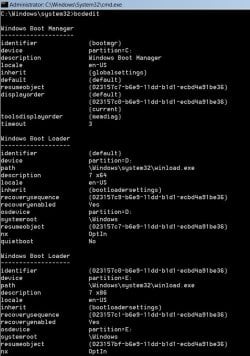
Hope it helps
SIW2
Open an elevated command prompt and type bcdedit at the prompt. Then press enter.
Post a screenshot of what is listed. Like this:
Hope it helps
SIW2
My Computers
System One System Two
-
- Computer type
- PC/Desktop
- OS
- 7 X64
- CPU
- i5 8400
- Motherboard
- gigabyte b365m ds3h
- Memory
- 2x8gb 3200mhz
- Hard Drives
- various
- PSU
- pure power 11 400w cm
- Case
- Coolermaster
- Cooling
- cryorig m9i
-
- Computer type
- PC/Desktop
- OS
- 7x64
- CPU
- g5400
- Motherboard
- ga b365m ds3h
- Memory
- 8gb ddr4 2400
- PSU
- xfx pro 450w
Hi mickrg123,
Open an elevated command prompt and type bcdedit at the prompt. Then press enter.
Post a screenshot of what is listed. Like this:
View attachment 4256
Hope it helps
SIW2
I haven't looked at mine before but everything is working fine but I noticed that both partitions in mine show as C: but in your screen shot they have different letters, is this right?

My Computer
- Computer Manufacturer/Model Number
- Home Brew
- OS
- Windows 7 Ultimate Vista Ultimate x64
- CPU
- Core 2 Duo E8500 3.16Ghz @ 3.8Ghz
- Motherboard
- eVGA 750i FTW
- Memory
- 2x2Gigs Patriot PC2-6400 LL
- Graphics Card(s)
- Inno3D GeForce GTX260 216 SP
- Monitor(s) Displays
- ASUS VW222U 22" 2ms Response time
- Screen Resolution
- 1680x1050
- Hard Drives
- SATA 150GB
SATA II 250GB
USB IDE 750GB Ext.
- PSU
- HYTEC 600W & Thermaltake 650W Toughpower Power Exp
- Case
- Thermaltake Armor LCS (Liquid Cooling System)
- Cooling
- Liquid Cooling System
- Keyboard
- Logitech G15 Gaming Keyboard
- Mouse
- Logitech G9 Gaming Mouse
Go to the start menu and type cmd and at the top of the menu you will see the icon, right click on the icon and open as administrator.
As to how do you post your image, you can use the snipping tool found in your start menu and then upload it using the paperclip in your post.
As to how do you post your image, you can use the snipping tool found in your start menu and then upload it using the paperclip in your post.
My Computer
- Computer Manufacturer/Model Number
- Home Brew
- OS
- Windows 7 Ultimate Vista Ultimate x64
- CPU
- Core 2 Duo E8500 3.16Ghz @ 3.8Ghz
- Motherboard
- eVGA 750i FTW
- Memory
- 2x2Gigs Patriot PC2-6400 LL
- Graphics Card(s)
- Inno3D GeForce GTX260 216 SP
- Monitor(s) Displays
- ASUS VW222U 22" 2ms Response time
- Screen Resolution
- 1680x1050
- Hard Drives
- SATA 150GB
SATA II 250GB
USB IDE 750GB Ext.
- PSU
- HYTEC 600W & Thermaltake 650W Toughpower Power Exp
- Case
- Thermaltake Armor LCS (Liquid Cooling System)
- Cooling
- Liquid Cooling System
- Keyboard
- Logitech G15 Gaming Keyboard
- Mouse
- Logitech G9 Gaming Mouse
- Local time
- 12:56 AM
- Messages
- 16,784
Hi mick,
We all had to learn how the first time.
Fiirst take a jpeg screenshot - use any screen capture you have , or the built in snipping tool.
Then click the Go Advanced button at the bottom of this thread page. Follow step 8 onward of this tutorial
How to use the Snipping Tool in Vista - Vista Forums
Hope it helps
SIW2
We all had to learn how the first time.
Fiirst take a jpeg screenshot - use any screen capture you have , or the built in snipping tool.
Then click the Go Advanced button at the bottom of this thread page. Follow step 8 onward of this tutorial
How to use the Snipping Tool in Vista - Vista Forums
Hope it helps
SIW2
My Computers
System One System Two
-
- Computer type
- PC/Desktop
- OS
- 7 X64
- CPU
- i5 8400
- Motherboard
- gigabyte b365m ds3h
- Memory
- 2x8gb 3200mhz
- Hard Drives
- various
- PSU
- pure power 11 400w cm
- Case
- Coolermaster
- Cooling
- cryorig m9i
-
- Computer type
- PC/Desktop
- OS
- 7x64
- CPU
- g5400
- Motherboard
- ga b365m ds3h
- Memory
- 8gb ddr4 2400
- PSU
- xfx pro 450w
- Local time
- 12:56 AM
- Messages
- 16,784
Hi Mark,
It's because I am currently in Vista .
The first thing showing is the bootmgr partition - shows as C .
The second thing showing is the default boot partition - which is actually my second partition , WIN7X64 - shows as D.
Did I explain that properly ?
SIW2
It's because I am currently in Vista .
The first thing showing is the bootmgr partition - shows as C .
The second thing showing is the default boot partition - which is actually my second partition , WIN7X64 - shows as D.
Did I explain that properly ?
SIW2
My Computers
System One System Two
-
- Computer type
- PC/Desktop
- OS
- 7 X64
- CPU
- i5 8400
- Motherboard
- gigabyte b365m ds3h
- Memory
- 2x8gb 3200mhz
- Hard Drives
- various
- PSU
- pure power 11 400w cm
- Case
- Coolermaster
- Cooling
- cryorig m9i
-
- Computer type
- PC/Desktop
- OS
- 7x64
- CPU
- g5400
- Motherboard
- ga b365m ds3h
- Memory
- 8gb ddr4 2400
- PSU
- xfx pro 450w
- Local time
- 12:56 AM
- Messages
- 16,784
Here's what it looks like when I boot into Win7x64
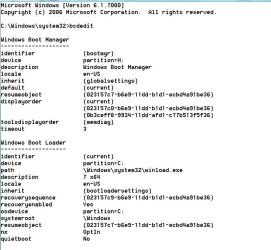
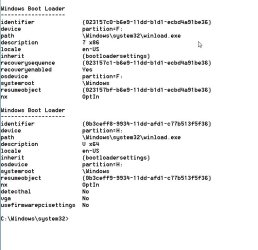
You will see the first entry is bootmgr - this is on my first partition - the System (active ) partition. I happen to have given the partition the letter H in Win7x64.
The second entry is now the current one as I am booted into it now - win7x64 boot partition. Windows gives C to the partition you are currently in.
Third entry is Win7x86 boot partition- I happen to have given that the letter F in Win7x64 ( which I am currently in ).
Fourth entry is Vista boot partition - which the same partition as the System partition - because I installed Vista first, bootmgr and Vista o/s files are both on the first partition. It is showing as H because I gave it that letter in Win7x64 -( which I am currently in).
Hope that helps
SIW2
You will see the first entry is bootmgr - this is on my first partition - the System (active ) partition. I happen to have given the partition the letter H in Win7x64.
The second entry is now the current one as I am booted into it now - win7x64 boot partition. Windows gives C to the partition you are currently in.
Third entry is Win7x86 boot partition- I happen to have given that the letter F in Win7x64 ( which I am currently in ).
Fourth entry is Vista boot partition - which the same partition as the System partition - because I installed Vista first, bootmgr and Vista o/s files are both on the first partition. It is showing as H because I gave it that letter in Win7x64 -( which I am currently in).
Hope that helps
SIW2
My Computers
System One System Two
-
- Computer type
- PC/Desktop
- OS
- 7 X64
- CPU
- i5 8400
- Motherboard
- gigabyte b365m ds3h
- Memory
- 2x8gb 3200mhz
- Hard Drives
- various
- PSU
- pure power 11 400w cm
- Case
- Coolermaster
- Cooling
- cryorig m9i
-
- Computer type
- PC/Desktop
- OS
- 7x64
- CPU
- g5400
- Motherboard
- ga b365m ds3h
- Memory
- 8gb ddr4 2400
- PSU
- xfx pro 450w

ebartolon
New member
- Local time
- 7:56 PM
- Messages
- 155
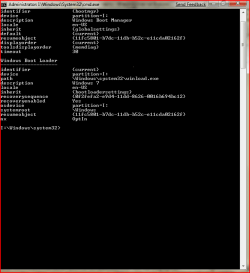
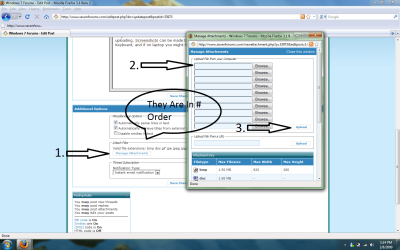
A normal Command Prompt In Other Words Then Type bcdedit in the prompt. Then press enter. And Lower IT DOwn And Take a Screen Shot And Post It Here, By attaching When you post, do not use quick reply but instead do ther longer and scroll down to attachments and then add your screen shot by uploading. Screenshots can be made by pressing Print Screen Button on Keyboard, and if on laptop you might have to push the FN button. Here IS A Mini Tutorial...
Attachments
My Computer
- Computer Manufacturer/Model Number
- Acer Aspire 8730-6951
- OS
- Windows 7, Windows Vista
- CPU
- 2.4 GHZ
- Memory
- 4.0 GB
- Graphics Card(s)
- Nvidia 9600m GT 1GB
- Screen Resolution
- 1680*945
- Hard Drives
- 320GB
Similar threads

- Replies
- 6
- Views
- 2K
- Replies
- 6
- Views
- 4K
- Replies
- 0
- Views
- 2K
- Replies
- 11
- Views
- 3K