Dual monitor support?

Status
Not open for further replies.
It seems as though everyone has gotten off subject from the original post as i have the same problem as the person in the original post.
What was trying to be asked is this:
I have two monitors. The right monitor is my desktop and the left is just my secondary with only the background on it. If i open a program and try to drag it from my desktop to the secondary monitor going to my left it will not work. I have to drag it all the way to right to get the open program to transfer to my secondary monitor. This works just the opposite if you switch the screens either by switching the cables or changing the configuration. This happens in windows 7 because of the auto fit half screen feature in windows 7 where you can get two programs to automatically fit half the screen. Is there anyway to disable this feature so that we can scroll from screen to screen without worring about what direction we have to move our mouse for screen transfer?
 

My Computer My Computer

At a glance

windows 7amd 6000+ dual core4 gig crucialgeforce 9800gt
Computer Manufacturer/Model Number
custom
OS
windows 7
CPU
amd 6000+ dual core
Motherboard
nvidia
Memory
4 gig crucial
Graphics Card(s)
geforce 9800gt
Monitor(s) Displays
dual 2333 syncmaster by samsung
Hard Drives
2 500g wd
Case
thermaltake armor
Both ATI and Nvidia drivers will allow you to do what you want to do. Right click on the desktop, click on the Nvidia or ATI control center then click on display options.
 

My Computer My Computer

At a glance

Windows 7 Ultimate 64bit2x Zeon Quad 2.33GHz16 gigsATI 4870x2
OS
Windows 7 Ultimate 64bit
CPU
2x Zeon Quad 2.33GHz
Motherboard
Asus Z7S WS
Memory
16 gigs
Graphics Card(s)
ATI 4870x2
Sound Card
Creative SB X-FI
Monitor(s) Displays
2x Acer X233H
Hard Drives
2x 15k 146 gig SAS drives in Raid 0 on an LSI card.
1 10k 300 gig SAS drive.
PSU
Corsair 850W
Case
iStarUSA 4U industrial rackmount chassis D Storm D-400L-7
Cooling
So far 3 5" fans
It seems as though everyone has gotten off subject from the original post as i have the same problem as the person in the original post.
What was trying to be asked is this:
I have two monitors. The right monitor is my desktop and the left is just my secondary with only the background on it. If i open a program and try to drag it from my desktop to the secondary monitor going to my left it will not work. I have to drag it all the way to right to get the open program to transfer to my secondary monitor. This works just the opposite if you switch the screens either by switching the cables or changing the configuration. This happens in windows 7 because of the auto fit half screen feature in windows 7 where you can get two programs to automatically fit half the screen. Is there anyway to disable this feature so that we can scroll from screen to screen without worring about what direction we have to move our mouse for screen transfer?

Welcome to the Se7en Forums! jgoody

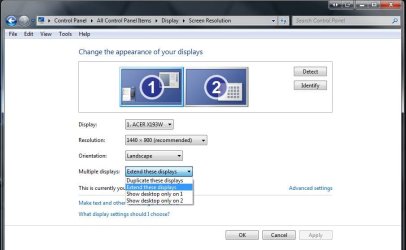
A little off topic now for sure but the question by the OP was already answered on page #1 of this thread. A quick trip into the Control Panel>Display>Display Settings will take care of switching desktops between monitors reversing things, or extending one to another if not cloning one desktop to both.

3rd party programs like Display Fusion and Ultramon are great for assigning different wallpapers to each desktop. You can also see an extended taskbar in the beta for Ultramon or full version not shareware for DisplayFusion.
 

Attachments

  • Dual Monitor Display settings.jpg
    Dual Monitor Display settings.jpg
    53.4 KB · Views: 666

My Computers My Computers

  • At a glance

    W7 Ultimate x64/W10 Pro x64/W11 Pro Triple Bo...AMD Phenom II X4 975 Deneb 3.6ghz - 965 2nd r...Kingston Hyper X DDR3 1600 1.5v 16gb - Hyper ...MSI HD Radeon 5750 1gb - MSI HD Radeon 6450 o...
    Computer type
    PC/Desktop
    Computer Manufacturer/Model Number
    Custom builds = 2
    OS
    W7 Ultimate x64/W10 Pro x64/W11 Pro Triple Boot - Main PC W7 Remote PC Micro ATX W7 Pro x64/W11 Pro
    CPU
    AMD Phenom II X4 975 Deneb 3.6ghz - 965 2nd remote pc
    Motherboard
    Gigabyte GA-790XTA-UD4-Gigabyte GA-880GM-D2H remote pc
    Memory
    Kingston Hyper X DDR3 1600 1.5v 16gb - Hyper X Fury 8gb 2nd
    Graphics Card(s)
    MSI HD Radeon 5750 1gb - MSI HD Radeon 6450 on mini tower
    Sound Card
    Creative Labs X-Fi Xtreme Audio P - Realtek onooard 2nd case
    Monitor(s) Displays
    ASUS VW199T-P 19" HP 2082a Main-HP 2082a 20" remote pc
    Screen Resolution
    Asus 1440x900 - HP 1600x900
    Hard Drives
    WD Black 1TB HD per OS W7, W10, and pending W11 presently on 500gb OS Drive - Pending Triple 1TB HDs for Spanned Storage/backup volume
    Single 2TB external USB enclosure, single 1TB System 7 Host/Boot drive, Pending 8TB external HD for system image b
    PSU
    Corsair 750TX - primary / Corsair CX600 - second
    Case
    Antec 900-2 - SSD compatible / NZXT Vulcan mini tower
    Cooling
    Zalman CNPS9900A
    Keyboard
    AZIO L70 Backlit Letters Gaming - ONN Cordless/USB
    Mouse
    MSI DS200 Programmable, Logitech Cordless
    Internet Speed
    30mbps upgrade - primary hard wired - mini tower usb WiFi
    Antivirus
    GFI VIPRE Internet Security 2014 on W7 2016 beta on W10,
    Browser
    Cyberfox, WaterFox 64bit FF variants, FireFox x64, Pale Moon
    Other Info
    Accomdata fan cooled usb 2.0 PIDE/Sata II, III external enclosure.
    Sambient usb/eSata PATA/Sata II, III external enclosure.
  • At a glance

    W7 Pro x64/W11 ProAMD Deneb 3.6ghz - 965Kingston Hyper X Fury 8gbMSI HD Radeon 6450 DVI Output
    Computer type
    PC/Desktop
    System Manufacturer/Model Number
    CUSTOM ASSEMBLY
    OS
    W7 Pro x64/W11 Pro
    CPU
    AMD Deneb 3.6ghz - 965
    Motherboard
    Gigabyte GA-880GM-D2H remote pc
    Memory
    Kingston Hyper X Fury 8gb
    Graphics Card(s)
    MSI HD Radeon 6450 DVI Output
    Sound Card
    Realtek onooard Creative or Other separate PENDING
    Monitor(s) Displays
    VIZIO 32" LCD TV Separate LCD Pending
    Screen Resolution
    1600x1080
    Hard Drives
    WD 500GB OS Host/Boot WD Green 1TB Storage/Backup
    PSU
    Corsair 600W - THERMALTAKE 600W spare case
    Case
    NZXT Vulcan mini tower
    Cooling
    Twin 120mm Top Fans - 240mm Side Cover
    Keyboard
    ONN Cordless/USB Logitech Cordless
    Mouse
    ONN USB/Cordless - Logitech Cordless
    Internet Speed
    DSL 5G
    Browser
    MS Edge, FireFox, WaterFox x64, FireFox Nightly
    Other Info
    OS Testing-Remote Access to Main TeamViewer
So I recently installed a second monitor and the second one works but I can't move my mouse to the second screen or any windows. Any thoughts.
 

My Computer My Computer

At a glance

Windows 7Core 2 Duo 2.4ghz4gm DDR29600gt 512mb
Computer Manufacturer/Model Number
HP dv7
OS
Windows 7
CPU
Core 2 Duo 2.4ghz
Memory
4gm DDR2
Graphics Card(s)
9600gt 512mb
Hard Drives
320GB 7200rpm internal
320GB External
Hello there winnabago111 Welcome to the Se7en Forums!

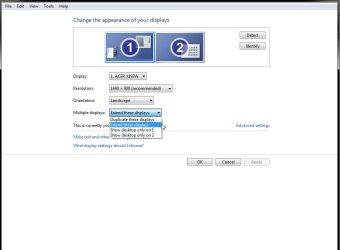
The first thing you will need to do is change the display settings in the Control Panel from the "clone to second monitor" setting seen by default to stretch onto monitor #2. From there you can download the free version of DisplayFusion or the beta version of Ultramon presently see and assign two different wallpapers one for each desktop.

The full retail version of both programs includes a "smart taskbar option for extending the taskbar onto the second display. The beta for Ultramon has that there as well but not in the free version of the other.
 

Attachments

  • Extend to Second Display.jpg
    Extend to Second Display.jpg
    44.6 KB · Views: 156

My Computers My Computers

  • At a glance

    W7 Ultimate x64/W10 Pro x64/W11 Pro Triple Bo...AMD Phenom II X4 975 Deneb 3.6ghz - 965 2nd r...Kingston Hyper X DDR3 1600 1.5v 16gb - Hyper ...MSI HD Radeon 5750 1gb - MSI HD Radeon 6450 o...
    Computer type
    PC/Desktop
    Computer Manufacturer/Model Number
    Custom builds = 2
    OS
    W7 Ultimate x64/W10 Pro x64/W11 Pro Triple Boot - Main PC W7 Remote PC Micro ATX W7 Pro x64/W11 Pro
    CPU
    AMD Phenom II X4 975 Deneb 3.6ghz - 965 2nd remote pc
    Motherboard
    Gigabyte GA-790XTA-UD4-Gigabyte GA-880GM-D2H remote pc
    Memory
    Kingston Hyper X DDR3 1600 1.5v 16gb - Hyper X Fury 8gb 2nd
    Graphics Card(s)
    MSI HD Radeon 5750 1gb - MSI HD Radeon 6450 on mini tower
    Sound Card
    Creative Labs X-Fi Xtreme Audio P - Realtek onooard 2nd case
    Monitor(s) Displays
    ASUS VW199T-P 19" HP 2082a Main-HP 2082a 20" remote pc
    Screen Resolution
    Asus 1440x900 - HP 1600x900
    Hard Drives
    WD Black 1TB HD per OS W7, W10, and pending W11 presently on 500gb OS Drive - Pending Triple 1TB HDs for Spanned Storage/backup volume
    Single 2TB external USB enclosure, single 1TB System 7 Host/Boot drive, Pending 8TB external HD for system image b
    PSU
    Corsair 750TX - primary / Corsair CX600 - second
    Case
    Antec 900-2 - SSD compatible / NZXT Vulcan mini tower
    Cooling
    Zalman CNPS9900A
    Keyboard
    AZIO L70 Backlit Letters Gaming - ONN Cordless/USB
    Mouse
    MSI DS200 Programmable, Logitech Cordless
    Internet Speed
    30mbps upgrade - primary hard wired - mini tower usb WiFi
    Antivirus
    GFI VIPRE Internet Security 2014 on W7 2016 beta on W10,
    Browser
    Cyberfox, WaterFox 64bit FF variants, FireFox x64, Pale Moon
    Other Info
    Accomdata fan cooled usb 2.0 PIDE/Sata II, III external enclosure.
    Sambient usb/eSata PATA/Sata II, III external enclosure.
  • At a glance

    W7 Pro x64/W11 ProAMD Deneb 3.6ghz - 965Kingston Hyper X Fury 8gbMSI HD Radeon 6450 DVI Output
    Computer type
    PC/Desktop
    System Manufacturer/Model Number
    CUSTOM ASSEMBLY
    OS
    W7 Pro x64/W11 Pro
    CPU
    AMD Deneb 3.6ghz - 965
    Motherboard
    Gigabyte GA-880GM-D2H remote pc
    Memory
    Kingston Hyper X Fury 8gb
    Graphics Card(s)
    MSI HD Radeon 6450 DVI Output
    Sound Card
    Realtek onooard Creative or Other separate PENDING
    Monitor(s) Displays
    VIZIO 32" LCD TV Separate LCD Pending
    Screen Resolution
    1600x1080
    Hard Drives
    WD 500GB OS Host/Boot WD Green 1TB Storage/Backup
    PSU
    Corsair 600W - THERMALTAKE 600W spare case
    Case
    NZXT Vulcan mini tower
    Cooling
    Twin 120mm Top Fans - 240mm Side Cover
    Keyboard
    ONN Cordless/USB Logitech Cordless
    Mouse
    ONN USB/Cordless - Logitech Cordless
    Internet Speed
    DSL 5G
    Browser
    MS Edge, FireFox, WaterFox x64, FireFox Nightly
    Other Info
    OS Testing-Remote Access to Main TeamViewer
Hello, I have been playing GTA4 for a while now and have been having to switch back to my desktop to look at some walkthru's that are available to help complete the missions. Even tho this is very useful in playing the game, it is very annoying having to wait to get back into the game. I thought about having 2 monitors to solve my problem. I could have 1 monitor with GTA4 going and the other with the web pages and I could switch back and fourth easier. So I called Dell and asked them if was possible with my configuration. They said yes, and I ordered a new 24" flat panel monitor to go with the 20" flat panel that came with my system. I received the monitor but have yet to receive the correct cable for it. I'm going to Best Buy after writing this to get the propper cable after 2 wrong cables sent from Dell.

I've read thru the threads here about this and haven't read of anyone doing this so I'm asking if anyone knows the correct way to set this up? It seems easy enough but without the cables, I can't say if it works yet. I'm asking in advance so when I get the propper cable, this will have been read and answered. Thank you.

I have Windows 7 Ultimate 64 bit on a Dell Studio 540, Intel(R) Core(TM)2 Quad CPU Q8200 @ 2.33GHz, w/ 8 gig RAM and a G-Force 9800 GT. Any help that anyone can give me would be very appreciated.

Thank You
John

EDIT: I have the correct cables now and have both monitors working like they should but I'm unable to switch between the 2 while playing GTA4. I've tried both Display Fusion and Ultramon, and I still can't do it. I was able to setup a hotkey to switch my mouse to the other monitor with Ultramon but it doesn't work while playing GTA4.

If anyone has a sollution for this please advise me on what to do. Thanks again...
 
Last edited:

My Computer My Computer

At a glance

Windows 7 Ultimate 64 bitIntel(R) Core(TM)2 Quad CPU Q8200 @ 2.33GHz8 gigNVIDIA GeForce 9800 GT 1024Mb
Computer Manufacturer/Model Number
Dell Model Studio 540
OS
Windows 7 Ultimate 64 bit
CPU
Intel(R) Core(TM)2 Quad CPU Q8200 @ 2.33GHz
Memory
8 gig
Graphics Card(s)
NVIDIA GeForce 9800 GT 1024Mb
Monitor(s) Displays
Dell ST2410(Digital) - Dell Inc.
Hard Drives
Disk Drives WDC WD3200AAKS-00L9A0 ATA Device 298.0Gb
WDC WD7501AALS-75J7B0 ATA Device 698.6Gb
Generic- Compact Flash USB Device
Generic- MS/MS-Pro USB Device
Generic- SD/MMC USB Device
Generic- SM/xD-Picture USB Device
I got a bigger problem with dual

Yeah, try this one on for size. My GPUs are nothing fantastic, which is ok, I'm a graphic illustrator not a gamer. But, I'm used to being able to task over two screens. Never had a problem with it in XP. Now 7 is being a pain.

I have an integrated NVIDIA GeForce 6150SE nForce 430 and an archaic MX device (PnP). The PnP device runs on the legacy MS VGA compatible driver, and the integrated nForce has a valid win7 driver which came with it.

Yet, I can't get it to see the two displays. It sees both devices. They both start fine, and the nForce is doing the actual generation of the pixels. Yet for some reason, it's sending the data through the old device to that monitor, and won't identify itself as a second display. I have a perfectly good monitor plugged into it and turned on. Yet, it thinks the VGA PnP is the only physical device.

I have tried EVERYTHING. Upgrading drivers, using an nVidia control panel (which won't launch because of that blasted old PnP) ... it just ... won't go.

Can someone tell me why? because I am at my wit's end and am about to downgrade my OS over this.
 

My Computer My Computer

At a glance

Windows 7
OS
Windows 7
Hi Guys, here my problem, my laptop screen is broke, I hooked up a second monitor, did all the setting and it was working fine till i powered down, few hours later powered back up and all i get is the mouse pointer on a black screen...Help..?
 

My Computer My Computer

At a glance

Windows 7
Computer Manufacturer/Model Number
Dell insperion laptop
OS
Windows 7
Dual Monitors

Hi all

I have recently bought a new pc and monitor with windows 7 OP. I have connected my old monitor using an AVI cable splitter. Both monitors are working fine. Unfortunately the old monitor (secondary monitor) is a mirror of the primary minitor instead of being an extention of it.

I have gone into display setting but it is not listed and clicking on the detect tab has not helped.

Suggestions greatly recieved
 

My Computer My Computer

At a glance

windows 7
OS
windows 7
The first thing I'll start off with here before going over each person's individual problems is say "HELLO!" and "Welcome to the Seven Forums!" :D

Hello, I have been playing GTA4 for a while now and have been having to switch back to my desktop to look at some walkthru's that are available to help complete the missions. Even tho this is very useful in playing the game, it is very annoying having to wait to get back into the game. I thought about having 2 monitors to solve my problem. I could have 1 monitor with GTA4 going and the other with the web pages and I could switch back and fourth easier. So I called Dell and asked them if was possible with my configuration. They said yes, and I ordered a new 24" flat panel monitor to go with the 20" flat panel that came with my system. I received the monitor but have yet to receive the correct cable for it. I'm going to Best Buy after writing this to get the propper cable after 2 wrong cables sent from Dell.

I've read thru the threads here about this and haven't read of anyone doing this so I'm asking if anyone knows the correct way to set this up? It seems easy enough but without the cables, I can't say if it works yet. I'm asking in advance so when I get the propper cable, this will have been read and answered. Thank you.

I have Windows 7 Ultimate 64 bit on a Dell Studio 540, Intel(R) Core(TM)2 Quad CPU Q8200 @ 2.33GHz, w/ 8 gig RAM and a G-Force 9800 GT. Any help that anyone can give me would be very appreciated.

Thank You
John

EDIT: I have the correct cables now and have both monitors working like they should but I'm unable to switch between the 2 while playing GTA4. I've tried both Display Fusion and Ultramon, and I still can't do it. I was able to setup a hotkey to switch my mouse to the other monitor with Ultramon but it doesn't work while playing GTA4.

If anyone has a sollution for this please advise me on what to do. Thanks again...

For what you are attempting there rather then cloning desktops and needing to exit the full screen game for each look you extend one desktop across both displays easy enough! UltraMon allows you to also have two separate wallpapers as well as the extended "smart bar" for extending the taskbar onto the second display as well.

All this however is done through the video card's as well as the 3rd party software for configuring the addon monitor. As far as exiting the game some games allow the minimized window as well while typically most full screen games display on the primary monitor leaving the second free for viewing a web page.

Yeah, try this one on for size. My GPUs are nothing fantastic, which is ok, I'm a graphic illustrator not a gamer. But, I'm used to being able to task over two screens. Never had a problem with it in XP. Now 7 is being a pain.

I have an integrated NVIDIA GeForce 6150SE nForce 430 and an archaic MX device (PnP). The PnP device runs on the legacy MS VGA compatible driver, and the integrated nForce has a valid win7 driver which came with it.

Yet, I can't get it to see the two displays. It sees both devices. They both start fine, and the nForce is doing the actual generation of the pixels. Yet for some reason, it's sending the data through the old device to that monitor, and won't identify itself as a second display. I have a perfectly good monitor plugged into it and turned on. Yet, it thinks the VGA PnP is the only physical device.

I have tried EVERYTHING. Upgrading drivers, using an nVidia control panel (which won't launch because of that blasted old PnP) ... it just ... won't go.

Can someone tell me why? because I am at my wit's end and am about to downgrade my OS over this.

Integrated and low end model video cards typically seeing the second port as a vga not HD type simply don't offer the support needed for dual monitor setups. You will note that when going to look over the mid to high end models that typically come with twin connectors.

Some system specifications might help here as well to what options you have to upgrading out of the integrated into a separate video card that will work out best for you there.

Hi Guys, here my problem, my laptop screen is broke, I hooked up a second monitor, did all the setting and it was working fine till i powered down, few hours later powered back up and all i get is the mouse pointer on a black screen...Help..?

That unfortunately is your main problem! Your primary display is needed in order to see things configured correctly. You will need to replace the main display first before you see all that done. :(

Hi all

I have recently bought a new pc and monitor with windows 7 OP. I have connected my old monitor using an AVI cable splitter. Both monitors are working fine. Unfortunately the old monitor (secondary monitor) is a mirror of the primary minitor instead of being an extention of it.

I have gone into display setting but it is not listed and clicking on the detect tab has not helped.

Suggestions greatly recieved

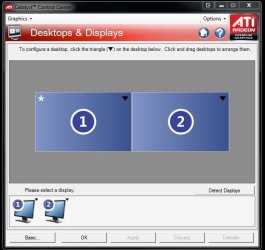
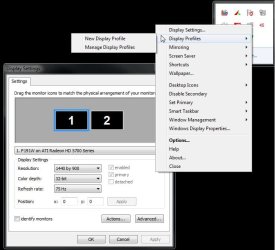
If you have a separate video card and not using integrated graphics part of the explaination is seen above in this reply. For ATI that would set through the Catalyst Control Center and for NVidia models through the Desktop Manager in the advanced settings for either software.

The options for an addon program like UltraMon or DisplayFusion would tend to other things like the extended taskbar.

The screenshots(snipping tool captures) attached here will show how two softwares one for ATI and the other UltraMon in use here are opened for seeing the monitors set accordingly. The #1 monitor becomes the primary display even if that is the second not first.

One other thing that should be pointed out here is if each of you should need further help or simply want to ask more questions it would be better for each of you to start a new thread rather then posting here. This one is a bit old at this time.

 

Attachments

  • Dual Display ATI.jpg
    Dual Display ATI.jpg
    43.5 KB · Views: 51
  • Dual Display UltraMon.jpg
    Dual Display UltraMon.jpg
    49.7 KB · Views: 73
Last edited:

My Computers My Computers

  • At a glance

    W7 Ultimate x64/W10 Pro x64/W11 Pro Triple Bo...AMD Phenom II X4 975 Deneb 3.6ghz - 965 2nd r...Kingston Hyper X DDR3 1600 1.5v 16gb - Hyper ...MSI HD Radeon 5750 1gb - MSI HD Radeon 6450 o...
    Computer type
    PC/Desktop
    Computer Manufacturer/Model Number
    Custom builds = 2
    OS
    W7 Ultimate x64/W10 Pro x64/W11 Pro Triple Boot - Main PC W7 Remote PC Micro ATX W7 Pro x64/W11 Pro
    CPU
    AMD Phenom II X4 975 Deneb 3.6ghz - 965 2nd remote pc
    Motherboard
    Gigabyte GA-790XTA-UD4-Gigabyte GA-880GM-D2H remote pc
    Memory
    Kingston Hyper X DDR3 1600 1.5v 16gb - Hyper X Fury 8gb 2nd
    Graphics Card(s)
    MSI HD Radeon 5750 1gb - MSI HD Radeon 6450 on mini tower
    Sound Card
    Creative Labs X-Fi Xtreme Audio P - Realtek onooard 2nd case
    Monitor(s) Displays
    ASUS VW199T-P 19" HP 2082a Main-HP 2082a 20" remote pc
    Screen Resolution
    Asus 1440x900 - HP 1600x900
    Hard Drives
    WD Black 1TB HD per OS W7, W10, and pending W11 presently on 500gb OS Drive - Pending Triple 1TB HDs for Spanned Storage/backup volume
    Single 2TB external USB enclosure, single 1TB System 7 Host/Boot drive, Pending 8TB external HD for system image b
    PSU
    Corsair 750TX - primary / Corsair CX600 - second
    Case
    Antec 900-2 - SSD compatible / NZXT Vulcan mini tower
    Cooling
    Zalman CNPS9900A
    Keyboard
    AZIO L70 Backlit Letters Gaming - ONN Cordless/USB
    Mouse
    MSI DS200 Programmable, Logitech Cordless
    Internet Speed
    30mbps upgrade - primary hard wired - mini tower usb WiFi
    Antivirus
    GFI VIPRE Internet Security 2014 on W7 2016 beta on W10,
    Browser
    Cyberfox, WaterFox 64bit FF variants, FireFox x64, Pale Moon
    Other Info
    Accomdata fan cooled usb 2.0 PIDE/Sata II, III external enclosure.
    Sambient usb/eSata PATA/Sata II, III external enclosure.
  • At a glance

    W7 Pro x64/W11 ProAMD Deneb 3.6ghz - 965Kingston Hyper X Fury 8gbMSI HD Radeon 6450 DVI Output
    Computer type
    PC/Desktop
    System Manufacturer/Model Number
    CUSTOM ASSEMBLY
    OS
    W7 Pro x64/W11 Pro
    CPU
    AMD Deneb 3.6ghz - 965
    Motherboard
    Gigabyte GA-880GM-D2H remote pc
    Memory
    Kingston Hyper X Fury 8gb
    Graphics Card(s)
    MSI HD Radeon 6450 DVI Output
    Sound Card
    Realtek onooard Creative or Other separate PENDING
    Monitor(s) Displays
    VIZIO 32" LCD TV Separate LCD Pending
    Screen Resolution
    1600x1080
    Hard Drives
    WD 500GB OS Host/Boot WD Green 1TB Storage/Backup
    PSU
    Corsair 600W - THERMALTAKE 600W spare case
    Case
    NZXT Vulcan mini tower
    Cooling
    Twin 120mm Top Fans - 240mm Side Cover
    Keyboard
    ONN Cordless/USB Logitech Cordless
    Mouse
    ONN USB/Cordless - Logitech Cordless
    Internet Speed
    DSL 5G
    Browser
    MS Edge, FireFox, WaterFox x64, FireFox Nightly
    Other Info
    OS Testing-Remote Access to Main TeamViewer
Status
Not open for further replies.
Back
Top