The first thing I'll start off with here before going over each person's individual problems is say "HELLO!" and "Welcome to the Seven Forums!"

Hello, I have been playing GTA4 for a while now and have been having to switch back to my desktop to look at some walkthru's that are available to help complete the missions. Even tho this is very useful in playing the game, it is very annoying having to wait to get back into the game. I thought about having 2 monitors to solve my problem. I could have 1 monitor with GTA4 going and the other with the web pages and I could switch back and fourth easier. So I called Dell and asked them if was possible with my configuration. They said yes, and I ordered a new 24" flat panel monitor to go with the 20" flat panel that came with my system. I received the monitor but have yet to receive the correct cable for it. I'm going to Best Buy after writing this to get the propper cable after 2 wrong cables sent from Dell.
I've read thru the threads here about this and haven't read of anyone doing this so I'm asking if anyone knows the correct way to set this up? It seems easy enough but without the cables, I can't say if it works yet. I'm asking in advance so when I get the propper cable, this will have been read and answered. Thank you.
I have Windows 7 Ultimate 64 bit on a Dell Studio 540, Intel(R) Core(TM)2 Quad CPU Q8200 @ 2.33GHz, w/ 8 gig RAM and a G-Force 9800 GT. Any help that anyone can give me would be very appreciated.
Thank You
John
EDIT: I have the correct cables now and have both monitors working like they should but I'm unable to switch between the 2 while playing GTA4. I've tried both Display Fusion and Ultramon, and I still can't do it. I was able to setup a hotkey to switch my mouse to the other monitor with Ultramon but it doesn't work while playing GTA4.
If anyone has a sollution for this please advise me on what to do. Thanks again...
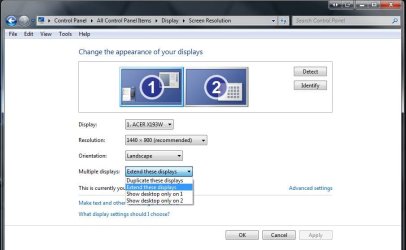
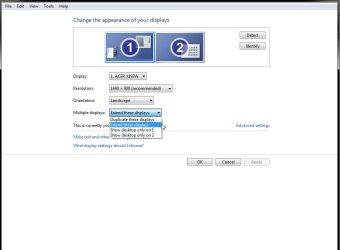
For what you are attempting there rather then cloning desktops and needing to exit the full screen game for each look you extend one desktop across both displays easy enough! UltraMon allows you to also have two separate wallpapers as well as the extended "smart bar" for extending the taskbar onto the second display as well.
All this however is done through the video card's as well as the 3rd party software for configuring the addon monitor. As far as exiting the game some games allow the minimized window as well while typically most full screen games display on the primary monitor leaving the second free for viewing a web page.
Yeah, try this one on for size. My GPUs are nothing fantastic, which is ok, I'm a graphic illustrator not a gamer. But, I'm used to being able to task over two screens. Never had a problem with it in XP. Now 7 is being a pain.
I have an integrated NVIDIA GeForce 6150SE nForce 430 and an archaic MX device (PnP). The PnP device runs on the legacy MS VGA compatible driver, and the integrated nForce has a valid win7 driver which came with it.
Yet, I can't get it to see the two displays. It sees both devices. They both start fine, and the nForce is doing the actual generation of the pixels. Yet for some reason, it's sending the data through the old device to that monitor, and won't identify itself as a second display. I have a perfectly good monitor plugged into it and turned on. Yet, it thinks the VGA PnP is the only physical device.
I have tried EVERYTHING. Upgrading drivers, using an nVidia control panel (which won't launch because of that blasted old PnP) ... it just ... won't go.
Can someone tell me why? because I am at my wit's end and am about to downgrade my OS over this.
Integrated and low end model video cards typically seeing the second port as a vga not HD type simply don't offer the support needed for dual monitor setups. You will note that when going to look over the mid to high end models that typically come with twin connectors.
Some system specifications might help here as well to what options you have to upgrading out of the integrated into a separate video card that will work out best for you there.
Hi Guys, here my problem, my laptop screen is broke, I hooked up a second monitor, did all the setting and it was working fine till i powered down, few hours later powered back up and all i get is the mouse pointer on a black screen...Help..?
That unfortunately is your main problem! Your primary display is needed in order to see things configured correctly. You will need to replace the main display first before you see all that done.

Hi all
I have recently bought a new pc and monitor with windows 7 OP. I have connected my old monitor using an AVI cable splitter. Both monitors are working fine. Unfortunately the old monitor (secondary monitor) is a mirror of the primary minitor instead of being an extention of it.
I have gone into display setting but it is not listed and clicking on the detect tab has not helped.
Suggestions greatly recieved
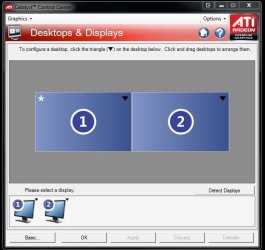
If you have a separate video card and not using integrated graphics part of the explaination is seen above in this reply. For ATI that would set through the Catalyst Control Center and for NVidia models through the Desktop Manager in the advanced settings for either software.
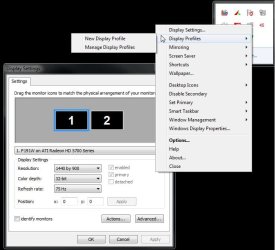
The options for an addon program like UltraMon or DisplayFusion would tend to other things like the extended taskbar.
The screenshots(snipping tool captures) attached here will show how two softwares one for ATI and the other UltraMon in use here are opened for seeing the monitors set accordingly. The #1 monitor becomes the primary display even if that is the second not first.
One other thing that should be pointed out here is if each of you should need further help or simply want to ask more questions it would be better for each of you to start a new thread rather then posting here. This one is a bit old at this time.