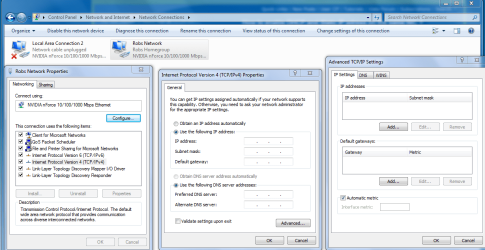
dual net config dhcp or static ip

Simoncu

New member
Local time
9:20 AM
Messages
2
Is there a way to have 2 different configurations, one DHCP, the other with a static IP on one network card ? And if yes, how can I switch from one to another (besides making scripts that change the settings)
I need a static address at work and DHCP at home.
I know some small progs are able to do that, but I'd like to know if I can do that in windows.
Thanks
Simon
 

My Computer My Computer

At a glance

w7
OS
w7
if on one network card..i think that's can't.
for what you want to do that?? you need static address at your work office?? than DHCP at your home>?? so it's means 2 location? if i'm not wrong.
 

My Computer My Computer

At a glance

windows 7Phenom II AMD Dragon 3.5GhzDDR3 4GBATI Radeon 512Mb
Computer Manufacturer/Model Number
built up
OS
windows 7
CPU
Phenom II AMD Dragon 3.5Ghz
Memory
DDR3 4GB
Graphics Card(s)
ATI Radeon 512Mb
Monitor(s) Displays
HP L1506
Screen Resolution
1152 x 864
Hard Drives
WDC 1 TB SATA-II Green Power
Keyboard
HP wireless keyboard
Mouse
HP Optic
Internet Speed
1GB
if on one network card..i think that's can't.
for what you want to do that?? you need static address at your work office?? than DHCP at your home>?? so it's means 2 location? if i'm not wrong.

Yes that's exactly it. And the problem is that you can do that if you put DHCP in the general Tab and in the alternat config (on the adapter settings, tcp/IP properties) with the static IP. And so if there is no dhcp server, it switches automatically to the static IP. But we have both at work, and if I let it like that, the adapter gets an address from the server, which I don't want. I want it to use the static at work, and the dhcp at home. I don't know if make myself understand...
 

My Computer My Computer

At a glance

w7
OS
w7
easy way is to setup your home network with the same IP range as your work and just use static at work and home.
 

My Computer My Computer

At a glance

Windows 7 Ultimate 64bitIntel i7 3770K16GB DDR3 1333 Corsair XMS3XFX HD6950 2GB EyeFinity
Computer Manufacturer/Model Number
HAL-9000
OS
Windows 7 Ultimate 64bit
CPU
Intel i7 3770K
Motherboard
Asus Sabertooth Z77
Memory
16GB DDR3 1333 Corsair XMS3
Graphics Card(s)
XFX HD6950 2GB EyeFinity
Sound Card
Logitech G35 & Sennheiser PC135 & VIA HD
Monitor(s) Displays
23" HP 2310e, 23" Samsung B2230, 21.5" Viewsonic
Screen Resolution
5760x1080
Hard Drives
16TB of Storage
128GB & 256GB Crucial M4 SSD's, 2X 1TB WD Black, 3x 2TB WD, 3x 2TB Samsung F4, 1.5TB Seagate, WD 500GB,
PSU
Antec True Power New 650watt
Case
Cooler Master HAF-932
Cooling
Corsair H60 Hydro Cooler, 3x 230mm Fans, 2x120mm Fan
Keyboard
Logitech G15 and G13
Mouse
Logitech G700 Gaming Mouse
Internet Speed
50/10 Mbit
Other Info
Speakers : Alesis M1 Active Mk2 Studio Monitors , APC RS 1200 UPS, HP 4500DN Color Laser, HP P1006 mono Laser, Kodak 8500 Dye-Sub, Epson 1280 inkjet, Epson Worforce 610 MFC
if on one network card..i think that's can't.
for what you want to do that?? you need static address at your work office?? than DHCP at your home>?? so it's means 2 location? if i'm not wrong.

Yes that's exactly it. And the problem is that you can do that if you put DHCP in the general Tab and in the alternat config (on the adapter settings, tcp/IP properties) with the static IP. And so if there is no dhcp server, it switches automatically to the static IP. But we have both at work, and if I let it like that, the adapter gets an address from the server, which I don't want. I want it to use the static at work, and the dhcp at home. I don't know if make myself understand...

As you suspected, you should be able to set this up using the advanced tcp/IP settings window. Just use the add button and then add both connections. :)
 

Attachments

  • TCP-IP ADVANCED SETTINGS.PNG
    TCP-IP ADVANCED SETTINGS.PNG
    64.3 KB · Views: 794

My Computer My Computer

At a glance

Windows 7 Ult, Windows 8.1 Pro,Q9650-4.275GHz, E8600 4.5GHz, E6750-3.8GHzG.Skill PC2 9600 1200Mhz 5 5 5 15 2TGTX480
Computer type
PC/Desktop
Computer Manufacturer/Model Number
Home built
OS
Windows 7 Ult, Windows 8.1 Pro,
CPU
Q9650-4.275GHz, E8600 4.5GHz, E6750-3.8GHz
Motherboard
Evga 780i FTW
Memory
G.Skill PC2 9600 1200Mhz 5 5 5 15 2T
Graphics Card(s)
GTX480
Sound Card
Asus Xonar D2
Monitor(s) Displays
HannsG
Screen Resolution
1680X1050
Hard Drives
GSkill Phoenix Pro 120GB SSD
PSU
ThermalTake Toughpower 1000Watt modular
Case
ThermalTake XaserV
Cooling
Xigmatek S1283
Keyboard
Logitech G15
Mouse
Logitech G9
Internet Speed
T1
if you manually set IP you can assign multiple IPs to a single nic.. you just keep adding under the setup.. Where that is depends in OS.. We do it at work on just about every computer there.. I work for the USPS and we have a fiber-optic network .. all manualy assigned IP becauser we own our own.. and we use another in house.. This keeps that network from showing or broadcasting out into the "Cloud" heh.. the internet.. If you do it manually you must set everything..
 

My Computer My Computer

At a glance

Win 7 Home Premium/Professional/XP homeAMD Athlon II X2 xxxYes they have memory 2,4 or 6 GigAMD 5750, 4870, 4380
Computer Manufacturer/Model Number
Me I did it, It's all my fault
OS
Win 7 Home Premium/Professional/XP home
CPU
AMD Athlon II X2 xxx
Motherboard
Asus, Biostar and ECS
Memory
Yes they have memory 2,4 or 6 Gig
Graphics Card(s)
AMD 5750, 4870, 4380
Sound Card
crap onboard Realtek..
Monitor(s) Displays
19"- 28" depends which one
Hard Drives
WDs many sizes
PSU
530-870
Case
Antec mostly
Cooling
All stock AMD coolers
Back
Top