
Solved Dual screen advice

fezbombmatt

New member
Member
VIP
Local time
7:15 AM
Messages
197
Hi, I'm looking at using dual screens for a new build (for work purposes) and wondered what GPU to go for.

The PC wont be used for gaming only small editing and design based tasks.

Am i right in thinking a Quadro NVS 300 is an ideal choice? My question with this card is it has 1 x DVI output with a split lead. So does that mean i can only have a mirrored screen?

Or would i be better with a Quadro NVS 310?

Appreciate your response thanks.
 

My Computer

Computer type
PC/Desktop
OS
windows 7 home premium 64bit
CPU
Amd phenom ii 560 3.30ghz
Motherboard
Asus m4a785td-v evo
Memory
Corsair TwinX 8GB (4x2)
Graphics Card(s)
AMD radeon HD 5670 1GB
Sound Card
None
Monitor(s) Displays
Hp
Hard Drives
WD Black Caviar 1TB 7200rpm
PSU
Corsair 500W
Case
CM Enforcer
Cooling
Stock HS, 200mm Front fan + 120mm Exhaust
Keyboard
Cyborg v7
Mouse
Laser Microsoft 6000
Internet Speed
5mb/s
Antivirus
Norton
Browser
Chrome
I've just looked at the specs - it seems that card has a non-standard DMS59 socket, but comes with short connecting leads to drive 2 * DVI, 2 * VGA, 2 * HDMI or 2 * display port. Also comes with software to spread your work across 2 screens, so it looks like exactly what you need - no need to worry about mirroring etc.

From the Nvidia site - 'high resolution, multi-display business graphics solution'.

This setup is new to me - I use a more conventional GTX 750Ti to drive my 2 * 27" screens.

edit - the card mentioned assumes 2 monitors with same connection ie VGA etc. This may not be convenient - a regular card (such as mine) would have a mix of sockets, so more versatile. On the plus side, that card is fanless so would be silent - could be important in a work environment.
 
Last edited:

My Computer

Computer type
PC/Desktop
Computer Manufacturer/Model Number
self build
OS
W10 Pro x64, W7 Pro x64 in VMware
CPU
i7 2600K @ 4.4GHz
Motherboard
MSI Z68A-GD80
Memory
8GB Mushkin @ 1600MHz
Graphics Card(s)
Nvidia GTX 750 Ti
Monitor(s) Displays
27" Benq + 27" LG
Screen Resolution
1080p
Hard Drives
500GB 850 Evo SSD + 3 * 2TB Seagate
PSU
EVGA 650 GS modular
Case
Antec 300
Cooling
Seidon 120V v2
Internet Speed
62/18 Mbps
Antivirus
Defender (W10) + MSE (W7)
Browser
Firefox
What would be the outcome of not having a standalone card and just using the mobo outputs? ie DVI and VGA or hdmi.

With just the on board graphics from Intel or AMD would it work smoothly ran at max resolution?
 

My Computer

Computer type
PC/Desktop
OS
windows 7 home premium 64bit
CPU
Amd phenom ii 560 3.30ghz
Motherboard
Asus m4a785td-v evo
Memory
Corsair TwinX 8GB (4x2)
Graphics Card(s)
AMD radeon HD 5670 1GB
Sound Card
None
Monitor(s) Displays
Hp
Hard Drives
WD Black Caviar 1TB 7200rpm
PSU
Corsair 500W
Case
CM Enforcer
Cooling
Stock HS, 200mm Front fan + 120mm Exhaust
Keyboard
Cyborg v7
Mouse
Laser Microsoft 6000
Internet Speed
5mb/s
Antivirus
Norton
Browser
Chrome

My Computer

Computer type
PC/Desktop
Computer Manufacturer/Model Number
Skylake Special #666
OS
Windows 10 Pro x64
CPU
Intel Core i7 6700K
Motherboard
Asus Sabertooth Z170 Mark 1
Memory
GSkill TridentZ RGB 16GB 3600 16-16-16-36
Graphics Card(s)
EVGA GTX 980 Ti SC x2
Sound Card
Realtek High Definition
Monitor(s) Displays
AOC G2460PG
Screen Resolution
1920 x 1080 144Hz
Hard Drives
Samsung 860 Pro 256GB, Seagate Barracuda 4TB x2
PSU
EVGA 1000 P2, EVGA White Custom Braided Cables
Case
Corsair Vengeance C70 Gunmetal Black
Cooling
Corsair H100i v2, Corsair ML120 x2, Thermal Grizzly Kryonaut
Keyboard
Logitech G910 Orion Spectrum
Mouse
Logitech G700s
Internet Speed
Verizon Fios Quantum Gateway 75/75
Antivirus
Windows Defender, Malwarebytes Free 3.8.3
Browser
Chrome
Other Info
Corsair SP120 x4, LG Blu-ray Drive, Durabrand HT-395 100 Watt Dolby Digital Amp, Corsair H2100 Wireless 7.1 Headset
Many motherboards can handle two monitors well enough for light duty work. If your motherboard can support two monitors, I would also suggest trying that first. As AddRAM said, you can always add a card later.

While the card AddRAM suggested is a good one for two monitors (the PNY K620 is a newer version that sells for slightly less), if it was me, I would get a card that supported at least three monitors for future expansion. Believe me, multiple monitors are addictive! I have three monitors and my card supports only three monitors so, to be able to clone one of them to my TV, I had to get a HDMI splitter. A card that supported four monitors would have been more sanitary.
 

My Computer

Computer type
PC/Desktop
Computer Manufacturer/Model Number
Custom Build
OS
Win 7 Ultimate 64 bit
CPU
Intel i7-3930K
Motherboard
ASUS P9X79 WS
Memory
Kingston HyperX Genesis 32GB Kit (8x4GB Modules) 1600MHz DDR
Graphics Card(s)
MSI R7850 Twin Frozr 2GD5/OC Radeon HD 7850 2GB 256-bit GDDR
Sound Card
Asus Xonar Essence STX
Monitor(s) Displays
3x Asus VG248QE 24", Vizio 32" TV
Screen Resolution
1920 x 1080, ?
Hard Drives
Samsung 128GB 840 Pro SSD (1),
Samsung 4TB 850 EVO SSDs (4)
Samsung 4TB 850 EVO SSDs (16) external backup drives used in 2.5" hot swap bays in the computer.
PSU
Corsair HX750w
Case
Antec Two Hundred v2 (modified)
Cooling
Cooler Master GeminII S524 120mm (fan replaced with a 140mm)
Keyboard
Logitech G510s
Mouse
Logitech M525 (two in use)
Internet Speed
=< 32Mbps down, 8Mbps up
Antivirus
AVAST!, MBAM, SAS, Spybot S&D (all but MBAM free) Glary Util
Browser
IE11
Other Info
LSI 9211-8i HBA card (8 SATA III ports), 2.5" & 3.5" Hot Swap Bays, HooToo HT-CR001 PCI-E to USB 3.0 Internal Hub + 6 Slot Card Reader, and LG Model CH12LS28 BD-ROM Optical Drive. Also, ScanSnap S1500 ADF duplexing scanner, Canon 9000F flat bed scanner, Corsair SP2500 2.1 speakers, Samsung CLP 415nw laser color printer, Cyberpower PP2200SW UPS
as most people said: onboard should suffice.
otherwise cheapest non-nvs quadro like k620.
quadro has a couple more multi-head tricks than standard gpus.
i'm against tripple screensetups because it will place your audio speakers so far apart that you will loose all stereo imaging.
 

My Computer

Computer type
PC/Desktop
Computer Manufacturer/Model Number
Custom Build
OS
Windows 7 Ultimate x64
CPU
Xeon E5-1650 v2
Motherboard
Asus p9x79 ws
Memory
Kingston ECC
Graphics Card(s)
Quadro fx 580
Hard Drives
Samsung 850 pro
Corsair Force Gt
Seagate Enterprise 6TB on 3ware 9750
Antivirus
avira
as most people said: onboard should suffice.
otherwise cheapest non-nvs quadro like k620.
quadro has a couple more multi-head tricks than standard gpus.
i'm against tripple screensetups because it will place your audio speakers so far apart that you will loose all stereo imaging.

:what: You use monitor speakers?

;) All seriousness aside, the worst computer speakers sound better than the best built-in monitor speakers (and one can always get even better speakers than the worst computer speakers). I have never used built-in monitor speakers. I would never let something like sound keep me from using more monitors when the extra monitors make life so much easier, especially when it is so easy to get better audio anyway.
 

My Computer

Computer type
PC/Desktop
Computer Manufacturer/Model Number
Custom Build
OS
Win 7 Ultimate 64 bit
CPU
Intel i7-3930K
Motherboard
ASUS P9X79 WS
Memory
Kingston HyperX Genesis 32GB Kit (8x4GB Modules) 1600MHz DDR
Graphics Card(s)
MSI R7850 Twin Frozr 2GD5/OC Radeon HD 7850 2GB 256-bit GDDR
Sound Card
Asus Xonar Essence STX
Monitor(s) Displays
3x Asus VG248QE 24", Vizio 32" TV
Screen Resolution
1920 x 1080, ?
Hard Drives
Samsung 128GB 840 Pro SSD (1),
Samsung 4TB 850 EVO SSDs (4)
Samsung 4TB 850 EVO SSDs (16) external backup drives used in 2.5" hot swap bays in the computer.
PSU
Corsair HX750w
Case
Antec Two Hundred v2 (modified)
Cooling
Cooler Master GeminII S524 120mm (fan replaced with a 140mm)
Keyboard
Logitech G510s
Mouse
Logitech M525 (two in use)
Internet Speed
=< 32Mbps down, 8Mbps up
Antivirus
AVAST!, MBAM, SAS, Spybot S&D (all but MBAM free) Glary Util
Browser
IE11
Other Info
LSI 9211-8i HBA card (8 SATA III ports), 2.5" & 3.5" Hot Swap Bays, HooToo HT-CR001 PCI-E to USB 3.0 Internal Hub + 6 Slot Card Reader, and LG Model CH12LS28 BD-ROM Optical Drive. Also, ScanSnap S1500 ADF duplexing scanner, Canon 9000F flat bed scanner, Corsair SP2500 2.1 speakers, Samsung CLP 415nw laser color printer, Cyberpower PP2200SW UPS
I'm just curious why some people wouldn't recommend it.

I have looked at the NVS 310 with 2 x DP outputs too.

Thing is the onboard graphics score better than that card itself. So what benefit would a low level card have for me?
 

My Computer

Computer type
PC/Desktop
OS
windows 7 home premium 64bit
CPU
Amd phenom ii 560 3.30ghz
Motherboard
Asus m4a785td-v evo
Memory
Corsair TwinX 8GB (4x2)
Graphics Card(s)
AMD radeon HD 5670 1GB
Sound Card
None
Monitor(s) Displays
Hp
Hard Drives
WD Black Caviar 1TB 7200rpm
PSU
Corsair 500W
Case
CM Enforcer
Cooling
Stock HS, 200mm Front fan + 120mm Exhaust
Keyboard
Cyborg v7
Mouse
Laser Microsoft 6000
Internet Speed
5mb/s
Antivirus
Norton
Browser
Chrome
One other thing, if I use onboard graphics it will be VGA + DVI. Providing the monitors are both the same bought from new, will the colour output be the same? Or is it just a gamble?
 

My Computer

Computer type
PC/Desktop
OS
windows 7 home premium 64bit
CPU
Amd phenom ii 560 3.30ghz
Motherboard
Asus m4a785td-v evo
Memory
Corsair TwinX 8GB (4x2)
Graphics Card(s)
AMD radeon HD 5670 1GB
Sound Card
None
Monitor(s) Displays
Hp
Hard Drives
WD Black Caviar 1TB 7200rpm
PSU
Corsair 500W
Case
CM Enforcer
Cooling
Stock HS, 200mm Front fan + 120mm Exhaust
Keyboard
Cyborg v7
Mouse
Laser Microsoft 6000
Internet Speed
5mb/s
Antivirus
Norton
Browser
Chrome
:what: You use monitor speakers?

;) All seriousness aside, the worst computer speakers sound better than the best built-in monitor speakers (and one can always get even better speakers than the worst computer speakers). I have never used built-in monitor speakers. I would never let something like sound keep me from using more monitors when the extra monitors make life so much easier, especially when it is so easy to get better audio anyway.[/QUOTE]

no, my speakers wre made by a fine finnish company called genelec and cost as much as a kidney in some countries.
I added the term audio to make it clear i'm kinda changing the subject.
 

My Computer

Computer type
PC/Desktop
Computer Manufacturer/Model Number
Custom Build
OS
Windows 7 Ultimate x64
CPU
Xeon E5-1650 v2
Motherboard
Asus p9x79 ws
Memory
Kingston ECC
Graphics Card(s)
Quadro fx 580
Hard Drives
Samsung 850 pro
Corsair Force Gt
Seagate Enterprise 6TB on 3ware 9750
Antivirus
avira
He never said he uses monitor speakers Jean, he said Audio speakers :)

You haven`t lost your vision too have you :cry:
 

My Computer

Computer type
PC/Desktop
Computer Manufacturer/Model Number
Skylake Special #666
OS
Windows 10 Pro x64
CPU
Intel Core i7 6700K
Motherboard
Asus Sabertooth Z170 Mark 1
Memory
GSkill TridentZ RGB 16GB 3600 16-16-16-36
Graphics Card(s)
EVGA GTX 980 Ti SC x2
Sound Card
Realtek High Definition
Monitor(s) Displays
AOC G2460PG
Screen Resolution
1920 x 1080 144Hz
Hard Drives
Samsung 860 Pro 256GB, Seagate Barracuda 4TB x2
PSU
EVGA 1000 P2, EVGA White Custom Braided Cables
Case
Corsair Vengeance C70 Gunmetal Black
Cooling
Corsair H100i v2, Corsair ML120 x2, Thermal Grizzly Kryonaut
Keyboard
Logitech G910 Orion Spectrum
Mouse
Logitech G700s
Internet Speed
Verizon Fios Quantum Gateway 75/75
Antivirus
Windows Defender, Malwarebytes Free 3.8.3
Browser
Chrome
Other Info
Corsair SP120 x4, LG Blu-ray Drive, Durabrand HT-395 100 Watt Dolby Digital Amp, Corsair H2100 Wireless 7.1 Headset
I'm just curious why some people wouldn't recommend it.

I have looked at the NVS 310 with 2 x DP outputs too.

Thing is the onboard graphics score better than that card itself. So what benefit would a low level card have for me?

No one here recommended getting a low level card, we gave you suggestions.

2 identical monitors should look exactly the same, no matter the source :)
 

My Computer

Computer type
PC/Desktop
Computer Manufacturer/Model Number
Skylake Special #666
OS
Windows 10 Pro x64
CPU
Intel Core i7 6700K
Motherboard
Asus Sabertooth Z170 Mark 1
Memory
GSkill TridentZ RGB 16GB 3600 16-16-16-36
Graphics Card(s)
EVGA GTX 980 Ti SC x2
Sound Card
Realtek High Definition
Monitor(s) Displays
AOC G2460PG
Screen Resolution
1920 x 1080 144Hz
Hard Drives
Samsung 860 Pro 256GB, Seagate Barracuda 4TB x2
PSU
EVGA 1000 P2, EVGA White Custom Braided Cables
Case
Corsair Vengeance C70 Gunmetal Black
Cooling
Corsair H100i v2, Corsair ML120 x2, Thermal Grizzly Kryonaut
Keyboard
Logitech G910 Orion Spectrum
Mouse
Logitech G700s
Internet Speed
Verizon Fios Quantum Gateway 75/75
Antivirus
Windows Defender, Malwarebytes Free 3.8.3
Browser
Chrome
Other Info
Corsair SP120 x4, LG Blu-ray Drive, Durabrand HT-395 100 Watt Dolby Digital Amp, Corsair H2100 Wireless 7.1 Headset
:what: You use monitor speakers?

;) All seriousness aside, the worst computer speakers sound better than the best built-in monitor speakers (and one can always get even better speakers than the worst computer speakers). I have never used built-in monitor speakers. I would never let something like sound keep me from using more monitors when the extra monitors make life so much easier, especially when it is so easy to get better audio anyway.

no, my speakers wre made by a fine finnish company called genelec and cost as much as a kidney in some countries.
I added the term audio to make it clear i'm kinda changing the subject.[/QUOTE]

He never said he uses monitor speakers Jean, he said Audio speakers :)

You haven`t lost your vision too have you :cry:

Lessee. I wear trifocals. Nope, vision is already gone.

I'm sorry, since were were discussing monitors, I put two and two together and got 3.7...er...I assumed that that the speakers were from the monitors. Separate speakers can be put on a desktop under monitors or hung over the monitors, either on the wall or from the upper part of a monitor stand. My audio speakers are 6 1/2 feet apart but that's so I get better stereo separation when listening to them in bed. It's a bit wide when I'm at my desk but I'm usually just playing background music then.
 

My Computer

Computer type
PC/Desktop
Computer Manufacturer/Model Number
Custom Build
OS
Win 7 Ultimate 64 bit
CPU
Intel i7-3930K
Motherboard
ASUS P9X79 WS
Memory
Kingston HyperX Genesis 32GB Kit (8x4GB Modules) 1600MHz DDR
Graphics Card(s)
MSI R7850 Twin Frozr 2GD5/OC Radeon HD 7850 2GB 256-bit GDDR
Sound Card
Asus Xonar Essence STX
Monitor(s) Displays
3x Asus VG248QE 24", Vizio 32" TV
Screen Resolution
1920 x 1080, ?
Hard Drives
Samsung 128GB 840 Pro SSD (1),
Samsung 4TB 850 EVO SSDs (4)
Samsung 4TB 850 EVO SSDs (16) external backup drives used in 2.5" hot swap bays in the computer.
PSU
Corsair HX750w
Case
Antec Two Hundred v2 (modified)
Cooling
Cooler Master GeminII S524 120mm (fan replaced with a 140mm)
Keyboard
Logitech G510s
Mouse
Logitech M525 (two in use)
Internet Speed
=< 32Mbps down, 8Mbps up
Antivirus
AVAST!, MBAM, SAS, Spybot S&D (all but MBAM free) Glary Util
Browser
IE11
Other Info
LSI 9211-8i HBA card (8 SATA III ports), 2.5" & 3.5" Hot Swap Bays, HooToo HT-CR001 PCI-E to USB 3.0 Internal Hub + 6 Slot Card Reader, and LG Model CH12LS28 BD-ROM Optical Drive. Also, ScanSnap S1500 ADF duplexing scanner, Canon 9000F flat bed scanner, Corsair SP2500 2.1 speakers, Samsung CLP 415nw laser color printer, Cyberpower PP2200SW UPS

My Computer

Computer type
PC/Desktop
Computer Manufacturer/Model Number
Skylake Special #666
OS
Windows 10 Pro x64
CPU
Intel Core i7 6700K
Motherboard
Asus Sabertooth Z170 Mark 1
Memory
GSkill TridentZ RGB 16GB 3600 16-16-16-36
Graphics Card(s)
EVGA GTX 980 Ti SC x2
Sound Card
Realtek High Definition
Monitor(s) Displays
AOC G2460PG
Screen Resolution
1920 x 1080 144Hz
Hard Drives
Samsung 860 Pro 256GB, Seagate Barracuda 4TB x2
PSU
EVGA 1000 P2, EVGA White Custom Braided Cables
Case
Corsair Vengeance C70 Gunmetal Black
Cooling
Corsair H100i v2, Corsair ML120 x2, Thermal Grizzly Kryonaut
Keyboard
Logitech G910 Orion Spectrum
Mouse
Logitech G700s
Internet Speed
Verizon Fios Quantum Gateway 75/75
Antivirus
Windows Defender, Malwarebytes Free 3.8.3
Browser
Chrome
Other Info
Corsair SP120 x4, LG Blu-ray Drive, Durabrand HT-395 100 Watt Dolby Digital Amp, Corsair H2100 Wireless 7.1 Headset
:what: You use monitor speakers?
I'm sorry, since were were discussing monitors, I put two and two together and got 3.7...er...I assumed that that the speakers were from the monitors. Separate speakers can be put on a desktop under monitors or hung over the monitors, either on the wall or from the upper part of a monitor stand. My audio speakers are 6 1/2 feet apart but that's so I get better stereo separation when listening to them in bed. It's a bit wide when I'm at my desk but I'm usually just playing background music then.

all good. what we're looking for is a ~60° angle between speakers, regardless of distance.
 

My Computer

Computer type
PC/Desktop
Computer Manufacturer/Model Number
Custom Build
OS
Windows 7 Ultimate x64
CPU
Xeon E5-1650 v2
Motherboard
Asus p9x79 ws
Memory
Kingston ECC
Graphics Card(s)
Quadro fx 580
Hard Drives
Samsung 850 pro
Corsair Force Gt
Seagate Enterprise 6TB on 3ware 9750
Antivirus
avira
Many motherboards can handle two monitors well enough for light duty work. If your motherboard can support two monitors, I would also suggest trying that first. As AddRAM said, you can always add a card later.

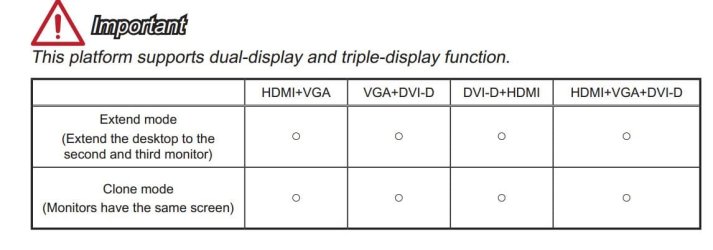
Mobo's that can drive 3 monitors are not uncommon. One of my machines has an i3-4130 in a MSI B85M-E45, and the board has HDMI, VGA and DVI-D. Although I don't use it in that configuration, I have tested it with 3 HD screens and 3 HD streams/videos and it wasn't overstretched. Not bad for a budget system. See snip from mobo manual

monitors.jpg
 

My Computer

Computer type
PC/Desktop
Computer Manufacturer/Model Number
self build
OS
W10 Pro x64, W7 Pro x64 in VMware
CPU
i7 2600K @ 4.4GHz
Motherboard
MSI Z68A-GD80
Memory
8GB Mushkin @ 1600MHz
Graphics Card(s)
Nvidia GTX 750 Ti
Monitor(s) Displays
27" Benq + 27" LG
Screen Resolution
1080p
Hard Drives
500GB 850 Evo SSD + 3 * 2TB Seagate
PSU
EVGA 650 GS modular
Case
Antec 300
Cooling
Seidon 120V v2
Internet Speed
62/18 Mbps
Antivirus
Defender (W10) + MSE (W7)
Browser
Firefox
Thanks for the responses. I will post back how it behaves once finished.
 

My Computer

Computer type
PC/Desktop
OS
windows 7 home premium 64bit
CPU
Amd phenom ii 560 3.30ghz
Motherboard
Asus m4a785td-v evo
Memory
Corsair TwinX 8GB (4x2)
Graphics Card(s)
AMD radeon HD 5670 1GB
Sound Card
None
Monitor(s) Displays
Hp
Hard Drives
WD Black Caviar 1TB 7200rpm
PSU
Corsair 500W
Case
CM Enforcer
Cooling
Stock HS, 200mm Front fan + 120mm Exhaust
Keyboard
Cyborg v7
Mouse
Laser Microsoft 6000
Internet Speed
5mb/s
Antivirus
Norton
Browser
Chrome
Back
Top