Dual screen not working

stevo292

New member
Local time
2:25 AM
Messages
4
**UPDATE IT WORKS** thank you

Hi all,

I just bought a monitor from my friend and i wanted a dual monitor set up. It is not working at the moment. I have connected two vga port. One to my graphics card (ATI radeon 4600) and one on my motherboard. My graphics card has two ports for monitors : one vga and one dvi. I read on the internet that for dual screen you need two vga. Is my problem because I need to get a dvi to vga adapter and connect my screen on my graphics card having two monitors on it? My main monittor supports dvi so I tried plugging in my main monittor to the dvi port of my graphics card while the other monitor on the vga of my graphics card and it is still not detecting it.

Thank you
 
Last edited:

My Computer My Computer

At a glance

Windows 7 Home Premium 32bit
OS
Windows 7 Home Premium 32bit
Welcome to the Seven Forums! stevo292

The best option for a dual monitor setup is having twin outputs on the video card itself. At first the desktop will appear to cloned over to the second display until the Catalyst C.C. is set for two monitors.

From there programs like UltraMON or DisplayFusion can see the Start taskbar extended onto the second screen for seeing the desktop extended across both. With those you can even have two separate wallpapers in use.

For a single port card using dv out or s-video can be troublesome at times to get the second display properly detected. The use of any onboard out along with having the first plugged into the card directly won't work since one will cancel out the other when the onboard video is enabled.

When first going to set up the present case here I went with an MSI R5750 1gb model that saw twin HDMI output for the twin display setup. I also bought an identical pair of lcds having already planned this ahead of time. For you however you may end up with the need of going for a new card that does have twin ports.

Unfortunately newegg is presently out of stock on the lower priced models for seeing how a twin port card looks. The Asus high end card Asus EAH6950 2gb card however features twin outputs and can be looked over at Newegg.com - ASUS EAH6950 DCII/2DI4S/2GD5 Radeon HD 6950 2GB 256-bit GDDR5 PCI Express 2.1 x16 HDCP Ready CrossFireX Support Video Card

If the lcd given to you was a different brand, model, and a different size? a card having twin outputs will likely be what you would need since you haven't been able to get either to work with the dvi. The ideal of course is having both identical to allow for having one resolution setting while each will still see the native resolution by default.
 

My Computers My Computers

  • At a glance

    W7 Ultimate x64/W10 Pro x64/W11 Pro Triple Bo...AMD Phenom II X4 975 Deneb 3.6ghz - 965 2nd r...Kingston Hyper X DDR3 1600 1.5v 16gb - Hyper ...MSI HD Radeon 5750 1gb - MSI HD Radeon 6450 o...
    Computer type
    PC/Desktop
    Computer Manufacturer/Model Number
    Custom builds = 2
    OS
    W7 Ultimate x64/W10 Pro x64/W11 Pro Triple Boot - Main PC W7 Remote PC Micro ATX W7 Pro x64/W11 Pro
    CPU
    AMD Phenom II X4 975 Deneb 3.6ghz - 965 2nd remote pc
    Motherboard
    Gigabyte GA-790XTA-UD4-Gigabyte GA-880GM-D2H remote pc
    Memory
    Kingston Hyper X DDR3 1600 1.5v 16gb - Hyper X Fury 8gb 2nd
    Graphics Card(s)
    MSI HD Radeon 5750 1gb - MSI HD Radeon 6450 on mini tower
    Sound Card
    Creative Labs X-Fi Xtreme Audio P - Realtek onooard 2nd case
    Monitor(s) Displays
    ASUS VW199T-P 19" HP 2082a Main-HP 2082a 20" remote pc
    Screen Resolution
    Asus 1440x900 - HP 1600x900
    Hard Drives
    WD Black 1TB HD per OS W7, W10, and pending W11 presently on 500gb OS Drive - Pending Triple 1TB HDs for Spanned Storage/backup volume
    Single 2TB external USB enclosure, single 1TB System 7 Host/Boot drive, Pending 8TB external HD for system image b
    PSU
    Corsair 750TX - primary / Corsair CX600 - second
    Case
    Antec 900-2 - SSD compatible / NZXT Vulcan mini tower
    Cooling
    Zalman CNPS9900A
    Keyboard
    AZIO L70 Backlit Letters Gaming - ONN Cordless/USB
    Mouse
    MSI DS200 Programmable, Logitech Cordless
    Internet Speed
    30mbps upgrade - primary hard wired - mini tower usb WiFi
    Antivirus
    GFI VIPRE Internet Security 2014 on W7 2016 beta on W10,
    Browser
    Cyberfox, WaterFox 64bit FF variants, FireFox x64, Pale Moon
    Other Info
    Accomdata fan cooled usb 2.0 PIDE/Sata II, III external enclosure.
    Sambient usb/eSata PATA/Sata II, III external enclosure.
  • At a glance

    W7 Pro x64/W11 ProAMD Deneb 3.6ghz - 965Kingston Hyper X Fury 8gbMSI HD Radeon 6450 DVI Output
    Computer type
    PC/Desktop
    System Manufacturer/Model Number
    CUSTOM ASSEMBLY
    OS
    W7 Pro x64/W11 Pro
    CPU
    AMD Deneb 3.6ghz - 965
    Motherboard
    Gigabyte GA-880GM-D2H remote pc
    Memory
    Kingston Hyper X Fury 8gb
    Graphics Card(s)
    MSI HD Radeon 6450 DVI Output
    Sound Card
    Realtek onooard Creative or Other separate PENDING
    Monitor(s) Displays
    VIZIO 32" LCD TV Separate LCD Pending
    Screen Resolution
    1600x1080
    Hard Drives
    WD 500GB OS Host/Boot WD Green 1TB Storage/Backup
    PSU
    Corsair 600W - THERMALTAKE 600W spare case
    Case
    NZXT Vulcan mini tower
    Cooling
    Twin 120mm Top Fans - 240mm Side Cover
    Keyboard
    ONN Cordless/USB Logitech Cordless
    Mouse
    ONN USB/Cordless - Logitech Cordless
    Internet Speed
    DSL 5G
    Browser
    MS Edge, FireFox, WaterFox x64, FireFox Nightly
    Other Info
    OS Testing-Remote Access to Main TeamViewer
How about a switch box or a dvi to vga converter
 

My Computer My Computer

At a glance

Windows 7 Home Premium 32bit
OS
Windows 7 Home Premium 32bit
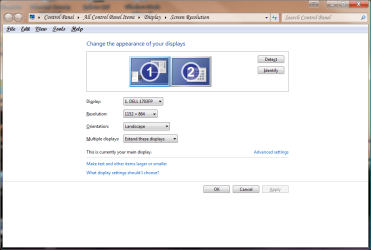
You should connect both monitors to the ATI Radeon HD 4600 series card that you have, one in the DVI and the other in the VGA port. As far as converting, you can use a DVI to VGA or vice versa. Then on your desktop, right-click somewhere on it and select "Screen Resolution" and then click on "Detect" so it can see both of your monitors. Once it shows both displays, you can select next to Multiple Displays to either extend your desktop.

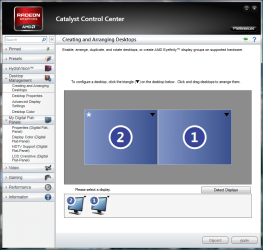
Alternatively you could do this through the Catalyst Control Center by launching it (CCC) and then going under "Creating and arranging desktops" and then click on "Detect Displays" and it should detect both displays after that. You can then click on "Apply" and arrange them right to left or vice versa.

And with today's modern video cards, you do not need two video cards to be able to use 2 monitors.
 

Attachments

  • Displays 1.png
    Displays 1.png
    39.7 KB · Views: 410
  • Displays 2.png
    Displays 2.png
    52.2 KB · Views: 380

My Computer My Computer

At a glance

Windows 7 Ultimate x64 SP1Intel Core i3 530 2.93 Ghz Clarkdale4 GB OCZ DDR3 1600 (PC12800) Low Voltage Desk...Nvidia GeForce GTX 550 Ti with 1 GB of RAM
OS
Windows 7 Ultimate x64 SP1
CPU
Intel Core i3 530 2.93 Ghz Clarkdale
Motherboard
ASRock P55 PRO/USB3 LGA 1156
Memory
4 GB OCZ DDR3 1600 (PC12800) Low Voltage Desktop Memory
Graphics Card(s)
Nvidia GeForce GTX 550 Ti with 1 GB of RAM
Sound Card
Realtek HD ALC892
Monitor(s) Displays
20'' eMachines E202HDbmd Glare Panel Widescreen
Screen Resolution
1600 x 900
Hard Drives
Western Digital 1 TB Caviar Black Edition (7200 RPM) SATA
Hitachi Deskstar 500 GB (7200 RPM) SATA
Samsung SpinPoint 400 GB (7200 RPM) SATA
PSU
Rosewill Xtreme Series RX750-D-B ATX12V v2.2 & EPS12V (750W)
Case
Cooler Master Centurion 534 RC-534-KKN2-GP Mid-Tower
Cooling
Standard Case Fans and Stock CPU Heatsink
Keyboard
Microsoft Wireless Optical Desktop Elite
Mouse
Microsoft Wireless Optical Desktop Elite
Internet Speed
7.1 Mbps Verizon DSL
that is exacly what I did and it does not detect anything...I used the ccc and everything. I made sure that the connectors were nicely in the ports. My main monittor (the one which is detected is the dvi. The other one is the vga. When i press the on button on my extra monitor it says vga : no input signal
 
Last edited:

My Computer My Computer

At a glance

Windows 7 Home Premium 32bit
OS
Windows 7 Home Premium 32bit
Have you tried running the second monitor by itself on the main port with a vga adapter? It sounds as if you are not plugging that in correctly or it won't work out for you. When plugged into the standard port you should see the monitor react right at post time before the first 7 logo screen appears even if nothing shows on your first using the dvi out.
 

My Computers My Computers

  • At a glance

    W7 Ultimate x64/W10 Pro x64/W11 Pro Triple Bo...AMD Phenom II X4 975 Deneb 3.6ghz - 965 2nd r...Kingston Hyper X DDR3 1600 1.5v 16gb - Hyper ...MSI HD Radeon 5750 1gb - MSI HD Radeon 6450 o...
    Computer type
    PC/Desktop
    Computer Manufacturer/Model Number
    Custom builds = 2
    OS
    W7 Ultimate x64/W10 Pro x64/W11 Pro Triple Boot - Main PC W7 Remote PC Micro ATX W7 Pro x64/W11 Pro
    CPU
    AMD Phenom II X4 975 Deneb 3.6ghz - 965 2nd remote pc
    Motherboard
    Gigabyte GA-790XTA-UD4-Gigabyte GA-880GM-D2H remote pc
    Memory
    Kingston Hyper X DDR3 1600 1.5v 16gb - Hyper X Fury 8gb 2nd
    Graphics Card(s)
    MSI HD Radeon 5750 1gb - MSI HD Radeon 6450 on mini tower
    Sound Card
    Creative Labs X-Fi Xtreme Audio P - Realtek onooard 2nd case
    Monitor(s) Displays
    ASUS VW199T-P 19" HP 2082a Main-HP 2082a 20" remote pc
    Screen Resolution
    Asus 1440x900 - HP 1600x900
    Hard Drives
    WD Black 1TB HD per OS W7, W10, and pending W11 presently on 500gb OS Drive - Pending Triple 1TB HDs for Spanned Storage/backup volume
    Single 2TB external USB enclosure, single 1TB System 7 Host/Boot drive, Pending 8TB external HD for system image b
    PSU
    Corsair 750TX - primary / Corsair CX600 - second
    Case
    Antec 900-2 - SSD compatible / NZXT Vulcan mini tower
    Cooling
    Zalman CNPS9900A
    Keyboard
    AZIO L70 Backlit Letters Gaming - ONN Cordless/USB
    Mouse
    MSI DS200 Programmable, Logitech Cordless
    Internet Speed
    30mbps upgrade - primary hard wired - mini tower usb WiFi
    Antivirus
    GFI VIPRE Internet Security 2014 on W7 2016 beta on W10,
    Browser
    Cyberfox, WaterFox 64bit FF variants, FireFox x64, Pale Moon
    Other Info
    Accomdata fan cooled usb 2.0 PIDE/Sata II, III external enclosure.
    Sambient usb/eSata PATA/Sata II, III external enclosure.
  • At a glance

    W7 Pro x64/W11 ProAMD Deneb 3.6ghz - 965Kingston Hyper X Fury 8gbMSI HD Radeon 6450 DVI Output
    Computer type
    PC/Desktop
    System Manufacturer/Model Number
    CUSTOM ASSEMBLY
    OS
    W7 Pro x64/W11 Pro
    CPU
    AMD Deneb 3.6ghz - 965
    Motherboard
    Gigabyte GA-880GM-D2H remote pc
    Memory
    Kingston Hyper X Fury 8gb
    Graphics Card(s)
    MSI HD Radeon 6450 DVI Output
    Sound Card
    Realtek onooard Creative or Other separate PENDING
    Monitor(s) Displays
    VIZIO 32" LCD TV Separate LCD Pending
    Screen Resolution
    1600x1080
    Hard Drives
    WD 500GB OS Host/Boot WD Green 1TB Storage/Backup
    PSU
    Corsair 600W - THERMALTAKE 600W spare case
    Case
    NZXT Vulcan mini tower
    Cooling
    Twin 120mm Top Fans - 240mm Side Cover
    Keyboard
    ONN Cordless/USB Logitech Cordless
    Mouse
    ONN USB/Cordless - Logitech Cordless
    Internet Speed
    DSL 5G
    Browser
    MS Edge, FireFox, WaterFox x64, FireFox Nightly
    Other Info
    OS Testing-Remote Access to Main TeamViewer
oh it works now haha! thank you so much for your help! I am so happy right now lol I had my vga plugged in my motherboard haha did not notice it
 

My Computer My Computer

At a glance

Windows 7 Home Premium 32bit
OS
Windows 7 Home Premium 32bit
Glad to see you have that cleared up now! I had a feeling you had one of them plugged in incorrectly when you had mentioned plugging the lcd given to you into the board itself.

You should be able to get both working together now as long as you get a picture on the first using the dvi out. The rest will be software controlled by the Catalyst and any optional wares you add on later.
 

My Computers My Computers

  • At a glance

    W7 Ultimate x64/W10 Pro x64/W11 Pro Triple Bo...AMD Phenom II X4 975 Deneb 3.6ghz - 965 2nd r...Kingston Hyper X DDR3 1600 1.5v 16gb - Hyper ...MSI HD Radeon 5750 1gb - MSI HD Radeon 6450 o...
    Computer type
    PC/Desktop
    Computer Manufacturer/Model Number
    Custom builds = 2
    OS
    W7 Ultimate x64/W10 Pro x64/W11 Pro Triple Boot - Main PC W7 Remote PC Micro ATX W7 Pro x64/W11 Pro
    CPU
    AMD Phenom II X4 975 Deneb 3.6ghz - 965 2nd remote pc
    Motherboard
    Gigabyte GA-790XTA-UD4-Gigabyte GA-880GM-D2H remote pc
    Memory
    Kingston Hyper X DDR3 1600 1.5v 16gb - Hyper X Fury 8gb 2nd
    Graphics Card(s)
    MSI HD Radeon 5750 1gb - MSI HD Radeon 6450 on mini tower
    Sound Card
    Creative Labs X-Fi Xtreme Audio P - Realtek onooard 2nd case
    Monitor(s) Displays
    ASUS VW199T-P 19" HP 2082a Main-HP 2082a 20" remote pc
    Screen Resolution
    Asus 1440x900 - HP 1600x900
    Hard Drives
    WD Black 1TB HD per OS W7, W10, and pending W11 presently on 500gb OS Drive - Pending Triple 1TB HDs for Spanned Storage/backup volume
    Single 2TB external USB enclosure, single 1TB System 7 Host/Boot drive, Pending 8TB external HD for system image b
    PSU
    Corsair 750TX - primary / Corsair CX600 - second
    Case
    Antec 900-2 - SSD compatible / NZXT Vulcan mini tower
    Cooling
    Zalman CNPS9900A
    Keyboard
    AZIO L70 Backlit Letters Gaming - ONN Cordless/USB
    Mouse
    MSI DS200 Programmable, Logitech Cordless
    Internet Speed
    30mbps upgrade - primary hard wired - mini tower usb WiFi
    Antivirus
    GFI VIPRE Internet Security 2014 on W7 2016 beta on W10,
    Browser
    Cyberfox, WaterFox 64bit FF variants, FireFox x64, Pale Moon
    Other Info
    Accomdata fan cooled usb 2.0 PIDE/Sata II, III external enclosure.
    Sambient usb/eSata PATA/Sata II, III external enclosure.
  • At a glance

    W7 Pro x64/W11 ProAMD Deneb 3.6ghz - 965Kingston Hyper X Fury 8gbMSI HD Radeon 6450 DVI Output
    Computer type
    PC/Desktop
    System Manufacturer/Model Number
    CUSTOM ASSEMBLY
    OS
    W7 Pro x64/W11 Pro
    CPU
    AMD Deneb 3.6ghz - 965
    Motherboard
    Gigabyte GA-880GM-D2H remote pc
    Memory
    Kingston Hyper X Fury 8gb
    Graphics Card(s)
    MSI HD Radeon 6450 DVI Output
    Sound Card
    Realtek onooard Creative or Other separate PENDING
    Monitor(s) Displays
    VIZIO 32" LCD TV Separate LCD Pending
    Screen Resolution
    1600x1080
    Hard Drives
    WD 500GB OS Host/Boot WD Green 1TB Storage/Backup
    PSU
    Corsair 600W - THERMALTAKE 600W spare case
    Case
    NZXT Vulcan mini tower
    Cooling
    Twin 120mm Top Fans - 240mm Side Cover
    Keyboard
    ONN Cordless/USB Logitech Cordless
    Mouse
    ONN USB/Cordless - Logitech Cordless
    Internet Speed
    DSL 5G
    Browser
    MS Edge, FireFox, WaterFox x64, FireFox Nightly
    Other Info
    OS Testing-Remote Access to Main TeamViewer
In my case it doesn't work

Hi all, I'm new here.

I have an ATI HD4850 and I'm experiencing a proble similar to the one described in this post.

I installed yesterday windows 7 for the first time and I took the opportunity to install the latest catalyst drivers.

My 4850 has 2 DVI output: one is connect to my monitor, the other one through the specific DVI-HDMI adapter to my TV.
I had both screens working with their own resolutions perfectly under windows xp perfectly.

Now I find impossible to have the video signal of my pc on both screens, each one with his own resolution. The only this I was able to do is to have on the TV the clone video signal I have on the monitor. And of course, as you understand, it's not my objective to have on my TV a 1280x1024 4/3 image.

While I'm sitting at my PC and working on my monitor I have on the TV a windows background ery similar to the image you have as a background the first time you install windows.
If I swap I have the normal video signal on the TV and that windows background on the monitor.

The HDMI Audio works.

Can anybody tell me how to enable dual screens at the same time, each one with its own resolution as I had before? I didn't find a preper option neither in the new Catalyst Control Center neither in windows options.

Thanks in advance.
 

My Computer My Computer

At a glance

windows 7 home premium 64bit
OS
windows 7 home premium 64bit
hey i need help its about my graphic card hd 6790 ..
its like i just bought the card and it has 2 dvi ports on its back ...
1 = Upper One
2 = Lower One
i was using the lower one everything was fine but after i plugged out my card for a reason and then just pluged it in again what i got on my monitor was this message the cable was plugged into the same lower dvi port again
" monitor is in power saving mode activate using pc "
i was shocked to see this tried many things but no win and then changed the cable to upper dvi port then it giving me display and working fine now but i want to know that what should be the cause of my lower dvi port for not working suddenly ...
plzzzz help !!!!!!!!!!!!!!!!!!!!!!!!!
:huh:
 

My Computer My Computer

At a glance

windows 7 32 bit
OS
windows 7 32 bit
Back
Top