
Quess
New member
Greetings i have been fighting my system for some time now. the problem is when i boot up my computer one of my screens stays black.
if i then turn the screen off and back on 20 to 30 times it well come online and stays on.
it seems to me that if i leave the computer on for a little before i start to turn my screen on/off i have to do it less. but i have tryed to leave it on for 30 min and see. but i still had to turn the screen off/on several times before it worked
i am running:
windows 7 home premium
AMD prossesor
500W power sup
Radion HD5770 (Driver is version 12.10 the newest version)
motherboard is Asus M4a78 Pro
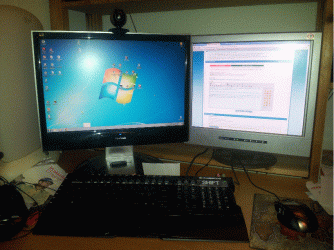
i have attached 2 Screenshots one wheer you can see my Screens, it is the left one i have to turn on and off to get to work(ViewSonic) and the right one works right off the bat (Digital Square)
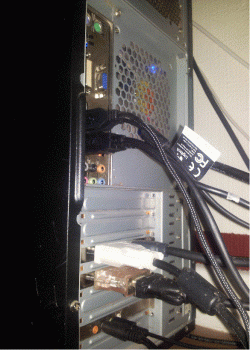
the other ScreenShoot is the back of my computer where you can see the screens connec to my computer, as you can see one of em is running on a adaptor it is the Digital Square that is useing the adaptor aka the screen that works all the time.
i have tryed to use the ViewSonic solo but i still have the problem.
i am correct at the stages where i am ready to get a flower pot that i can place in the room in the hopes that turning it the right way well make this work. i have all ready been in the computer dusting it off and cleaning it out in case it was a heat/dirt problem. and last i check with a power sup calculate my system needed around 350W. so i still have some power left in the computer even if it was a bad power sup.
thanks for you time i hope you can help me
Quess
if i then turn the screen off and back on 20 to 30 times it well come online and stays on.
it seems to me that if i leave the computer on for a little before i start to turn my screen on/off i have to do it less. but i have tryed to leave it on for 30 min and see. but i still had to turn the screen off/on several times before it worked
i am running:
windows 7 home premium
AMD prossesor
500W power sup
Radion HD5770 (Driver is version 12.10 the newest version)
motherboard is Asus M4a78 Pro
i have attached 2 Screenshots one wheer you can see my Screens, it is the left one i have to turn on and off to get to work(ViewSonic) and the right one works right off the bat (Digital Square)
the other ScreenShoot is the back of my computer where you can see the screens connec to my computer, as you can see one of em is running on a adaptor it is the Digital Square that is useing the adaptor aka the screen that works all the time.
i have tryed to use the ViewSonic solo but i still have the problem.
i am correct at the stages where i am ready to get a flower pot that i can place in the room in the hopes that turning it the right way well make this work. i have all ready been in the computer dusting it off and cleaning it out in case it was a heat/dirt problem. and last i check with a power sup calculate my system needed around 350W. so i still have some power left in the computer even if it was a bad power sup.
thanks for you time i hope you can help me
Quess
Attachments
My Computer
At a glance
Windows 7 home premium 64-bit
- OS
- Windows 7 home premium 64-bit


