Dual Win7 & Ubuntu

jlindblo

New member
Local time
2:39 PM
Messages
12
Location
Idaho
I have the 32 bit Win7 & Ubuntu installed on one system with dual boot ... works fine and the menu appears correctly. I installed to a clean disk Win7 first and then Ubuntu second using the Ubuntu wubi installer. I also have another system with the 64 bit Win7 OS that I would like to put Ubuntu on too, but have been unable to successfully create a dual boot menu on it. I realize that boot.ini is no longer used but even using EasyBCD I cannot add Ubuntu. I use the wubi installer that works from within Windows ... I must be overlooking something simple??
 

My Computer

OS
Windows 7
Hello jlindblo...

yes, you're missing something here...
Windows 7 after a clean install, it creates a small 200MB hidden partition to store the BCD store database. (similar files to boot.ini). This is where the bootloader is stored.
This partition is currently invisible to you, so even if you added a linux boot entry in EasyBCD, easybcd thinks that it has written the files to the partition where the bootloader is, but it actually can't write there cause it's hidden (no drive letter given). To fix that, open Disk Management, assign a drive letter to your hidden small partition (200MB of size must be), and then add a linux boot entry from EASYBCD again. This time it should work and you should be able to dual boot.

(If later on you need to hide again the small boot partition, you can. You can have it hidden and the dual boot will still work. If you need to re-hide it, just ask. Disk management won't allow you, needs a trick.

Hope it helps
 

My Computer

Computer Manufacturer/Model Number
ENIAC
OS
Windows 7 RC 7100 32bit/64bit
CPU
Intel Core2Duo E4500 2.20 GHz
Motherboard
ASUS P5LD2-X/1333
Memory
2x1GB Kinsgston DDR2 800MHz
Graphics Card(s)
Nvidia 8500GT
Sound Card
Onboard High Definition Audio Device
Monitor(s) Displays
Sony Bravia 42"
Case
LINKW 2222
Cooling
Standard Intel
Keyboard
Some cheap one
Mouse
Microsoft Intellimouse something
Internet Speed
24MBps ADSL
Hi limneos,

I'd be curious to know how to rehide that system partition without using a 3rd party app.

SIW2:D
 

My Computers

System One System Two

  • Computer type
    PC/Desktop
    OS
    7 X64
    CPU
    i5 8400
    Motherboard
    gigabyte b365m ds3h
    Memory
    2x8gb 3200mhz
    Hard Drives
    various
    PSU
    pure power 11 400w cm
    Case
    Coolermaster
    Cooling
    cryorig m9i
  • Computer type
    PC/Desktop
    OS
    7x64
    CPU
    g5400
    Motherboard
    ga b365m ds3h
    Memory
    8gb ddr4 2400
    PSU
    xfx pro 450w
Hi limneos,

I'd be curious to know how to rehide that system partition without using a 3rd party app.

SIW2:D

Sure... I found it when I wanted it hidden cause I thought its convenient.

here you go.
Run elevated cmd and start diskpart

diskpart> list disk

(find your disk number with he 200mb hidden partition, your w7 boot disk usually)

diskpart > select disk 0 (change 0 with your disk no)

diskpart> list partition (find your 200 mb partition)

diskpart> select partition 1

diskpart > remove (don't worry, it doesn't remove the partition , just the letter)

DONE
 

Attachments

  • Untitled.png
    Untitled.png
    13.5 KB · Views: 751

My Computer

Computer Manufacturer/Model Number
ENIAC
OS
Windows 7 RC 7100 32bit/64bit
CPU
Intel Core2Duo E4500 2.20 GHz
Motherboard
ASUS P5LD2-X/1333
Memory
2x1GB Kinsgston DDR2 800MHz
Graphics Card(s)
Nvidia 8500GT
Sound Card
Onboard High Definition Audio Device
Monitor(s) Displays
Sony Bravia 42"
Case
LINKW 2222
Cooling
Standard Intel
Keyboard
Some cheap one
Mouse
Microsoft Intellimouse something
Internet Speed
24MBps ADSL
Thanks,

That's interesting - how do you then get it back -assign a letter in Disk Management ?

I don't have one of those little system partitions , but may try it in future.

SIW2
 

My Computers

System One System Two

  • Computer type
    PC/Desktop
    OS
    7 X64
    CPU
    i5 8400
    Motherboard
    gigabyte b365m ds3h
    Memory
    2x8gb 3200mhz
    Hard Drives
    various
    PSU
    pure power 11 400w cm
    Case
    Coolermaster
    Cooling
    cryorig m9i
  • Computer type
    PC/Desktop
    OS
    7x64
    CPU
    g5400
    Motherboard
    ga b365m ds3h
    Memory
    8gb ddr4 2400
    PSU
    xfx pro 450w
either by using the same commands, but instead of remove , type assign.

Or from Disk Management. It always allows you to assign a drive letter to this hidden partition, it just doesn't allow you to remove it.
 

My Computer

Computer Manufacturer/Model Number
ENIAC
OS
Windows 7 RC 7100 32bit/64bit
CPU
Intel Core2Duo E4500 2.20 GHz
Motherboard
ASUS P5LD2-X/1333
Memory
2x1GB Kinsgston DDR2 800MHz
Graphics Card(s)
Nvidia 8500GT
Sound Card
Onboard High Definition Audio Device
Monitor(s) Displays
Sony Bravia 42"
Case
LINKW 2222
Cooling
Standard Intel
Keyboard
Some cheap one
Mouse
Microsoft Intellimouse something
Internet Speed
24MBps ADSL
my bcd drive is only 8mb and not 200mb
 

My Computer

OS
Windows 7
CPU
E5200
Motherboard
GA-G31M-S2L
Memory
2GB Kingston 6-6-6-18
Graphics Card(s)
Inno3d 9800GT 512MB
Hard Drives
80GB Barracuda
640GB Caviar
PSU
Gigabyte Superb 550P
Thanks limneos ..... I appreciate your response to my dual boot question which I'll print out as soon as I can find an HP 5740 printer driver (which I have not been able to find thus far) :)
 

My Computer

OS
Windows 7
Is it the 5740 Deskjet, or the J5740 officejet? Are you looking for a driver for Windows 7?
 

My Computer

Computer Manufacturer/Model Number
ENIAC
OS
Windows 7 RC 7100 32bit/64bit
CPU
Intel Core2Duo E4500 2.20 GHz
Motherboard
ASUS P5LD2-X/1333
Memory
2x1GB Kinsgston DDR2 800MHz
Graphics Card(s)
Nvidia 8500GT
Sound Card
Onboard High Definition Audio Device
Monitor(s) Displays
Sony Bravia 42"
Case
LINKW 2222
Cooling
Standard Intel
Keyboard
Some cheap one
Mouse
Microsoft Intellimouse something
Internet Speed
24MBps ADSL
HP Deskjet 5740. I remember that XP downloaded a driver for it automatically but since Win7 didn't I went to HP's site and downloaded the latest XP driver and attempted an install. It came back with an error and said it was not compatible. Now it seems that there was a mode in XP that would allow "Compatibility Mode" but I haven't come across it yet in Win7. Seems that Compatibility Mode was selectable from the Shortcut Icon before .... but if it won't install I won't have the icon. So I'm still working on that one ...

Jim
 

My Computer

OS
Windows 7
Well .... some progress I guess. I assigned "X" to the 200 MB hidden partition and then reinstalled Ubuntu 8.10 using it's own installer wubi.exe from within Windows. (I did NOT do the Manual Install). I then followed the instructions at www.neosmart.net/wiki/displayh/EBCD/Ubuntu (Adding Ubuntu to the Vista Bootloader) to Drive 0, Partition 0, which did NOT work by the way. I made several changes and rebooting to test ..... and NO success. What I get when I select "Ubuntu" is the OS loading up to the Grub> PROMPT and no progress after that. My menu item #2 on boot looks like this:

Name: Ubuntu
BCD ID: {cc8164e1-e2a8-11dd-a5f8-e57f48c7afb9}
Drive: X:\
Bootloader Path: \NST\NeoGrub.mbr

My Ubuntu Folder with all it's files is on C: and the individual files wubildr.mbr and wubildr are also in C: (it's root)

On X: (previously hidden) are 3 files (bootmgr, BOOTSECT.BAK, NeoGrub) and in the NST folder are 2 files (menu.1st, and NeoGrub.mbr)

The menu.1st lists just 2 commands:

find --set-root --ignore-floppies \ubuntu\winboot\menu.lst
configfile \ubuntu\winboot\menu.lst

find --set-root --ignore-floppies /boot/grub/menu.lst
configfile /boot/grub/menu.lst

The instructions at NeoSmart, although helpful, are NOT an accurate step by step answer .... they may have been at one time ... but they are not now.

Surely this should not be so complicated?

Jim
 

My Computer

OS
Windows 7
find --set-root --ignore-floppies \ubuntu\winboot\menu.lst
configfile \ubuntu\winboot\menu.lst

find --set-root --ignore-floppies /boot/grub/menu.lst
configfile /boot/grub/menu.lst

If you get grub at startup, then EASYBCD is fine.

The above boot list though, searches for ubuntu folder in partition X: !!!
Try changing the root partition as stated below.

Add on top of this file:

root (hd0,0)

or

root(hd0,1)


hd0 is your first hard disk, the following "0" is your first partition.
So (hd0,0) means first hard disk, first partition.
(hd1,2) means second hard disk, third partition. etc...

Try until you find which partition is the one containing ubuntu .

Final example of what you should try:

Code:
root (hd0,1)
configfile \ubuntu\winboot\menu.lst

If you can, post here a screenshot of your Disk Management
 

My Computer

Computer Manufacturer/Model Number
ENIAC
OS
Windows 7 RC 7100 32bit/64bit
CPU
Intel Core2Duo E4500 2.20 GHz
Motherboard
ASUS P5LD2-X/1333
Memory
2x1GB Kinsgston DDR2 800MHz
Graphics Card(s)
Nvidia 8500GT
Sound Card
Onboard High Definition Audio Device
Monitor(s) Displays
Sony Bravia 42"
Case
LINKW 2222
Cooling
Standard Intel
Keyboard
Some cheap one
Mouse
Microsoft Intellimouse something
Internet Speed
24MBps ADSL
Now it seems that there was a mode in XP that would allow "Compatibility Mode" but I haven't come across it yet in Win7. Seems that Compatibility Mode was selectable from the Shortcut Icon before .... but if it won't install I won't have the icon. So I'm still working on that one ...
Jim

Hi Jim,

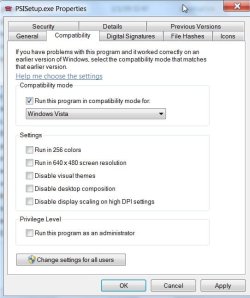
You can right click on the setup.exe., select Properties, Compatibility tab.

Tick the box , select the compatible o/s in the drop down flap, (may be worth ticking Run as administrator as well) click Apply and OK.

COMPATIBILITY2009-01-22_025854.jpg

Hope it helps

SIW2
 

My Computers

System One System Two

  • Computer type
    PC/Desktop
    OS
    7 X64
    CPU
    i5 8400
    Motherboard
    gigabyte b365m ds3h
    Memory
    2x8gb 3200mhz
    Hard Drives
    various
    PSU
    pure power 11 400w cm
    Case
    Coolermaster
    Cooling
    cryorig m9i
  • Computer type
    PC/Desktop
    OS
    7x64
    CPU
    g5400
    Motherboard
    ga b365m ds3h
    Memory
    8gb ddr4 2400
    PSU
    xfx pro 450w
If you get grub at startup, then EASYBCD is fine.

The above boot list though, searches for ubuntu folder in partition X: !!!
Try changing the root partition as stated below.

Add on top of this file:

root (hd0,0)

or

root(hd0,1)


hd0 is your first hard disk, the following "0" is your first partition.
So (hd0,0) means first hard disk, first partition.
(hd1,2) means second hard disk, third partition. etc...

Try until you find which partition is the one containing ubuntu .

Final example of what you should try:

Code:
root (hd0,1)
configfile \ubuntu\winboot\menu.lst

If you can, post here a screenshot of your Disk Management

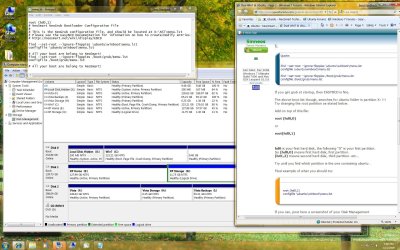
I have tried both the root (hd0,0) and root (hd0,1) to no avail. Ubuntu loading stops at the Grub> prompt! My first hard drive has only Win7 on it and the Ubuntu folder is in C: I have renamed the hidden partition X:
Here is a screenshot if that helps:
 

Attachments

  • Boot Grub.JPG
    Boot Grub.JPG
    70.1 KB · Views: 175

My Computer

OS
Windows 7
Works now after crash!!!!

Well I had a little scare. I rebooted and Win7 hung solid .... rebooted again and the same thing. Ok ....the menu says "REPAIR" in the boot screen so let's try that. The "repair" ran for about 20 minutes and said the it could not be fixed! Excuse Me?? Now THAT'S just great .... all the nifty stuff I had. Ok .... try ONE last time .... and hey, it's coming up, but taking some time. On opening on screen popped a warning that HP wants to make some changes to your computer and would you like to continue? Well, why not? So I did ..... and then "Your device is installed and ready to use". Oh .... so it's like XP without the heads up messages! But I'm good to go ...l thanks for the assist! :) :D :)


Thanks SIW2,
I tried both .... in XP Compatibility Mode and as Admin. I appear to have the printer installed (& I probably didn't know it before) but I am unable to put it Online ... but still, the install tells me that it has failed>

I appreciate your response though.

Jim
 
Last edited:

My Computer

OS
Windows 7
Ok ..... I think it was too small to be readable?? Here's another shot ...
 

My Computer

OS
Windows 7
Whoops ..... did not wait for the jpg to upload ... sorry.
 

Attachments

  • Boot Grub.JPG
    Boot Grub.JPG
    319 KB · Views: 147

My Computer

OS
Windows 7

My Computers

System One System Two

  • Computer type
    PC/Desktop
    OS
    7 X64
    CPU
    i5 8400
    Motherboard
    gigabyte b365m ds3h
    Memory
    2x8gb 3200mhz
    Hard Drives
    various
    PSU
    pure power 11 400w cm
    Case
    Coolermaster
    Cooling
    cryorig m9i
  • Computer type
    PC/Desktop
    OS
    7x64
    CPU
    g5400
    Motherboard
    ga b365m ds3h
    Memory
    8gb ddr4 2400
    PSU
    xfx pro 450w
limneos,
I uploaded my Computer Management jpg if you still have time to help me?

Jim
 

My Computer

OS
Windows 7
Hello jlindblo...

From what I see, your linux partition must be the third on the first hard disk, with 9GB or so...

If that's the case, then you should try to put in the menu.lst these lines (and only these):

root (hd0,2)
configfile \ubuntu\winboot\menu.lst

Try saving the file as it is above and try again.
 

My Computer

Computer Manufacturer/Model Number
ENIAC
OS
Windows 7 RC 7100 32bit/64bit
CPU
Intel Core2Duo E4500 2.20 GHz
Motherboard
ASUS P5LD2-X/1333
Memory
2x1GB Kinsgston DDR2 800MHz
Graphics Card(s)
Nvidia 8500GT
Sound Card
Onboard High Definition Audio Device
Monitor(s) Displays
Sony Bravia 42"
Case
LINKW 2222
Cooling
Standard Intel
Keyboard
Some cheap one
Mouse
Microsoft Intellimouse something
Internet Speed
24MBps ADSL
Back
Top