Dualboot

termikxs

New member
Local time
12:04 AM
Messages
24
Location
Ostrava, Czech Republic
Hello I have 3 Hard Drives. I had 2 Win XP on two different hard drives. I have formated one of those hard drives and put Win 7 here. But each time I turn on pc there is no OS choosing. It just boots to the Win 7... How to enable choice of OS I want boot to?
 

My Computer

OS
Microsoft Windows 7 Ultimate x86 Build 7600
CPU
Intel Core2Duo 2.44GHz
Memory
2048GB
Graphics Card(s)
ATi Radeon X550 128MB
Monitor(s) Displays
Acer 17" AL1716
Screen Resolution
1280x1024
Hard Drives
WD320
WD80
Keyboard
Logitech G15
Hello I have 3 Hard Drives. I had 2 Win XP on two different hard drives. I have formated one of those hard drives and put Win 7 here. But each time I turn on pc there is no OS choosing. It just boots to the Win 7... How to enable choice of OS I want boot to?

It will only dual boot if both operating systems are on the same HD.

From what you have said, one HD has only Windows 7 and is set as the primary boot device, correct?
 

My Computer

Computer Manufacturer/Model Number
Gateway, Toshiba Laptop, and Home Brew
OS
Windows 7 x64 HP, Windows 7 HP, Windows 7 Ult
CPU
Intel I3, Cerelon, Pentium 4 @ 3Ghz
Motherboard
Intel, Intel, Asus
Memory
8G, 3G, 3G
Graphics Card(s)
On-board Intel, On-board nVidia, nVIDIA card
Sound Card
on-board, on-board, SoundBlaster
Monitor(s) Displays
Hannspree HF237, Toshiba, SyncMaster 931B
Screen Resolution
default (all)
Hard Drives
1T internal, 320G internal, 160G internal, 1T networked
PSU
300w, unk, 650w
Case
black, black, grey
Cooling
air (all)
Keyboard
standard wired (all)
Mouse
standard wired (all)
Internet Speed
6M down, 768K up
Other Info
Home LAN through Linksys hub to 4 port and wireless switch/router. Networked HP 2600n. Wife's computer running Windows 7, and spare laptop running Ubuntu "Karmic Kola" (9.10).
Hello I have 3 Hard Drives. I had 2 Win XP on two different hard drives.

I have formated one of those hard drives and put Win 7 here.

But each time I turn on pc there is no OS choosing. It just boots to the Win 7... How to enable choice of OS I want boot to?
Should we guess which one ? ;)

OS Microsoft Windows 7 Ultimate x86 Build 7600
CPU Intel Core2Duo 2.44GHz
Memory 2048GB
Graphics Card ATi Radeon X550 128MB
Monitor(s) Displays Acer 17" AL1716
Screen Resolution 1280x1024

Keyboard Logitech G15
Hard Drives WD320 WD80
 

My Computer

Computer Manufacturer/Model Number
Gateway GT5056
OS
XP_Pro, W7_7201, W7RC.vhd, SciLinux5.3, Fedora12, Fedora9_2x, OpenSolaris_09-06
CPU
AMD 64x2
Motherboard
Yes
Memory
1 gig
Graphics Card(s)
Dunno
Sound Card
Realtek something
Monitor(s) Displays
Samsung SyncMaster 940MW w/TV
Screen Resolution
1280x1024
Hard Drives
250 GB WD, USB Seagate Freedesk 1.5 T
Internet Speed
Cable modem
Other Info
1 + 1 = 10b,
7 + 7 = 16o,
a + b = 15h.
Yes, but on my previous PC I had two hard drives, one OS on each (7 and XP) and everything was fine.... Boot menu appeared each reboot.

I just need to get the choice of the OS :X

EDIT: 2Chuckr: This is my home computer, now I am working on different computer ;)
 

My Computer

OS
Microsoft Windows 7 Ultimate x86 Build 7600
CPU
Intel Core2Duo 2.44GHz
Memory
2048GB
Graphics Card(s)
ATi Radeon X550 128MB
Monitor(s) Displays
Acer 17" AL1716
Screen Resolution
1280x1024
Hard Drives
WD320
WD80
Keyboard
Logitech G15
Hello I have 3 Hard Drives. I had 2 Win XP on two different hard drives. I have formated one of those hard drives and put Win 7 here. But each time I turn on pc there is no OS choosing. It just boots to the Win 7... How to enable choice of OS I want boot to?

It will only dual boot if both operating systems are on the same HD.

From what you have said, one HD has only Windows 7 and is set as the primary boot device, correct?

Sorry Schaft, but that's not correct.

They can be on different HDD's

W7 doesn't even have to be on the active partition, as long as the W7 boot files are on the active partition.

To answer the OP

To incorporate XP in the boot sequence, you could download easybcd.
You can add OS's to the boot sequences with it, among other things.

If you need help with it, check back here.
 

My Computer

OS
Win7 Build 7600 x86
CPU
Pentium II 300MHz
Motherboard
Asus
Memory
32mb EDO RAM
Graphics Card(s)
Diamond Viper
Sound Card
Soundblaster 16
Monitor(s) Displays
14" AOC CRT 16K color
Screen Resolution
800x600
Hard Drives
300mb Quantum fireball
PSU
110 Watts
Cooling
Passive
Keyboard
Trust Ergonomic
Mouse
Generic
Internet Speed
256K u 128K d
Or you could simply enter the BIOS at boot time to determine which drive you want to boot to...
 

My Computer

Computer Manufacturer/Model Number
Self-Built
OS
Vista Ultimate X64/ Windows 7 Dual-boot
CPU
Q6600
Motherboard
ASUS P5K
Memory
4G OCZ PC2 8500 Platinum
Graphics Card(s)
EVGA 8800GTS Vid Card
Hard Drives
500G Seagate SATA
200G Seagate SATA
100G WD Caviar SATA
80G WD Caviar IDE
PSU
OCZ Elite 800W PSU
Case
RaidMax Smilodon Case
Or you could simply enter the BIOS at boot time to determine which drive you want to boot to...

Go in the bios every time you want to boot the other OS??
I don't see how that would be useful.

Wouldn't dual booting be a more practical solution? ;)
 

My Computer

OS
Win7 Build 7600 x86
CPU
Pentium II 300MHz
Motherboard
Asus
Memory
32mb EDO RAM
Graphics Card(s)
Diamond Viper
Sound Card
Soundblaster 16
Monitor(s) Displays
14" AOC CRT 16K color
Screen Resolution
800x600
Hard Drives
300mb Quantum fireball
PSU
110 Watts
Cooling
Passive
Keyboard
Trust Ergonomic
Mouse
Generic
Internet Speed
256K u 128K d
Hi there

Something is screwed up -- download EasyBcd - this should fix it.

The only requirement is for the BOOTLOADER to be on an active partition -- otherwise OS'es can be on ANY hard disk you like (or at least AFAIK on the first 4) -- the Bootloader will ensure that the Windows OS booted will see the OS disk as drive "C".

Note also that in this scenario your 2nd or 3rd OS (if Windows systems) will see the drives (apart from its own "C" drive) with different letters -- for example drive "E" on OS 1 might be Drive "F" on OS 2.

Cheers
jimbo
 

My Computer

Computer type
PC/Desktop
Computer Manufacturer/Model Number
Custom built, several laptops HP/ASUS
OS
Linux CENTOS 7 / various Windows OS'es and servers
CPU
Intel i7 Intel i5
Memory
8GB, 16GB
Graphics Card(s)
On Motherboard
Sound Card
Realtek HD audio
Monitor(s) Displays
Apple Cinema display, Samsung LCD
Screen Resolution
1920 X 1080
Hard Drives
4 X 1TB SATA
Mouse
Toshiba wireless laser
Internet Speed
> 20MB up
Hey Jimbo, you sound like a parrot. :D

This what you wrote,

Hi there

Something is screwed up -- download EasyBcd - this should fix it.

The only requirement is for the BOOTLOADER to be on an active partition -- otherwise OS'es can be on ANY hard disk you like (or at least AFAIK on the first 4) -- the Bootloader will ensure that the Windows OS booted will see the OS disk as drive "C".

Note also that in this scenario your 2nd or 3rd OS (if Windows systems) will see the drives (apart from its own "C" drive) with different letters -- for example drive "E" on OS 1 might be Drive "F" on OS 2.

Cheers
jimbo

.

This is what I wrote a few posts back

They can be on different HDD's
Windows 7 doesn't even have to be on the active partition, as long as the Windows 7 boot files are on the active partition.

To answer the OP
To incorporate XP in the boot sequence, you could download easybcd.
You can add OS's to the boot sequences with it, among other things.

No hard feelings, just too funny! :D:D:D
 

My Computer

OS
Win7 Build 7600 x86
CPU
Pentium II 300MHz
Motherboard
Asus
Memory
32mb EDO RAM
Graphics Card(s)
Diamond Viper
Sound Card
Soundblaster 16
Monitor(s) Displays
14" AOC CRT 16K color
Screen Resolution
800x600
Hard Drives
300mb Quantum fireball
PSU
110 Watts
Cooling
Passive
Keyboard
Trust Ergonomic
Mouse
Generic
Internet Speed
256K u 128K d
Or you could simply enter the BIOS at boot time to determine which drive you want to boot to...


This works, but only if you have an independent boot record on each drive. To accomplish that you have to physically disconnect drives B and C whilst you are installing on drive A - etc.
I personally like this method of installation and switching the OS via the BIOS boot sequence. No mess with the boot record and when you want to uninstall one system, you need not fumble with the boot record either. But you have to open the box and pull the appropriate wires during the installation of each OS. I guess it is either that or EasyBCD.
 

My Computer

Computer Manufacturer/Model Number
HP, Dell, Gateway, Toshiba - 4 laptops and 2 desktops
OS
Vista, Windows7, Mint Mate, Zorin, Windows 8
CPU
from 1.6GHz Duo to i7
Monitor(s) Displays
2x HP w2207
Hard Drives
5x HDD, 7x SSD, 12x Externals
Keyboard
with trackball - no mices
Mouse
Trackball mice
Internet Speed
DSL 6000
Hi all...

I have downloaded EasyBCD but when I try to add entries and add WinXP it says some files (NTDETECT.com and NTLDR) are needed.... Where can I get them? How to copy them correctly?

And I can't choose the "hard drive letter" when adding a new entry... :cry:
 

My Computer

OS
Microsoft Windows 7 Ultimate x86 Build 7600
CPU
Intel Core2Duo 2.44GHz
Memory
2048GB
Graphics Card(s)
ATi Radeon X550 128MB
Monitor(s) Displays
Acer 17" AL1716
Screen Resolution
1280x1024
Hard Drives
WD320
WD80
Keyboard
Logitech G15
Forget Easybcd, only good for altering systems already set.

It will always boot to the latest OS, the easiest way is to go into RUN "msconfig" BOOT and select your own default.
 

My Computer

Computer Manufacturer/Model Number
Home build.
OS
Vista Ultimate 32 bit, Win 7 Pro 32 bit, Win 7 Pro 64 bit
CPU
Intel i5 CPU 750 @ 2.67 GHZ, OC 3.7 GHZ
Motherboard
Asus P7P55D
Memory
4 Gig
Graphics Card(s)
Nvidia GeForce GTS450
Monitor(s) Displays
Acer 24"
Screen Resolution
1440 x 900
Hard Drives
1000 GIG
1000 GIG
PSU
650
Case
Antec Nine Hundred Two
Internet Speed
14 MB (APPROX)
Forget Easybcd, only good for altering systems already set.

It will always boot to the latest OS, the easiest way is to go into RUN "msconfig" BOOT and select your own default.


Everything msconfig can do for booting, easybcd can, and then some.

How would msconfig magically recreate his lost boot files?

No NTLDR = no boot. simple as that.
 

My Computer

OS
Win7 Build 7600 x86
CPU
Pentium II 300MHz
Motherboard
Asus
Memory
32mb EDO RAM
Graphics Card(s)
Diamond Viper
Sound Card
Soundblaster 16
Monitor(s) Displays
14" AOC CRT 16K color
Screen Resolution
800x600
Hard Drives
300mb Quantum fireball
PSU
110 Watts
Cooling
Passive
Keyboard
Trust Ergonomic
Mouse
Generic
Internet Speed
256K u 128K d
Hi all...

I have downloaded EasyBCD but when I try to add entries and add WinXP it says some files (NTDETECT.com and NTLDR) are needed.... Where can I get them? How to copy them correctly?

And I can't choose the "hard drive letter" when adding a new entry... :cry:

From this info I can deduct the following.

1. You had two partitions with windows XP
2. You deleted the wrong one. (the one that contained the boot files)

solution.
Extract NTDETECT.com, Command.com, and NTDLR from the XP CD,
and copy them to your C: (where Win7 resides.)

Next with easybcd, create a new entry for XP.

The previous poster had it 180 degrees wrong.

msconfig can not do that for you. :sarc:
msconfig can only select an os that is already there to boot.

good luck
 

My Computer

OS
Win7 Build 7600 x86
CPU
Pentium II 300MHz
Motherboard
Asus
Memory
32mb EDO RAM
Graphics Card(s)
Diamond Viper
Sound Card
Soundblaster 16
Monitor(s) Displays
14" AOC CRT 16K color
Screen Resolution
800x600
Hard Drives
300mb Quantum fireball
PSU
110 Watts
Cooling
Passive
Keyboard
Trust Ergonomic
Mouse
Generic
Internet Speed
256K u 128K d
Hi all...

I have downloaded EasyBCD but when I try to add entries and add WinXP it says some files (NTDETECT.com and NTLDR) are needed.... Where can I get them? How to copy them correctly?

And I can't choose the "hard drive letter" when adding a new entry... :cry:


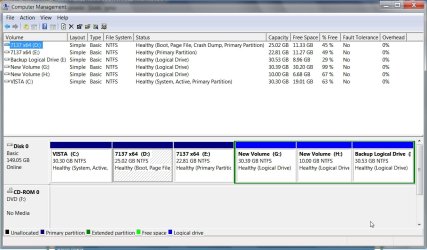
Post a screenshot of Disk Management window, like this:

http://www.sevenforums.com/tutorials/9733-how-post-screenshot-seven-forums.html

DISKMANAGEMENET-2009-09-20_134201.jpg

Somebody will post up the files you need - ntldr, ntdetect.com and a properly configured boot.ini.

They need to be placed on the SYSTEM partition - then you can add the XP entry. I assume you are using Easybcd 1.7.2.
 

My Computers

System One System Two

  • Computer type
    PC/Desktop
    OS
    7 X64
    CPU
    i5 8400
    Motherboard
    gigabyte b365m ds3h
    Memory
    2x8gb 3200mhz
    Hard Drives
    various
    PSU
    pure power 11 400w cm
    Case
    Coolermaster
    Cooling
    cryorig m9i
  • Computer type
    PC/Desktop
    OS
    7x64
    CPU
    g5400
    Motherboard
    ga b365m ds3h
    Memory
    8gb ddr4 2400
    PSU
    xfx pro 450w
Hi Siw2,

The OP dropped his question and never came back.

I'm 10-7 until he decides to come back and give us something to work with.

Greetings
 

My Computer

OS
Win7 Build 7600 x86
CPU
Pentium II 300MHz
Motherboard
Asus
Memory
32mb EDO RAM
Graphics Card(s)
Diamond Viper
Sound Card
Soundblaster 16
Monitor(s) Displays
14" AOC CRT 16K color
Screen Resolution
800x600
Hard Drives
300mb Quantum fireball
PSU
110 Watts
Cooling
Passive
Keyboard
Trust Ergonomic
Mouse
Generic
Internet Speed
256K u 128K d
Have a good night.
 

My Computers

System One System Two

  • Computer type
    PC/Desktop
    OS
    7 X64
    CPU
    i5 8400
    Motherboard
    gigabyte b365m ds3h
    Memory
    2x8gb 3200mhz
    Hard Drives
    various
    PSU
    pure power 11 400w cm
    Case
    Coolermaster
    Cooling
    cryorig m9i
  • Computer type
    PC/Desktop
    OS
    7x64
    CPU
    g5400
    Motherboard
    ga b365m ds3h
    Memory
    8gb ddr4 2400
    PSU
    xfx pro 450w

My Computer

OS
Win7 Build 7600 x86
CPU
Pentium II 300MHz
Motherboard
Asus
Memory
32mb EDO RAM
Graphics Card(s)
Diamond Viper
Sound Card
Soundblaster 16
Monitor(s) Displays
14" AOC CRT 16K color
Screen Resolution
800x600
Hard Drives
300mb Quantum fireball
PSU
110 Watts
Cooling
Passive
Keyboard
Trust Ergonomic
Mouse
Generic
Internet Speed
256K u 128K d

My Computer

Computer Manufacturer/Model Number
* BFK Customs *
OS
W 7 64-bit Ultimate
CPU
Intel Q9550 Yorkfield
Motherboard
ASUS P5Q Pro
Memory
8GB Dominator 8500C5D
Graphics Card(s)
ATI : XFX 5870
Sound Card
Realtek HD Audio 7-1
Monitor(s) Displays
1x 47" LCD HDMI & 3x 26" LCD HDMI
Screen Resolution
1920x1080P & 1920x1200
Hard Drives
1x 80GB Intel X25-M G2 SSD : 1x 500GB & 1x 640GB WD Caviar Black(s)
PSU
Corsair 620HX
Case
Cooler Master RC-690
Cooling
Tuniq Tower 120, 2x 140mm and 3x 120mm case fans
Keyboard
Microsoft 500
Mouse
Razer Diamondback 3G
Internet Speed
14 Mb/s
Other Info
1x Koutech 3Gb/s SATA HDD Hot Swap Rack
Hey guys ..

Something has gone terribly wrong... I really dunno WTH is with that computer.

i have copied files NTLDR, NTDETECT.com from XP CD to Win 7 C:/ Drive...
Then I have added entry in EasyBCD.....

Each time I try to boot to Win XP it says "Invalid BOOT.ini" so I have copied boot.ini from the XPBOOTFILES.zip to XP Partition... But without effect...
 

My Computer

OS
Microsoft Windows 7 Ultimate x86 Build 7600
CPU
Intel Core2Duo 2.44GHz
Memory
2048GB
Graphics Card(s)
ATi Radeon X550 128MB
Monitor(s) Displays
Acer 17" AL1716
Screen Resolution
1280x1024
Hard Drives
WD320
WD80
Keyboard
Logitech G15
Back
Top