Duplicating my PC to my TV

lennon

New member
Local time
4:08 PM
Messages
12
Hi,This used to work but for some unknown reason, my tv now only displays the background..no icons etc, only in extended mode. I've tried the Win+P, duplicate, but only the tv displays and the computer screen goes into saving mode. Please help!!
 

My Computer My Computer

At a glance

Windows 7 Home
Computer type
PC/Desktop
Computer Manufacturer/Model Number
Dell
OS
Windows 7 Home
welcome :) .
You want to Duplicate the desktop onto the secondary monitor.
Add an extra monitor for a laptop

Because every laptop comes with an integrated screen, you only have to connect one monitor to create a dual screen. That's easy because most laptops have a video port. (Unlike desktop PCs, two video ports are rare on a laptop.) Just plug a monitor into the DVI or VGA port and Windows 7 will automatically detect the monitor. As explained above, you might need an adapter to plug a DVI cable into a VGA port or vice versa.
I plug a monitor into my laptop when I'm at my desk and unplug it when I take my laptop on the go. You don't have to change any settings in Windows when you do this.
18fec5ad-1018-49ce-a4d8-3797bf07ee92_52.jpg

The Multiple displays drop-down list appears when Windows detects more than one monitor connected to your PC.
 

My Computer My Computer

At a glance

Windows 10Intel Core i5 3570K16GB 1600Mhz G.SkillGigabyte GTX 970 G1-Gaming
Computer type
PC/Desktop
OS
Windows 10
CPU
Intel Core i5 3570K
Motherboard
Asus P8Z77V-PRO
Memory
16GB 1600Mhz G.Skill
Graphics Card(s)
Gigabyte GTX 970 G1-Gaming
PSU
Seasonic 1000W Platinum
Case
Fractal Design Define R4
Cooling
Noctua NH-D14
He said he has tried duplicate, as I was going to suggest that also.
 

My Computer My Computer

At a glance

Windows 10 Pro x64Intel Core i7 6700KGSkill TridentZ RGB 16GB 3600 16-16-16-36EVGA GTX 980 Ti SC x2
Computer type
PC/Desktop
Computer Manufacturer/Model Number
Skylake Special #666
OS
Windows 10 Pro x64
CPU
Intel Core i7 6700K
Motherboard
Asus Sabertooth Z170 Mark 1
Memory
GSkill TridentZ RGB 16GB 3600 16-16-16-36
Graphics Card(s)
EVGA GTX 980 Ti SC x2
Sound Card
Realtek High Definition
Monitor(s) Displays
AOC G2460PG
Screen Resolution
1920 x 1080 144Hz
Hard Drives
Samsung 860 Pro 256GB, Seagate Barracuda 4TB x2
PSU
EVGA 1000 P2, EVGA White Custom Braided Cables
Case
Corsair Vengeance C70 Gunmetal Black
Cooling
Corsair H100i v2, Corsair ML120 x2, Thermal Grizzly Kryonaut
Keyboard
Logitech G910 Orion Spectrum
Mouse
Logitech G700s
Internet Speed
Verizon Fios Quantum Gateway 75/75
Antivirus
Windows Defender, Malwarebytes Free 3.8.3
Browser
Chrome
Other Info
Corsair SP120 x4, LG Blu-ray Drive, Durabrand HT-395 100 Watt Dolby Digital Amp, Corsair H2100 Wireless 7.1 Headset
Try using extended mode and move a window to the tv screen by dragging a the window outside your screen to the left or right side. Extended mode is not supposed to have icons.
 

My Computer My Computer

At a glance

Windows 7 Professional 32-bit/Windows 8 64-bi...Intel Core 2 Quad Q6600/Intel Core i7 4790/In...2GB/16GB/4GBIntel G33/G31 Express(Vostro)/NVIDIA GeForce ...
Computer type
PC/Desktop
Computer Manufacturer/Model Number
Dell Vostro 400/Dell XPS 8700(Slightly Customized for me by Dell)/Toshiba Satellite T135
OS
Windows 7 Professional 32-bit/Windows 8 64-bit/Win7 Pro64-bit
CPU
Intel Core 2 Quad Q6600/Intel Core i7 4790/Intel Pentium
Memory
2GB/16GB/4GB
Graphics Card(s)
Intel G33/G31 Express(Vostro)/NVIDIA GeForce GTX 745(XPS)
Monitor(s) Displays
HP 2009m(Vostro)/ViewSonic VX2250wm-LED(XPS)
Screen Resolution
1600x900(Vostro)/1920x1080(XPS)
Hard Drives
Seagate ST3160815AS(Vostro)/Western Digital Blue(Satellite)
External:
Western Digital My Passport 0748
Samsung HM121HC
Keyboard
Dell L100)(Vostro)/Dell KB2133p(XPS)
Mouse
Dell M-UAV-DEL8(XPS)
Internet Speed
100 Mbit/s(Only when IPTV is plugged out)
Antivirus
Avast, Malwarebytes PRO
Browser
Internet Explorer 11
Other Info
Note: Names with slashes between two different parts mean that the left is my old desktop and the right is my old laptop and the middle is my new desktop.(Unless specified)
Ping is horrible for servers overseas in US and Europe.
New laptop:LG Gram(Not available in US) Processor:Intel Core i3 4th Gen Ultra Low Power RAM:4GB Hard Drive:SK Hynix OEM MSATA or M.2 Graphics:Intel HD
He said he has tried duplicate, as I was going to suggest that also.
Indeed he has :huh:.
In that case, do you have a dedicated GPU?
If so did you install the software (control panel) for it?
Are you using the integrated GPU/APU?
 

My Computer My Computer

At a glance

Windows 10Intel Core i5 3570K16GB 1600Mhz G.SkillGigabyte GTX 970 G1-Gaming
Computer type
PC/Desktop
OS
Windows 10
CPU
Intel Core i5 3570K
Motherboard
Asus P8Z77V-PRO
Memory
16GB 1600Mhz G.Skill
Graphics Card(s)
Gigabyte GTX 970 G1-Gaming
PSU
Seasonic 1000W Platinum
Case
Fractal Design Define R4
Cooling
Noctua NH-D14
Thanks for the replies..This was what I did months ago and it worked..
I've connected my Dell PC to Panansonic TV with HDMI Monster cable.
Gone into "Display Settings" - "Multiple Displays" - "Duplicate These Displays"


For some unknown reason, it has switched and the TV won't Duplicate the PC, only Extends
When I go into "Display Settings" - "Multiple Displays" ..."Duplicate these displays" is not in the drop bar..it disappeared!!
Then I tried Win+P and cycle to "Duplicate". The TV then displays the computer screen with icons and all but my computer screen goes blank and into "saving mode"


All software updated and even tried going to systems restore but still can't Duplicate
Help! It's driving me mad
 

My Computer My Computer

At a glance

Windows 7 Home
Computer type
PC/Desktop
Computer Manufacturer/Model Number
Dell
OS
Windows 7 Home
Wait, do you want to duplicate the screen or extend the screen? I think your only choice is for extending since duplicating is not working.
 

My Computer My Computer

At a glance

Windows 7 Professional 32-bit/Windows 8 64-bi...Intel Core 2 Quad Q6600/Intel Core i7 4790/In...2GB/16GB/4GBIntel G33/G31 Express(Vostro)/NVIDIA GeForce ...
Computer type
PC/Desktop
Computer Manufacturer/Model Number
Dell Vostro 400/Dell XPS 8700(Slightly Customized for me by Dell)/Toshiba Satellite T135
OS
Windows 7 Professional 32-bit/Windows 8 64-bit/Win7 Pro64-bit
CPU
Intel Core 2 Quad Q6600/Intel Core i7 4790/Intel Pentium
Memory
2GB/16GB/4GB
Graphics Card(s)
Intel G33/G31 Express(Vostro)/NVIDIA GeForce GTX 745(XPS)
Monitor(s) Displays
HP 2009m(Vostro)/ViewSonic VX2250wm-LED(XPS)
Screen Resolution
1600x900(Vostro)/1920x1080(XPS)
Hard Drives
Seagate ST3160815AS(Vostro)/Western Digital Blue(Satellite)
External:
Western Digital My Passport 0748
Samsung HM121HC
Keyboard
Dell L100)(Vostro)/Dell KB2133p(XPS)
Mouse
Dell M-UAV-DEL8(XPS)
Internet Speed
100 Mbit/s(Only when IPTV is plugged out)
Antivirus
Avast, Malwarebytes PRO
Browser
Internet Explorer 11
Other Info
Note: Names with slashes between two different parts mean that the left is my old desktop and the right is my old laptop and the middle is my new desktop.(Unless specified)
Ping is horrible for servers overseas in US and Europe.
New laptop:LG Gram(Not available in US) Processor:Intel Core i3 4th Gen Ultra Low Power RAM:4GB Hard Drive:SK Hynix OEM MSATA or M.2 Graphics:Intel HD
I don't think you can duplicate unless both monitors have exactly the same resolution. If they don't it might explain why duplicate isn't even an option.
 

My Computer My Computer

At a glance

Win 7 Pro 64 bit
OS
Win 7 Pro 64 bit
Resolution only plays a limiting factor when the monitor is physically unable to display it,
in which case you will be presented with and Out of range OSD.
 

My Computer My Computer

At a glance

Windows 10Intel Core i5 3570K16GB 1600Mhz G.SkillGigabyte GTX 970 G1-Gaming
Computer type
PC/Desktop
OS
Windows 10
CPU
Intel Core i5 3570K
Motherboard
Asus P8Z77V-PRO
Memory
16GB 1600Mhz G.Skill
Graphics Card(s)
Gigabyte GTX 970 G1-Gaming
PSU
Seasonic 1000W Platinum
Case
Fractal Design Define R4
Cooling
Noctua NH-D14
YoYo155,I'm not sure about the APU and GPU. Mine is a Dell and its the basic with windows 7.
What do you think I should do to get it to Duplicate. It is so frustrating!!!
 

My Computer My Computer

At a glance

Windows 7 Home
Computer type
PC/Desktop
Computer Manufacturer/Model Number
Dell
OS
Windows 7 Home
I don't think you can duplicate unless both monitors have exactly the same resolution. If they don't it might explain why duplicate isn't even an option.
this is correct, it willl use the smallest resolution of the two monitors, none the less, it will still show.
 

My Computer My Computer

At a glance

Windows 7 Ultimate x64 SP1Intel Q6600 @ 2.6Ghz4Gb DDR2 Corsair Dominator @ 800Mhz 5-5-5-15EVGA 560 GTX SC FTW 1GB
Computer type
PC/Desktop
Computer Manufacturer/Model Number
Custom Build
OS
Windows 7 Ultimate x64 SP1
CPU
Intel Q6600 @ 2.6Ghz
Motherboard
Evga NF78-CK-132-A 3-Way SLI
Memory
4Gb DDR2 Corsair Dominator @ 800Mhz 5-5-5-15
Graphics Card(s)
EVGA 560 GTX SC FTW 1GB
Sound Card
Realtek HD 7.1 Audio, Plantronics GameCom780 7.1 Headset
Monitor(s) Displays
Dell S2409W
Screen Resolution
1920 x 1080
Hard Drives
SanDisk SDSSDHII-120G-G25 120GB SSD
Samsung 7200RPM 750Gb SATA
Samsung 850 EVO 120GB SSD
Western Digital Green 1TB 7200RPM
PSU
Xigmatek 750W Quad sli quad core 80% eff
Case
Antec 900 Gaming Case
Cooling
Zalman CNPS9700-NT NVIDIA Tritium
Keyboard
Logitech generic keyboard, MS wireless keyboard
Mouse
Razor Lachesis Banshee V2 Blue, 4000DPI, MS wireless mouse
Internet Speed
152Mb Virgin Media Fibre Optic
Antivirus
Microsoft Security Essentials
Browser
Google Chrome
Other Info
Wireless Gaming Receiver for Windows, Wireless Xbox 360 Pad
I don't think you can duplicate unless both monitors have exactly the same resolution. If they don't it might explain why duplicate isn't even an option.
this is correct, it willl use the smallest resolution of the two monitors, none the less, it will still show.

Interesting, on my PC I only found out I could duplicate when I hitched up two monitors with identical resolution and saw the duplicate option for the first time. I don't want to contradict your experience but do wonder whether it will always show in Windows or whether it depends on the graphics card etc.
 

My Computer My Computer

At a glance

Win 7 Pro 64 bit
OS
Win 7 Pro 64 bit

My Computer My Computer

At a glance

Windows 10Intel Core i5 3570K16GB 1600Mhz G.SkillGigabyte GTX 970 G1-Gaming
Computer type
PC/Desktop
OS
Windows 10
CPU
Intel Core i5 3570K
Motherboard
Asus P8Z77V-PRO
Memory
16GB 1600Mhz G.Skill
Graphics Card(s)
Gigabyte GTX 970 G1-Gaming
PSU
Seasonic 1000W Platinum
Case
Fractal Design Define R4
Cooling
Noctua NH-D14
I don't think you can duplicate unless both monitors have exactly the same resolution. If they don't it might explain why duplicate isn't even an option.
this is correct, it willl use the smallest resolution of the two monitors, none the less, it will still show.

Interesting, on my PC I only found out I could duplicate when I hitched up two monitors with identical resolution and saw the duplicate option for the first time. I don't want to contradict your experience but do wonder whether it will always show in Windows or whether it depends on the graphics card etc.
res extend.jpg


seems to work right now with my monitor as primary and tv as secondary
 

My Computer My Computer

At a glance

Windows 7 Ultimate x64 SP1Intel Q6600 @ 2.6Ghz4Gb DDR2 Corsair Dominator @ 800Mhz 5-5-5-15EVGA 560 GTX SC FTW 1GB
Computer type
PC/Desktop
Computer Manufacturer/Model Number
Custom Build
OS
Windows 7 Ultimate x64 SP1
CPU
Intel Q6600 @ 2.6Ghz
Motherboard
Evga NF78-CK-132-A 3-Way SLI
Memory
4Gb DDR2 Corsair Dominator @ 800Mhz 5-5-5-15
Graphics Card(s)
EVGA 560 GTX SC FTW 1GB
Sound Card
Realtek HD 7.1 Audio, Plantronics GameCom780 7.1 Headset
Monitor(s) Displays
Dell S2409W
Screen Resolution
1920 x 1080
Hard Drives
SanDisk SDSSDHII-120G-G25 120GB SSD
Samsung 7200RPM 750Gb SATA
Samsung 850 EVO 120GB SSD
Western Digital Green 1TB 7200RPM
PSU
Xigmatek 750W Quad sli quad core 80% eff
Case
Antec 900 Gaming Case
Cooling
Zalman CNPS9700-NT NVIDIA Tritium
Keyboard
Logitech generic keyboard, MS wireless keyboard
Mouse
Razor Lachesis Banshee V2 Blue, 4000DPI, MS wireless mouse
Internet Speed
152Mb Virgin Media Fibre Optic
Antivirus
Microsoft Security Essentials
Browser
Google Chrome
Other Info
Wireless Gaming Receiver for Windows, Wireless Xbox 360 Pad
Maybe for some reason, the graphics card does not support the tv's resolution.
 

My Computer My Computer

At a glance

Windows 7 Professional 32-bit/Windows 8 64-bi...Intel Core 2 Quad Q6600/Intel Core i7 4790/In...2GB/16GB/4GBIntel G33/G31 Express(Vostro)/NVIDIA GeForce ...
Computer type
PC/Desktop
Computer Manufacturer/Model Number
Dell Vostro 400/Dell XPS 8700(Slightly Customized for me by Dell)/Toshiba Satellite T135
OS
Windows 7 Professional 32-bit/Windows 8 64-bit/Win7 Pro64-bit
CPU
Intel Core 2 Quad Q6600/Intel Core i7 4790/Intel Pentium
Memory
2GB/16GB/4GB
Graphics Card(s)
Intel G33/G31 Express(Vostro)/NVIDIA GeForce GTX 745(XPS)
Monitor(s) Displays
HP 2009m(Vostro)/ViewSonic VX2250wm-LED(XPS)
Screen Resolution
1600x900(Vostro)/1920x1080(XPS)
Hard Drives
Seagate ST3160815AS(Vostro)/Western Digital Blue(Satellite)
External:
Western Digital My Passport 0748
Samsung HM121HC
Keyboard
Dell L100)(Vostro)/Dell KB2133p(XPS)
Mouse
Dell M-UAV-DEL8(XPS)
Internet Speed
100 Mbit/s(Only when IPTV is plugged out)
Antivirus
Avast, Malwarebytes PRO
Browser
Internet Explorer 11
Other Info
Note: Names with slashes between two different parts mean that the left is my old desktop and the right is my old laptop and the middle is my new desktop.(Unless specified)
Ping is horrible for servers overseas in US and Europe.
New laptop:LG Gram(Not available in US) Processor:Intel Core i3 4th Gen Ultra Low Power RAM:4GB Hard Drive:SK Hynix OEM MSATA or M.2 Graphics:Intel HD
Both monitors were set to the same resolution but still no "Duplicate" in the drop bar...Can someone please help me!!!!!
 

My Computer My Computer

At a glance

Windows 7 Home
Computer type
PC/Desktop
Computer Manufacturer/Model Number
Dell
OS
Windows 7 Home
Are you using some kind of dedicated software for your GPU?
i.e. nVidia control panel or catalyst control center?
 

My Computer My Computer

At a glance

Windows 10Intel Core i5 3570K16GB 1600Mhz G.SkillGigabyte GTX 970 G1-Gaming
Computer type
PC/Desktop
OS
Windows 10
CPU
Intel Core i5 3570K
Motherboard
Asus P8Z77V-PRO
Memory
16GB 1600Mhz G.Skill
Graphics Card(s)
Gigabyte GTX 970 G1-Gaming
PSU
Seasonic 1000W Platinum
Case
Fractal Design Define R4
Cooling
Noctua NH-D14

My Computer My Computer

At a glance

Win 10 Pro x64Intel I5-2500K @3.3GHz16GB G.Skill Ripjaws X (4x4GB)EVGA GeForce 750 Ti SC 2GB
Computer type
PC/Desktop
Computer Manufacturer/Model Number
Self Built
OS
Win 10 Pro x64
CPU
Intel I5-2500K @3.3GHz
Motherboard
Asrock P67 Extreme4
Memory
16GB G.Skill Ripjaws X (4x4GB)
Graphics Card(s)
EVGA GeForce 750 Ti SC 2GB
Sound Card
ASUS Xonar DG 5.1 Channels 24-bit 96KHz PCI Interface Sound
Monitor(s) Displays
auria eq2367
Screen Resolution
1920 x 1080
Hard Drives
250GB Samsung 850 EVO SSD
1TB WD Blue
1TB Hitachi
PSU
SeaSonic X 650W 80 Plus Gold
Case
Corsair Obsidian 750D
Cooling
Corsair H60, Three 140mm case fans
Keyboard
Logitech Wireless Keyboard K520
Mouse
Logitech Wireless Mouse M310
Internet Speed
Wave Broadband ~ 100 dn 5 up
Antivirus
Windows Defender, Malwarebytes Premium
Browser
Edge, IE11, Chrome
Other Info
Laptop specs: HP g7-1365dx /
CPU: AMD A6-3420M APU with Radeon(tm) HD Graphics /
RAM: Crucial 8Gb (2x4Gb) /
SSD: Crucial M4-CT128M4SSD2 ATA Device/ FW 000F /
GFX: AMD Radeon HD 6520G /
OS: Windows 10 Pro x64
It's Nvidia
 

My Computer My Computer

At a glance

Windows 7 Home
Computer type
PC/Desktop
Computer Manufacturer/Model Number
Dell
OS
Windows 7 Home
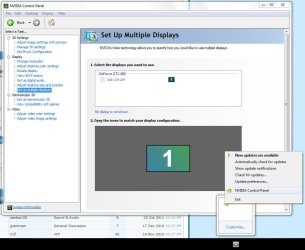
What does yours display?

what nvpanel.jpg
 

My Computer My Computer

At a glance

Windows 10Intel Core i5 3570K16GB 1600Mhz G.SkillGigabyte GTX 970 G1-Gaming
Computer type
PC/Desktop
OS
Windows 10
CPU
Intel Core i5 3570K
Motherboard
Asus P8Z77V-PRO
Memory
16GB 1600Mhz G.Skill
Graphics Card(s)
Gigabyte GTX 970 G1-Gaming
PSU
Seasonic 1000W Platinum
Case
Fractal Design Define R4
Cooling
Noctua NH-D14
Back
Top