DVD Drive not detected

mr payne

New member
Local time
4:18 AM
Messages
13
Hi there..

I have a problem regarding DVD drive not getting detected in Windows seven.
I checked in Device Manager, and it shows that DVD drive is disabled. I checked the properties
and it shows the following message -

Windows cannot load the device driver for this hardware. The driver may be corrupted or missing. (Code 39)

Note: The DVD drive is working fine because it is working in Linux.

Kindly help.

Thanks:huh:
 

My Computer

Computer type
PC/Desktop
OS
Windows 7 Ultimate 32bit on Desktop & 64bit on Laptop
CPU
Core 2 Duo E7500
Motherboard
ASUS P5QPL-AM
Memory
2.0 G
Screen Resolution
1440x900
What type of disk drive is it? what brand and model? Search for the brand and model on the official manufacturer site. Sounds to me like you do not have the driver installed.
When did the issue start to occur? Could you use your disk drive before? Did it suddenly stop working?
What happens when you try to enable it? Have you tried telling windows to search for a driver from windows update?
 

My Computer

Computer type
PC/Desktop
Computer Manufacturer/Model Number
Custom Built
OS
Windows 10 Pro
CPU
AMD Ryzen 5 2400G Processor with Radeon RX Vega 11 Graphics
Motherboard
ASRock X470 Master SLI/AC AM4 AMD Promontory X470 SATA 6Gb/s
Memory
G.SKILL Ripjaws V Series 16GB (2 x 8GB) 288-Pin DDR4 SDRAM D
Graphics Card(s)
2047MB NVIDIA GeForce GTX 1060 6GB (EVGA)
Sound Card
Motherboard Built in
Monitor(s) Displays
Acer R240HY bidx 23.8-Inch IPS HDMI DVI VGA (1920 x 1080) Wi
Screen Resolution
1920 x 1080
Hard Drives
1TB Sandisk SSD PLUS (Main drive)
500 GB Seagate 7200 RPM (Games)
500 GB Western Digital 7200 RPM (Virtual Machines)
PSU
CORSAIR TX Series TX650M 650W 80+ Gold Modular Power Supply
Case
CORSAIR CARBIDE SPEC-02 Mid-Tower Gaming Case, Red LED Fan
Cooling
220mm, two 120mm, and four 60mm fans
Keyboard
Wired Dell keyboard
Mouse
Wireless Logitech mouse
Internet Speed
250mb down, 30mb up
Antivirus
Panda Cloud Antivirus
Browser
Chrome-ish x64
Other Info
Your awesome for reading this.
If the drive worked before, do you have a Restore Point prior to the drive problem? If so, that's an easy fix that's worth a shot. Otherwise I agree with Andrew. I'd go to the drive maker's site and download the latest W7 driver.
 

My Computer

Computer Manufacturer/Model Number
HP Media Center
OS
Windows 7 32 bit
CPU
AMD 5200+ dual core
Memory
2 GB
Graphics Card(s)
NVidia GeForce 6150SE 128 MB
Monitor(s) Displays
CRT
Screen Resolution
1280x1024
Hard Drives
500 GB Sata internal :

SIIG USB 3.0 docking stations w/WD Caviar Black 6 Gb/s drives
Keyboard
PS/2
Mouse
PS/2 Wheel Mouse
Other Info
SIIG USB 3.0 PCIexpress card.
Hi there..

I have a problem regarding DVD drive not getting detected in Windows seven.
I checked in Device Manager, and it shows that DVD drive is disabled. I checked the properties
and it shows the following message -

Windows cannot load the device driver for this hardware. The driver may be corrupted or missing. (Code 39)

Note: The DVD drive is working fine because it is working in Linux.

Kindly help.

Thanks:huh:

Hi mr payne,

It might not be disabled but not loading the drivers for the DVD drive. Please post a screenshot of the device manager so we can check the same. If you need help in posting screenshot see this.

You should also check these useful links below which should help you resolve this issue:

Your CD drive or DVD drive is missing or is not recognized by Windows or other programs

DVD/CD-ROM drive Code 39 - Microsoft Community

Kindly update your system specs here by following this.

Keep us posted with the results so we can advise you further.
 

My Computer

Computer type
PC/Desktop
OS
Winndows 7 32 bit
I wanted to mount an image using a virtual drive. And when I installed Alcohol and daemon tools, it also failed to create a virtual drive. So what could be the problem?

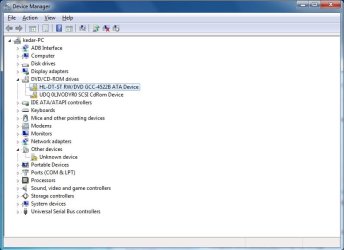
I have attached an image of the device manager for reference.

Thanks for the replies.
 

Attachments

  • driver.jpg
    driver.jpg
    41.2 KB · Views: 6

My Computer

Computer type
PC/Desktop
OS
Windows 7 Ultimate 32bit on Desktop & 64bit on Laptop
CPU
Core 2 Duo E7500
Motherboard
ASUS P5QPL-AM
Memory
2.0 G
Screen Resolution
1440x900
I wanted to mount an image using a virtual drive. And when I installed Alcohol and daemon tools, it also failed to create a virtual drive. So what could be the problem?

I have attached an image of the device manager for reference.

Thanks for the replies.

Hi mr payne,

Thanks for your reply. Kindly remove the virtual drive software from the system and then uninstall the DVD drive.

Then perform the steps outlined in the link below which should help you resolve this issue.

Keep us posted with the results so we can advise you further.
 

My Computer

Computer type
PC/Desktop
OS
Winndows 7 32 bit
Back
Top