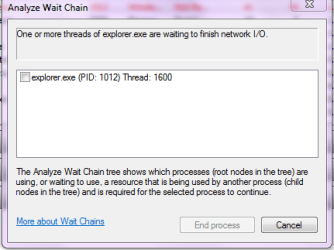
Hi, I have an Dell Inspiron 1525 running windows 7 32-bit and has a PBDS DVD+-RW DS8W1P ATA Device drive. Whenever I play DVDs back in any player my system locks up and my DVD drive will not eject or read the disk while Explorer is at a standstill and task manager can't even kill the process. I have tried flashing the firmware on the drive which completed successfully and had some improvement but the symptoms still occur. My DVD drive is region one and this occurs in multiple DVDs so my discs aren't scratched. Also I am able to run and install software from DVDs as well as read files and burn discs.
also here is the crash information for the failures
Description:
A problem caused this program to stop interacting with Windows.
Problem signature:
Problem Event Name: AppHangB1
Application Name: explorer.exe
Application Version: 6.1.7600.16450
Application Timestamp: 4aeba271
Hang Signature: 4972
Hang Type: 0
OS Version: 6.1.7600.2.0.0.256.4
Locale ID: 1033
Additional Hang Signature 1: 497227662588a1f40785eb4877026607
Additional Hang Signature 2: 3c9b
Additional Hang Signature 3: 3c9b709b391f974f526f30cdb4411fec
Additional Hang Signature 4: 4972
Additional Hang Signature 5: 497227662588a1f40785eb4877026607
Additional Hang Signature 6: 3c9b
Additional Hang Signature 7: 3c9b709b391f974f526f30cdb4411fec
Below is the Binary Data
- System
- Provider
[ Name] Application Hang
- EventID 1002
[ Qualifiers] 0
Level 2
Task 101
Keywords 0x80000000000000
- TimeCreated
[ SystemTime] 2010-11-21T22:00:48.000000000Z
EventRecordID 630
Channel Application
Computer Amanda-1525
Security
- EventData
Explorer.EXE
6.1.7600.16450
900
01cb89c71f7deeed
60000
C:\Windows\Explorer.EXE
9c22aab3-f5ba-11df-929a-00219be44ba7
55006E006B006E006F0077006E0000000000
Binary data:
In Words
0000: 006E0055 006E006B 0077006F 0000006E
0008: 0000
In Bytes
0000: 55 00 6E 00 6B 00 6E 00 U.n.k.n.
0008: 6F 00 77 00 6E 00 00 00 o.w.n...
0010: 00 00 ..
and here is the process explorer stack for explorer.exe
ntdll.dll!KiFastSystemCallRet
kernel32.dll!WaitForMultipleObjectsEx+0x8e
USER32.dll!GetMessageW+0x127
USER32.dll!MsgWaitForMultipleObjects+0x1f
EXPLORERFRAME.dll!Ordinal134+0x87f
EXPLORERFRAME.dll!Ordinal110+0x85ae3
explorer.exe+0x52454
explorer.exe+0x2aa50
kernel32.dll!BaseThreadInitThunk+0x12
ntdll.dll!RtlInitializeExceptionChain+0x63
ntdll.dll!RtlInitializeExceptionChain+0x36
Any help would be appreciated as I am completely puzzled on this one thanks!
also here is the crash information for the failures
Description:
A problem caused this program to stop interacting with Windows.
Problem signature:
Problem Event Name: AppHangB1
Application Name: explorer.exe
Application Version: 6.1.7600.16450
Application Timestamp: 4aeba271
Hang Signature: 4972
Hang Type: 0
OS Version: 6.1.7600.2.0.0.256.4
Locale ID: 1033
Additional Hang Signature 1: 497227662588a1f40785eb4877026607
Additional Hang Signature 2: 3c9b
Additional Hang Signature 3: 3c9b709b391f974f526f30cdb4411fec
Additional Hang Signature 4: 4972
Additional Hang Signature 5: 497227662588a1f40785eb4877026607
Additional Hang Signature 6: 3c9b
Additional Hang Signature 7: 3c9b709b391f974f526f30cdb4411fec
Below is the Binary Data
- System
- Provider
[ Name] Application Hang
- EventID 1002
[ Qualifiers] 0
Level 2
Task 101
Keywords 0x80000000000000
- TimeCreated
[ SystemTime] 2010-11-21T22:00:48.000000000Z
EventRecordID 630
Channel Application
Computer Amanda-1525
Security
- EventData
Explorer.EXE
6.1.7600.16450
900
01cb89c71f7deeed
60000
C:\Windows\Explorer.EXE
9c22aab3-f5ba-11df-929a-00219be44ba7
55006E006B006E006F0077006E0000000000
Binary data:
In Words
0000: 006E0055 006E006B 0077006F 0000006E
0008: 0000
In Bytes
0000: 55 00 6E 00 6B 00 6E 00 U.n.k.n.
0008: 6F 00 77 00 6E 00 00 00 o.w.n...
0010: 00 00 ..
and here is the process explorer stack for explorer.exe
ntdll.dll!KiFastSystemCallRet
kernel32.dll!WaitForMultipleObjectsEx+0x8e
USER32.dll!GetMessageW+0x127
USER32.dll!MsgWaitForMultipleObjects+0x1f
EXPLORERFRAME.dll!Ordinal134+0x87f
EXPLORERFRAME.dll!Ordinal110+0x85ae3
explorer.exe+0x52454
explorer.exe+0x2aa50
kernel32.dll!BaseThreadInitThunk+0x12
ntdll.dll!RtlInitializeExceptionChain+0x63
ntdll.dll!RtlInitializeExceptionChain+0x36
Any help would be appreciated as I am completely puzzled on this one thanks!
My Computer
- OS
- Windows 7 Home Premium 64 bit

 Too many players and too many codec packs is a sure recipe for inviting problems with playback.