- Local time
- 10:27 PM
- Messages
- 568
My system has two SATA DVD drives, both of them are read/write:
LG DVD±RW SuperMulti Drive GH22NS50B
LITE-ON 24X DVD iHAS424-98
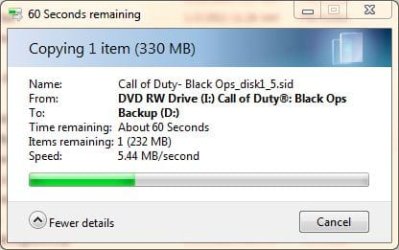
Copying from the DVD to HDD works just fine with most of the times and the transfer rate is normal:
The copy does hang when the *.wim image file is copied from the DVD to the HDD:
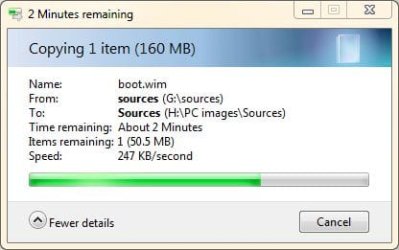
The actual file is copied to the HDD within the normal timeframe, the size on the HDD matches the size on the DVD; however, the copy window stays open. After about 30 minutes or so and the system pops up this error message:
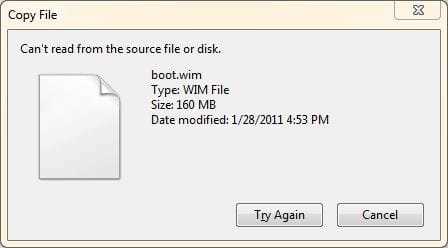
Choosing "Cancel" results in going back to copy window, same as in the first image and it is not canceled. Even within the copy window hitting cancel does not close the process. Through the task manager, the process can be killed; however, it restarts windows explorer and gives this error message:
After the explorer.exe is reloaded through the kill process, I cannot open Windows explorer. Logging out and back in fixes that; however, the source DVD cannot be ejected neither manually, or through software.
Rebooting the system is available; however, it also hangs up. Normally, it takes about three seconds to shut the system down, but it stalls on logging off and/or restarting the computer stage. Both the DVD and HDD lights are on at this point. The hard reset does restart the system, but it does not boot; there's a blinking cursor with the black background and presumably it stays there forever. The system requires a cold boot that brings up Windows without any issues, no warning about "Your computer has not been shutdown incorrectly..." or offering to boot in safe mode.
The same issue impacts both DVD drives and again, it shows up only when the *.wim image is being copied, it does not matter to which HDD the image is being copied to. It is repeatable, almost to the point where it could be called the "old reliable...."
I am lost what can cause this, does anyone have an idea?
TIA....
LG DVD±RW SuperMulti Drive GH22NS50B
LITE-ON 24X DVD iHAS424-98
Copying from the DVD to HDD works just fine with most of the times and the transfer rate is normal:
The copy does hang when the *.wim image file is copied from the DVD to the HDD:
The actual file is copied to the HDD within the normal timeframe, the size on the HDD matches the size on the DVD; however, the copy window stays open. After about 30 minutes or so and the system pops up this error message:
Choosing "Cancel" results in going back to copy window, same as in the first image and it is not canceled. Even within the copy window hitting cancel does not close the process. Through the task manager, the process can be killed; however, it restarts windows explorer and gives this error message:
Code:
Description:
  A problem caused this program to stop interacting with Windows.

Problem signature:
  Problem Event Name:    AppHangB1
  Application Name:    explorer.exe
  Application Version:    6.1.7600.16450
  Application Timestamp:    4aebab8d
  Hang Signature:    f05f
  Hang Type:    6144
  OS Version:    6.1.7600.2.0.0.256.48
  Locale ID:    1033
  Additional Hang Signature 1:    f05faae734097d1699a3b30706084779
  Additional Hang Signature 2:    5b3f
  Additional Hang Signature 3:    5b3f05f74bc428e594945c72a389c6e7
  Additional Hang Signature 4:    f05f
  Additional Hang Signature 5:    f05faae734097d1699a3b30706084779
  Additional Hang Signature 6:    5b3f
Additional Hang Signature 7: 5b3f05f74bc428e594945c72a389c6e7Rebooting the system is available; however, it also hangs up. Normally, it takes about three seconds to shut the system down, but it stalls on logging off and/or restarting the computer stage. Both the DVD and HDD lights are on at this point. The hard reset does restart the system, but it does not boot; there's a blinking cursor with the black background and presumably it stays there forever. The system requires a cold boot that brings up Windows without any issues, no warning about "Your computer has not been shutdown incorrectly..." or offering to boot in safe mode.
The same issue impacts both DVD drives and again, it shows up only when the *.wim image is being copied, it does not matter to which HDD the image is being copied to. It is repeatable, almost to the point where it could be called the "old reliable...."
I am lost what can cause this, does anyone have an idea?
TIA....
My Computer
- Computer type
- PC/Desktop
- Computer Manufacturer/Model Number
- Custom built at Home
- OS
- Windows 7 64-bit, Windows 8.1 64-bit, OSX El Capitan, Windows 10 (VMware)
- CPU
- Intel i5-3350P 3.1 GHz
- Motherboard
- Gigabyte GA-Z77X-UP5 TH
- Memory
- 16 GBs GSkill Sniper
- Graphics Card(s)
- Radeon HD 7850
- Sound Card
- VIA HD Audio
- Monitor(s) Displays
- Dell U2410 24"
- Screen Resolution
- 1920x1200
- Hard Drives
- 1 x Intel 520 240 GBs
1 x Seagate 1TBs SATA 2.0,
1 x Seagate 1TBs eSATA 2.0
- PSU
- Thermaltake 850W
- Case
- Antec P183
- Cooling
- Noctua NH-D14 Heatsink 2 x 120mm fans, 4 x 120mm case fans
- Keyboard
- Dell Multimedia keyboard
- Mouse
- Logitech Trackball
- Internet Speed
- 28.5 Mb/s