DVD-ROM

krys

New member
Local time
11:07 AM
Messages
6
Location
Wrexham
Hi guys.
I have already problem with my dvd-rom. I plug my new dvd-rom to the copmuter, it's work everything, but only i can't burn my any blank dvd-r in program CopyToDVD or Nero:confused: do someone has maybe this same problem like this?? please help
 

My Computer My Computer

At a glance

WiNdOwS 73gb
OS
WiNdOwS 7
Memory
3gb
Keyboard
Genius
Mouse
Nikkai
Internet Speed
about 6mb
Do you mean burning the ISO file? If that, google a program called 7-zip, and right click the file. Hover over 7-zip, click extract files. After it's done, double-click the new folder, and double-click setup.exe.
 

My Computer My Computer

At a glance

Windows Vista UltimateAMD Athlon(tm) Dual Core Processor 4050e 2.10GHz4GBnVidia Geforce 6150SE
Computer Manufacturer/Model Number
eMachines ET1161-07
OS
Windows Vista Ultimate
CPU
AMD Athlon(tm) Dual Core Processor 4050e 2.10GHz
Memory
4GB
Graphics Card(s)
nVidia Geforce 6150SE
Monitor(s) Displays
eMachines E181H
I mean burning eg. any movies or music by DVD..but when i'm ready to started burning my DVD then I have message in program CopyToDVD " Cannot create file "C:\ProgramData\Vso\~c2c_fl.tmp".Access is denited"
 

My Computer My Computer

At a glance

WiNdOwS 73gb
OS
WiNdOwS 7
Memory
3gb
Keyboard
Genius
Mouse
Nikkai
Internet Speed
about 6mb
Perhaps there is a language problem.

You cannot write/create DVDs on a DVD-ROM (read only memory).

Do you mean any of the varieties of DVD burners?
 
You can copy and paste a folder with structured dvd content directly to the dvd drive without any third party program. The structured content will be in the video-ts folder. The audio-ts folder should be empty and need not be copied. No reason to buy or use a third party program. Third party progams like Nero are needed to convert and author video files into dvd content. From what you are telling us the dvd content is already on your hard drive.
 

My Computer My Computer

At a glance

Windows 7 64
OS
Windows 7 64
I have tried everything what you write and still doesn't wan't to burning :(
maybe problem is because I need a new software to my dvd-rom Asus??
It's my a new dvd-rom because my old one dvd-rom work rubbish hmm
I had few days ago downloaded a Registry to the Asus but nothing happen. maybe is good idea to re-install a new system to my coputer and then I will see do something will to changes. i heared well from other people i can set up something in Bios but i'm not sure what to changes. Maybe you know?:p
 

My Computer My Computer

At a glance

WiNdOwS 73gb
OS
WiNdOwS 7
Memory
3gb
Keyboard
Genius
Mouse
Nikkai
Internet Speed
about 6mb
I have tried everything what you write and still doesn't wan't to burning :(
maybe problem is because I need a new software to my dvd-rom Asus??
It's my a new dvd-rom because my old one dvd-rom work rubbish hmm
I had few days ago downloaded a Registry to the Asus but nothing happen. maybe is good idea to re-install a new system to my coputer and then I will see do something will to changes. i heared well from other people i can set up something in Bios but i'm not sure what to changes. Maybe you know?:p
Second Request -

Please confirm - are you trying to burn DVDs using a DVD-ROM? It cannot be done.

I can only rely on what you say, and what you say is "DVD-ROM".
 
so if I can't burn DVDs in using a DVD-ROM..I need a CDs only to burning in a DVD-ROM?? or what?;/
 

My Computer My Computer

At a glance

WiNdOwS 73gb
OS
WiNdOwS 7
Memory
3gb
Keyboard
Genius
Mouse
Nikkai
Internet Speed
about 6mb
so if I can't burn DVDs in using a DVD-ROM..I need a CDs only to burning in a DVD-ROM?? or what?;/
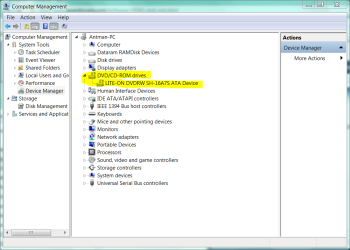
Please, post a screenshot of Device Manager with the optical drives expanded.

.
 

Attachments

  • Capture.PNG
    Capture.PNG
    39.2 KB · Views: 46
 

My Computer My Computer

At a glance

WiNdOwS 73gb
OS
WiNdOwS 7
Memory
3gb
Keyboard
Genius
Mouse
Nikkai
Internet Speed
about 6mb
OK. Now that we have established that you have a DVD writer, let's do a simple test.

Insert a writable (blank) DVD into the drive. In Explorer, drag any small file or group of files from anywhere and drop them on to the DVD-RW drive.

Then, right click the drive and choose Burn These Files to Disc - or whatever the exact language is.

Report your results.
 
Back
Top